Tag: cloud fax

  • Fax API Service: The Ultimate Developer’s Guide for 2026

    Fax API Service: The Ultimate Developer’s Guide for 2026

    You're staring at a familiar mess. A clinic staffer prints a referral, walks it to a fax machine, waits for a confirmation slip, then files the paper somewhere that only makes sense to the person who last touched it. If that sounds slow, it is. It's also exactly the kind of workflow a fax API service was built to replace, without forcing the recipient side to change how it accepts documents.

    Fax has survived because its job never really disappeared. It started on May 27, 1843, when Alexander Bain created the first fax machine, and its modern relevance comes from the shift to an API-to-API, cloud-based workflow that took shape around 2010 with internet faxing (LaneDS on the evolution of fax technology). In other words, fax didn't win by staying old, it stayed useful by becoming software.

    Why Faxing Has a Future in a Digital World

    A busy office doesn't keep a fax line because it loves hardware. It keeps it because someone on the other end still expects a fax, and because the intake process around that fax often sits inside a regulated workflow. That's why the key question isn't whether fax looks outdated. It's whether the document has to arrive through a channel that the recipient system already trusts.

    A fax API service gives you that path without the machine in the corner. Instead of asking a person to print, dial, wait, and confirm, your application hands the document to a cloud service and gets back a status trail it can work with programmatically. That matters in healthcare, legal, and finance, where records, forms, and contracts don't just need to move, they need to move in a way that fits existing procedures.

    Practical rule: if a business process still depends on a legacy recipient or a regulated intake desk, fax may be an interoperability requirement, not a nostalgia problem.

    The historical arc matters because it explains why fax API services aren't a temporary workaround. They sit between old endpoints and modern systems, which is exactly where a lot of real-world document traffic still lives. A clinic can embed faxing inside its app, a legal team can trigger a filing from case software, and a finance workflow can route contracts without a human babysitting the transmission.

    That's the mindset shift. You're not choosing between “modern” and “outdated.” You're choosing whether a document should pass through a browser workflow, a portal, or a programmable fax layer that preserves the recipient's expectations while removing manual handling from your side.

    What Exactly Is a Fax API Service

    A diagram illustrating the workflow of a fax API service, from application request to final delivery confirmation.

    Think of a fax API like a specialized postal service for applications. Your app doesn't print the document, walk it to a counter, and wait around for a stamped receipt. It sends a request to the API, and the provider handles the awkward parts, conversion, transmission, and delivery tracking.

    The easiest way to picture it is with three roles. Your application is the sender. The API endpoint is the digital post office. The provider's cloud infrastructure is the logistics network that turns the document into something a fax recipient can accept.

    A normal web portal is different. A portal is for a person who logs in, uploads a file, and sends it once. A fax API is for software that needs to do that automatically as part of another workflow, such as a claim submission or a referral trigger. If you're building a product or internal tool, that distinction matters more than the word “fax” in the name.

    For developers, the useful mental model is API documentation, not office equipment. If you're new to that side of integration work, a solid 2026 API documentation guide helps frame how request fields, responses, and status codes fit together in a well-designed service.

    The moving parts you actually integrate

    Your code usually sends the recipient number and the document payload to the service. The provider then handles conversion and delivery on its side, which keeps your app from needing fax hardware, phone lines, or a human to press send. That separation is why these services fit so naturally into web apps and enterprise systems.

    The big takeaway is simple. A fax API service isn't a fax machine exposed over the internet. It's a software interface that wraps the whole transmission process so your application can treat faxing like any other backend action.

    The Technical Workflow of an API Fax

    A five-step technical infographic explaining the workflow of sending a document via a fax API service.

    A fax API usually behaves like a REST/HTTP service. Your app submits a document payload and a recipient fax number, and the provider responds right away with a job identifier or a queued status, often with HTTP 202 rather than waiting for the fax to finish (BlueHive fax services API reference). That immediate response is the clue that the work has been handed off to cloud infrastructure.

    What happens after the request

    First, your app authenticates. That can be an API key, bearer token, or another server-side secret, depending on the provider. Then your backend sends the fax request to a REST endpoint with the destination number and file data. At that point, the provider has enough information to queue the transmission.

    The job is accepted quickly, the fax itself is not finished quickly.

    That difference matters because it prevents your app from blocking while the transmission runs. Fax delivery can take far longer than the API call itself, so the provider decouples the request from the transport. Your service can move on, and the fax platform keeps working in the background.

    After that, the provider's backend converts the document into a fax-compatible format, sets up the line, and dials the recipient. The transmission is then tracked internally until the provider can report success or failure. Some platforms expose this through a status endpoint, others push results through webhooks or callbacks.

    Why asynchronous design is the right default

    This asynchronous pattern keeps your application responsive. A user can submit a form, your backend can enqueue the fax, and your UI can show a “sent for processing” state while the provider handles the rest. That's a better design than forcing your request thread to wait on a telecom process that doesn't belong in your app server.

    If you want a server-side walkthrough that stays close to real integration concerns, this internal guide on fax from server is a useful companion. It fits naturally with the same architecture, because the transmission logic belongs in your backend, not in a browser.

    The practical lesson is that the request, the transmission, and the confirmation are three different moments. If you design for that separation early, your integration will feel stable instead of brittle.

    Essential Features of a Modern Fax API

    Not every provider solves the same problem well. Some are fine for occasional sends, while others are built for applications that need tracking, compliance, and operational control. If you're evaluating a fax API service, look at the features that reduce work for your team after the first successful test fax.

    Start with workflow features, not marketing labels

    The first thing to check is file handling. A good provider should accept the formats your team already uses and convert them reliably on the backend. That matters because developers don't want to build one-off conversion code just to get a document out the door.

    Next, look at webhooks or callback events. They're the difference between guessing and knowing. When a fax is delivered, failed, or still in flight, your app should learn that automatically so it can update the database, notify the user, or trigger the next task.

    A third feature is retry behavior. Some transmission failures are temporary, especially when a line is busy or the recipient device doesn't answer. A provider that supports sensible retry handling can save your team from building all that logic by hand.

    Developer advice: if the provider can't tell your app what happened to the fax, your integration will end up with blind spots.

    Features that matter in regulated environments

    For regulated teams, audit trails are not optional. You want to know when a fax was sent, who triggered it, what happened next, and whether the record is available for review. That's the kind of detail compliance teams need when document handling is part of a controlled workflow.

    Fax number provisioning or porting can also matter. If you already have published fax numbers, you may want to keep them. If you're launching a new workflow, virtual number setup can simplify how inbound and outbound traffic is organized.

    One useful way to think about the provider is as part transport layer, part recordkeeping system. If the platform only sends a document, it's solving half the problem. If it also gives you status, traceability, and controlled delivery, it's doing the job an application needs.

    Top Use Cases and Regulated Industries

    A clinic doesn't choose fax because it wants extra steps. It chooses fax because the receiving office, insurer, or records team often still processes documents through fax-compatible intake. That's why fax APIs keep showing up in healthcare and adjacent regulated fields, where the value is less about the device and more about the accepted handoff point (RingCentral fax API).

    A flowchart showing how Fax APIs support regulated industries like healthcare, legal, and finance with secure document transmission.

    Healthcare and intake-heavy workflows

    In healthcare, fax often sits in the middle of referrals, records exchange, and other intake steps. A fax API lets an EHR or scheduling system send a document automatically instead of asking staff to print and rescan it. The value is operational, fewer manual touches, fewer opportunities for a page to get misfiled, and a cleaner path from one system to another.

    That's also why healthcare teams care so much about compliance posture. If the document contains protected information, the service has to fit into the organization's security process, not just its technical stack. A fax API becomes a bridge between modern software and a legacy recipient that still expects fax delivery.

    Legal and finance need proof-friendly delivery

    Legal teams use fax when they need a familiar, document-centric channel for filings, notices, and agreements. Finance teams use it for contracts and other sensitive paperwork that still moves between institutions with fax as the accepted format. In both cases, the attraction is not novelty. It's compatibility with established intake and review processes.

    Practical rule: if the recipient's workflow is built around a fax inbox, an API is the cleanest way to automate your side without changing theirs.

    If you're comparing implementation approaches for security-sensitive workflows, the internal notes in this fax security overview can help frame the risk side before you build. That's especially useful when the question isn't “can we fax?” but “should this data move by fax, or by something else?”

    The decision point is simple. If fax is just a convenience, a portal may be enough. If fax is part of a repeated business process, the API is the more durable choice because it lets software trigger, track, and store the transaction without human mediation.

    How to Choose the Right Fax API Provider

    Choosing a provider is less about finding the lowest sticker price and more about avoiding hidden friction later. A service that looks cheap on day one can become expensive if the documentation is weak, the webhook model is awkward, or compliance work has to be rebuilt around the tool. That's why the decision should be made like any other backend dependency, with operational fit in mind.

    A useful reference point is pricing. A 2026 developer-focused provider may advertise $25 per month for 1,000 pages plus API access, which shows how faxing has been packaged as a measurable cloud service rather than a physical utility (Faxage developer guide). That kind of plan is worth comparing against the way your team sends documents.

    Evaluation checklist

    Criterion What to Look For Why It Matters
    Pricing model Clear page allotments, subscription terms, or usage-based billing Helps match cost to real volume
    Compliance posture Signed agreements, encryption, and audit controls Matters for sensitive or regulated documents
    Documentation quality Clear request examples, status handling, and error responses Reduces integration time and support load
    Webhooks and callbacks Delivery events, inbound events, and retry guidance Lets your app react without polling
    Reliability handling Status endpoints, retry policy, and error visibility Keeps failed transmissions from becoming silent failures
    Developer support Responsive support and clear onboarding paths Lowers the cost of getting unstuck

    How to compare providers without getting lost

    Read the docs like you're about to ship production code, because you are. If the provider's examples are vague, the onboarding will probably be vague too. If the status model is clear, your own application logic will be easier to keep tidy.

    Also compare how the service treats the backend realities of faxing. Some providers lean heavily into developer tooling, others bundle fax with a broader communications suite. One option in that space is SendItFax, which offers browser-based fax sending and also documents a server-based workflow for application-driven submission.

    For teams that need a broader cloud integration model, the internal comparison at cloud based fax solutions is useful because it frames fax as part of infrastructure, not just a sending tool. That's the right lens if you're choosing for a product roadmap rather than a one-off task.

    Your First Steps with a Fax API

    The first integration should be boring. That's a compliment. You want one authenticated request, one response, one webhook listener, and one test document sent to a number you control. If that path works cleanly, the rest of the implementation gets much easier.

    A minimal request usually looks like a POST to the provider's fax endpoint with a recipient number and a file payload. The response should give you a job ID or accepted status so you can track the transmission asynchronously. The exact field names vary by provider, so don't copy field names from another API and assume they'll fit.

    A safe onboarding sequence

    1. Read the API docs first. The request shape, authentication method, and status model need to be clear before you write code.
    2. Use a sandbox if the provider offers one. Test with a number you control so you can verify the end-to-end path.
    3. Build your webhook listener early. Delivery updates are where your app learns whether the fax made it.
    4. Respect rate limits. Your code should back off instead of hammering the endpoint when the provider tells you to slow down.

    For teams who want a more general pattern for wiring endpoints and callbacks together, the Markdown Converters API integration guide is a good example of how to think about request structure, response handling, and failure paths in any third-party API integration.

    The final check is business, not just technical. If the fax API removes manual work, improves traceability, and fits your compliance needs, you've got a good candidate. If it can't support the way your documents move, keep looking.


    If you're ready to turn fax into a workflow instead of a manual task, start by testing a real document path in a sandbox, then map the result against your compliance and operations needs. A CTA for SendItFax.

  • Fax to Server Setup: A Practical Guide for 2026

    Fax to Server Setup: A Practical Guide for 2026

    Your current setup probably looks familiar. A shared fax number feeds a dusty machine in one office, somebody checks the tray when they remember, and important documents turn into PDFs only after a person scans them back into a computer. Remote staff can’t see inbound faxes without asking someone onsite for help. Nobody trusts the routing. Everyone assumes the fax arrived, until it didn’t.

    That’s the point where “fax to server” stops being a legacy cleanup project and becomes an operations project. The fax machine is only the visible problem. The underlying issue is that inbound documents still depend on paper, manual sorting, and guesswork. A fax server fixes that only if you choose the right architecture first, then build the routing and security around it.

    The First Critical Choice Cloud Service Or On-Premise Server

    A lot of teams start this project thinking they’re choosing a product. They’re not. They’re choosing an operating model.

    Interest in fax server projects is rising. Search queries for “fax server setup” have risen 40% in the last year, driven by fax machine shortages and remote work needs, according to WestFax’s overview of HIPAA faxing. The problem is that most advice still jumps from “replace the machine” straight to “buy cloud fax,” without dealing with routing, ownership, or integration.

    What usually pushes the change

    The trigger is rarely elegant. It’s usually one of these:

    • The office machine keeps failing: pages jam, toner runs out, or the line quality drifts just enough to make delivery unreliable.
    • Remote staff need access: inbound documents can’t stay trapped in one building.
    • Audit pressure increases: leadership wants a record of who received what, when, and where it went.
    • Someone needs automated routing: accounting, intake, HR, and records each want faxes delivered differently.

    If you’re still relying on standalone hardware, it helps to look at the broader replacement question too. This comparison of fax machines for business is useful for understanding what you’re really giving up when you move away from physical devices.

    Cloud Fax Service vs. On-Premise Fax Server at a Glance

    Factor Cloud Fax Service On-Premise Fax Server
    Setup speed Faster to launch. Good for teams that need to get off paper quickly. Slower. Requires server planning, telephony coordination, testing, and internal support.
    IT overhead Lower day-to-day maintenance. Vendor handles most platform upkeep. Higher. Your team owns patching, uptime, backups, and troubleshooting.
    Control Less direct control over platform internals and upgrade timing. Full control over routing logic, storage, retention, and infrastructure design.
    Compliance model Easier path if the provider supports regulated workflows and contracts. Strong fit when policy requires tighter internal ownership of systems and data paths.
    Integration flexibility Usually best for email, folder drops, and API/webhook workflows. Best when you need deep internal integration with line-of-business systems and custom routing.
    Scalability Easier to expand without adding local hardware. Scales well, but only if you size hardware, licensing, and telephony correctly.
    Failure domains Depends on vendor platform plus your internet path. Depends on your server, your network, and your telephony design.
    Best fit Small teams, distributed offices, lean IT shops, fast migrations. Organizations that need maximum control and already have capable infrastructure staff.

    Practical rule: If your team struggles to maintain ordinary file servers cleanly, it probably shouldn’t run its own fax platform either.

    How I separate the right choice from the wrong one

    Cloud wins when the business problem is speed, accessibility, and low friction. It’s the right answer for firms that want inbound fax to land in shared mailboxes, folders, or applications without adding telecom complexity.

    On-premise wins when the business problem is control. If your security team cares about exact routing paths, local retention, internal segmentation, and tight integration with existing systems, building your own fax to server environment can make sense. But it only works if someone owns it. Half-managed fax servers become the most fragile system in the stack.

    The mistake I see most often is buying cloud because it sounds simple, then discovering later that nobody planned document routing, user permissions, archive rules, or downstream processing. The second most common mistake is building on-prem because leadership wants control, then assigning it to a team that doesn’t have the time to support telephony and server maintenance.

    Configuring Your Cloud Fax To Server Pipeline

    Once you’ve chosen cloud, the critical work starts after the number is provisioned. “Fax to email” is fine for a solo operator. It’s weak for a team. What you want is a pipeline that takes inbound faxes from the provider and drops them where work is performed.

    A hand gesturing towards a digital network graphic overlaid on server racks in a data center.

    A good cloud deployment has three layers. Receipt, validation, and delivery. If you skip the middle layer, users end up trusting every file that arrives just because it has a fax header.

    For a broader look at hosted options, this breakdown of cloud-based fax solutions is worth reviewing before you lock in your provider.

    Start with delivery targets, not inboxes

    Most cloud fax platforms let you forward inbound documents to an email address. That’s the easiest option, but it becomes messy fast. Shared inboxes fill with duplicate attachments, users download copies to desktops, and version control disappears.

    Better targets are:

    • A controlled cloud folder: good for shared access and light process discipline.
    • A document management repository: better when records retention matters.
    • A webhook or API endpoint: best when another application needs to react automatically.
    • A hybrid approach: PDF to archive, metadata to an app, alert to a monitored mailbox.

    If the provider supports folder delivery, create separate destinations by business function. Don’t dump every fax into one giant intake directory and hope naming conventions will save you.

    A practical setup order

    Here’s the order that avoids rework:

    1. Assign the inbound number to a single business workflow first. One number, one owner, one route.
    2. Define the canonical storage location. Pick the system of record before creating user notifications.
    3. Set file naming rules. Include date, time, fax number, and destination label if your provider allows it.
    4. Enable delivery confirmations. Users need a clear way to know whether the provider accepted and delivered the fax.
    5. Add exception routing. Failed processing should go to a queue that a person reviews.
    6. Only then add email alerts. Alerts should point users to the stored file, not become the storage system.

    The cleanest cloud fax setups treat email as notification, not as the archive.

    Webhook delivery is where cloud gets useful

    When a cloud service can push an event to your application, inbound fax becomes much more than a PDF attachment. Your app can create a case, attach the file, assign a team, or start OCR and indexing without human handling.

    A typical inbound payload often includes fields like these:

    • Fax identifier
    • Receiving number
    • Sending number
    • Received timestamp
    • Page count
    • File format
    • Storage URL or attachment reference
    • Transmission status

    In practice, I recommend treating webhook payloads as untrusted until your app verifies the sender signature or token, validates expected numbers, and confirms the file was successfully stored. If the webhook says a fax arrived but your storage step fails, users will assume the job is done when it isn’t.

    Common cloud gotchas

    Cloud projects usually break in predictable ways:

    • Too many recipients: one inbound fax triggers multiple mailboxes, and nobody owns final processing.
    • No queue for failures: malformed PDFs, duplicate deliveries, or bad OCR jobs vanish unnoticed.
    • Permissions drift: everyone can see everything because the folder was created for convenience.
    • Unclear retention: users keep local copies because they don’t trust the central archive.

    The cloud model works best when the service handles receipt, but your rules decide where each fax belongs next.

    Implementing An On-Premise Fax Server

    A lot of on-prem fax projects start the same way. The server is installed, a few test faxes go through, everyone assumes the hard part is done, and then production traffic exposes the underlying problem. Routing is unclear, the SIP provider handles voice better than fax, and nobody agreed on where failed jobs should go.

    On-premise fax to server still makes sense when you need direct control over retention, integrations, and data handling. I usually recommend it for organizations with strict compliance requirements, site-to-site dependencies, or line-of-business systems that were built around local workflows. The trade-off is simple. You get control, but you also inherit the telecom and support burden that cloud services hide.

    A six-step infographic illustrating the implementation journey for setting up an on-premise fax server in a business.

    Pick software that matches the support model

    For a small office with light volume, Windows Fax and Scan may be enough. It can handle basic receive and send tasks if expectations are low and the workflow is simple. It is a poor fit for shared intake, departmental routing, audit needs, or any environment where fax delivery has operational consequences.

    For larger deployments, teams usually evaluate HylaFAX or platforms built around Asterisk. Those options offer far more control over dial plans, inbound routing, device behavior, and integration points. They also assume your team can read logs, trace failures across the phone system, and maintain the platform after the installer leaves.

    That support question matters more than feature checklists. The better product on paper becomes the worse choice if your staff cannot diagnose a failed inbound route at 4:30 p.m. on a Friday.

    Telephony decisions matter more than the server brand

    Fax reliability on IP networks depends heavily on the path between your carrier, gateway, and server. If your environment supports T.38 cleanly end to end, use it. It is usually the safer choice for fax traffic than generic voice pass-through, especially once you add jitter, transcoding, or carrier-side changes.

    This is also where many deployments fail. Voice can sound fine while fax sessions drop, stall, or produce incomplete pages. I have seen teams replace software twice before discovering the underlying issue was a provider normalizing traffic for voice and treating fax as an afterthought.

    A clean on-prem build starts with a simple question. Who owns the fax path when transmissions fail: telecom, infrastructure, or the application team? If the answer is unclear, support will be slow and users will blame the server.

    Build the system around routing and review

    The server should be sized for the workflow, not just for raw fax volume. Concurrent inbound jobs, OCR load, image processing, storage growth, and retry behavior all affect the design. If the server is only specified as “a VM for fax,” expect trouble later.

    A practical deployment sequence looks like this:

    • Confirm carrier and gateway behavior first: test T.38 support, fallback behavior, and fax handling under load before finalizing the server design.
    • Define DID ownership early: every inbound number needs a business owner, a target queue, and a rule for exceptions.
    • Separate receipt from long-term storage: let the fax server receive and log the job, then hand archived copies to the repository that owns retention.
    • Create a review state for bad or ambiguous faxes: unreadable pages, partial transmissions, and unknown destinations need a human queue.
    • Document failure handling: busy signals, retransmissions, duplicate receipts, and line errors should trigger a known response, not improvisation.

    That last point gets missed often. A fax server that can receive documents is only half built. The useful system is the one that routes cleanly, flags exceptions, and gives staff a predictable way to resolve edge cases.

    What works in production

    These choices usually hold up well:

    • Dedicated fax settings on the gateway instead of reusing generic voice profiles
    • Conservative defaults for speed and page handling when reliability matters more than throughput
    • A pilot rollout with one or two departments before wider cutover
    • Daily log review during the first weeks of production
    • Clear ownership between telecom, server, and application teams

    What causes repeated trouble

    These choices usually create avoidable support tickets:

    • Consumer-grade VoIP adapters in business fax workflows
    • Assuming voice quality and fax reliability are the same thing
    • Routing every inbound fax straight into a live business system with no review queue
    • Letting each team manage only its own piece without one owner for the full delivery path
    • Treating fax retention and audit requirements as an afterthought

    A stable on-prem fax server depends on three things working together: telephony, routing logic, and support ownership.

    Reliability checks that catch real problems

    When fax performance is inconsistent, start with the path before blaming the application. Check for packet loss, jitter, codec changes, SIP re-invites, gateway firmware quirks, and carrier behavior during longer jobs. Multi-page transmissions often expose problems that short test faxes never reveal.

    I also recommend testing with real documents, not just a one-page sample. Use mixed page counts, imperfect source quality, and the actual destination rules the business will use. That approach surfaces the issues that matter in production, especially if the broader goal is not just receiving a PDF but feeding OCR, routing, and downstream systems without manual cleanup.

    Administrators who plan for that full chain usually get better results. The fax server is only the intake point. The business value comes from what happens after receipt, and the on-prem design should support that from day one.

    Automating The Inbound Fax Workflow

    Teams often stop too early. They celebrate when the fax arrives as a PDF in a folder. That’s not transformation. That’s just a paperless inbox.

    Abstract 3D digital illustration showing floating capsules and colorful paper pages with the text Automate Workflow.

    Value appears when inbound fax stops being a document delivery event and becomes the first trigger in a workflow. That usually means some combination of OCR, rules-based routing, document tagging, and archiving into the system your staff already uses.

    OCR turns images into usable records

    Fax files arrive as images more often than teams realize. If nobody runs OCR on them, your archive becomes a pile of visually readable files that are operationally blind. Staff can open them, but they can’t search them well, classify them reliably, or extract metadata without manual work.

    A practical OCR flow looks like this:

    • Capture the fax file immediately: don’t let users rename it first.
    • Run OCR in a staging area: keep the raw file and the processed file linked.
    • Extract a small metadata set: sender number, received date, page count, and key text fields if available.
    • Store both image and text context: the image remains the record, the text makes it usable.

    Good OCR won’t fix a terrible fax image, but it will make decent inbound documents searchable and routable. That’s enough to cut a lot of manual triage.

    Routing rules should reflect business ownership

    The best routing logic starts with things the system can detect consistently. DID number, destination line, sender number, cover page text, or document keywords after OCR. The worst routing logic depends on users remembering to classify files after receipt.

    A simple pattern looks like this:

    Trigger Action
    Inbound number assigned to finance Save to finance intake folder and notify the monitored team mailbox
    OCR detects patient record language Route to a restricted repository with limited staff access
    Known sender matches a partner organization Tag the fax for priority review
    No rule matches Send to an exception queue for manual classification

    Build routing around what the system can verify, not what users promise they’ll remember later.

    File naming and archiving need discipline

    If every inbound fax gets a human-edited filename, your archive will decay almost immediately. Standardize names before users ever touch the file. Date, intake route, sending number, and an internal identifier are usually enough.

    For storage, push documents to the platform people already trust. That might be SharePoint, a document management system, or a controlled network repository. The important part is consistency. Don’t let the fax server become a second shadow archive with its own informal rules.

    A short demonstration can help when you’re planning workflow automation and document handling:

    Where automation usually fails

    It usually isn’t the OCR engine. It’s governance.

    • Nobody owns the rules: departments ask for exceptions until the routing logic becomes unmaintainable.
    • The exception queue is ignored: unmatched faxes pile up and users lose trust.
    • Archive permissions are too broad: automation succeeds technically but fails operationally.
    • There’s no retention policy: old intake folders become unofficial record systems.

    When fax to server projects succeed long term, the document arrives once, gets classified once, and lands in the right system without staff inventing process in their inbox.

    Ensuring Security and HIPAA Compliance

    Monday at 8:15 a.m., a referral fax lands in the right inbox, gets copied to the wrong shared folder, and sits there for six months with open permissions. That is how many fax compliance failures happen. Not through exotic attacks, but through ordinary workflow decisions made during setup.

    In healthcare, that risk is easy to underestimate because fax still carries a huge share of clinical communication. Get Codes Health’s review of medical fax usage statistics reports that 70% of communication still happens via fax, rising to 90% when integrated EHR fax workflows are counted, with more than 9 billion fax pages exchanged annually in the United States. The same source reports 117 network server fax breaches by 2019, frequent delays tied to patient harm, reordered tests caused by lost faxes, and a $2.5 million HIPAA fine tied to fax mishandling.

    A server rack with glowing network status lights, featuring a shield icon and the text Secure Compliance.

    A fax to server deployment becomes safer only when the full document path is controlled. That includes intake, temporary storage, OCR staging, final archive, notifications, backups, and admin access. Teams often secure the fax application itself and forget the folders, mailboxes, and service accounts around it. That is the gap auditors find.

    Start with five controls:

    • Encryption in transit: protect fax data between gateways, applications, storage, and user access points.
    • Encryption at rest: secure stored files in queues, archives, snapshots, and backups.
    • Role-based access: intake staff, clinicians, HIM staff, and system admins should have different permissions.
    • Audit logging: record receipt, routing, viewing, export, deletion, and admin changes.
    • Retention and disposal: remove old files from temp paths, email notifications, and unmanaged exports.

    For healthcare, vendor screening has to go beyond feature checklists. If a provider cannot support a Business Associate Agreement, document its controls clearly, and explain where temporary files live, it should not make the shortlist. This guide to choosing a HIPAA-compliant fax service is a practical reference for that review.

    Cloud deployments add another layer of due diligence. The fax app may be configured correctly while the storage account, logging stack, or identity settings are not. If you are assessing hosted infrastructure around this workflow, review CloudCops on cloud platform security as well. The platform controls underneath the fax workflow matter just as much as the fax settings.

    The trade-off is straightforward. Tighter controls reduce exposure, but they also add friction for support teams and end users. Broad shared access makes intake faster for a week, then turns every permission review into a cleanup project. Aggressive retention keeps storage tidy, but if legal hold and records teams are not involved, staff will start saving local copies and create a different problem.

    The best fax server deployments treat security as part of document workflow design, not as a separate compliance task. If inbound faxes trigger OCR, routing, and archival rules, those automation steps need the same scrutiny as the fax transport itself. That is where the core business value shows up, and it is also where many avoidable HIPAA problems start.

    Testing Troubleshooting And Sending Faxes

    A fax server usually looks fine right up until the first real document misses its route, OCR fails unnoticed, or a five-page referral arrives as three unreadable pages. That is why I treat testing as a workflow exercise, not a basic send-and-receive check. The transport can succeed while the business process still fails.

    Start with a controlled set of test documents that match real use. Send a clean one-page file, then a multi-page document, then something harder to process, like a skewed scan or a form with handwriting. Check where the fax lands, how it is named, whether OCR extracts usable text, and whether routing rules send it to the right queue or folder. Email notifications are helpful, but they are not proof that the archive, indexing, and downstream automation worked.

    A pre-flight checklist that catches most problems

    • Run an inbound test first: confirm the document lands in the correct destination and creates a usable log entry.
    • Send a multi-page fax: longer jobs expose timeout, buffering, and image-quality problems that a one-page test can miss.
    • Review transaction logs after each test: the receiving application can show a file while the fax layer still reports retries or page errors.
    • Test routing by DID and by document content: number-based routing and OCR-based routing fail for different reasons.
    • Force an exception on purpose: break a rule and confirm the fax goes to a monitored fallback location instead of disappearing into a dead queue.

    Transport quality still matters, especially on FoIP. As noted earlier, IP faxing is more sensitive to jitter, packet loss, codec choices, and carrier interoperability than a stable analog path. ECM and T.38 help. They do not fix a weak WAN circuit, a misconfigured SIP trunk, or a provider that unannounced falls back to G.711 at the wrong moment.

    How to read failures without guessing

    The error pattern usually points to the failing layer if you know what to look for.

    • Handshake failures usually mean protocol negotiation, line compatibility, or carrier interop trouble.
    • Partial pages, stretched images, or corruption usually point to transport instability.
    • Failures on longer jobs often come from timeout settings, memory limits, or buffering issues in the fax service or gateway.
    • Misrouted inbound faxes are usually rule logic, OCR confidence, or mapping errors inside the application stack.

    Check delivery confirmations, transaction logs, and device logs in that order. That narrows the problem fast.

    For sending, keep the scope honest. If the project’s real value is inbound capture, OCR, routing, and records handling, bolting full outbound fax operations onto the same platform can add support work without much payoff. Teams that send only occasional documents often do better with a separate browser-based tool for one-off jobs, overflow, and remote users.

    If you only need to send occasional outbound faxes to U.S. or Canadian numbers, SendItFax is a straightforward option. You can send from a browser without a fax machine or account, which makes it useful for overflow, one-off documents, remote staff, or teams that want to keep their fax to server setup focused on inbound intake and workflow automation.

  • Fax Machine No Phone Line How To Send And Receive Faxes

    Fax Machine No Phone Line How To Send And Receive Faxes

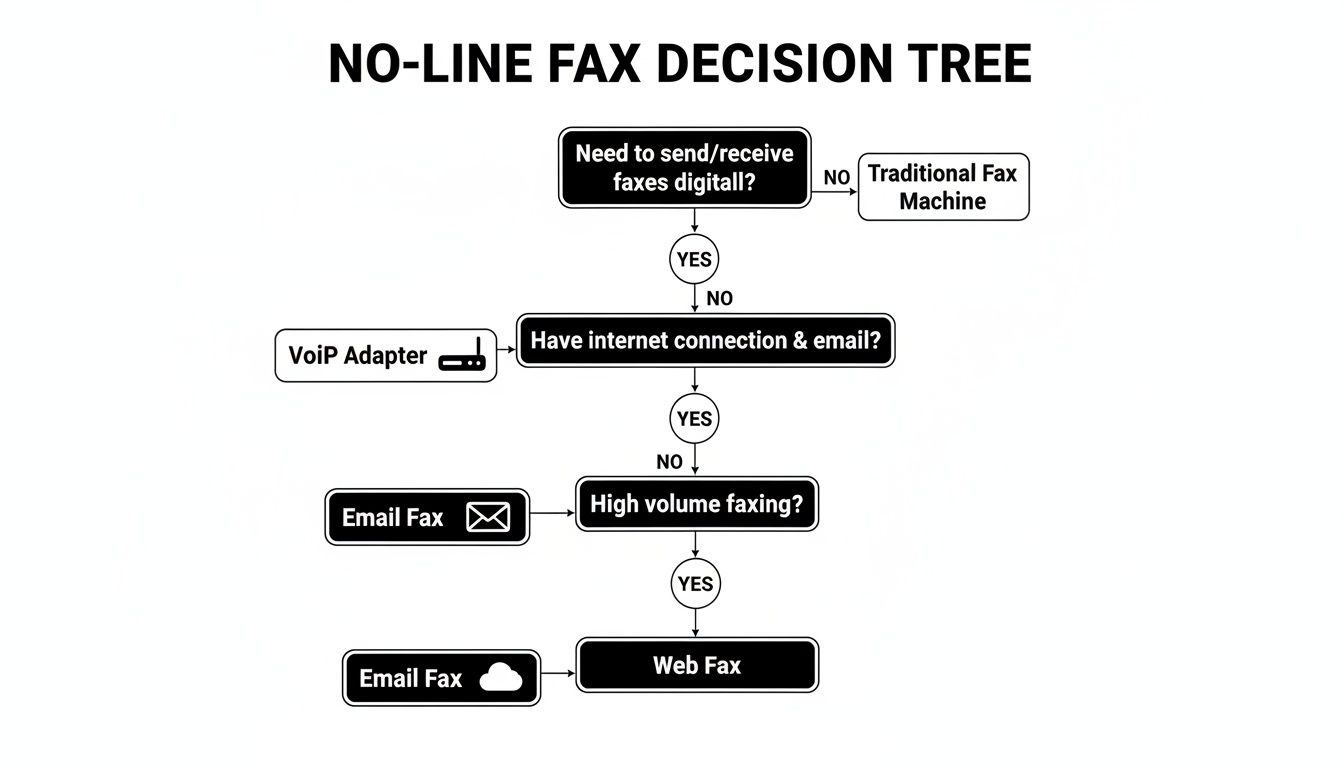
    Ditch the landline and still send that contract in minutes. There are four reliable no-line fax methods that fit different needs. Whether you’re at home, in the field, or tied to an old-school machine, one of these options will do the trick.

    Quick Overview Of No Line Fax Options

    No line fax options

    • Browser-based web fax services let you drag, drop and hit send—no installs required.
    • Email-to-fax gateways transform your inbox into a fax line with zero extra software.
    • VoIP adapters link your router to a fax machine, blending old gear with modern networks.
    • Scanner-plus-cloud apps convert scans into faxes in a single upload.

    Below is a quick rundown of each approach, spotlighting where they shine.

    Summary Of No Line Fax Methods

    Method Key Benefit Ideal Use Case
    Web Fax No hardware needed Home office compliance
    Email Fax Seamless email workflow Remote reporting
    VoIP Adapter Integrates old equipment Legacy systems
    Scan & Upload True mobility On-the-go faxing

    Each route solves a common fax challenge without tapping into a physical phone line. To explore the full step-by-step process, head over to our detailed guide to faxing.

    Understanding How No Line Fax Works

    Ever sent a fax without a phone jack? Modern solutions tap into VoIP protocols—T.38 and G.711—to translate those classic fax beeps into digital packets for smooth internet transport.

    Translating Fax Tones Into Data

    Cloud fax services lean on email APIs to route documents securely. They mimic the old handshake, chop the data into packets, then reassemble everything on the other side:

    • Packetization splits your fax into RTP packets for reliable delivery.
    • Handshake Emulation recreates the familiar CNG and CED tones.
    • Reassembly stitches the packets back into the original scan.

    Imagine firing off a PDF in London. It cruises through an encrypted tunnel and arrives in New York as a crisp printout in seconds.

    Back in the day, fax machines reshaped office workflows. By 1988, businesses had over 10 million units, and early ’90s sales hit 20 million a year. Discover more history on Business.com

    Key Takeaway: Knowing how VoIP and cloud faxing work helps you pick between a fully managed service or a DIY hardware setup—balancing speed, security, and budget.

    Setting Up Web Fax With SendItFax

    Getting Started With Your Account

    When you sign up for SendItFax, the whole process takes just a few clicks. Verify your email, and you’re ready to roll—no hardware or phone lines necessary.

    Next, pick a local or toll-free number that fits your business needs. Then upload your PDF and, if you like, slap on a branded cover page to make it look sharp.

    Navigating The Dashboard

    The SendItFax dashboard keeps everything in one place:

    • Quick-Send buttons for one-off or batch faxes
    • Real-time status updates from “Queued” to “Delivered”
    • A complete history so you can track what went out and when

    Screenshot from https://www.senditfax.com/dashboard

    Everything is laid out clearly, so even first-time users can find their way around.

    Key Takeaway: You can manage every fax—sent or received—right from your laptop, tablet, or smartphone.

    Automating Routine Faxes

    Imagine waking up to an inbox full of invoices already on their way to clients. With SendItFax’s scheduling feature, you can:

    • Queue daily, weekly, or monthly invoice runs
    • Set recurring cover pages with client logos
    • Receive email alerts on failed deliveries

    This kind of automation frees you from the daily grind and keeps cash flow steady.

    Learn more in this guide on sending faxes online

    Market Trends And Projections

    Fax services aren’t disappearing—they’re evolving. Here’s a quick look at where the market stands:

    Year Market Size (USD)
    2024 $3.31 billion
    2030 $4.47 billion

    That 5.15% CAGR underscores steady growth, driven largely by email-to-fax solutions in regulated industries.

    Read the full research on market growth

    Configuring Email To Fax And VoIP Fax Gateways

    Setting Up Email-To-Fax Gateways

    Turning your email into a fax machine only takes a few quick steps. First, plug in your SMTP credentials so the gateway can authenticate and relay messages on your behalf.

    • Send your fax by addressing an email to faxnumber@provider.com, with the recipient’s number in the subject line.
    • Attach your document as a PDF, Word file, or image.
    • Watch for a confirmation email that tells you whether the fax went through or bounced back.

    For instance, I often drag an invoice PDF into Outlook, type 9876543210 in the subject field, and hit send. A moment later, the gateway files a success—or failure—notice right in my inbox.

    Integrating VoIP Fax Adapters

    If you’ve still got a trusty fax machine, a VoIP adapter can breathe new life into it—no copper lines needed. Just connect an RJ11 cable from the adapter’s phone port to your fax machine and assign it a static IP on your network.

    Flip on T.38 in the adapter settings to ensure reliable fax-over-IP transfers. Once that’s done, your legacy hardware behaves just like it’s hooked to a traditional phone line.

    Combining email-to-fax with a VoIP adapter gives you the best of both worlds: modern convenience and tried-and-true hardware. And while standalone fax machines have seen lower sales, the overall market still hit $624 million in 2025—with service revenues climbing to $3.3 billion in 2024. Dive deeper into these trends in this market report.

    Comparing No Line Fax Methods

    Finding the right way to fax without a landline comes down to balancing cost, setup time, security, and your team’s workflow. What works for a small startup may not suit a busy law firm or a mobile repair crew.

    Why These Four Approaches Stand Out

    • Web-Based Fax Services
      Instant onboarding—often under five-minute—with no extra hardware.

    • Email-to-Fax Gateways
      Send a standard email, and the gateway converts it to a fax. Simplicity itself.

    • VoIP Adapters
      Keep your existing fax machine; just plug in a small adapter. Setup takes about 30-minute.

    • Scanning & Uploading
      Perfect for field teams: scan documents onsite and upload through a browser or mobile app.

    Visual Roadmap To Your Choice

    The graphic below walks you through each option with clear icons and decision paths. You’ll see which method wins on speed, which one on ease, and where adapters or scanners really shine.

    Infographic about fax machine no phone line

    Web fax is unbeatable for rapid deployment. Email gateways keep things low-friction. Adapters let you hang on to legacy hardware. Scanning gives you true on-the-move flexibility.

    Comparison Of No Line Fax Techniques

    Below is an at-a-glance comparison of setup complexity, ongoing costs, and security levels:

    Comparison of No Line Fax Techniques

    Technique Setup Complexity Monthly Cost Security Level
    Web-Based Fax Low (5-minute) Moderate High (TLS/AES encryption)
    Email-to-Fax Gateway Very Low Low Medium (SSL/TLS)
    VoIP Adapter Medium (30-minute) One-Time Fee Variable (provider-dependent)
    Scanning & Upload Low Free–Low Medium (password-protected)

    This snapshot helps you match each method to your priorities—whether speed, budget or compliance.

    Next Steps And Further Reading

    Think about how many faxes you send monthly, your security requirements, and any existing fax hardware you want to keep. For a deeper dive into online fax service options, explore our guide on online fax services comparison.

    With these insights in hand, you can confidently ditch the phone line and keep those documents flowing.

    Troubleshooting No-Line Fax Issues

    Image

    Fixing Web Fax Portal Hiccups

    When your online fax portal hangs on a spinning icon or times out, a quick cache clear often brings it back to life.

    Next, ensure your network isn’t blocking essential traffic by confirming ports 80 and 443 are open.

    Handling Email-To-Fax Rejections

    Sometimes SMTP servers reject attachments because of format mismatches.

    Dig into your mail logs to spot the bounce codes, then switch your documents to PDF or TIFF—that single change usually stops the failures.

    Improving VoIP Fax Quality

    Faxing over VoIP can hit snags if jitter spikes or packets get dropped.

    Flip on T.38 support in your phone system and give UDP traffic top priority in your router’s QoS settings. This combo slashes handshake errors.

    Fine-Tuning Document Settings

    Upload glitches often crop up when resolution is too high or color formats get messy.

    Dial your dpi back to 200 and stick with black-and-white TIFF files—this simple tweak fixes most upload hiccups.

    Quick Fix Summary

    Clear browser cache; verify ports 80/443; convert attachments to PDF/TIFF; enable T.38 & prioritize UDP; set dpi to 200.

    Frequently Asked Questions

    • How Can I Send Faxes Without A Traditional Phone Line?
      You don’t need copper wires anymore. I often point people toward a web-fax service, but you can also set up email-to-fax gateways, attach a VoIP adapter, or simply scan your docs and upload them directly.

    • Will I Lose My Existing Fax Number?
      Absolutely not. You can port your current number in just a few days—no need to update everyone in your address book.

    • Are These Methods Really Secure?
      Yes. Go for solutions that support TLS, offer end-to-end encryption, or even provide an air-gap option if you’re handling highly sensitive files.

    • What If My Internet Connection Drops?
      It happens. The best services let you queue outbound faxes until you’re back online, or you can switch over to a mobile hotspot and keep your documents moving.


    Ready to drop that old landline? Give SendItFax a try—no extra hardware required.