Tag: digital fax service

  • A Practical Guide to Free Fax Online Send Instantly

    A Practical Guide to Free Fax Online Send Instantly

    Of course. Sending a fax online for free, without even creating an account, is absolutely possible. Tools like SendItFax have completely changed the game, turning what used to be a clunky, machine-driven process into something you can do right from your web browser in a matter of seconds.

    Why Do People Still Bother With Faxing?
    A person signs a document while working on a laptop, with 'SECURE FAXING' graphic.

    It’s a fair question. With email and countless file-sharing apps, why hasn’t faxing gone the way of the dinosaur? The truth is, it remains an essential tool in many professional circles.

    For industries like healthcare, law, finance, and government, faxing isn’t just an old habit—it’s a trusted method for secure and legally recognized communication. A faxed signature often carries the same legal weight as one signed in person, a standard that email attachments can't always guarantee.

    Think about a real estate agent on a tight deadline. They need to get a signed purchase agreement to a client on the other side of the country, and time is critical. Instead of printing, signing, scanning, and hoping an email doesn't land in a spam folder, they can send the document directly to the recipient’s fax machine. It’s a secure, verifiable transmission that gets the job done.

    Connecting Old-School Needs with Modern Tech

    This is exactly where online fax services come in. They perfectly connect the trusted, legacy systems of the past with the digital ease we all expect today. You get all the security and legal backing of a traditional fax without needing a dedicated phone line, a bulky machine, or even an office.

    This simple shift has opened up faxing to a whole new world of users.

    • Freelancers can now send signed contracts and invoices with a professional touch.
    • Patients can securely submit sensitive medical forms to their doctor’s office from home.
    • Small business owners can quickly transmit purchase orders without spending a dime on office equipment.

    The idea really took off in the 2010s, giving individuals and small operations a powerful tool they never had before. And it’s not just a niche market; the global fax services market was valued at USD 3.31 billion in 2024 and is expected to keep growing. This trend, as detailed in recent market research on fax services, shows just how much people rely on sending documents without a physical machine.

    The Advantage of Faxing from Your Browser

    At the end of the day, being able to send a document by fax from your computer makes a once-annoying process accessible to everyone. It moves faxing from a task tied to a specific machine to a flexible, digital service you can use whenever you need it.

    Sending a fax is no longer about finding a machine; it's about opening a browser tab. This accessibility ensures that critical communications in regulated industries can happen instantly, from anywhere, keeping business and personal affairs moving forward without delay.

    How to Send Your First Free Fax in Under Five Minutes

    Ready to get that document on its way? Sending an online fax is surprisingly simple—it honestly takes less time than brewing a pot of coffee. We're going to walk through the process using SendItFax, focusing on the practical steps, not a bunch of technical jargon.

    Let’s use a real-world example. Imagine you need to send a signed permission slip to your child's school. It’s due today, and who owns a fax machine anymore? This is the perfect job for a quick, free fax online send.

    Getting Your Document Ready to Go

    First things first, you need a digital copy of your document. SendItFax keeps it simple and accepts the most common file types you’ll have on hand:

    • PDF files (.pdf): This is usually your best bet. PDFs lock in the formatting, so what you see is exactly what the recipient gets.
    • Microsoft Word documents (.doc, .docx): Perfect if you’ve just typed up a letter or need to send an editable form.

    For our permission slip, you've already printed and signed it. The easiest next step? Just snap a clear, well-lit photo of it with your phone. Most modern phones can save it directly as a PDF.

    Once you have the file, head over to the SendItFax homepage. You'll see a big "Upload File" button—give that a click. It works just like attaching a file to an email. Find your permission slip file on your computer or phone and select it.

    A Quick Tip from Experience: For the clearest possible fax, make sure your document is high-contrast. Crisp, black text on a plain white background transmits beautifully. Documents with light gray text or colored backgrounds can end up looking smudged and unreadable on the other end.

    Plugging in the Sender and Recipient Info

    With your file uploaded, the next step is to fill in the "to" and "from" details. This part is critical for making sure your fax actually arrives and the recipient knows who sent it.

    You’ll see a few simple fields:

    • Your Info (Sender): Pop in your name and email address. The email is super important because that’s where they’ll send your confirmation receipt.
    • Their Info (Recipient): Add the recipient's name and their fax number. Triple-check this number! I can't tell you how many faxes fail simply because of one wrong digit. It's the number one cause of transmission errors.

    For our school example, you'd put your name and email, then the school office's name and their fax number. The best part is there's no need to create an account or sign up for anything. If you're curious about other services that offer this, we have a whole guide on how to find a free online fax service with no credit card required.

    Adding a Simple Cover Page

    The last piece of the puzzle is the cover page. The free service automatically adds one for you, which is a great professional touch. Think of it as the envelope for your fax—it tells the person on the other end who this is for and what it's about right away.

    There’s a text box where you can write a short, clear message. For our permission slip, something straightforward is perfect:

    • Subject: Permission Slip for Jane Doe
    • Message: Please find the signed permission slip for Jane Doe's field trip on Friday. Thank you!

    This little note makes a huge difference. When that fax spits out of the machine in a busy school office, your message ensures it lands on the right desk instead of getting lost in a paper shuffle.

    Once that's filled in, just hit the send button. That's really all there is to it. Your document is on its way, and a confirmation email will hit your inbox shortly.

    What You Actually Get With a Free Online Fax Service

    Let's be honest, "free" always comes with some fine print. When you need to send a fax online for free, it helps to know exactly what you’re getting into. At SendItFax, we believe in being upfront about our service so you can get your task done without hitting any unexpected roadblocks.

    Our free option is built for those one-off, "I just need to send this one thing" moments. It’s perfect for when you need to fax a signed contract, a doctor's note, or a single application form.

    The Nuts and Bolts of the Free Plan

    Using the free SendItFax tool is straightforward, but there are a few ground rules. These limits are what allow us to keep the service running smoothly without needing your credit card or forcing you to create an account.

    Here’s a quick rundown of what to expect:

    • Page Limit: Your document can be up to three pages long. This doesn't include the cover page, which we automatically add for you.
    • Daily Limit: You can send up to five free faxes in a single day. For most people handling personal or small business needs, that's more than enough.
    • Branding: The cover page will have a small SendItFax logo on it. It’s a subtle way we support the free service so it can stay free.

    This simple guide shows you just how easy the process is.
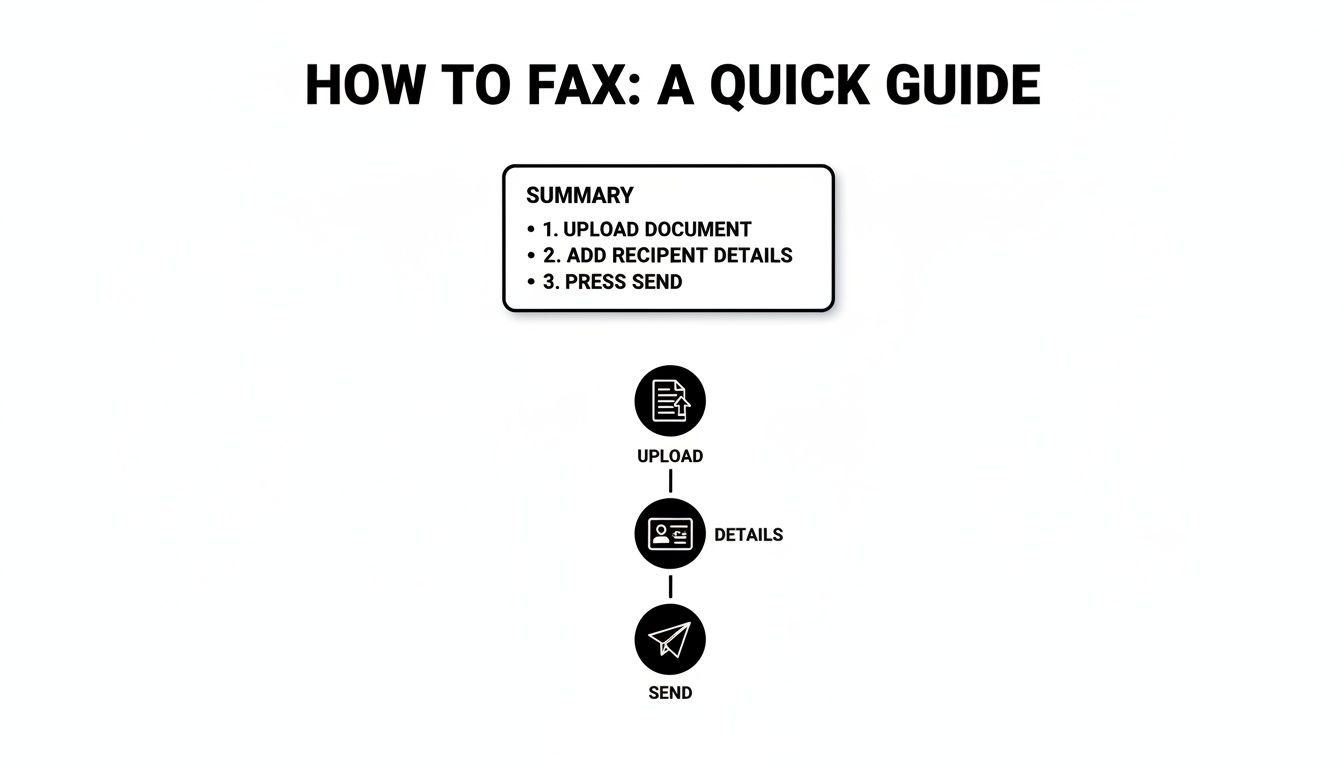
    A visual guide explaining how to fax in three simple steps: upload document, add recipient details, and send.

    As you can see, it really is just a matter of uploading your file, typing in the details, and clicking send.

    This "freemium" model is pretty common in the online fax world. By 2025, the industry standard is to offer a basic free tier with page and daily limits, encouraging users who need more to upgrade. It's a system that works, allowing services like ours to help both the occasional user and those with heavier faxing demands.

    When Paying a Little Makes a Lot of Sense

    But what if your document is five pages long? Or what if you're sending a professional quote and don't want any branding on it? That’s exactly why we created the "Almost Free" plan. For just $1.99 per fax, you get a whole lot more flexibility without being locked into a subscription.

    This pay-as-you-go option really hits the sweet spot. It’s for those times when the free plan is almost enough, but you need a little extra power.

    Upgrading gives you a few key perks:

    • Longer Faxes: Send documents up to 25 pages long.
    • No Branding: Your cover page is completely clean—no SendItFax logo.
    • Priority Sending: Your fax gets bumped to the front of the line for immediate delivery.

    To help you decide, here’s a quick comparison.

    SendItFax Free vs. Almost Free Plan Comparison

    A quick look at our plans to help you decide which one is the right fit for your faxing needs.

    Feature Free Plan Almost Free Plan ($1.99/fax)
    Cost $0 $1.99 per fax
    Page Limit Up to 3 pages Up to 25 pages
    Cover Page Includes SendItFax branding No branding
    Daily Faxes Up to 5 Unlimited
    Delivery Speed Standard queue Priority delivery

    Choosing is simple. If you're faxing a quick, informal document, the free plan is a no-brainer. But for a lengthy business proposal or an official application where every detail matters, that small $1.99 investment ensures a professional look and fast delivery. If you think your faxing needs might be more consistent, you might want to look into a fax online free trial for a full-featured plan.

    Tips for a Flawless Online Fax Transmission
    A 'FAXING TIPS' checklist document with checked boxes next to a silver laptop on a wooden desk.

    Sending your fax is only half the battle. Making sure it arrives crisp, clear, and in the right hands is what really counts. I’ve found that just a few simple checks before you hit "send" can be the difference between a successful transmission and a frustrating failure. Think of it as setting your document up for success from the start.

    The quality of the file you upload directly impacts the final printout on the other end. Fax technology compresses files, which can sometimes degrade quality. The best way to combat this is to start with a high-resolution, high-contrast document.

    This means using bold, black text on a clean white background. I’d strongly advise against using light gray fonts, busy backgrounds, or tiny text—those are always the first things to become unreadable after a fax transmission.

    Prepare Your Document for Success

    Before you even think about uploading, give your file a quick once-over. The most common issue with a free fax online send is poor document quality, and it's almost always preventable.

    Here are a few professional tips I've picked up to ensure a fax is legible every single time:

    • Font Choice Matters: Stick to simple, clean fonts like Arial, Calibri, or Times New Roman. I always recommend using a font size of 12 points or larger to be safe.
    • Convert to PDF: While you can send a Word doc, I always convert my files to PDF first. This locks in the formatting and prevents any weird shifts in text or images during the conversion process. If you need a hand with that, we have a helpful guide on how to convert a Word document to PDF.
    • Image Quality: If you’re including images or a scanned signature, make sure they are sharp and clear. A blurry signature on a contract could cause some serious headaches down the line.

    A great pro-tip is to remember the recipient's fax machine is almost certainly printing in black and white. What looks perfectly fine in color on your screen can easily turn into a muddy, illegible gray blob on their end. Always preview your document in grayscale to spot any potential problems.

    Double-Check the Details

    This sounds incredibly basic, but you’d be surprised how often a simple typo derails an important fax. A single wrong digit in the recipient's fax number is, without a doubt, the most common reason for a failed transmission.

    Just take an extra ten seconds to verify the number before you send it. If it's a critical document, I'll even call the recipient to confirm their fax line is active and ready to receive. It's a small step that can save a lot of time.

    Your cover page message is another powerful tool. Don't just put your name. Give clear context. A message like, "Attention: HR Department – Signed Offer Letter for John Smith" ensures that even if your fax lands on a shared machine, it gets routed to the right person quickly. That small detail turns your fax from a random piece of paper into a priority document.

    How to Troubleshoot Common Faxing Glitches

    Even with a process as simple as online faxing, things can occasionally go sideways. Getting a "transmission failed" message is frustrating, but don't worry—most of the time, the fix is surprisingly simple. Let’s walk through the most common issues and how to get your fax moving.

    The number one culprit? A simple typo in the fax number. I've seen it happen countless times; 9 times out of 10, a failed fax is just due to a transposed digit or a wrong area code. It's an easy mistake to make when you're moving fast.

    So, before you do anything else, just take a breath and carefully re-enter the number, checking it against your contact's information. If you're positive the number is correct, it's time to look at what might be happening on the other end.

    Diagnosing the Problem

    Remember, you're often sending a document to a physical machine. Is it possible that machine is busy with another fax, turned off for the night, or even just out of paper? Old-school fax machines are single-taskers, so if their line is tied up, your fax will fail.

    Here's a quick mental checklist to run through:

    • Verify the Number: Did you double-check every single digit, including the country and area codes?
    • Check Recipient Status: Could their machine be offline? If it's a critical document, a quick phone call to the recipient can confirm if their machine is on and ready.
    • Review Your File: Is your document in a standard format like PDF, DOC, or DOCX? A corrupted file or an unsupported format won't even get out of the gate.

    The simplest solution is almost always the right one. Before you get frustrated with the service, always start with the basics: the fax number and the status of the receiving machine. This little bit of diligence clears up the vast majority of problems.

    When the Confirmation Is Delayed

    Another thing that can cause a bit of anxiety is when that delivery confirmation email doesn't show up right away. You hit send and… nothing. This doesn't automatically mean your fax failed.

    Online services have queues, and during busy periods, it might take a few minutes for your fax to go through and for the system to generate a confirmation. My rule of thumb is this: if you haven't seen anything after 15 minutes (and you've already checked your spam folder!), it's safe to assume something went wrong.

    At that point, circle back to the top of our troubleshooting list and start again, beginning with the fax number. By working through these steps methodically, you’ll be able to solve almost any glitch that comes your way.

    Your Questions About Online Faxing Answered

    Even with a walkthrough, it's totally normal to have a few questions about how sending a free fax online actually works. I've pulled together the most common things people ask to give you quick, clear answers so you can send your documents with confidence.

    Is Sending a Fax with SendItFax Really Free?

    Yes, it absolutely is. Our free service is built for just that—sending faxes without reaching for your wallet.

    You can send a document up to three pages long, plus a cover page, without spending a dime. It's perfect for those one-off situations, and you can send up to five faxes per day. The only catch? We place a small SendItFax brand mention on the cover sheet, which is what allows us to offer this service for free. No hidden costs, no sign-up needed.

    How Do I Know If My Fax Actually Went Through?

    Once you hit "Send," you won't be left wondering. We'll send you an email notification from SendItFax to confirm the status of your fax.

    This email lets you know if the fax was sent successfully from our end or if it failed. If it does fail, the most common reason is a simple typo in the fax number. It always pays to double-check the number and give it another try.

    Keep in mind that while our email confirms we sent it, the final delivery receipt depends on the recipient's fax machine. Still, our confirmation is your best and first sign that everything went smoothly.

    How Secure Are the Documents I Upload?

    Your privacy is a huge deal to us. We use secure, encrypted connections for all file uploads and transmissions. This protects your data from the moment it leaves your computer to the moment it's delivered.

    Your documents are only ever used for the single purpose of sending that one fax. Since our service doesn't require an account, your files aren't stored on our servers long-term, which adds another layer of security to the whole process.

    Can I Get Faxes with the Free Service?

    Our free service is a one-way street—it’s designed exclusively for sending faxes. It doesn't give you a dedicated fax number for receiving them.

    This focus helps us provide a reliable and powerful sending tool that stays completely free for anyone who just needs to send a document to a U.S. or Canadian fax number every now and then.


    Ready to send a document without tracking down an old fax machine? SendItFax lets you upload your file and get it on its way in just a few clicks. Give it a try at https://senditfax.com.

  • How to Send a Fax Online A Modern Professional’s Guide

    How to Send a Fax Online A Modern Professional’s Guide

    Sending a fax online is surprisingly straightforward. You just pick a service, upload your document, punch in the recipient's fax number, and hit send. It effectively turns your computer or phone into a fax machine, but without the bulky hardware or the need for a separate phone line.

    Why Online Faxing Still Matters in a Digital World

    An office worker is sending a fax online using a modern computer, symbolizing the blend of old and new technology.

    I get it. Faxing sounds like a relic from a bygone era, something you'd find collecting dust next to a Rolodex. But the truth is, in a lot of critical professions, it’s still an essential communication tool. This isn’t about being old-fashioned; it’s about security, legal weight, and compliance.

    For anyone working in law, healthcare, or finance, a simple email often isn't enough. These industries are governed by strict regulations like HIPAA, where protecting sensitive client and patient data is a legal mandate, not just a good idea. Online faxing bridges that gap, giving you the trusted security of a traditional fax with the ease of modern tech.

    The Enduring Relevance of Fax Technology

    Think about a real estate agent on a tight deadline to submit a signed purchase offer. Emailing a document that sensitive opens it up to all sorts of interception risks. Sending it through an online fax service, on the other hand, creates a secure, point-to-point transmission that’s legally recognized and provides a verifiable receipt of delivery.

    This combination of old-school security and new-school convenience is precisely why faxing is still around. We're not trying to bring back obsolete tech; we're just applying its strengths in a modern context. The numbers back this up, too. The global fax services market was valued at USD 3.31 billion and is expected to climb to USD 4.48 billion by 2030. That growth is fueled by the roughly 17% of businesses that still rely on faxing for their most important operations. You can discover more insights about the fax market on ResearchAndMarkets.com.

    A Practical Solution for Modern Needs

    Online faxing solves a few key problems that other digital communication methods can't always handle:

    • Legal Admissibility: Faxes are widely accepted as legally binding documents, which is crucial for things like contracts, court filings, and official records.
    • Enhanced Security: Unlike email, which is susceptible to hacking and phishing scams, fax transmissions travel over the public switched telephone network (PSTN), a much more secure channel.
    • Audit Trails: Good online fax services give you detailed confirmation reports. This creates a clear, auditable trail proving when a document was sent and successfully received.

    The real value of learning how to send a fax online is realizing it's a modern skill for secure communication, not an outdated task. It's the digital equivalent of a sealed, hand-delivered envelope for your most important documents.

    At the end of the day, knowing how to send a fax from your computer is a genuinely practical skill for anyone who deals with confidential information. It’s a simple way to ensure your documents are sent securely, arrive without being tampered with, and meet the strict compliance standards of many professional fields.

    A Practical Walkthrough to Sending Your First Online Fax

    A person is sitting at a clean desk, using a laptop to send a digital fax, with a satisfied expression.

    Jumping into any new technology can feel a little intimidating, but sending an online fax is surprisingly straightforward. Let's walk through it together. We'll use a popular service like SendItFax as our example, since its workflow is typical of most top-tier platforms.

    First things first, you need an account. Most services offer a few different plans, from free tiers for the occasional one-off fax to paid subscriptions for businesses that need more volume and features. Once you're signed up and logged in, you’ll land on the main dashboard.

    This is your command center. Just look for a big, obvious button that says something like “Send Fax” or “New Fax” to get started.

    Navigating the Sending Interface

    Clicking that button will take you to a simple form that should feel a lot like sending an email. This is where you’ll plug in the recipient’s information, attach your files, and add a cover sheet.

    The most important field here, without a doubt, is the recipient's fax number. Getting this right is everything.

    • Entering the Fax Number: Always include the full number, starting with the area code. For international faxes, you'll need the country code first (e.g., +44 for the UK).
    • Adding Multiple Recipients: One of the real perks of online faxing is the ability to send the same document to several numbers at once. It's a massive time-saver for things like company announcements or client updates.

    Pro Tip: I can't stress this enough: double-check the fax number. A single wrong digit is the number one reason for a failed fax. It’s a simple check that saves a ton of headaches.

    Assembling Your Fax Package

    With the number locked in, it’s time to add your documents. Most services handle all the common file types you'd expect—PDF, DOCX, JPG, you name it. You can either drag and drop files from your computer or, even better, pull them directly from cloud storage like Google Drive or Dropbox.

    This is a huge part of why people are learning how to send a fax online; it completely cuts out the annoying print-and-scan step.

    Next up is the cover page. Don't skip this! It's not just a formality; it’s what tells the recipient who you are and why you're sending them a document.

    Nearly every platform provides a simple template. You’ll just fill in a few key details:

    • To: Recipient's name and company.
    • From: Your name and company.
    • Subject: A clear, concise description. Think "Signed Contract – Account #54321" instead of just "Contract."
    • Message: A spot for a quick, optional note.

    Taking 30 seconds to fill this out properly makes you look professional and ensures your fax gets to the right person quickly. For a deeper look at faxing without the clunky hardware, our guide on how to fax without a fax machine has you covered.

    The Final Review and Send

    Before you commit, any good service will give you one last confirmation screen. This is your final chance to give everything a once-over.

    Your Pre-Flight Checklist:

    1. Recipient's Number: Is it perfect? Country code included?
    2. Attached Documents: Are the right files there? Does the page count look correct?
    3. Cover Page Details: Any typos in the names or subject line?
    4. Plan Limits: Give a quick thought to how many pages you’re sending. Make sure it fits within your plan to avoid any surprise fees.

    Once everything looks good, hit "Send Fax." The service takes it from there—dialing the number, transmitting your files, and then sending you a confirmation notice right to your email or dashboard. And that's it! You've officially sent an online fax.

    Getting Your Documents Ready for a Perfect Send

    Preparing documents for a clear online fax

    A blurry or unreadable fax can bring a deal to a screeching halt. The secret to a crisp, professional-looking fax on the other end is all in the prep work. What you send is what they get, so a few minutes of setup makes all the difference.

    Think of it this way: your digital file is about to be translated into an old-school analog signal and then back again. Garbage in, garbage out. The cleaner your starting file, the better the final result will be.

    Choose The Best File Format

    When in doubt, go with a PDF. It’s the gold standard for online faxing because it locks in your formatting—fonts, images, and layout stay exactly where you put them. No nasty surprises like a signature line jumping to the next page.

    While you can often send a DOCX or JPG file, they can be a bit of a gamble.

    • DOCX: A Word file can look different on the receiving end if they don't have the same fonts installed, shifting your carefully crafted layout.
    • JPG: Great for a quick photo or a single-page scan, but small text can get fuzzy.
    • PNG: Usually offers better quality for graphics than a JPG, but the files can get large.
    • TIFF: This is the heavyweight champion for quality, often used in legal and medical fields for its high detail, but the file sizes are massive.

    Industry experience shows that using a PDF can cut down on layout-related transmission errors by as much as 75%.

    Here’s a quick cheat sheet on why PDF usually comes out on top:

    Format Pros Cons
    PDF Layout is locked and reliable Can be a slightly larger file
    DOCX Easy to edit Display can be inconsistent
    JPG Small file size Quality loss is common (lossy compression)
    TIFF Extremely high detail Creates very large files

    Optimize Scanned Documents

    If you're working with paper, how you scan it is critical. For documents with text, aim for a resolution of 300 dpi. This is the sweet spot for crisp, readable characters without creating a giant file. Going higher, like 600 dpi, is usually overkill and can bog down the transmission.

    Before you hit "scan," make sure you crank up the contrast. You want bold, dark text on a clean, white background. This simple tweak makes a huge difference in legibility. If you're using a flatbed scanner, ensure there are no shadows creeping in from the edges.

    A few more pro tips for scanning:

    • Scan in black-and-white for text-only documents. It keeps file sizes tiny.
    • Wipe down the scanner glass to get rid of any dust or smudges.
    • Crop out any unnecessary white space or margins.
    • Always preview the scan on your full screen to catch any issues.

    Compress Without Losing Clarity

    Huge files are the enemy of a successful fax. If your document is loaded with high-resolution images, the file size can quickly balloon, leading to failed transmissions. Most online fax services have a file size limit, often around 2 MB.

    You can use tools like Adobe Acrobat's optimizer or a free online compressor to shrink your file down. The goal is to make it lean without turning your text into a blurry mess.

    Here's how to do it smartly:

    1. Lower the resolution on images from 300 dpi to 200 dpi—it's usually fine for faxing.
    2. If you're saving a JPG, reduce the quality setting to around 75%.
    3. Strip out any unnecessary data like embedded thumbnails or extra color profiles.

    A smaller, optimized file can cut your transmission time by up to 40% and helps you avoid frustrating timeouts.

    Some fax services automatically compress files when you upload them, which is handy. Just be sure to double-check their settings to ensure your images don't get too compressed and lose important detail.

    Your Final Pre-Flight Checklist

    Before you hit that "send" button, run through this quick final check. It's saved me from countless headaches.

    1. File Format: Is it a PDF? If not, are you confident the chosen format will work?
    2. Page Count: Does the total number of pages fit within your plan's limits?
    3. Readability: Is the text clear and the contrast sharp on every single page?
    4. Cover Page: Are all the names, numbers, and details correct?
    5. Final Preview: Give it one last look in the fax service's preview window.

    I once heard from a real estate agent who nearly lost a same-day closing because he skipped the readability check. The signed contract he scanned arrived as a faint, illegible smudge. A five-second check could have saved him hours of stress. Taking a moment to prepare your files properly ensures they arrive looking professional, clear, and ready for action.

    How to Choose the Right Online Fax Service

    https://www.youtube.com/embed/tw6LzYHD9z4

    With so many online fax providers popping up, picking the right one can feel a bit overwhelming. The good news? The best choice really just boils down to your specific situation. By thinking through how often you fax, what you're sending, and your budget, you can quickly find the perfect fit.

    The first big question to answer is how you want to pay. Pretty much every service falls into one of two buckets: a monthly subscription or a simple pay-as-you-go model. Neither one is inherently better, but one will almost certainly make more sense for you.

    Online Fax Service Models Compared

    To figure out which model is right for you, it helps to see them side-by-side. Think about your faxing habits over the last year—were they consistent or just a one-off thing? This table breaks down the main differences.

    Feature Subscription-Based Plans Pay-Per-Use Services
    Best For Businesses and individuals who fax regularly (e.g., several times a month). People who only need to send a fax occasionally (e.g., a few times per year).
    Cost Structure A flat monthly fee for a set number of pages. Pay for each fax you send, with no recurring charges.
    Cost-Per-Page Typically very low, making it economical for high volume. Higher per page, but you save money by not paying for an unused service.
    Included Features Often includes a dedicated fax number, advanced security, and integrations. Focused on the core function of sending a fax quickly and easily.
    Commitment Requires an ongoing monthly commitment. No commitment; you only pay when you need to send something.
    Common Use Cases A medical office sending patient files, a law firm submitting legal documents, a real estate agent sending contracts. Sending a signed form to a government agency, submitting a one-time application, faxing a document while traveling.

    In the end, it’s a simple calculation: if you fax often enough that the subscription fee is less than what you’d pay for individual faxes, go with the subscription. If not, pay-per-use is the way to go.

    Subscription Plans for Frequent Users

    If sending faxes is a regular part of your workflow, a subscription plan is almost always the smartest financial decision. These plans give you a certain number of pages each month for a flat fee, which dramatically lowers your cost per page.

    Think about a small medical practice that faxes 20-30 documents a month or a law firm constantly filing paperwork with the courts. For them, a subscription is a no-brainer. These plans also tend to bundle in premium features that professionals rely on, like a dedicated fax number, HIPAA compliance, and detailed logs for auditing purposes.

    A good subscription service is like a business utility—you pay a predictable monthly fee for reliable, high-volume access with advanced features. It’s designed for integration into daily operations.

    Pay-Per-Use for Occasional Needs

    On the flip side, what if you only need to send a fax once in a blue moon? A pay-per-use service is your best bet. This is perfect for when you need to send a signed contract, submit a single form to a government agency, or fax a document while you're on the road.

    You simply pay for the single transmission without getting locked into a monthly bill. Services like SendItFax are designed for exactly this kind of scenario. While the cost for one fax might be a bit higher than the per-page rate on a subscription, you end up saving a ton of money by not paying for a service you hardly ever use.

    Key Features You Shouldn't Overlook

    Beyond just the price, a few key features can make a huge difference in your experience. As you compare services, decide which of these are must-haves for you.

    • Security and Compliance: If you handle sensitive information, this is non-negotiable. Look for services that offer TLS encryption to protect your faxes. For anyone in healthcare, HIPAA compliance is an absolute requirement.
    • International Faxing: Don't just assume every service can send faxes globally. If you need to reach numbers outside your country, double-check that the service supports it and take a close look at their international rates. They can vary a lot.
    • Cloud Storage Integrations: The ability to pull a document straight from Google Drive, Dropbox, or OneDrive is a massive time-saver. It means you don’t have to download files to your computer just to upload them again.
    • Mobile Apps: For anyone who works on the go, a good mobile app for iOS or Android is a game-changer. It effectively turns your smartphone into a portable fax machine.
    • API Access: This one is more for businesses. If you want to build faxing directly into your own software, like a CRM or an EHR system, you'll need a service that offers an API to automate those workflows.

    The online fax industry is growing fast—its market value is on track to hit USD 5 billion by 2030. This boom is happening because more and more professionals, especially in legal and healthcare, need secure, mobile-friendly ways to send documents. You can read more about the growth of online fax services on LLCBuddy.com.

    Ultimately, picking the right service comes down to matching its features to what you actually need. For a deeper dive, check out our full online fax services comparison to see how the top providers stack up. Taking a few minutes to think about your needs now will save you a lot of time and money later.

    Confirming Delivery and Troubleshooting Common Errors

    A close-up shot of a computer screen showing a fax delivery confirmation report, with a checkmark indicating success.

    You might think that hitting “send” is the finish line, but until you see that confirmation, the fax hasn’t truly arrived. Delivery confirmation reports act as your digital receipt, giving you a clear audit trail. They’re indispensable when you’re passing along time-sensitive or legally binding documents.

    Most online fax providers either email this report to you automatically or make it available in your dashboard within minutes. Treat it like proof of delivery—keep it on file whenever you’re dealing with contracts, medical records, or financial statements.

    Decoding Your Fax Confirmation Report

    At first, the confirmation report can look a bit dense. Once you know where to focus, though, it becomes a simple overview of your fax’s journey.

    A typical report highlights:

    • Transmission Status: Clear labels such as Success, Delivered, or Failed.
    • Date and Time: The exact moments when the fax was sent and when the session wrapped up.
    • Recipient’s Number: The fax number you dialed, for cross-checking.
    • Number of Pages: Verifies how many pages actually went through.
    • Thumbnail Image: A quick peek at the first page, so you know it’s the right document.

    The confirmation report is more than just a notification; it's your proof of delivery. For legal contracts, medical records, or financial documents, this report can be an invaluable, legally admissible record.

    Solving Common Fax Transmission Errors

    Not every fax sails through on the first attempt, and that’s okay. A “Failed” label usually points to something fixable. Your confirmation report’s error code is your roadmap to a solution.

    Here are the most frequent hiccups:

    • Busy Signal or Line Is Busy: The recipient’s machine was in use. Wait 10–15 minutes and try again.
    • No Answer or No Response: The fax didn’t connect. Check if the receiving machine is powered on, loaded with paper, and has a solid phone line.
    • Invalid Fax Number or Number Unobtainable: A hard failure—double-check that the number is correct and still active.

    These simple steps resolve most issues. If failures persist, verifying the number should be your first move. You can learn more about managing faxes digitally in our guide to the benefits of fax to email systems.

    Proactive Tips For Preventing Failures

    Why troubleshoot when you can prevent errors upfront? A few smart habits can boost your success rate dramatically.

    • Send during off-peak hours. Early mornings or late afternoons often dodge busy signals in busy offices.
    • Embrace cloud-based fax services. The market is projected to hit USD 1,034.34 million by 2025, reflecting a growing need for secure, efficient document delivery. Discover more insights about cloud fax services in a report by DataInsightsMarket.com.

    By getting comfortable with confirmation reports and these troubleshooting steps, you’ll turn faxing from a guessing game into a reliable, trackable process.

    Answering Your Questions About Online Faxing

    If you're new to sending a fax from your computer, you probably have a few questions. It's a big change from the clunky machine in the corner, but the whole point is to make your life easier. Here are the most common things people ask when they're getting started.

    Is It Really Safe to Send Sensitive Documents This Way?

    This is usually the first question people ask, and for good reason. The answer is yes, as long as you use a reputable service. These providers don't just zap your document into the ether; they protect it.

    Top-tier services use strong SSL/TLS encryption—the same security that protects your online banking—to shield your information as it travels to the fax network. Honestly, it's a lot more secure than leaving a sensitive contract sitting on a shared office fax machine for anyone to see.

    For those in fields like healthcare, law, or finance, the stakes are even higher. If that's you, look for services that are specifically HIPAA compliant. This isn't just a buzzword; it means they meet strict federal standards for protecting private information, often including things like secure data storage and detailed audit trails. For many professionals, this makes online faxing the more secure choice.

    The real advantage of a good online fax service isn't just convenience; it's the added security. Encrypting your data and delivering it to a private inbox eliminates the physical risks that come with a traditional fax machine.

    Can I Get Faxes This Way, Too?

    Absolutely. This is where online faxing really shines. Most subscription-based services will give you your own dedicated fax number, and you can usually pick a local or toll-free one that fits your business.

    When someone sends a document to your number from a regular fax machine, the service catches it, converts it into a PDF, and sends it right to your email. You can open, download, and save your faxes just like any other attachment. Your laptop or phone instantly becomes a fax machine, no extra hardware required.

    Do I Need to Buy Any Special Equipment?

    Nope, and that's the whole point. The main reason people look up how to send a fax online is to get rid of the extra hardware and dedicated phone lines. You don't need any of it.

    All you really need is an internet connection. You can send and receive everything right from your web browser or a mobile app on your phone. The service itself handles all the technical heavy lifting of talking to the old-school telephone network, so you don't have to think about it.

    How Is This Any Different From Just Emailing a PDF?

    It’s a great question, because on the surface, they seem similar. But they operate in fundamentally different ways, and those differences are a big deal when it comes to security and legal standing.

    An email bounces across the public internet from server to server, which opens it up to security risks if it isn't perfectly encrypted. An online fax, on the other hand, travels over the Public Switched Telephone Network (PSTN). That’s the same secure, closed network that handles phone calls, and it delivers your document directly to a specific fax number.

    Here's why that matters:

    • It Holds Up Legally: Because of that secure, point-to-point transmission, a fax is often considered a legally binding document for things like contracts or court filings where a simple email might not be accepted.
    • You Get Proof of Delivery: Online fax services give you a detailed confirmation report that acts as a verifiable receipt. It shows the exact time your fax was successfully delivered, something standard email just can't do.
    • It Works for Everyone: You can send a document to someone who only has a traditional fax machine. They don’t need a computer or an email address to get what you sent.

    Think of it this way: online faxing gives you the ease of email but with the security, legal weight, and verifiability of a traditional fax. It's the best of both worlds.


    Ready to send your first fax without the hassle? With SendItFax, you can send your documents from any browser in just a few clicks—no account or subscription needed. Experience the convenience and security for yourself. Send a fax online now with SendItFax.

  • Fax without landline: The Definitive Guide

    Fax without landline: The Definitive Guide

    Yes, you absolutely can fax without a landline. It's not just possible; it's now the standard way to do things. The easiest route is through an online fax service. These platforms let you send and receive faxes right from your email, a web browser, or a dedicated mobile app—all you need is an internet connection. This completely sidesteps the need for a physical fax machine or a dedicated phone line.

    Why Landline-Free Faxing Is Now Standard Practice

    A person using a laptop and phone to send a document, symbolizing the convenience of modern faxing.

    The days of listening to that familiar fax machine screech are fading fast. While faxing is still a go-to for secure document transfers in fields like healthcare, law, and government, the clunky hardware and expensive phone line are officially obsolete. Today, the ability to fax without a landline isn't some clever workaround—it's just how it’s done.

    This change is all about adapting to how we work now. Work is mobile, flexible, and digital. We need tools that fit that reality, not ones that chain us to a specific corner of an office.

    The Real-World Benefits of Going Digital

    Making the switch to a landline-free fax solution brings some immediate and very real perks. The most obvious win is saving money. A dedicated business phone line adds up month after month, and it's a tough expense to justify for a machine that only does one thing.

    But the advantages go well beyond your budget. It’s about efficiency and security, too.

    • Ultimate Flexibility: Need to send a signed contract from a coffee shop? Or review a patient's medical record from your home office? No problem. Your office is literally anywhere you have an internet connection.
    • Enhanced Security: Think about it: a traditional fax leaves sensitive documents sitting out in the open on a shared machine. Digital faxes, on the other hand, land directly in your secure email inbox. The best services also offer end-to-end encryption, giving you a level of protection old analog tech could never provide.
    • Simplified Workflow: When faxing is part of your digital process, you can forget about printing, scanning, and manually filing. Documents are handled as digital files (like PDFs), which you can easily save, organize, and archive in the cloud.
    • Reduced Waste: No more paper jams, empty ink cartridges, or toner messes. Going digital not only cuts costs but also supports a greener, paperless operation.

    The shift away from old-school hardware isn't just a trend; it's a massive market evolution. The global online fax market—which is what makes sending a fax without a landline possible—was valued at USD 2.52 billion in 2024 and is expected to nearly double by 2033. You can dive into the full market analysis on the future of online faxing to see where things are headed.

    To give you a clearer picture, here’s a quick breakdown of the most common methods people are using today.

    Modern Faxing Methods at a Glance

    Method Best For Typical Cost Key Advantage
    Web-Based Fax Service Businesses and individuals who need a reliable, feature-rich solution. Monthly subscription (often starting around $10) User-friendly interface, document storage, and tracking.
    Email-to-Fax Sending faxes quickly from any device with email access. Included with most online fax service plans. Extremely convenient; no need to log into a separate platform.
    Mobile Fax App On-the-go professionals who need to scan and send documents from their phone. Pay-per-fax or subscription-based. Portability; turns your phone's camera into a scanner.
    Public Fax Location Sending a one-off, non-sensitive fax very rarely. Per-page fee (can be expensive). No signup or commitment required.

    Each of these options offers a modern, efficient way to handle documents without being tied to outdated technology, proving that you can easily keep the security of faxing while ditching the hardware.

    Choosing Your Digital Fax Service Provider

    Diving into the world of online fax services can feel a bit much at first, but it really just boils down to one thing: matching a provider's features to what you actually need.

    Get this right, and sending a fax without a landline becomes a two-minute task. Get it wrong, and you'll either be frustrated with the limitations or end up paying for a bunch of features you never touch.

    Think about a common scenario: you're a freelance consultant who just landed a new client. They need you to send a signed copy of the contract to their records department, which, like many, still runs on traditional faxing. You need to get this three-page document over to them securely and get proof they received it—all from your home office.

    Pricing Models: Pay-Per-Fax vs. Subscription

    Your first big decision is how you want to pay. This almost entirely depends on how often you’ll be sending faxes.

    The pay-per-fax model is perfect if you’re an infrequent user. If you only send a handful of documents a year—maybe for taxes, a mortgage application, or that one-off client contract—this is easily the most budget-friendly route. You pay a small fee only when you need it, with zero monthly commitment.

    For instance, a service like SendItFax has a straightforward pay-as-you-go option. For a small fee, you can send your file, get priority delivery, and receive a confirmation receipt, all without signing up for a recurring plan.

    On the flip side, if faxing is part of your weekly or even daily routine, a subscription plan is going to give you much better value. These plans usually offer a set number of pages you can send and receive each month for a flat fee, often starting around $10. This is the go-to model for small businesses, legal teams, and healthcare providers who depend on faxing for regular communication.

    Evaluating Key Features and Usability

    Cost is one thing, but the features and overall experience are what really make a service stand out. As you compare your options, keep these practical points in mind.

    • File Type Support: Can you upload the files you actually work with? Most services handle PDFs and Microsoft Word files (.docx) without breaking a sweat. But if you deal with images like JPEGs or PNGs, or even spreadsheets, you’ll want to double-check that they’re supported.
    • Cloud Storage Integration: A smooth workflow is everything. I always look for services that link up with platforms like Google Drive, Dropbox, or OneDrive. This lets you grab documents directly from your cloud storage instead of having to download them to your computer first—a small but significant time-saver.
    • Cover Page Customization: For any kind of business communication, a professional cover page is a must. A good service will let you easily add sender and recipient details, a subject line, and a quick note. Some plans, like the Almost Free option from SendItFax, even let you remove their branding for a cleaner look or skip the cover page entirely if you don't need one.

    Pro Tip: Before you pull the trigger on any service, check its international capabilities. A lot of basic plans only cover domestic faxes (within the U.S. and Canada). If you need to send documents overseas, make sure the provider supports your target country and that you're clear on the per-page rates, which are almost always higher.

    A Practical Walkthrough: Sending Your First Digital Fax

    Let's circle back to our freelance consultant to see how this all plays out. Once you’ve picked a service, the actual process is incredibly simple and takes just a couple of minutes.

    First, you’ll head to the service's website. There’s usually a big "Send a Fax" button right on the homepage to get you started. No need to create a complicated account or log in.

    Next, you'll plug in the sender and recipient info—your name and email (so you can get the confirmation receipt) and the recipient's name and fax number. Don’t forget to use the full 10-digit number.

    Then, it's time for the document itself. You'll see an "Upload File" button. Click it to select the signed contract from your computer. Or, if you chose a service with cloud integration, you could just pull it straight from your Google Drive.

    Finally, you’ll handle the cover page. You can type in a quick message like, "Signed contract for Project Alpha as requested. Please confirm receipt." After a quick review to make sure everything looks right, you hit "Send."

    From there, the service does all the heavy lifting, converting your digital file and sending it over the phone network.

    Within a few minutes, a confirmation email will land in your inbox, complete with a transmission report. That report is your proof of delivery—you can save it for your records or forward it to the client. The whole thing is done without ever touching a piece of paper or hearing a single dial tone. This simple, efficient process is exactly why so many people have made the switch to faxing without a landline.

    Faxing on the Go with Email and Mobile Apps

    A person using their smartphone to scan and send a document, with email icons floating nearby.

    While online fax services give you a central dashboard, the real game-changer is being able to send faxes using the tools you already have in your pocket: your email and your smartphone. This is where faxing without a landline truly becomes flexible, letting you send important documents from pretty much anywhere.

    You’re no longer tied to a desk. Whether you're traveling for work, waiting for your coffee, or sitting in a client's office, you have what you need to handle urgent requests on the spot.

    Master the Art of Email-to-Fax

    One of the most useful tricks in the book is the email-to-fax feature offered by most online fax services. It’s a beautifully simple idea: if you know how to send an email, you know how to send a fax. This turns your everyday email client—Gmail, Outlook, you name it—into a direct line to any fax machine on the planet.

    The whole process hinges on how you format the recipient's address. Instead of a person’s email, you’ll type a special address provided by your fax service. The format is usually [recipient’s fax number]@[faxserviceprovider].com.

    Let's say you need to fax a document to 1-800-555-0199. If you're using a service like SendItFax, you'd just address your email to 18005550199@senditfax.com. That’s it. Your email is now routed through the fax network.

    Here's how the rest of the email translates into a fax:

    • The Subject Line is Your Cover Note: Whatever you put in the subject line shows up as the main note on the fax cover page. Perfect for a quick message like "Signed Agreement for Invoice #4521."
    • The Body Becomes the Main Message: Any text you write in the email body will fill out the details section of the cover sheet.
    • Attachments are the Actual Fax: This is where you put your document. Just attach a PDF, Word doc, or image file like you normally would, and the service handles the rest.

    This is a fantastic workflow for anyone who practically lives in their email. A real estate agent, for example, can get a signed offer, forward it directly to the lawyer's fax machine, and add a quick note in the subject line—all in one motion, right from their phone.

    The Power of Dedicated Mobile Faxing Apps

    For a more robust experience, dedicated mobile apps are the way to go. These apps are built specifically for mobile faxing and pack in features your email client just doesn't have, essentially turning your smartphone into a portable scanner and fax machine.

    The biggest advantage here is the built-in scanner. Using your phone’s camera, the app can create a crisp, high-contrast scan of any physical document. It automatically handles cropping and perspective correction to make sure the fax looks professional and legible on the other end.

    Imagine you're a field technician who needs to send a signed work order back to the office immediately. Instead of hunting down a scanner, you can just:

    1. Pop open the mobile fax app.
    2. Snap a picture of the signed form.
    3. Type in the office fax number.
    4. Hit send.

    The entire thing is done in less than a minute, right from the job site.

    Key Insight: Mobile fax apps are the perfect bridge between physical paper and the digital world. They're essential for anyone who still deals with hard copies but needs to transmit them instantly.

    These apps also give you much better tracking. You can see the real-time status of your fax, from "processing" to "delivered," right on your screen. Most will even send you a push notification the second it goes through, so you're not left wondering.

    Choosing the Right Mobile Method for Your Workflow

    So, which should you use? It really comes down to what you’re trying to do.

    Scenario Recommended Method Why It's the Best Fit
    Quickly Forwarding a Digital Document Email-to-Fax The file is already in your inbox. Just forwarding it is the fastest way to get it sent without logging into another platform.
    Sending a Signed Physical Paper Mobile App The integrated scanner is a lifesaver. It creates a clean, professional-looking digital copy for clear transmission.
    Needing Immediate Confirmation Mobile App Push notifications and real-time status tracking give you instant peace of mind, which is critical for time-sensitive documents.
    Integrating Fax into Your Email Workflow Email-to-Fax If you manage everything from your inbox, this keeps all your communications in one place and easily searchable in your sent folder.

    At the end of the day, both email-to-fax and mobile apps are indispensable tools for anyone needing to fax without a landline. Knowing the strengths of each will help you pick the right one for the job, ensuring your documents get where they need to go, no matter where you are.

    Is Digital Faxing Actually Secure? Spoiler: It’s Often Safer Than the Real Thing

    It’s a common myth that the old fax machine humming in the corner is the gold standard for security. That’s a big reason why industries like healthcare, law, and finance have clung to it for so long. But let's be honest—the reality is quite different.

    Think about the last time you used a traditional fax machine. Where did the document end up? Probably sitting in a shared tray, out in the open, for anyone to see. Patient records, legal contracts, financial statements—all just lying there. When you fax without a landline, you completely sidestep that physical risk. Faxes land directly in a password-protected inbox, not on a public tray.

    That simple change moves security from a game of chance to a controlled, digital process.

    Encryption and Data Protection in the Modern Age

    When you send a fax online, it’s not just zipping across the internet for anyone to grab. Good online fax services wrap your documents in layers of digital armor.

    Here’s what’s happening behind the scenes:

    • Transport Layer Security (TLS): This is the same powerful encryption that protects your credit card details when you shop online (the "https" in a web address). It creates a secure tunnel for your fax, scrambling the data so it's unreadable to anyone trying to intercept it.
    • Secure Cloud Storage: Your faxes aren't just emailed; they're also stored on highly secure servers. We're talking fortresses protected by things like 256-bit AES encryption—the same standard the U.S. government trusts for classified information.
    • Clear Audit Trails: A traditional fax machine might spit out a vague "OK" confirmation slip. Online services give you a full digital receipt. You get a detailed log showing who sent what, exactly when it was delivered, and its final status. This paper trail is invaluable for legal and compliance needs.

    This drive for better security is a huge reason why the market is booming. As data breaches become more common, businesses are realizing that online faxing, with its modern encryption, is a much safer bet. For a deeper dive, check out the market research on the growth of secure fax services.

    Let's look at a quick comparison.

    Security Features Traditional vs Online Fax

    Security Feature Traditional Fax Machine Online Fax Service
    Data Transmission Sent over unsecured phone lines. Vulnerable to wiretapping. Encrypted with TLS, creating a secure digital tunnel.
    Document Access Sits on a public tray, accessible to anyone nearby. Delivered to a private, password-protected inbox or portal.
    Storage Security Physical copies can be lost, stolen, or viewed by anyone. Stored in secure data centers with AES 256-bit encryption.
    Access Control No user-specific controls. Anyone can walk up and use it. Requires user authentication (username/password, 2FA).
    Audit Trails Basic confirmation page with limited info. Easily lost. Detailed, time-stamped logs of all activity.
    Compliance (HIPAA) Technically compliant, but relies heavily on manual procedures. Built-in compliance features, often includes a BAA.

    The table makes it pretty clear: while traditional faxing has a reputation for security, the modern digital approach offers far more robust and verifiable protections right out of the box.

    Meeting Tough Compliance Rules like HIPAA

    If you work in healthcare or finance, you know that compliance isn't just a suggestion—it’s the law.

    In the U.S., the Health Insurance Portability and Accountability Act (HIPAA) governs how sensitive patient data is handled. Getting it wrong can lead to massive fines and legal trouble, so secure communication is non-negotiable.

    While old-school faxing is technically considered HIPAA-compliant, it puts all the responsibility on your team to create and follow strict physical security protocols. It’s a huge headache.

    HIPAA-compliant online fax services, on the other hand, build the security right into their platform. They will sign a Business Associate Agreement (BAA), which is a legally binding contract promising to protect patient health information (PHI) to HIPAA standards. This gives you layers of security that a physical machine simply can’t match.

    Smart Habits for Maximum Security

    Technology can only do so much; the rest is up to you. A secure service is a great start, but a few smart habits will lock things down completely.

    • Double-Check That Number: This is the most common mistake. A single wrong digit could send your sensitive document to a complete stranger. Always take a second look before you hit send.
    • Lock Down Your Email: Your email inbox is now your fax machine’s delivery tray. Protect it with a strong, unique password and, more importantly, turn on two-factor authentication (2FA).
    • Avoid Public Wi-Fi: Sending a sensitive contract from a coffee shop? Think again. Unsecured public networks are a playground for hackers. Wait until you're on a trusted, password-protected network.
    • Clean House Regularly: Don't let old faxes pile up digitally. Review your archives, keep what you need for compliance, and securely delete the rest. A smaller digital footprint is a safer one.

    Troubleshooting Common Digital Faxing Issues

    Even with the best online tools, sending a fax without a landline can hit a snag every now and then. The good news? Most of these issues are surprisingly easy to fix and usually boil down to small, overlooked details in how you prepared the document or entered the recipient’s info.

    So, when you see that dreaded "failed" notification, don't get frustrated. It's rarely a sign of a major technical meltdown. More often than not, it's just the system's way of telling you to double-check a typo in the fax number or that your file is a bit too hefty.

    My Fax Failed to Send. What Now?

    That failure notification isn't just bad news; it's a breadcrumb trail. Your first move should always be to check the error message or confirmation receipt from the service. It will often point you right to the problem with a specific reason, like "busy signal" or "no answer."

    A "busy signal" is straightforward—the machine on the other end was tied up. The best solution is often the simplest: just wait 10-15 minutes and try sending it again. If you get a "no answer" error, that’s a clue that the number might be wrong, or the receiving machine could be off, out of paper, or disconnected.

    Before you hit "send" a second time, run through this quick mental checklist:

    • Verify the Fax Number: Seriously, look at it again. Did you type all 10 digits correctly? Is the area code right? In my experience, a single wrong digit is the number-one reason faxes fail to go through.
    • Check Your File Size: Online fax services have their limits. If you’re trying to send a massive, high-resolution PDF packed with images, you might be over the size limit. Try compressing the file or saving it at a slightly lower quality.
    • Confirm the File Type: While services like SendItFax are great with common formats like PDF and DOCX, make sure you didn't accidentally upload something weird, like a video file or a complex spreadsheet format that isn't supported.

    Preparing Your Documents for Success

    Here’s a hard truth about faxing: the quality of what you send directly impacts the quality of what they receive. A blurry, poorly formatted document on your end will turn into an unreadable smudge on theirs. A few moments of prep work can save you a world of headaches.

    If you're starting with a physical piece of paper, don't just snap a quick photo. Use a scanner app on your phone that can convert the image into a high-contrast black-and-white PDF. This makes the text sharp and clear, almost as if it came from a dedicated office scanner. Regular photos often have shadows and uneven lighting that can make the final fax completely illegible.

    And when you're dealing with sensitive information, the method you choose is just as crucial as the document's clarity.

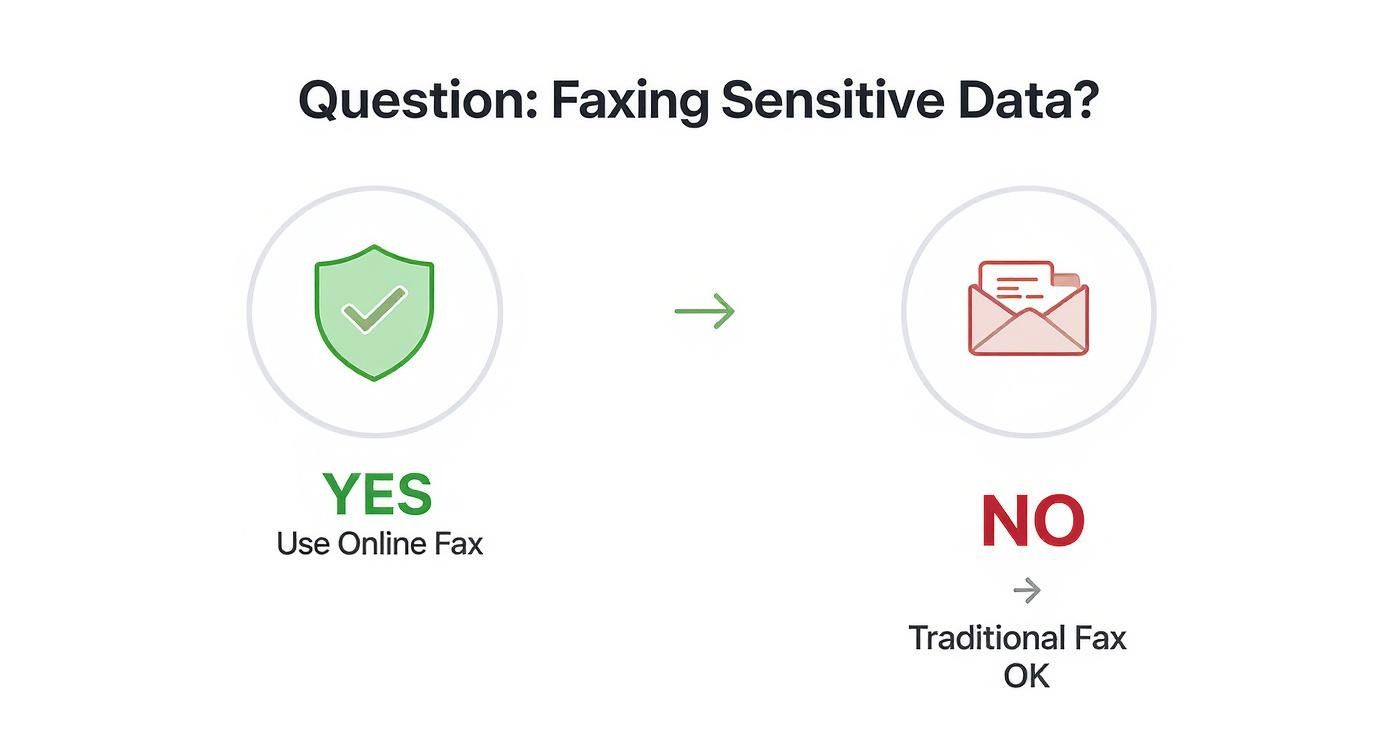
    A decision tree showing that if you are faxing sensitive data, you should use online fax, and if not, a traditional fax is okay.

    The takeaway here is simple: for anything with personal, financial, or medical data, the encryption and security baked into an online service offer a layer of protection that old-school fax machines just can't match.

    Interpreting Confirmation Receipts

    That "Success!" email is more than just a pat on the back—it's your proof of delivery. For important documents, it can even serve as a legal record that the document was successfully transmitted and received. Don't just glance at it; take a second to understand what it's telling you.

    A proper confirmation receipt should include the date and time of transmission, the total number of pages sent, the recipient's fax number, and a clear status like "Success" or "Delivered." I always recommend saving this receipt as a PDF for your records, especially if you're sending contracts, invoices, or legal filings.

    If you don't get a confirmation email within about 10 minutes, your first stop should be your spam or junk folder. If it's not hiding in there, it's safe to assume the fax didn't go through, and you should start troubleshooting from the top. Never assume a fax was delivered without that receipt in hand—it's your only guarantee the job is done.

    Answering Your Questions About Faxing Without a Landline

    Even with all the options laid out, it's natural to have a few lingering questions. Moving away from a familiar piece of hardware always comes with a bit of a learning curve. Let's tackle some of the most common things people ask when they're ready to ditch the landline for good.

    Can I Also Receive Faxes This Way?

    You absolutely can. In fact, this is one of the biggest perks of going digital. When you sign up for an online fax service, you get your own dedicated fax number—you can usually pick a local, toll-free, or even an international one.

    Here’s how it works: someone sends a document to your new number from their old-school fax machine. The service catches that incoming analog signal, instantly converts it into a digital file (usually a PDF), and zips it right over to your email inbox. From there, you can open, save, print, or forward it just like any other attachment. No paper, no toner, no fuss.

    Are Faxes Sent Online Legally Binding?

    Yes, they are. In most places, including the United States, faxes sent through a legitimate online service are considered legally binding. This is a huge deal for anyone in legal, real estate, or finance, where having undeniable proof of delivery is everything.

    The secret sauce is the detailed transmission log these services generate. It’s way more robust than the flimsy confirmation slip you get from a physical machine. A digital receipt gives you:

    • The exact date and time the fax was sent.
    • The total number of pages that went through successfully.
    • The sender's and recipient's fax numbers.
    • A clear "Success" or "Delivered" status.

    This digital audit trail provides solid proof that your document was sent and received, which holds up in most legal situations.

    A Quick Pro Tip: For your own records and peace of mind, always go with a service that provides detailed, storable confirmation receipts. This digital paper trail is far more reliable and easier to archive than a piece of thermal paper that will fade over time.

    What Kind of Files Can I Send?

    You've got a ton of flexibility here. These services are built to handle the documents you're already working with every day. Most of the top providers can easily process a wide variety of common formats.

    You can typically send:

    • Documents: PDF, Microsoft Word (.doc, .docx), and plain text (.txt) files.
    • Images: Standard formats like JPEG, PNG, GIF, and TIFF.
    • Spreadsheets: Microsoft Excel files (.xls, .xlsx) are usually supported too.

    The service does the heavy lifting for you by automatically converting your file into the standard black-and-white format that fax machines understand. So, you can attach a color photo or a heavily formatted Word doc, and it will come out looking just right on the other end.

    Do I Need to Install Any Special Software?

    For the most part, no. The best thing about these solutions is how accessible they are. The vast majority of online fax services are entirely web-based, which means you can handle everything right from your favorite internet browser on any computer.

    And if you go the email-to-fax route, your regular email client—like Gmail, Outlook, or Apple Mail—is all you need. The only exception is if you want to use a provider’s mobile app on your smartphone, which is just a quick download from the iOS or Android app store.


    Ready to send your first fax without the hassle of a landline? With SendItFax, you can upload your document, enter the recipient’s number, and send it on its way in just a few clicks. Try our simple, no-account-needed service today. Visit us at https://senditfax.com to get started.