An online fax service is a browser-based way to send documents to a real fax number without a fax machine or phone line. The category exists at significant scale, with more than 17 billion faxed documents sent in the United States in 2019, including more than 9 billion in healthcare (industry summary).
You may be dealing with the practical version of this problem right now. Someone has asked you to send a signed form, contract, authorization, or record by fax, but there isn't a fax machine nearby. You have the completed document on your laptop, and you need to get it to a recipient quickly.
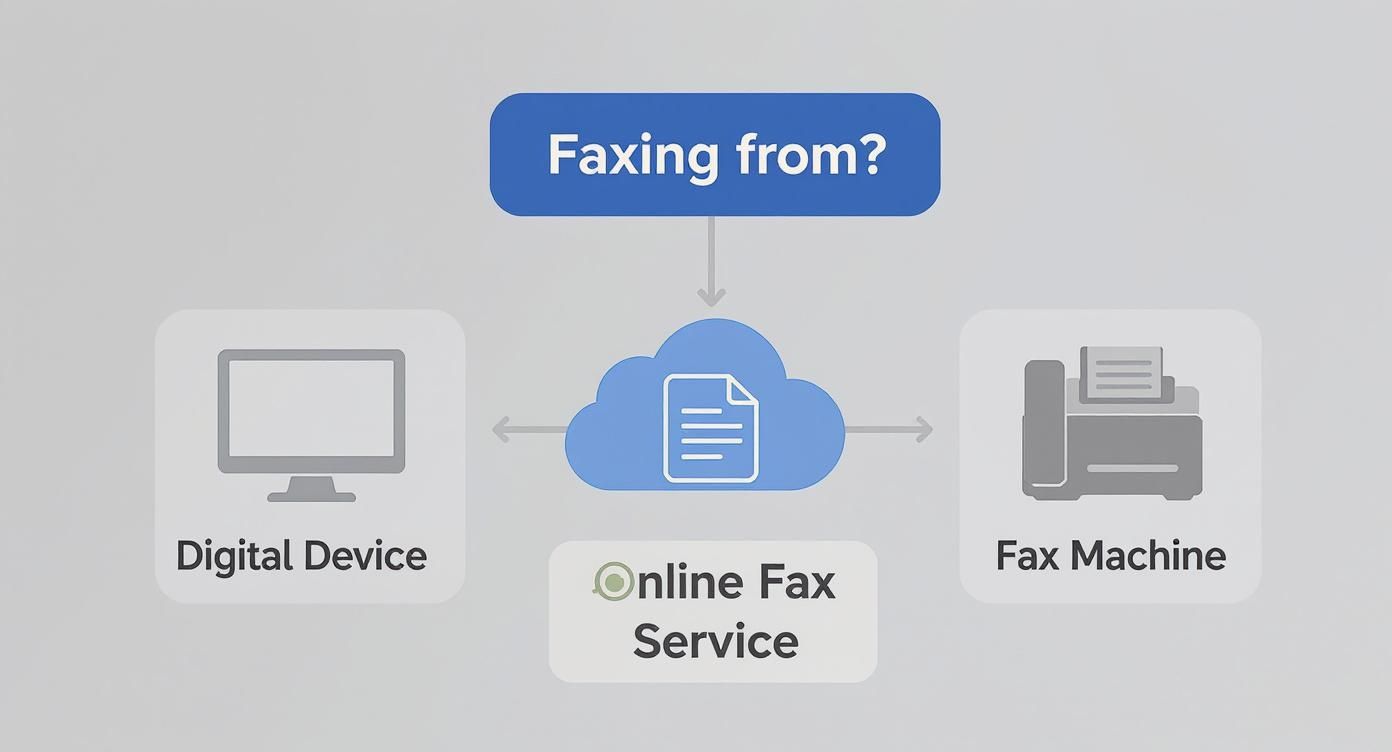
An online fax service solves that mismatch. You upload the file in a website or app, enter the recipient's fax number, and let the provider handle the technical connection. The recipient may receive the document on a traditional fax machine or through another digital fax system, while you receive a transmission result in your account or inbox.
The important qualification is that online faxing isn't automatically safe or compliant merely because it happens online. The provider's security controls, contracts, retention practices, and delivery model matter, especially when the document contains medical, legal, financial, or identity information.
What an Online Fax Service Really Is
In everyday language, an online fax service is a bridge between a digital file and a traditional fax recipient. You start with a PDF, Word document, or scanned image on your computer or phone. The service converts and routes that file so it can arrive at a fax number without requiring you to own a machine.
A useful analogy is emailing a letter that arrives as a paper printout. You create the document digitally, send it through an internet service, and the other party receives it in the format their existing process expects. The analogy isn't perfect, because fax transmission has its own signaling and delivery rules, but it captures the basic relationship.

Where it fits among familiar tools
An online fax service differs from several nearby tools:
- A dedicated fax machine scans paper and sends it through a phone connection. Online faxing starts with a digital file and moves the hardware requirement to the provider's infrastructure.
- Email-to-fax uses an email message and a provider-specific address format to trigger the same type of service. A browser portal gives you a more visible form for entering the number, adding a cover sheet, and checking status. You can also compare this workflow with fax to email, which focuses on receiving fax traffic in a digital inbox.
- Electronic document signing lets people sign and exchange files digitally. It doesn't help when the recipient's procedure specifically requires a fax number or fax-compatible delivery.
The complete path has several parts. You upload the document, the provider's servers prepare and route it, and the service connects with the recipient's fax endpoint. The destination may print the pages or convert an incoming fax into a digital file for an online inbox.
That model explains why faxing has persisted. Fax didn't vanish when email became common. It was adapted into internet-delivered services that reduce dependence on a local phone line and standalone equipment while preserving point-to-point document delivery in sectors that still use it.
How Online Fax Works From Upload to Delivery
Suppose you're a remote worker sending a signed PDF contract to a small law office. The process usually feels simple on your side, but the service performs several conversions before the document reaches the recipient.
1. Prepare the transmission
Open the provider's web portal or app and enter the destination fax number. Add a cover sheet if the recipient needs identifying details, then attach the signed PDF and review the sender information.
The service sends your upload over an internet connection to its platform. Before pressing the final button, check the number and page order carefully. A fax usually can't be recalled once transmission begins.
2. Convert the file
The provider accepts the PDF and prepares its pages for fax delivery. That may involve temporarily storing the file and converting each page into a fax-compatible image, often with a simpler black-and-white presentation than the original document.
This conversion explains why a colorful, highly designed file may not look identical at the destination. Text should remain legible, but fine graphics, shading, and color distinctions can change.
For paper originals, you first need a digital copy. A local scanning provider can help with specialized document workflows, including scanning for AEC firms, when large project records or paper archives need to become usable files.

3. Transmit and confirm
The service then carries the fax traffic through an IP-enabled fax system and connects it to the recipient's fax number. Online fax services commonly operate as Fax over IP, or FoIP. The technical challenge is that traditional fax traffic was built around the T.30 protocol and analog tones, while IP networks can introduce jitter, latency, and packet loss.
T.38, an ITU-T real-time fax-over-IP standard, helps address that mismatch by converting fax signals into structured packets, transmitting them with error handling, and reconstructing the fax signal at the destination (technical explanation of T.38).
4. Deliver the pages
The receiving fax machine prints the pages, or a receiving service stores them for download or inbox delivery. Your provider should return a status message showing whether the transmission completed, failed, or needs another attempt.
If you want a visual explanation of the broader process, this embedded video provides another walkthrough:
Benefits and Honest Limitations
Online faxing removes several obstacles that make traditional faxing inconvenient. You don't need to buy a machine, replace toner, clear paper jams, or maintain a dedicated phone line. A browser-based service also lets you send from a laptop, tablet, or phone when you're working away from the office.
The convenience becomes especially clear with urgent paperwork. Instead of locating a public fax machine, printing the document, and traveling to it, you can upload the file from your current workspace. Stored transmission confirmations can also create a clearer record than relying on a loose paper receipt.
The practical trade-off
Those benefits don't make online faxing a universal replacement for every document workflow. The service depends on internet access and on a third-party platform receiving, processing, and potentially retaining your file. A provider outage or an incorrectly entered fax number can still interrupt the task.
File handling creates another constraint. Providers commonly impose limits on file size, page count, or supported formats. Fax output may lose color and visual detail, while a large multi-page packet can take longer to process or fail if it exceeds the service's limits.
| Benefit | Limitation |
|---|---|
| No local fax hardware to purchase or maintain | You depend on the provider and an active internet connection |
| Send from a browser or mobile device | A portal, app, or account is still required |
| Digital confirmations support recordkeeping | A confirmation may show transmission, not that the intended person reviewed the pages |
| Faster access than finding a physical fax location | File size, page, format, and image-quality limits may apply |
| Paperless handling on the sender's side | The recipient may still print and manually file the document |
| A service can support remote teams | Sensitive files pass through an outside provider |
Transmission security also deserves careful attention. Internet connections and provider portals may use encryption, but the fax portion can involve public telephone infrastructure and may not provide end-to-end encryption in the same way a modern secure file-sharing system does. Free plans may add advertising or watermarks to the cover page, which can look unprofessional or expose information you didn't intend to share.
Practical rule: Treat convenience as one selection criterion, not as proof that a service is appropriate for sensitive records.
Free vs Paid Fax Plans
Free fax options exist because many people need to send a document only once. A provider can attract occasional users with a limited send while offering paid plans to people who need recurring access, cleaner presentation, or a dedicated fax number.
The main difference isn't whether you pay. It lies in capacity, delivery treatment, branding, and accountability.
| Feature | Free Tier | Paid Tier |
|---|---|---|
| Page allowance | Usually restricted to a small number of pages | Higher limits through bundles or per-fax pricing |
| Cover page | May include provider branding or advertising | Often allows a cleaner or optional cover page |
| Delivery priority | May enter a standard queue | May receive priority processing |
| Fax number | Often unavailable for permanent receiving | May include a dedicated number |
| Payment model | No payment for qualifying sends | Per-page, per-fax, monthly, or enterprise billing |
| Compliance controls | May provide limited documentation | May offer business contracts, access controls, and audit features |
A free tier can work for a low-risk personal form or an occasional short document. It may not be suitable when a cover-page advertisement creates confusion, when a page cap forces you to split a packet, or when you need a reliable incoming fax number.
Paid plans can use several pricing structures. Some charge for each transmission, some provide monthly page bundles, and enterprise offerings may include administrative controls and compliance-oriented features. Check for overage fees, international destinations, toll-free numbers, and charges that apply after an included allowance.
Security claims need close reading. A paid plan may provide stronger controls, but you still need to verify what the provider offers, including data retention, user permissions, audit logs, and any required business associate agreement.
For a one-off document, paying for a single clean transmission may be more practical than maintaining a subscription. For recurring business use, the value usually comes from predictable access, delivery records, and controls rather than from the fax itself.
Who Uses Online Fax Services Today
Online fax services remain useful wherever one organization needs to send a document to another organization that still operates around a fax number. The sender may be fully digital, while the recipient's intake process remains tied to a fax machine or fax inbox.
Healthcare practices
A clinic may need to send a referral, prescription-related document, insurance authorization, or medical-record request to another practice. The staff member can upload the prepared file rather than print it and stand beside a machine. The workflow still requires careful recipient verification because a successful transmission doesn't eliminate the risk of sending protected information to the wrong destination.
Legal and financial offices
A lawyer may transmit a signed filing, settlement document, or confidential client record to a court-related office, opposing counsel, or another professional service. A financial office might send an authorization form or account document to an institution that accepts fax submissions.
These users often care about the delivery record as much as the transmission. A timestamped confirmation and retained copy can help staff document what they sent, although the record shouldn't be confused with proof that the recipient acted on it.

Small businesses and remote workers
A real estate agent working from a property can send a signed contract or addendum to a title company without returning to an office. A small business owner can send an invoice, vendor form, or government document from a laptop instead of maintaining a home fax line.
Freelancers and travelers also use fax when a government office, insurer, landlord, or overseas organization accepts fax but doesn't offer a convenient secure portal. The common thread isn't industry prestige. It's the need to reach an established process with minimal friction.
Fax stays relevant when the recipient's system, policy, or staff still expects a fax number.
The category also serves nonprofits and community organizations that can't justify permanent hardware for occasional transmissions. For these users, a browser-based service can turn a rare administrative requirement into a short digital task.
Privacy and Compliance Considerations
Fax becomes a regulated workflow when the document, sender, recipient, or governing industry rules impose obligations beyond ordinary convenience. Healthcare is the clearest example. Faxing can remain an accepted transmission method, but a service handling protected health information may need a signed Business Associate Agreement, encryption, access controls, and audit logs. A free consumer tool isn't automatically appropriate for PHI (discussion of HIPAA and cloud fax controls).
The right question isn't “Is fax compliant?” in the abstract. Ask whether the specific provider, account, contract, transmission path, and internal process satisfy the rules that apply to your document.
Controls worth checking
Before uploading sensitive material, look for clear answers about:
- Encryption: Does the service protect files while they travel to the platform and while stored?
- Access management: Can administrators restrict documents to authorized users with role-based permissions?
- Audit evidence: Does the system record user activity, transmission status, and relevant access events?
- Retention and deletion: How long does the provider keep uploaded and received files, and can your organization control deletion?
- Contract coverage: If your workflow involves PHI, will the provider sign the required BAA?
- Location and oversight: Does the provider explain where data is stored and what independent security documentation it makes available?
A consumer service may route documents through shared operational systems with limited administrative visibility. A business-grade provider may offer stronger authentication, documented controls, and contractual commitments, but you still need to review the terms rather than relying on a label such as “secure” or “HIPAA enabled.”
For broader background on handling personal information, the MyOfficeOps privacy guide can help frame questions about access, retention, and organizational responsibility. You can also compare those concerns with the practical discussion of the security of fax.
Compliance reminder: Fax compatibility describes delivery. It doesn't describe the provider's complete security or legal posture.
Is Online Fax a Long Term Solution or a Bridge
Online fax is often best understood as a bridge technology. It modernizes the sender's side of a legacy process, but it doesn't necessarily modernize the recipient's intake system. If the other organization still requires a fax number, online fax gives you a practical way to meet that requirement without keeping a machine in your office.
Its future depends on industry and geography. Healthcare practices, legal offices, government departments, real estate operations, and financial organizations may continue using fax where established procedures and recipient expectations are difficult to replace. At the same time, policy momentum is pushing some medical organizations toward electronic exchange standards and away from fax machines, while European and German-language coverage describes tighter scrutiny and restrictions in certain healthcare settings (Florida Medical Association coverage of healthcare fax modernization).
That creates a split path. Secure portals, electronic signatures, and interoperable record systems can offer better search, automation, and centralized auditability when both sides support them. Online fax reduces equipment and location barriers, but it may still leave someone manually downloading, printing, scanning, or re-entering information.
A sensible organization-wide roadmap keeps fax available for external requirements while improving internal document handling. Store records digitally, establish retention rules, and offer secure electronic delivery whenever the recipient can accept it.
The useful question isn't whether online fax will last forever. Ask whether it remains the most reliable and acceptable bridge to the organizations you need to reach.
Choosing the Right Online Fax Option
Start with the document, not the brand. A single urgent signed form has different requirements from recurring medical records, a permanent incoming fax line, or a large contract workflow.
For occasional use, compare the following before you upload anything:
- Capacity: Check page limits, file-size rules, and supported formats.
- Delivery: Look for destination coverage, expected processing, retries, and a transmission confirmation.
- Presentation: Confirm whether the free option adds branding, advertising, or a mandatory cover page.
- Privacy: Read the retention period, deletion process, encryption description, and access policy.
- Records: Determine whether you can download a report or preserve a useful audit trail.
- Account needs: Check whether the service requires registration, payment details, or a permanent subscription.
Organizations handling regulated documents should ask for specific evidence. “Secure” is too broad by itself, and a compliance statement may apply only to a particular plan or configuration. Confirm the contract and controls required for your workflow before sending PHI, confidential legal files, or sensitive identity records.
A helpful way to evaluate cloud-based service responsibilities is to review guidance on comparing AWS, Azure, and GCP. The same general habit applies here: compare documented capabilities and operating responsibilities instead of choosing from a feature slogan.
SendItFax is a browser-based option for sending DOC, DOCX, and PDF files to recipients in the United States and Canada without creating an account. Its free option supports up to three pages plus a cover page, with a daily limit of five free faxes, while its $1.99 per-fax Almost Free option supports up to 25 pages, priority delivery, and no SendItFax branding (SendItFax plan details). For a broader feature comparison, review this online fax services comparison.
| Factor | Free Tier | Paid Tier |
|---|---|---|
| Best fit | Occasional, low-page sending | Recurring or presentation-sensitive sending |
| Branding | May appear on the cover page | Can be removed on applicable plans |
| Volume | Limited pages and sends | Higher per-fax or bundled allowance |
| Delivery | Standard processing | May include priority processing |
| Records | Basic confirmation may be available | More suitable for organized recurring records |
Test the recipient's number, file format, cover page, and confirmation process before adopting any service for routine operations.
If you need to send a short document from a browser without buying fax hardware, SendItFax offers free and pay-per-fax options for U.S. and Canadian recipients. Review the file limits and privacy requirements first, then choose the tier that matches whether you're sending one urgent form or handling recurring business documents.