Yes, you can call a fax number because it's a regular telephone number on the public phone network. You'll usually hear modem tones or a fax handshake, not a person answering.
You only discover one part of the story by dialing. The bigger question is whether the line can receive a fax, and that depends on what's waiting on the other end.
The Short Answer to a Familiar Question
A fax number is, at heart, a telephone number connected to a fax endpoint, so you can usually dial it like any other number. Traditional Group 3 fax starts with call setup over the public phone network, then the two machines exchange tones to identify themselves and agree on transmission settings, with Cisco describing the process as beginning as a voice call before one side signals that it's a fax device. Cisco's fax call-establishment overview
That's the part that often gets missed. Dialing a fax number confirms reachability, but it doesn't prove that a document will go through. A voice call can connect cleanly and still tell you almost nothing about whether the receiving endpoint is ready to complete fax negotiation.
What to expect at the start
If the line is a dedicated fax line, you'll usually hear a very electronic tone sequence instead of a greeting. If it's a shared voice-and-fax number, a person may answer first and then hand the call off to fax mode. If nothing answers, you may get ringing, voicemail, a busy signal, or a failed call, depending on the setup and the provider.
Practical rule: Calling tells you whether the number exists as a telephone destination. It does not tell you whether the fax endpoint will finish the handshake and accept your document.
That difference is why people get confused. They think “the call connected” means “the fax worked,” but those are two separate events. The first is a phone-network event, the second is a machine-to-machine agreement that has to succeed before any page moves.
Why a Fax Number Is a Telephone Number at Heart
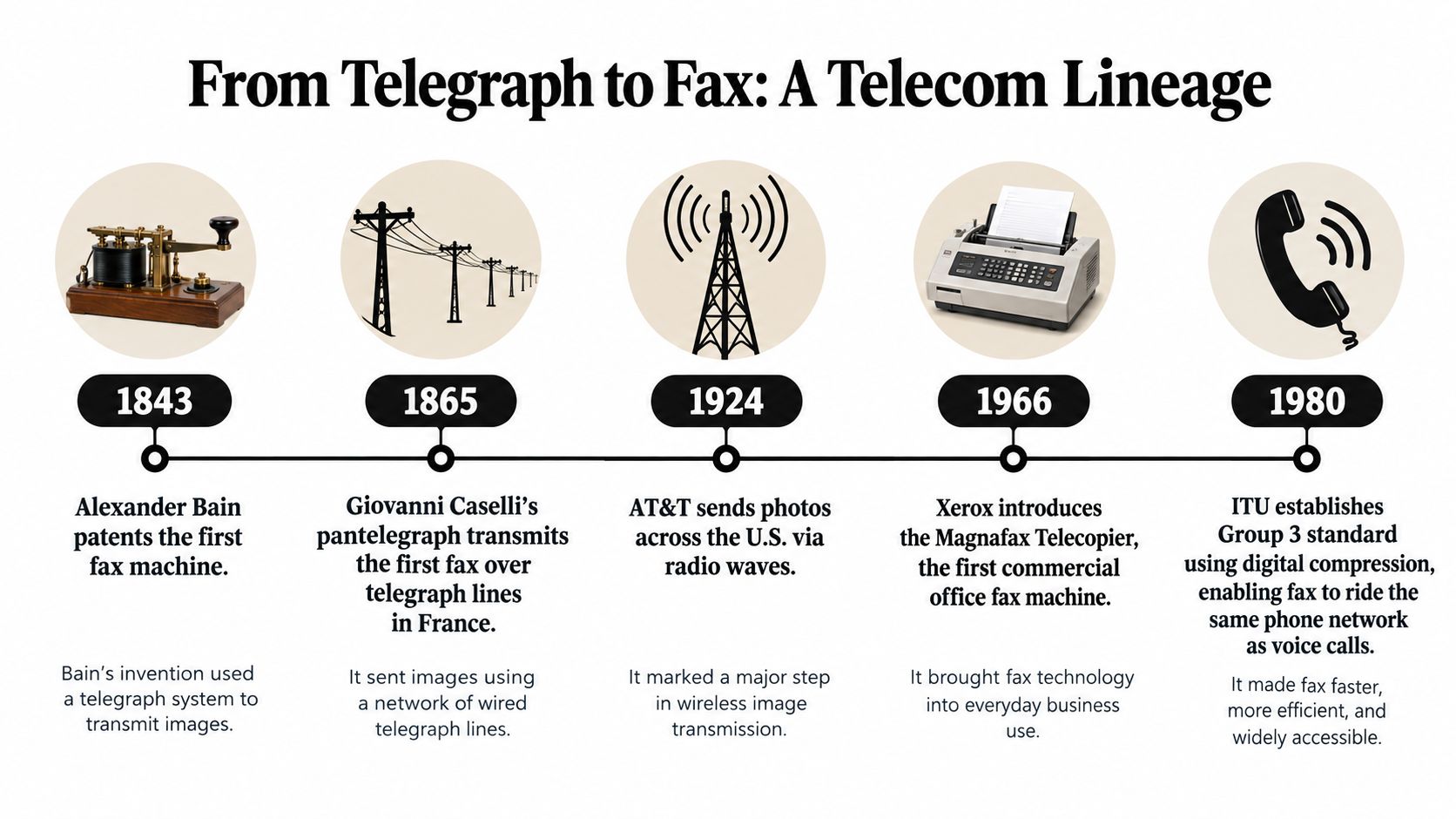
Why does a fax number behave like an ordinary phone number? Because fax developed through telephone networks rather than a separate numbering system. Early work included Alexander Bain's fax demonstration in the 1840s, Arthur Korn's photoelectric system in 1902, and a radio-based system in 1922. These examples showed that images could travel through different communications paths. ITU's history of fax standards
The standards that made fax practical
Standardization made modern fax easier to operate across networks. The International Telecommunication Union approved Group 1 in 1968, Group 2 in 1972, and Group 3 in 1980. Group 1 took roughly six minutes per page, while Group 3 reduced transmission to less than one minute per page by using digital image data carried through voice-band modems. Group 3 could work over copper telephone lines, optical-fiber networks, microwave links, and cellular systems when the network supported the required signaling. ITU-T T.30 Group 3 specification
That design explains the central point: the phone network routes a call to an endpoint, regardless of whether the destination expects speech or fax. The equipment at the other end determines what happens next. It might connect a person, begin fax negotiation, or fail to respond.
Why this still matters in real life
A fax number can share a line with voice service or pass through different equipment, so a successful call does not prove that a document can be delivered. It confirms only that the telephone destination is reachable at that moment. Even then, a spam filter or caller-ID problem may prevent a voice-side connection, as explained in this guide to getting calls answered despite spam flag.
For a plain-language explanation of what a fax number is used for, the distinction is simple: the network can deliver the call, but the fax endpoint still has to accept the document. Calling checks the route. It does not complete delivery.
What You Will Actually Hear When You Dial
The first clue is usually sound, not words. A dedicated fax line typically answers automatically and emits a CED response tone near 2100 Hz, then the sending device replies with the T.30 calling tone, or CNG, which is a 1100 Hz signal sent for about 0.5 seconds and repeated after roughly 3 seconds of silence. In plain English, it sounds like two machines introducing themselves in beeps before handing a page across the network. T.30 fax signaling details
How to tell tones from a human voice
A person sounds like a person, which seems obvious until you are listening through a handset and deciding whether to wait or hang up. Fax tones are sharp, mechanical, and repetitive. A voicemail greeting starts with speech, music, or a recorded prompt, while a busy signal has its own steady pattern and does not resemble the handshake at all.
If you hear loud modem-like tones right after the call connects, you have probably reached fax equipment, not a receptionist.
A short pause helps. Listen for a few seconds, then decide. If you hear the fax handshake, the line is likely set up for fax reception. If you hear a person, ask whether the number accepts fax and whether an extension or manual step is required.
The timing matters too. A call may sound promising and still fail later, because fax transmission has its own pacing and negotiation steps, as explained in this overview of fax transmission speed. The sound tells you the equipment is trying to talk. It still does not tell you whether the document will arrive cleanly.
When the line shares voice and fax
Some fax numbers sit on a shared voice-and-fax setup, an auto-attendant, or a service that routes calls differently after a human answers. In those cases, you may hear a normal greeting first, then a request to switch to fax mode. That is not a failure. It is a different workflow.
The main mistake is treating every beep as proof of success. The tones only show that a fax connection attempt has started. They do not show that a document was accepted, stored, or routed to the right person.
Three Realistic Outcomes on a Fax Call
A fax number can answer like a phone line and still tell you very little about fax success. The call only shows whether something is reachable at that number. It does not confirm that a document will land in the right inbox or print on the other side.
| Three Outcomes When You Call a Fax Number | What You Will Hear | Best Next Step |
|---|---|---|
| Dedicated fax line | High-pitched fax tones, no conversation | Hang up, then send the fax through a fax-capable service |
| Shared voice-and-fax line | A person, voicemail, or an auto-attendant | Ask whether the number accepts fax and whether it needs an extension or manual start |
| No active fax endpoint | Ringing, busy, voicemail, or no answer | Retry during staffed hours or verify the number separately |
What each result really tells you
Fax tones usually mean the line is ready to speak fax, or at least trying to. That is useful, but narrow. A human voice or voicemail points to a shared office number, so the fax route may depend on an extension, a prefix, or a person who can route the call. Ringing or no answer can mean the line is unattended, unavailable, or not set up for fax reception at that moment.
Practical takeaway: A call can tell you whether the line behaves like a fax destination, but it cannot tell you whether the machine is out of paper, unattended, or routed to the wrong inbox.
Calling also does not resolve the common confusion around mixed lines. A number can be live, answered, and still fail as a fax destination if the receiving side expects a different entry step. That is why the call is closer to checking whether a door opens than confirming that the room is ready.
If you need a broader business view of why fax still appears in document workflows, a legal support resource on virtual assistants can help explain how teams handle intake and follow-up when paperwork still needs a human check on the far end. The call is just the doorbell. It is not the delivery itself.
Safe Ways to Test a Number Without Missteps
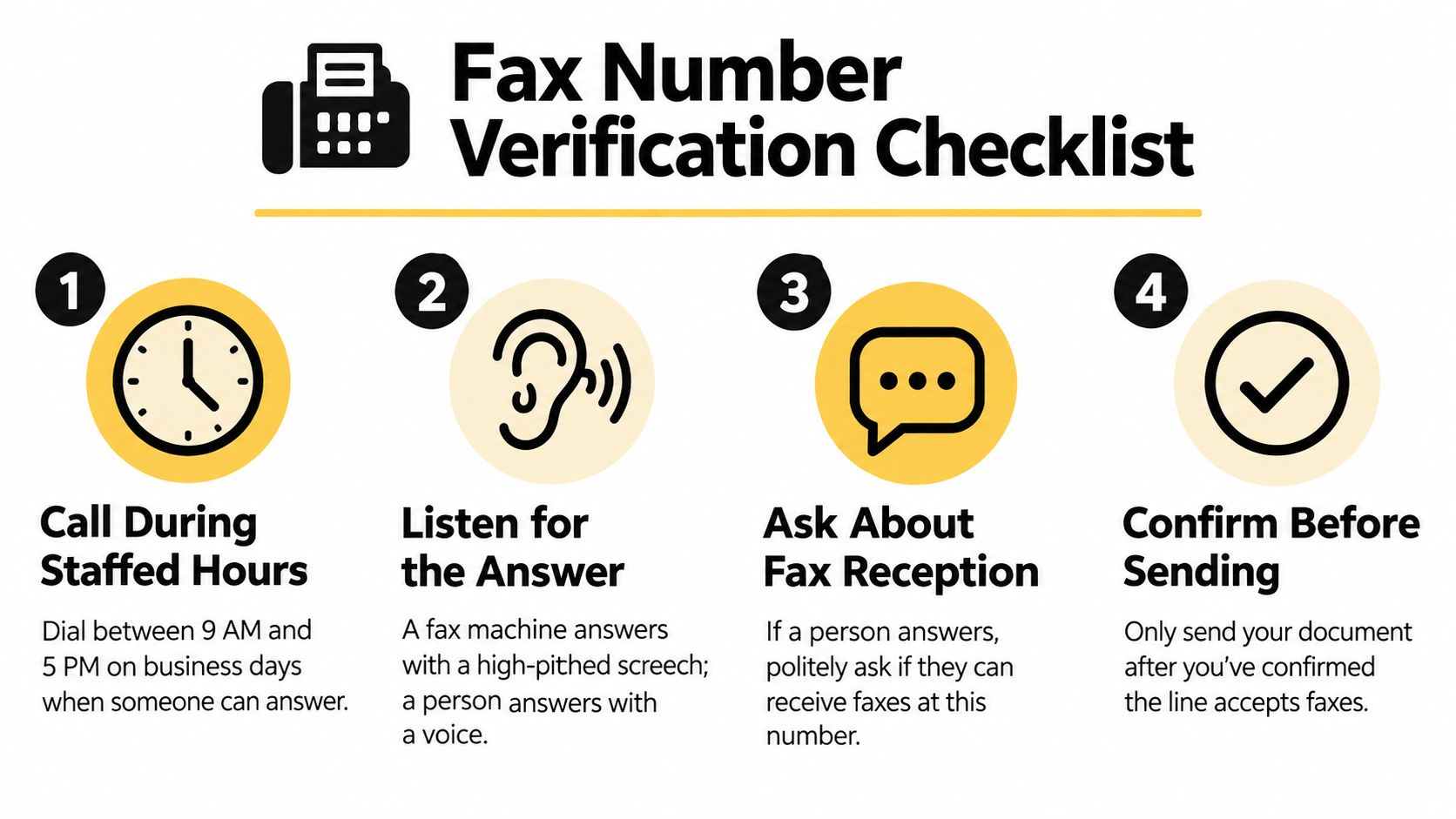
Start with the same cautious workflow every time. Call during staffed hours, identify the line as the fax number you're checking, and ask whether fax reception is available. Don't read confidential details out loud, because the verification call is for routing, not disclosure.
A simple verification routine
Call during staffed hours.
A live person can confirm the right department, extension, or fax route. If you reach voicemail, leave only a callback number and a short request to confirm the fax destination.Listen before speaking.
Fax tones usually mean the line is already trying to receive a document. A human voice means you've reached a shared number or a front desk, not necessarily a fax endpoint.Ask one direct question.
“Does this number receive fax documents?” gets you further than a long explanation. If the answer is yes, ask whether the line needs a prefix, extension, or manual start.Send only after confirmation.
Once the number is verified, use a separate fax transmission. Don't use the call itself as a proxy for delivery.
The three practical outcomes are the same ones readers keep bumping into: fax tones, ringing or no answer, or a human or voicemail. That framework comes from how fax lines are configured in real offices and services. A plain-language guide to dialing a fax number
Common snags to expect
A fax machine may answer on the first ring, which can surprise anyone expecting a receptionist. A phone tree may demand an extension before it routes to fax. Some hybrid devices play hold music or answer as voice first, then switch over when someone presses the right option or speaks to the operator.
For a more detailed checklist, see fax number verification. That extra step matters most for healthcare, legal, insurance, and government documents, because a number that answers isn't the same thing as a number that's ready to receive the right file.
When You Should Skip the Call and Send the Fax Online
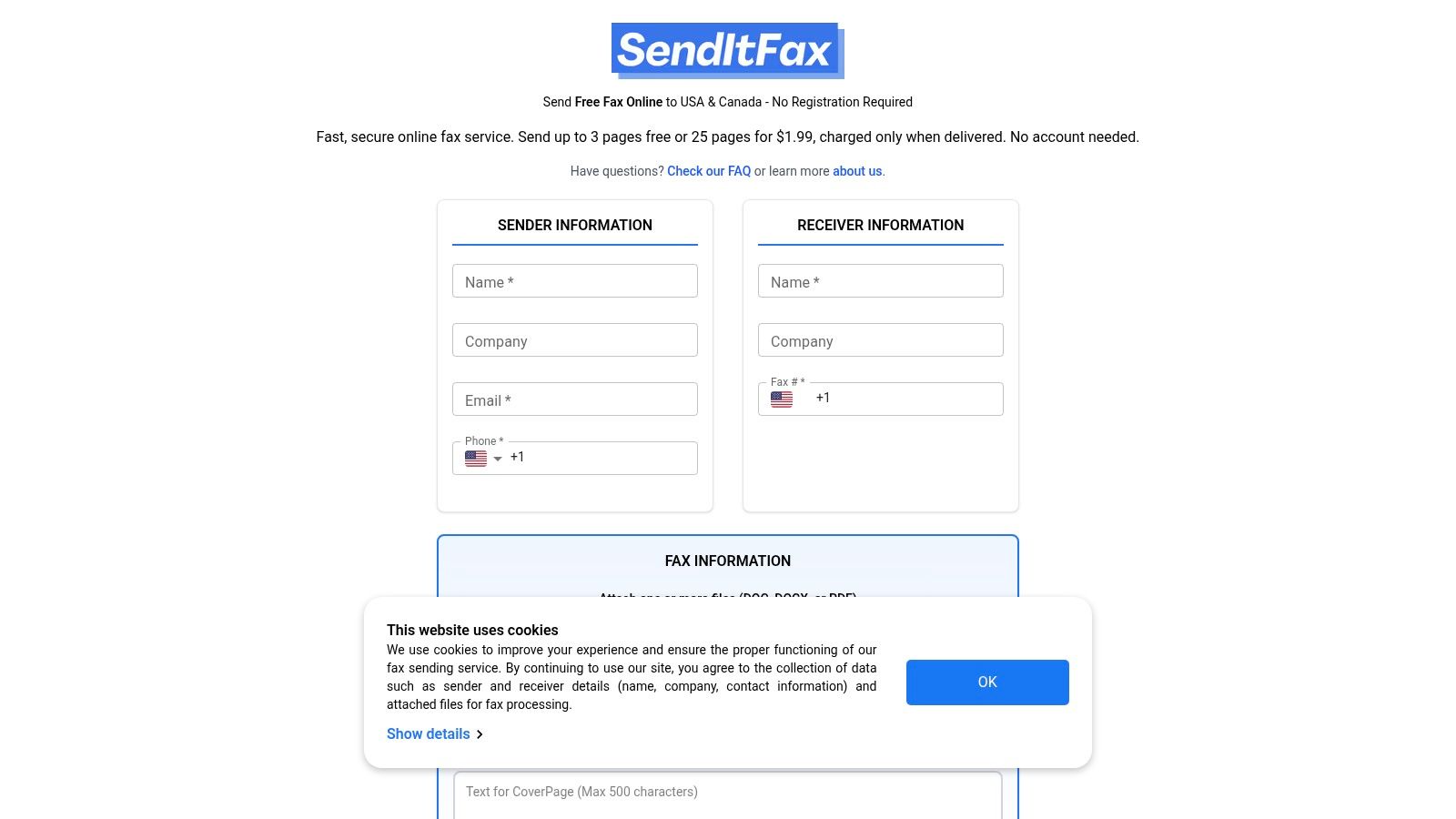
If your goal is to deliver a document, skip the call and use a fax service. A phone call only checks whether the number answers. A fax tool turns that same number into a delivery path, which is the part that matters once the file is ready. One option is SendItFax, which lets users send faxes to recipients in the United States and Canada without creating an account, and supports DOC, DOCX, and PDF uploads with an optional cover message. SendItFax service details
What the service offers
The free option allows up to three pages plus a cover, with a daily limit of five free faxes and SendItFax branding on the cover page. The Almost Free plan costs $1.99 per fax via Stripe, supports up to 25 pages, offers priority delivery, removes branding, and lets users omit the cover page entirely.
That is a better fit when a form has to move now and you do not want to wait through call setup, tone detection, or voicemail. For document-heavy teams, including legal intake or paralegal support, the workflow often works better when people separate verification from transmission. The best place to hire legal virtual assistants can help with that kind of document handling, but the fax itself still belongs in a fax tool.
The point is simple. A call checks reachability. A fax service handles delivery.
Calling Is a Check, Not a Delivery
A phone call only tells you that the fax line answers as a telephone destination. It does not tell you that the document reached the right machine, the right inbox, or the right person. A fax device can be out of paper, set to manual review, left unattended, or routed to a different department, so a successful handshake can still leave the job unfinished.
Use a simple checklist for sensitive documents. Confirm the number and department by phone, send the document through a fax service, save the confirmation page and timestamp, and follow up if the matter is time-sensitive. That sequence matters because the tone on the line is only a reachability check.
If you need to send a fax now, a browser-based fax service can handle the delivery step without a machine. That approach fits when the goal is transmission, while the call itself only confirms that the line answers.