Yes, you absolutely can fax without a fax machine. Thanks to a handful of modern solutions, you can now send documents directly from your computer or smartphone—no bulky hardware, dedicated phone lines, or stacks of paper required.
Embracing a Machine-Free Faxing World
In a world of instant messaging and email, it's easy to think faxing is a relic of the past. But for many industries, including healthcare, legal, and real estate, it’s still the gold standard for sending secure documents.
The good news? The technology has come a long way from those screeching, paper-jamming machines we all remember. Today, anyone can send a fax using the tools they already have.
This isn't just a niche workaround; it's a booming industry. The online fax market is projected to grow from USD 2.88 billion in 2026 to USD 5.18 billion by 2035, expanding at a steady clip of 6.76% annually. That growth tells a clear story: people are ditching the hardware for the convenience and security of digital faxing. You can explore more data on the online fax market growth and what's driving it.
So, how does it actually work? There are a few core methods people rely on:
- Online Fax Services: These are web-based platforms. You just upload your document, type in the recipient's fax number, and hit send. Simple.
- Email-to-Fax Technology: A clever solution that converts a standard email and any attachments into a traditional fax transmission.
- Mobile Faxing Apps: These apps turn your smartphone into a pocket-sized fax machine, using your camera to scan documents and send them on the fly.
Choosing the Right Method for You
Each approach has its own strengths, and the best one really depends on what you need to do. An online service is perfect for sending a one-off contract from your desk, while a mobile app is a lifesaver for a field agent who needs to fax a signed form immediately.
This flowchart lays out the main paths you can take when you need to send a fax without owning any of the old-school gear.
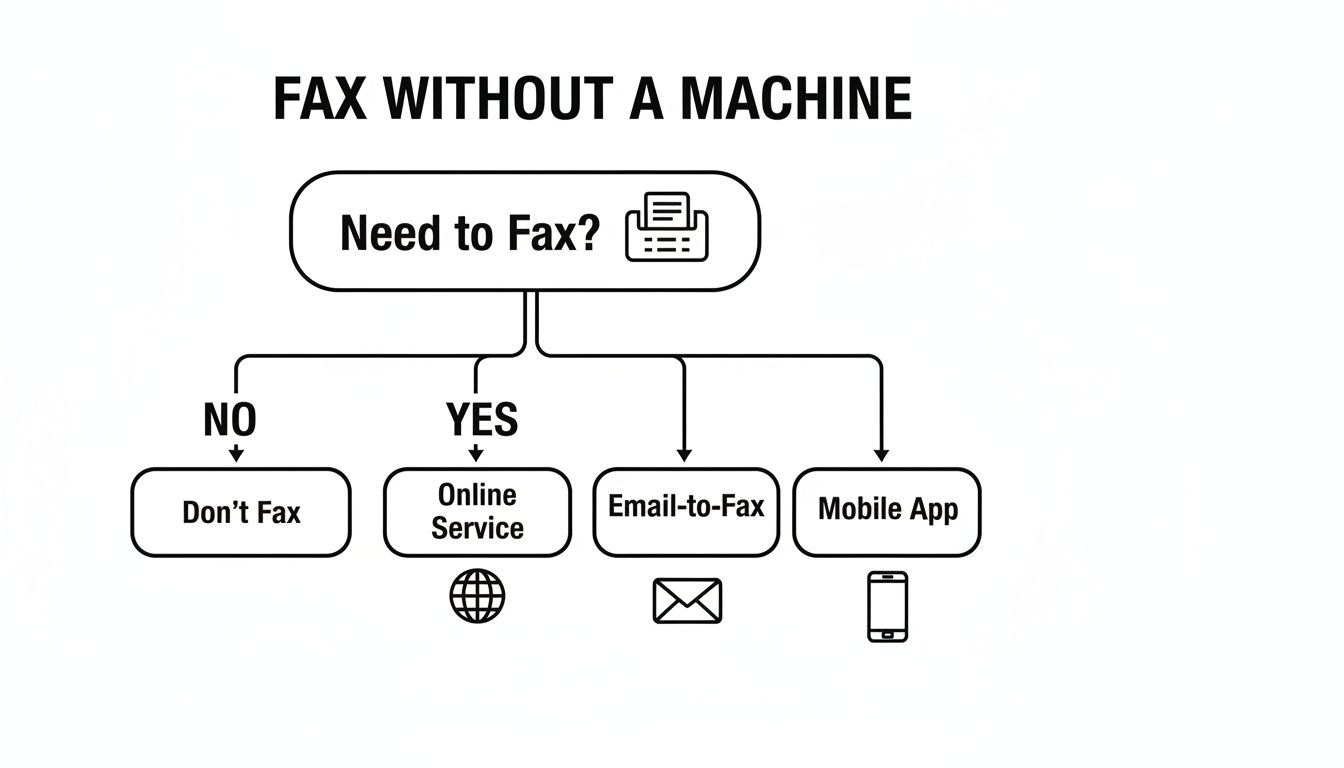
As you can see, your options branch out into web services, email platforms, and mobile apps, with each one serving a different purpose.
Key Takeaway: The best way to fax without a fax machine comes down to your situation. Are you looking for a quick, one-time send? A solution that works with your email? Or the freedom to fax from anywhere with your phone?
To help you decide which route to take, here's a quick comparison of the most popular ways to send a fax without owning a physical fax machine.
Comparing Methods to Fax Without a Machine
| Method | Best For | Typical Cost | Key Benefit |
|---|---|---|---|
| Online Fax Service | Occasional or business use, sending from a computer. | Free with limits, or low-cost per fax. | No account needed for quick sends. |
| Email-to-Fax | Integrating faxing into existing email workflows. | Subscription-based. | Send and receive faxes like emails. |
| Mobile Fax App | On-the-go scanning and sending. | Pay-per-fax or subscription. | Ultimate portability and convenience. |
Ultimately, whether you choose an online service for its simplicity, an email-to-fax setup for its integration, or a mobile app for its portability, you have plenty of great options that don't involve a clunky machine.
Using Online Fax Services for Instant Results
When you need to send a fax right now and don't have a fax machine, your best bet is almost always a web-based service. Think of these platforms as a digital middleman. They take your file—like a PDF or Word doc—and translate it into the beeps and boops that an old-school fax machine on the other end can understand and print. The whole thing happens right in your web browser. No hardware, no dedicated phone line, no software to install. It's incredibly straightforward.
Let's say you're a freelancer who just landed a new client. You need to send them your signed W-9 form before they can cut your first check. Their accounting department, like so many others, still relies on a physical fax machine. Instead of hunting down a copy shop, you just pull up an online fax service like SendItFax on your computer.
The interface is usually designed for exactly this kind of urgent task. You’ll see a big, obvious button to upload your document. Grab the W-9 PDF from your desktop, type in your name and the client’s fax number, and hit send. For most one-off faxes, that’s literally all there is to it.
Account-Free Sending for Occasional Needs
One of the best things about modern online fax platforms is the option for account-free sending. This is a game-changer for those one-off situations where signing up for a monthly subscription feels like total overkill. If you only send a fax a couple of times a year, this is the most practical way to fax without a fax machine.
These "pay-as-you-go" or free services are perfect for simple jobs, but they do come with a few trade-offs:
- Page Limits: Most free tiers let you send a handful of pages. For instance, SendItFax allows up to three pages plus a cover sheet, which is perfect for a short form or a single-page contract.
- Branding: Your cover page will probably have the service’s logo on it. For most standard documents, this is no big deal.
- Daily Caps: To keep the service from being abused, there's typically a limit on the number of free faxes you can send in a 24-hour period.
In our W-9 scenario, a free, no-account send is the perfect solution. It gets the document where it needs to go in minutes, and you don’t have to pull out your credit card.
When to Consider a Paid Send
But what if your document is a bit more substantial? Maybe it's a 15-page legal agreement or a detailed project proposal. This is where the low-cost, single-payment options are brilliant. For a small one-time fee, often just a few dollars, you can send a much larger document and get a few extra perks.
Key Takeaway: One-time paid sends are the perfect middle ground. You get professional features—like an ad-free cover page, higher page limits, and priority delivery—without getting roped into a monthly plan you don't need.
This browser-based approach is quickly becoming the new normal. The cloud fax technology powering these services is booming; the market was valued at USD 704.1 million in 2025 and is expected to grow at a 10.3% CAGR through 2033. That kind of growth shows a massive shift away from clunky hardware. If you're curious, you can discover more insights about this cloud fax market expansion to see why so many businesses and individuals in the U.S. and Canada are making the switch.
To get a closer look at the nuts and bolts, our guide on how to send a fax online breaks down the process even further.
While a web-based fax service is a great go-to for sending a quick document, it’s not the only game in town. There are a couple of other powerful ways to fax without a fax machine that have become incredibly popular, especially for folks who need to integrate faxing into their daily grind or send documents on the fly.
We're talking about email-to-fax technology and dedicated mobile faxing apps.
Each of these methods tackles the problem from a different angle, but they both make faxing possible from the devices you already have in your hand or on your desk. One cleverly turns your email into a faxing powerhouse, while the other puts a scanner and a fax machine right in your pocket.
Sending Faxes Directly From Your Email
What if you could send a fax just as easily as firing off an email? That's exactly what email-to-fax services let you do. You don't have to log into a separate website. Just open your usual email client—whether it's Gmail, Outlook, or something else—attach your document, and send it to a special email address.
This special address is how the magic happens. It usually follows a simple formula: [recipient_fax_number]@[fax_service_provider].com.
So, if you needed to send a document to (800) 555-1234 using our service, you'd address the email to 8005551234@senditfax.com.
Once you hit send, the fax service takes over. It receives your email, converts everything into a proper fax format, and dials the recipient's fax machine. This is a fantastic setup for anyone who spends their day in their inbox and wants a clean, searchable history of all their communications, faxes included. For a more detailed look, check out our guide on how to fax via email.
Using Mobile Apps to Fax From Anywhere
For anyone who works remotely, out in the field, or just away from a computer, mobile faxing apps are a lifesaver. These tools essentially turn your smartphone into a high-powered scanner and fax machine that fits in your pocket. The whole process is surprisingly simple.
- Scan with your camera: Just point your phone's camera at a paper document to get a crisp, clear scan. The best apps have built-in tools to crop, straighten, and brighten the image so it looks professional.
- Sign on the spot: Need to get a signature on a contract? No problem. Most apps let you add a digital signature right on the screen.
- Send in seconds: After your document is prepped, you just punch in the recipient’s fax number and tap the send button. You’re done.
This is the perfect solution for urgent situations. Think of a real estate agent sending a signed offer from their client's kitchen table or a service tech faxing a completed work order from the job site.
Even with all our modern digital tools, faxing is still a major player, particularly in regulated fields. The market for fax services that don't require a machine was valued at a staggering USD 3.31 billion in 2024 and is expected to climb to USD 4.47 billion by 2030. Why? Because it’s essential in sectors like healthcare, where faxing still makes up 45% of communications because of its legal weight. You can discover more insights about the fax services market on wiseguyreports.com.
So, which one is right for you? It really boils down to your workflow. If you’re at a computer working with digital files all day, the email-to-fax method is incredibly smooth. But if you’re out and about dealing with physical papers, a mobile app offers convenience you just can't beat.
Getting Your Documents Ready for a Perfect Fax
Sending a fax without a physical machine is incredibly convenient, but what the person on the other end sees depends entirely on how you prep your files. A few minutes of prep work can be the difference between a sharp, professional document and a fuzzy, unreadable page.
First things first, let's talk file formats. While most online fax services are pretty flexible and can handle things like Microsoft Word files (DOC, DOCX) or even images (JPG, PNG), the undisputed champion for faxing is the PDF.
Why PDF? Simple: it locks everything in place. Your fonts, your margins, your carefully placed images—they all stay exactly where you intended. This avoids that nightmare scenario where your beautifully formatted Word doc arrives looking like a jumbled mess. If your document isn't a PDF yet, converting it is a must-do step. We have a great guide on how to easily convert your Word documents into high-quality PDFs if you need a hand.
Don't Skip the Cover Page
Think of your fax cover page as the first handshake. It’s not just a formality; it’s a crucial piece of the puzzle that ensures your documents land on the right desk and provides immediate context. A well-crafted cover page is clean, clear, and gets straight to the point.
Make sure it always includes these essentials:
- To: Recipient's full name and department (if you know it).
- From: Your name and company.
- Date: The day you're sending it.
- Number of Pages: Be specific! For example, "5 pages, including cover."
- Subject: A quick, clear description of what's inside.
Pro Tip from Experience: Keep the message on your cover page short and sweet. Something like "Attached are the signed contract documents for Project Titan" works far better than a long, rambling paragraph.
Make Sure It's Easy to Read
Here’s something to keep in mind: your pristine digital file is about to be turned into a simple black-and-white image, possibly printed on an old, low-resolution machine. To make sure it survives the journey and is still perfectly legible, you need to optimize for clarity.
It all starts with your font choice. Stick to classic, clean sans-serif fonts like Arial, Helvetica, or Calibri. Steer clear of fancy, decorative, or super-thin fonts—they tend to get distorted and become a blurry mess. From my experience, a font size of at least 12 points is the safest bet for readability.
Finally, think in black and white. High contrast is your best friend. Use bold, black text on a clean white background. Any colored text, watermarks, or shaded areas will likely turn into muddy gray smudges on the other end, so it's best to avoid them altogether. Taking these small steps ensures your fax arrives looking just as professional as you intended.
Picking a Secure and Reliable Fax Service
When you need to send something important—like a signed contract or personal medical form—without a physical fax machine, the service you choose really matters. It's natural to wonder about security when you're sending documents online, but honestly, modern fax services are often a whole lot safer than the old office machine humming away in the corner.
Think about it: a traditional fax machine spits out your document into a shared tray, where anyone walking by can see it. An online fax, on the other hand, travels directly from the service’s secure servers to the recipient's machine. This direct digital path cuts down the risk of prying eyes significantly.
What Makes a Fax Service Secure?
The absolute non-negotiable security feature you should look for is encryption. Good services encrypt your files both "in transit" (as they fly across the internet) and "at rest" (while stored on their servers). This is the same technology your bank uses to protect your financial data. If someone managed to intercept it, they'd just see a jumbled mess of unreadable code.
Another clear sign of a trustworthy service is its compliance with industry regulations. For instance, any service handling healthcare documents needs to follow HIPAA (Health Insurance Portability and Accountability Act) rules to protect patient privacy. Even if you aren't sending medical records, a HIPAA-compliant service shows they take security seriously.
My Take: I always tell people that digital faxing is inherently more private than using a communal office machine. Just make sure the service you pick uses end-to-end encryption. That way, your document is locked down from the moment you hit "send."
Making Sure Your Fax Actually Arrives
Security is only half the battle. You also need to know your fax got there. There’s nothing worse than sending a time-sensitive document into the digital ether, crossing your fingers and hoping it arrived. This is where delivery confirmations are a lifesaver.
Any decent online fax service will send you a detailed confirmation report via email. It will tell you one of two things:
- Successful Transmission: A clear confirmation that the fax was received on the other end.
- Failed Transmission: An alert that the delivery failed, usually because of a busy signal, a wrong number, or some other connection issue.
This confirmation email is your proof of delivery. For anything legal or financial, it’s an indispensable record that takes all the guesswork out of the process.
The Great Debate: Free vs. Paid
For a one-time, non-critical fax, a free service can get the job done. But if you’re sending something sensitive or need it to arrive promptly, a paid plan is almost always worth the small cost.
Paid services typically come with better reliability, like priority delivery that bumps your fax to the front of the line. They also let you send a clean, professional-looking document without the service's logo plastered all over the cover page. The bottom line is to pick the service that matches your needs for security and peace of mind.
Got Questions About Online Faxing? We've Got Answers.
Making the switch from a physical machine to a modern faxing solution can feel like a big leap. It's only natural to have a few questions. Let's tackle some of the most common ones I hear from people new to faxing online.
Is It Really Secure to Fax Online Without a Machine?
Believe it or not, it's often more secure than using that old machine in the corner of the office.
Think about it: a traditional fax machine spits out sensitive documents into a public tray where anyone walking by can see them. Reputable online fax services, on the other hand, use strong encryption to scramble your data as it travels, similar to how online banking protects your financial information.
The fax lands directly in the recipient's secure digital inbox or their private machine, which slashes the risk of prying eyes. My advice? Always double-check that the service you choose has a clear, robust privacy policy.
Can I Receive Faxes Without a Fax Machine?
Absolutely. This is one of the biggest perks of going digital.
Most online fax services that offer subscription plans will give you your own dedicated virtual fax number. When someone sends a fax to that number, the service instantly converts it into a digital file (almost always a PDF) and sends it straight to your email.
This means you can receive, save, and organize all your faxes from your computer or phone without ever touching a piece of hardware. It’s a full-circle replacement for a traditional machine.
Key Insight: Receiving faxes digitally is a game-changer for privacy and organization. Your sensitive documents arrive in your private inbox, not on a shared office machine, and are automatically saved for easy retrieval.
What’s the Best File Format for Sending an Online Fax?
Hands down, the best format is PDF (Portable Document Format). I always recommend it.
Why? A PDF locks in your document's layout, fonts, and images, guaranteeing that what you send is exactly what the recipient sees on their end. While most services accept other common formats like Microsoft Word files (DOC, DOCX), converting to a PDF first is the simplest way to sidestep any weird formatting glitches.
How Do I Know If My Online Fax Was Delivered Successfully?
You won't be left guessing. Nearly every online fax service provides a detailed delivery confirmation.
Once you hit "send," the service tracks the transmission and shoots you an email notification. This confirmation will tell you if the fax went through successfully or if it failed. If it fails, it usually includes a reason, like a busy signal or a wrong number.
This confirmation email acts as your digital receipt and proof of transmission—something that’s incredibly important for business or legal documents.
Ready to send a fax without the clunky hardware? With a service like SendItFax, you can get your documents sent from any browser in just a minute or two. Whether it's a one-page form or a multi-page contract, a good online service makes sure your fax gets delivered reliably, every time. Try SendItFax today and discover how easy modern faxing really is.