Tag: fax without landline

  • Do You Need a Landline for Fax in 2026

    Do You Need a Landline for Fax in 2026

    A landline is not required for most faxing today, because online fax services and some VoIP setups transmit over the internet instead of an analog phone line. The catch is that some printers, office phone substitutes, and older fax habits still depend on a real jack, so the right answer depends on how you're trying to send.

    You might be standing in a home office with a canceled phone line, or staring at an all-in-one printer that still has a fax button you've never used. The confusion usually starts there, because faxing now sits between old phone hardware and newer internet tools. A physical fax machine still needs a live phone line to complete the fax handshake, while internet fax services move that transmission step to the provider's network and work over broadband instead of a landline (mfax.to). That's why people asking do you need a landline for fax are usually really asking which setup works in a home office, on a laptop, or from a phone without creating a maintenance headache.

    The Short Answer and Why It Matters

    If you just canceled your home phone and need to send a form, the short answer is straightforward. You do not need a landline for fax if you use an internet-based fax service, and you may not need one if your VoIP setup is built to handle fax traffic.

    That distinction matters because many readers are not trying to build a phone system, they just need to send a document that another fax machine can read. A traditional fax machine still expects to reach another machine over the public switched telephone network, which is why it needs a real telephone line. An online fax service takes your file, converts it on the provider's side, and sends it onward through the internet, so your laptop or phone becomes the sender instead of a hardware modem. If you want a closer look at the signaling side of that handoff, the guide to DTMF for business communication helps explain why some line types behave differently from others.

    What usually confuses people

    The first point of confusion is that “fax” still sounds like a phone-line activity. That was true for the old model, but it is not true for every setup now. The second point is that a service can produce a dial tone and still be a weak fax line. Voice calls and fax tones do not stress a line in the same way, so a setup that works fine for everyday calling can still fail when it has to carry fax signals.

    Practical rule: If your setup has to pretend to be a phone line, test it before you trust it with anything important.

    The messy middle is where most confusion lives. A VoIP line may support fax in some cases, a printer's fax port may still need a real jack, and browser-based fax tools can send from a laptop without touching a handset. The rest of the guide walks through those options so you can match the setup to the way you work.

    Why a Traditional Fax Machine Needs a Phone Line

    A traditional fax machine was built for a phone call, not for a file upload. The machine dials a number, waits for the other side to answer, and then sends a signal that both devices can interpret as fax data. That exchange only works when there is a live telephone circuit behind it, which is why a real line matters.

    An infographic diagram illustrating the five-step process of how traditional faxing works through phone lines and modems.

    The old fax path

    A physical fax machine depends on an active PSTN telephone line because it was designed to place and answer analog calls. Without that connection, it cannot complete the handshake or carry the audio-frequency fax signal that turns pages into something the receiving machine can decode. In plain terms, the machine is placing a specialized call, not sending a digital attachment.

    That is why a cordless handset, a disconnected wall jack, or a number that only lives inside an app does not automatically qualify as fax-ready. The machine needs a live circuit at the moment it dials. If that circuit is missing, the send fails before the pages even start moving.

    How internet fax changes the path

    Internet fax services move the conversion step to the provider. Your device sends the document over broadband, and the service handles the translation before forwarding it to the recipient's fax number. Your side only needs an internet-connected computer, tablet, or phone, which is why this model fits people who want to fax from a laptop or mobile device without using a handset.

    That also explains the middle ground that causes so much confusion. A VoIP line may handle faxing in some cases, but it still depends on how the provider carries voice signals. Printer all-in-ones can still need a jack because their fax port expects a real phone-style connection, while cell-phone apps can send a document only through the app's own workflow, not by acting like a true fax modem. If you want to compare the available setup paths more closely, an online fax services comparison can help you sort the options by how they handle the handoff.

    If you want a closer look at the signaling side of that handoff, the guide to DTMF for business communication is useful background, especially if you have ever wondered why some phone-based systems behave differently from others. It helps explain why analog signals and internet workflows are not interchangeable just because they both use a number.

    The practical takeaway is simple. A fax machine expects a phone conversation. Online fax expects an internet connection. Those are different paths, and the gap between them is where most setup mistakes start.

    Comparing the Three Ways to Fax Today

    There are really three realistic choices now. You can keep a landline fax machine, try a VoIP-based fax line, or use an online fax service. Each one solves the same basic problem in a different way, and the best pick depends on how often you fax, where you work, and how much friction you're willing to tolerate.

    Fax Options Compared Requires Landline Typical Cost Portability Best For
    Landline fax machine Yes Higher ongoing hardware and line cost Low Fixed offices with heavy fax use
    VoIP-based fax line Usually not a classic landline, but it still acts like one Varies by phone provider Medium Users who already rely on VoIP and can test compatibility
    Online or cloud fax service No Subscription or per-fax pricing High Home offices, remote workers, and occasional senders

    A useful way to think about the decision is reliability versus convenience. A landline fax machine is the most literal version of faxing, but it anchors you to a phone jack and physical hardware. A VoIP setup sits in the middle, which is why it can confuse people. It may look like a phone line from the outside, yet fax tones can be affected by the way the service handles audio.

    If you're comparing office phone choices more broadly, compare office phone options before you assume your current line can double as a fax line. That distinction matters because a line that works for talking may not work consistently for faxing.

    Useful shortcut: If you need to send a fax from a laptop or phone, skip the hardware debate and start with an online fax service. If you already have office telecom gear, test fax behavior before retiring the landline.

    There's also a planning angle. If your team already uses internet-first tools, keeping a separate fax line just for a few pages a month often feels like maintaining a second system for one narrow task. That's why the practical question is less about fax “can” and more about fax “should” in your setup.

    For a more detailed buying framework, the online fax services comparison offers a broader look at service types and helps narrow the field once you know you don't want a landline.

    Practical Ways to Fax Without a Landline

    A home office that no longer has a phone jack can still fax without much trouble. The main question is which path matches the way you work. Some people only need to send a signed form now and then. Others need a setup that can handle replies, keep a record, and work from a laptop or phone without extra hardware.

    Browser-based fax services

    A web-based fax service is usually the cleanest starting point. You open a browser, upload a PDF, DOC, or DOCX file, enter the recipient's fax number, and the service sends the document through its own system. Your computer never needs to talk to a fax modem, and there is no machine sitting on the desk waiting for a wall jack.

    The next question is whether you only need to send fax pages or whether you also need a number for receiving them. That distinction matters because a service built for outbound sending may be enough for a one-off form, while a small business that expects replies often needs inbound faxing too. If you want a more detailed walkthrough, see a guide to faxing without a landline.

    A browser service also helps when the fax has to be sent from a shared computer or a remote workspace. You can save the sent file as a PDF and keep the record in the same place as the rest of your documents. For people who fax only occasionally, that is usually simpler than keeping a separate machine alive for one narrow task.

    Mobile apps and email-to-fax tools

    A phone can send a fax, but the phone number itself is not doing the faxing. The app or email service hands the file to the provider, and the provider completes the fax on the backend. That is why a mobile fax setup can feel like dialing a number even though it is really a document transfer through another system.

    The common misunderstanding is assuming any app that places calls can also send a fax. Voice calling and faxing are different jobs. A calling app may connect to a person, while faxing depends on a service that can send the tones and timing a fax machine expects. If you are building a mobile-only setup, you also need stable internet at the device level, so find internet without a landline if you are cutting the old phone line completely.

    All-in-one printers and Wi-Fi connected hardware

    Some all-in-one printers still include fax features, but the fax function often assumes a phone jack is available. Others can send through a connected computer or work with a VoIP adapter if the hardware and service cooperate. The fax button on the printer does not automatically mean the printer can handle a landline-free setup.

    Before relying on one of these machines, check whether it can fax through the connection you already have. Then check whether you need to receive faxes as well, because receiving usually places more pressure on the setup than sending a single page. A printer that can push out a document may still struggle when it has to wait for an incoming transmission.

    For occasional use, a browser-based service is usually the easiest path. For a small office that receives forms back from clients or vendors, a dedicated fax number through a provider may fit better. For someone sending from a phone, app-based and email-based tools are often the least disruptive choice because they avoid extra hardware and keep the workflow tied to the device already in hand.

    Pros and Cons of Dropping the Landline for Fax

    Dropping the landline usually makes faxing simpler, but it doesn't remove every tradeoff. The biggest advantage is obvious, you stop paying for a dedicated line just to move a few pages. You also avoid maintaining a machine, replacing toner, and keeping paper loaded just to satisfy an occasional fax request.

    An infographic comparing the pros and cons of dropping a traditional home landline for digital phone services.

    What gets easier

    Digital faxing is easier to carry around. You can send documents from a laptop, a tablet, or a phone, then store the sent file as a PDF instead of filing a paper copy. That's a real advantage for remote workers and small businesses that want a searchable record without scanning anything afterward.

    It also cuts down on physical clutter. There's no machine to jam, no handset to maintain, and no cable run to a wall jack just to keep one workflow alive. For people who fax only occasionally, the convenience gain is often bigger than the communication channel itself.

    What you give up

    The tradeoff is dependence on a provider. If you use an online fax service, you're trusting someone else's infrastructure to deliver a document that may be time-sensitive. You may also need a paid plan if you want your own fax number for receiving, not just sending.

    There's also a compatibility question. Some legacy fax systems are picky, and some transmission issues still happen when digital tools have to communicate with older machines. In compliance-heavy settings, you should confirm that the digital record, delivery receipt, or confirmation page meets the rules of the recipient's office or court.

    A fax confirmation page can matter as much as the fax itself when the receiving office wants proof that the document landed.

    Most jurisdictions still accept fax as a valid delivery method for legal documents, but your specific process still needs checking. A court clerk, insurer, or medical records office may have its own preferences about proof of transmission and how the file must be formatted. That's why dropping the landline should be a setup decision, not just a cost-cutting move.

    Why Online Fax Has Become the Default

    A small office often reaches the same conclusion the first time it tries to fax from home, the old landline setup fits poorly with the way work happens now. Many households no longer keep a dedicated phone jack alive just for faxing, and that makes a physical fax line feel like extra plumbing for one narrow task. An online fax service uses the internet connection you already have, so the sender can work from a laptop, tablet, or phone without tying the job to a wall outlet.

    A chart showing declining landline ownership alongside the growing global online fax services market.

    The market still exists, just in a different form

    Fax is still part of daily business in healthcare, legal work, insurance, and cross-border paperwork. One industry summary places the global fax services market at $3.3 billion in 2024 and projects it to reach $4.47 billion by 2030 at a 5.15% CAGR (business.com). The useful point here is simple. Fax has not vanished, but the path a document takes is changing, and more of that path now runs through internet-based services instead of a dedicated phone line.

    That shift matters because it changes the setup question. A lot of users no longer need to decide whether to keep a line open just for fax. They need to decide which internet-based fax setup matches their volume, device mix, and budget. A traditional fax machine on a landline can still make sense in a large office that already has copper service and wants everything handled on-site. For a home office, a small team, or a person who faxes only now and then, online fax has become the default way to keep the workflow without the extra hardware.

    Why the default changed

    Work habits moved first, and fax followed. People send files from browsers, cloud storage, and mobile apps, then expect the rest of the workflow to move with them. Online fax fits that pattern because it lets the sender prepare and send documents from the same devices used for email and file sharing, while the receiving office can still get a fax in the format it expects.

    That is also why the question keeps coming up. The issue is not whether fax still has a use. The issue is whether the old phone line needs to stay attached to it. For many remote workers and small businesses, the answer is no, because the internet connection now does the part the phone jack used to do.

    Picking the Right Setup for Your Situation

    Your best setup depends on how often you fax and how much control you need. Occasional senders usually do better with a browser-based tool, while small businesses often want a plan that gives them a stable sending workflow and, if needed, a fax number for replies.

    For personal one-off use, a free or low-cost web service is usually enough. If you just need to send a few pages a year, there's no reason to rebuild a full office line for it. If you're sending more regularly as a freelancer or small business, a monthly online fax subscription or pay-per-fax setup gives you more predictability. find the best online fax service for small business if you want a wider comparison before choosing.

    For remote workers and travelers, browser access matters more than anything else. A setup that only works at one desk is fragile if your work happens in airports, shared offices, or at home on a laptop. If the service works from a browser and mobile device, it fits the way you already work.

    For healthcare, legal, and real estate users, compliance and receipts matter more than convenience alone. Look for encrypted transmission, delivery confirmation, and a record-keeping process that matches the demands of the office sending or receiving the fax. If your workflow depends on formal proof, don't choose a tool just because it's easy to click.

    A flowchart infographic titled Choose Your Setup showing four options for different faxing needs and solutions.

    A quick filter helps. Ask whether you need sending only, whether you need a fax number for replies, whether you must keep a paper trail, and whether your current internet setup is stable enough for cloud-based faxing. If the answer is yes to the first two and no to the last one, a landline-free fax service is usually the cleanest path.

    Questions People Still Ask About Landline-Free Fax

    Yes, you can fax from a cell phone, but only through an app or web service that routes the document through the provider's infrastructure. Your phone number itself is not the fax line. It's just the device you use to start the send.

    An all-in-one printer can sometimes fax without a landline, but usually only if it has an alternate route built in, such as a VoIP adapter or a computer-assisted workflow. Many models still expect a phone jack for the fax modem, so the fax button on the machine doesn't guarantee landline-free use. That's a common mistake people make when they treat “all-in-one” as “internet fax ready.”

    Free fax services are often free for sending, but they usually come with limits. Some cap the number of pages, some add branding to the cover sheet, and many reserve receiving for paid plans. That doesn't make them unusable, it just means “free” usually means “free for a narrow task,” not “free forever for anything.”

    International faxing is also possible without a landline. The main thing to confirm is whether the provider supports the destination country and whether any extra charges apply. If you only fax domestically today but may need to send abroad later, check that before you commit to a service.

    The easiest way to avoid surprises is to match the tool to the job. A phone app is fine for a quick send. A browser service is better for occasional office work. A hardware fax machine still has a place when a business wants a fixed, always-on setup with no dependency on a third-party cloud layer.


    If you want to fax from your laptop or phone without keeping a landline alive, SendItFax is set up for that workflow, with browser-based sending to U.S. and Canadian numbers, no account required, and a pay-as-you-go option for heavier use. Visit SendItFax to send your first fax from the web and see whether a landline-free setup fits your routine.
  • Fax without landline: The Definitive Guide

    Fax without landline: The Definitive Guide

    Yes, you absolutely can fax without a landline. It's not just possible; it's now the standard way to do things. The easiest route is through an online fax service. These platforms let you send and receive faxes right from your email, a web browser, or a dedicated mobile app—all you need is an internet connection. This completely sidesteps the need for a physical fax machine or a dedicated phone line.

    Why Landline-Free Faxing Is Now Standard Practice

    A person using a laptop and phone to send a document, symbolizing the convenience of modern faxing.

    The days of listening to that familiar fax machine screech are fading fast. While faxing is still a go-to for secure document transfers in fields like healthcare, law, and government, the clunky hardware and expensive phone line are officially obsolete. Today, the ability to fax without a landline isn't some clever workaround—it's just how it’s done.

    This change is all about adapting to how we work now. Work is mobile, flexible, and digital. We need tools that fit that reality, not ones that chain us to a specific corner of an office.

    The Real-World Benefits of Going Digital

    Making the switch to a landline-free fax solution brings some immediate and very real perks. The most obvious win is saving money. A dedicated business phone line adds up month after month, and it's a tough expense to justify for a machine that only does one thing.

    But the advantages go well beyond your budget. It’s about efficiency and security, too.

    • Ultimate Flexibility: Need to send a signed contract from a coffee shop? Or review a patient's medical record from your home office? No problem. Your office is literally anywhere you have an internet connection.
    • Enhanced Security: Think about it: a traditional fax leaves sensitive documents sitting out in the open on a shared machine. Digital faxes, on the other hand, land directly in your secure email inbox. The best services also offer end-to-end encryption, giving you a level of protection old analog tech could never provide.
    • Simplified Workflow: When faxing is part of your digital process, you can forget about printing, scanning, and manually filing. Documents are handled as digital files (like PDFs), which you can easily save, organize, and archive in the cloud.
    • Reduced Waste: No more paper jams, empty ink cartridges, or toner messes. Going digital not only cuts costs but also supports a greener, paperless operation.

    The shift away from old-school hardware isn't just a trend; it's a massive market evolution. The global online fax market—which is what makes sending a fax without a landline possible—was valued at USD 2.52 billion in 2024 and is expected to nearly double by 2033. You can dive into the full market analysis on the future of online faxing to see where things are headed.

    To give you a clearer picture, here’s a quick breakdown of the most common methods people are using today.

    Modern Faxing Methods at a Glance

    Method Best For Typical Cost Key Advantage
    Web-Based Fax Service Businesses and individuals who need a reliable, feature-rich solution. Monthly subscription (often starting around $10) User-friendly interface, document storage, and tracking.
    Email-to-Fax Sending faxes quickly from any device with email access. Included with most online fax service plans. Extremely convenient; no need to log into a separate platform.
    Mobile Fax App On-the-go professionals who need to scan and send documents from their phone. Pay-per-fax or subscription-based. Portability; turns your phone's camera into a scanner.
    Public Fax Location Sending a one-off, non-sensitive fax very rarely. Per-page fee (can be expensive). No signup or commitment required.

    Each of these options offers a modern, efficient way to handle documents without being tied to outdated technology, proving that you can easily keep the security of faxing while ditching the hardware.

    Choosing Your Digital Fax Service Provider

    Diving into the world of online fax services can feel a bit much at first, but it really just boils down to one thing: matching a provider's features to what you actually need.

    Get this right, and sending a fax without a landline becomes a two-minute task. Get it wrong, and you'll either be frustrated with the limitations or end up paying for a bunch of features you never touch.

    Think about a common scenario: you're a freelance consultant who just landed a new client. They need you to send a signed copy of the contract to their records department, which, like many, still runs on traditional faxing. You need to get this three-page document over to them securely and get proof they received it—all from your home office.

    Pricing Models: Pay-Per-Fax vs. Subscription

    Your first big decision is how you want to pay. This almost entirely depends on how often you’ll be sending faxes.

    The pay-per-fax model is perfect if you’re an infrequent user. If you only send a handful of documents a year—maybe for taxes, a mortgage application, or that one-off client contract—this is easily the most budget-friendly route. You pay a small fee only when you need it, with zero monthly commitment.

    For instance, a service like SendItFax has a straightforward pay-as-you-go option. For a small fee, you can send your file, get priority delivery, and receive a confirmation receipt, all without signing up for a recurring plan.

    On the flip side, if faxing is part of your weekly or even daily routine, a subscription plan is going to give you much better value. These plans usually offer a set number of pages you can send and receive each month for a flat fee, often starting around $10. This is the go-to model for small businesses, legal teams, and healthcare providers who depend on faxing for regular communication.

    Evaluating Key Features and Usability

    Cost is one thing, but the features and overall experience are what really make a service stand out. As you compare your options, keep these practical points in mind.

    • File Type Support: Can you upload the files you actually work with? Most services handle PDFs and Microsoft Word files (.docx) without breaking a sweat. But if you deal with images like JPEGs or PNGs, or even spreadsheets, you’ll want to double-check that they’re supported.
    • Cloud Storage Integration: A smooth workflow is everything. I always look for services that link up with platforms like Google Drive, Dropbox, or OneDrive. This lets you grab documents directly from your cloud storage instead of having to download them to your computer first—a small but significant time-saver.
    • Cover Page Customization: For any kind of business communication, a professional cover page is a must. A good service will let you easily add sender and recipient details, a subject line, and a quick note. Some plans, like the Almost Free option from SendItFax, even let you remove their branding for a cleaner look or skip the cover page entirely if you don't need one.

    Pro Tip: Before you pull the trigger on any service, check its international capabilities. A lot of basic plans only cover domestic faxes (within the U.S. and Canada). If you need to send documents overseas, make sure the provider supports your target country and that you're clear on the per-page rates, which are almost always higher.

    A Practical Walkthrough: Sending Your First Digital Fax

    Let's circle back to our freelance consultant to see how this all plays out. Once you’ve picked a service, the actual process is incredibly simple and takes just a couple of minutes.

    First, you’ll head to the service's website. There’s usually a big "Send a Fax" button right on the homepage to get you started. No need to create a complicated account or log in.

    Next, you'll plug in the sender and recipient info—your name and email (so you can get the confirmation receipt) and the recipient's name and fax number. Don’t forget to use the full 10-digit number.

    Then, it's time for the document itself. You'll see an "Upload File" button. Click it to select the signed contract from your computer. Or, if you chose a service with cloud integration, you could just pull it straight from your Google Drive.

    Finally, you’ll handle the cover page. You can type in a quick message like, "Signed contract for Project Alpha as requested. Please confirm receipt." After a quick review to make sure everything looks right, you hit "Send."

    From there, the service does all the heavy lifting, converting your digital file and sending it over the phone network.

    Within a few minutes, a confirmation email will land in your inbox, complete with a transmission report. That report is your proof of delivery—you can save it for your records or forward it to the client. The whole thing is done without ever touching a piece of paper or hearing a single dial tone. This simple, efficient process is exactly why so many people have made the switch to faxing without a landline.

    Faxing on the Go with Email and Mobile Apps

    A person using their smartphone to scan and send a document, with email icons floating nearby.

    While online fax services give you a central dashboard, the real game-changer is being able to send faxes using the tools you already have in your pocket: your email and your smartphone. This is where faxing without a landline truly becomes flexible, letting you send important documents from pretty much anywhere.

    You’re no longer tied to a desk. Whether you're traveling for work, waiting for your coffee, or sitting in a client's office, you have what you need to handle urgent requests on the spot.

    Master the Art of Email-to-Fax

    One of the most useful tricks in the book is the email-to-fax feature offered by most online fax services. It’s a beautifully simple idea: if you know how to send an email, you know how to send a fax. This turns your everyday email client—Gmail, Outlook, you name it—into a direct line to any fax machine on the planet.

    The whole process hinges on how you format the recipient's address. Instead of a person’s email, you’ll type a special address provided by your fax service. The format is usually [recipient’s fax number]@[faxserviceprovider].com.

    Let's say you need to fax a document to 1-800-555-0199. If you're using a service like SendItFax, you'd just address your email to 18005550199@senditfax.com. That’s it. Your email is now routed through the fax network.

    Here's how the rest of the email translates into a fax:

    • The Subject Line is Your Cover Note: Whatever you put in the subject line shows up as the main note on the fax cover page. Perfect for a quick message like "Signed Agreement for Invoice #4521."
    • The Body Becomes the Main Message: Any text you write in the email body will fill out the details section of the cover sheet.
    • Attachments are the Actual Fax: This is where you put your document. Just attach a PDF, Word doc, or image file like you normally would, and the service handles the rest.

    This is a fantastic workflow for anyone who practically lives in their email. A real estate agent, for example, can get a signed offer, forward it directly to the lawyer's fax machine, and add a quick note in the subject line—all in one motion, right from their phone.

    The Power of Dedicated Mobile Faxing Apps

    For a more robust experience, dedicated mobile apps are the way to go. These apps are built specifically for mobile faxing and pack in features your email client just doesn't have, essentially turning your smartphone into a portable scanner and fax machine.

    The biggest advantage here is the built-in scanner. Using your phone’s camera, the app can create a crisp, high-contrast scan of any physical document. It automatically handles cropping and perspective correction to make sure the fax looks professional and legible on the other end.

    Imagine you're a field technician who needs to send a signed work order back to the office immediately. Instead of hunting down a scanner, you can just:

    1. Pop open the mobile fax app.
    2. Snap a picture of the signed form.
    3. Type in the office fax number.
    4. Hit send.

    The entire thing is done in less than a minute, right from the job site.

    Key Insight: Mobile fax apps are the perfect bridge between physical paper and the digital world. They're essential for anyone who still deals with hard copies but needs to transmit them instantly.

    These apps also give you much better tracking. You can see the real-time status of your fax, from "processing" to "delivered," right on your screen. Most will even send you a push notification the second it goes through, so you're not left wondering.

    Choosing the Right Mobile Method for Your Workflow

    So, which should you use? It really comes down to what you’re trying to do.

    Scenario Recommended Method Why It's the Best Fit
    Quickly Forwarding a Digital Document Email-to-Fax The file is already in your inbox. Just forwarding it is the fastest way to get it sent without logging into another platform.
    Sending a Signed Physical Paper Mobile App The integrated scanner is a lifesaver. It creates a clean, professional-looking digital copy for clear transmission.
    Needing Immediate Confirmation Mobile App Push notifications and real-time status tracking give you instant peace of mind, which is critical for time-sensitive documents.
    Integrating Fax into Your Email Workflow Email-to-Fax If you manage everything from your inbox, this keeps all your communications in one place and easily searchable in your sent folder.

    At the end of the day, both email-to-fax and mobile apps are indispensable tools for anyone needing to fax without a landline. Knowing the strengths of each will help you pick the right one for the job, ensuring your documents get where they need to go, no matter where you are.

    Is Digital Faxing Actually Secure? Spoiler: It’s Often Safer Than the Real Thing

    It’s a common myth that the old fax machine humming in the corner is the gold standard for security. That’s a big reason why industries like healthcare, law, and finance have clung to it for so long. But let's be honest—the reality is quite different.

    Think about the last time you used a traditional fax machine. Where did the document end up? Probably sitting in a shared tray, out in the open, for anyone to see. Patient records, legal contracts, financial statements—all just lying there. When you fax without a landline, you completely sidestep that physical risk. Faxes land directly in a password-protected inbox, not on a public tray.

    That simple change moves security from a game of chance to a controlled, digital process.

    Encryption and Data Protection in the Modern Age

    When you send a fax online, it’s not just zipping across the internet for anyone to grab. Good online fax services wrap your documents in layers of digital armor.

    Here’s what’s happening behind the scenes:

    • Transport Layer Security (TLS): This is the same powerful encryption that protects your credit card details when you shop online (the "https" in a web address). It creates a secure tunnel for your fax, scrambling the data so it's unreadable to anyone trying to intercept it.
    • Secure Cloud Storage: Your faxes aren't just emailed; they're also stored on highly secure servers. We're talking fortresses protected by things like 256-bit AES encryption—the same standard the U.S. government trusts for classified information.
    • Clear Audit Trails: A traditional fax machine might spit out a vague "OK" confirmation slip. Online services give you a full digital receipt. You get a detailed log showing who sent what, exactly when it was delivered, and its final status. This paper trail is invaluable for legal and compliance needs.

    This drive for better security is a huge reason why the market is booming. As data breaches become more common, businesses are realizing that online faxing, with its modern encryption, is a much safer bet. For a deeper dive, check out the market research on the growth of secure fax services.

    Let's look at a quick comparison.

    Security Features Traditional vs Online Fax

    Security Feature Traditional Fax Machine Online Fax Service
    Data Transmission Sent over unsecured phone lines. Vulnerable to wiretapping. Encrypted with TLS, creating a secure digital tunnel.
    Document Access Sits on a public tray, accessible to anyone nearby. Delivered to a private, password-protected inbox or portal.
    Storage Security Physical copies can be lost, stolen, or viewed by anyone. Stored in secure data centers with AES 256-bit encryption.
    Access Control No user-specific controls. Anyone can walk up and use it. Requires user authentication (username/password, 2FA).
    Audit Trails Basic confirmation page with limited info. Easily lost. Detailed, time-stamped logs of all activity.
    Compliance (HIPAA) Technically compliant, but relies heavily on manual procedures. Built-in compliance features, often includes a BAA.

    The table makes it pretty clear: while traditional faxing has a reputation for security, the modern digital approach offers far more robust and verifiable protections right out of the box.

    Meeting Tough Compliance Rules like HIPAA

    If you work in healthcare or finance, you know that compliance isn't just a suggestion—it’s the law.

    In the U.S., the Health Insurance Portability and Accountability Act (HIPAA) governs how sensitive patient data is handled. Getting it wrong can lead to massive fines and legal trouble, so secure communication is non-negotiable.

    While old-school faxing is technically considered HIPAA-compliant, it puts all the responsibility on your team to create and follow strict physical security protocols. It’s a huge headache.

    HIPAA-compliant online fax services, on the other hand, build the security right into their platform. They will sign a Business Associate Agreement (BAA), which is a legally binding contract promising to protect patient health information (PHI) to HIPAA standards. This gives you layers of security that a physical machine simply can’t match.

    Smart Habits for Maximum Security

    Technology can only do so much; the rest is up to you. A secure service is a great start, but a few smart habits will lock things down completely.

    • Double-Check That Number: This is the most common mistake. A single wrong digit could send your sensitive document to a complete stranger. Always take a second look before you hit send.
    • Lock Down Your Email: Your email inbox is now your fax machine’s delivery tray. Protect it with a strong, unique password and, more importantly, turn on two-factor authentication (2FA).
    • Avoid Public Wi-Fi: Sending a sensitive contract from a coffee shop? Think again. Unsecured public networks are a playground for hackers. Wait until you're on a trusted, password-protected network.
    • Clean House Regularly: Don't let old faxes pile up digitally. Review your archives, keep what you need for compliance, and securely delete the rest. A smaller digital footprint is a safer one.

    Troubleshooting Common Digital Faxing Issues

    Even with the best online tools, sending a fax without a landline can hit a snag every now and then. The good news? Most of these issues are surprisingly easy to fix and usually boil down to small, overlooked details in how you prepared the document or entered the recipient’s info.

    So, when you see that dreaded "failed" notification, don't get frustrated. It's rarely a sign of a major technical meltdown. More often than not, it's just the system's way of telling you to double-check a typo in the fax number or that your file is a bit too hefty.

    My Fax Failed to Send. What Now?

    That failure notification isn't just bad news; it's a breadcrumb trail. Your first move should always be to check the error message or confirmation receipt from the service. It will often point you right to the problem with a specific reason, like "busy signal" or "no answer."

    A "busy signal" is straightforward—the machine on the other end was tied up. The best solution is often the simplest: just wait 10-15 minutes and try sending it again. If you get a "no answer" error, that’s a clue that the number might be wrong, or the receiving machine could be off, out of paper, or disconnected.

    Before you hit "send" a second time, run through this quick mental checklist:

    • Verify the Fax Number: Seriously, look at it again. Did you type all 10 digits correctly? Is the area code right? In my experience, a single wrong digit is the number-one reason faxes fail to go through.
    • Check Your File Size: Online fax services have their limits. If you’re trying to send a massive, high-resolution PDF packed with images, you might be over the size limit. Try compressing the file or saving it at a slightly lower quality.
    • Confirm the File Type: While services like SendItFax are great with common formats like PDF and DOCX, make sure you didn't accidentally upload something weird, like a video file or a complex spreadsheet format that isn't supported.

    Preparing Your Documents for Success

    Here’s a hard truth about faxing: the quality of what you send directly impacts the quality of what they receive. A blurry, poorly formatted document on your end will turn into an unreadable smudge on theirs. A few moments of prep work can save you a world of headaches.

    If you're starting with a physical piece of paper, don't just snap a quick photo. Use a scanner app on your phone that can convert the image into a high-contrast black-and-white PDF. This makes the text sharp and clear, almost as if it came from a dedicated office scanner. Regular photos often have shadows and uneven lighting that can make the final fax completely illegible.

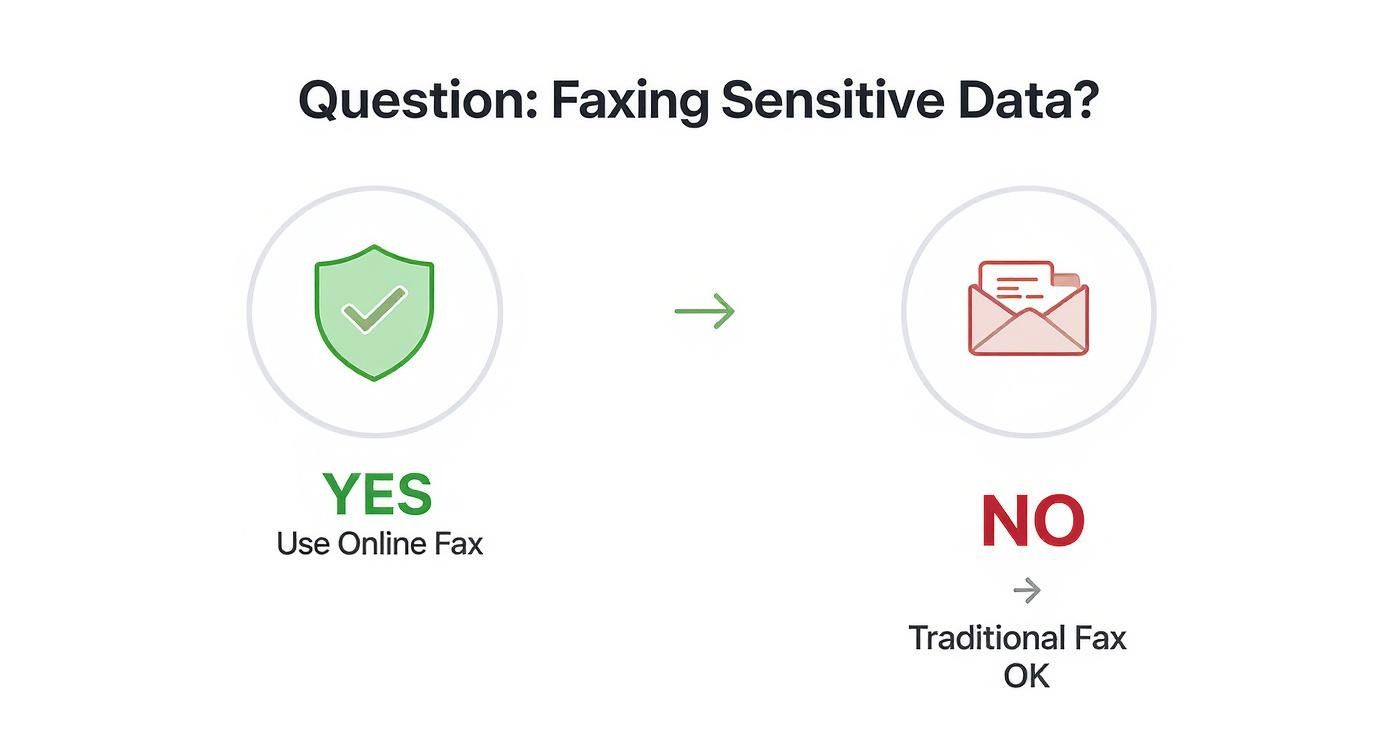
    And when you're dealing with sensitive information, the method you choose is just as crucial as the document's clarity.

    A decision tree showing that if you are faxing sensitive data, you should use online fax, and if not, a traditional fax is okay.

    The takeaway here is simple: for anything with personal, financial, or medical data, the encryption and security baked into an online service offer a layer of protection that old-school fax machines just can't match.

    Interpreting Confirmation Receipts

    That "Success!" email is more than just a pat on the back—it's your proof of delivery. For important documents, it can even serve as a legal record that the document was successfully transmitted and received. Don't just glance at it; take a second to understand what it's telling you.

    A proper confirmation receipt should include the date and time of transmission, the total number of pages sent, the recipient's fax number, and a clear status like "Success" or "Delivered." I always recommend saving this receipt as a PDF for your records, especially if you're sending contracts, invoices, or legal filings.

    If you don't get a confirmation email within about 10 minutes, your first stop should be your spam or junk folder. If it's not hiding in there, it's safe to assume the fax didn't go through, and you should start troubleshooting from the top. Never assume a fax was delivered without that receipt in hand—it's your only guarantee the job is done.

    Answering Your Questions About Faxing Without a Landline

    Even with all the options laid out, it's natural to have a few lingering questions. Moving away from a familiar piece of hardware always comes with a bit of a learning curve. Let's tackle some of the most common things people ask when they're ready to ditch the landline for good.

    Can I Also Receive Faxes This Way?

    You absolutely can. In fact, this is one of the biggest perks of going digital. When you sign up for an online fax service, you get your own dedicated fax number—you can usually pick a local, toll-free, or even an international one.

    Here’s how it works: someone sends a document to your new number from their old-school fax machine. The service catches that incoming analog signal, instantly converts it into a digital file (usually a PDF), and zips it right over to your email inbox. From there, you can open, save, print, or forward it just like any other attachment. No paper, no toner, no fuss.

    Are Faxes Sent Online Legally Binding?

    Yes, they are. In most places, including the United States, faxes sent through a legitimate online service are considered legally binding. This is a huge deal for anyone in legal, real estate, or finance, where having undeniable proof of delivery is everything.

    The secret sauce is the detailed transmission log these services generate. It’s way more robust than the flimsy confirmation slip you get from a physical machine. A digital receipt gives you:

    • The exact date and time the fax was sent.
    • The total number of pages that went through successfully.
    • The sender's and recipient's fax numbers.
    • A clear "Success" or "Delivered" status.

    This digital audit trail provides solid proof that your document was sent and received, which holds up in most legal situations.

    A Quick Pro Tip: For your own records and peace of mind, always go with a service that provides detailed, storable confirmation receipts. This digital paper trail is far more reliable and easier to archive than a piece of thermal paper that will fade over time.

    What Kind of Files Can I Send?

    You've got a ton of flexibility here. These services are built to handle the documents you're already working with every day. Most of the top providers can easily process a wide variety of common formats.

    You can typically send:

    • Documents: PDF, Microsoft Word (.doc, .docx), and plain text (.txt) files.
    • Images: Standard formats like JPEG, PNG, GIF, and TIFF.
    • Spreadsheets: Microsoft Excel files (.xls, .xlsx) are usually supported too.

    The service does the heavy lifting for you by automatically converting your file into the standard black-and-white format that fax machines understand. So, you can attach a color photo or a heavily formatted Word doc, and it will come out looking just right on the other end.

    Do I Need to Install Any Special Software?

    For the most part, no. The best thing about these solutions is how accessible they are. The vast majority of online fax services are entirely web-based, which means you can handle everything right from your favorite internet browser on any computer.

    And if you go the email-to-fax route, your regular email client—like Gmail, Outlook, or Apple Mail—is all you need. The only exception is if you want to use a provider’s mobile app on your smartphone, which is just a quick download from the iOS or Android app store.


    Ready to send your first fax without the hassle of a landline? With SendItFax, you can upload your document, enter the recipient’s number, and send it on its way in just a few clicks. Try our simple, no-account-needed service today. Visit us at https://senditfax.com to get started.