Tag: how to fax online

  • Send Fax Online Pay Per Fax: Quick & Easy

    Send Fax Online Pay Per Fax: Quick & Easy

    You usually need a fax at the worst possible moment. A signed lease addendum. A medical intake form. A legal notice that somebody still insists must be faxed, not emailed.

    If that’s where you are right now, the fastest move is usually simple: use a browser-based service, send the document, get confirmation, and move on. No machine, no toner, no monthly plan you’ll forget to cancel. For occasional use, send fax online pay per fax is the practical lane because it matches how many users fax now. They don’t fax every day. They need it once, maybe twice, and they need it done without drama.

    Why Pay-Per-Fax Is Your Best Bet for Occasional Faxes

    The old pattern used to be terrible for low-volume users. You either kept a fax machine around for rare moments, or you drove to a shipping store and paid retail pricing for a task that should take minutes. Neither option makes sense if you fax a few times a month or less.

    That’s why pay-per-fax works so well for real life. You upload a PDF, DOC, or DOCX file, enter the recipient’s fax number, add your details, and send. No hardware. No dedicated phone line. No subscription hanging over a task you may not repeat for weeks.

    A person with a stressed expression holding a signed paper while looking at their laptop screen.

    Faxing still matters in the places that need proof and process

    Fax hasn’t disappeared just because email exists. Industries that handle sensitive records or standardized workflows still use it every day. The global online fax market was valued at USD 4.70 billion in 2022 and is projected to reach USD 12.32 billion by 2030, with a 12.75% CAGR from 2023 to 2030, according to Kings Research on the online fax market.

    That lines up with what office staff already know. Healthcare offices, law firms, insurers, real estate teams, and public agencies often keep fax in the mix because the receiving side still expects it.

    If the receiving office says “fax it,” arguing about better technology doesn’t help. Sending it quickly does.

    Why occasional users should avoid the old setup

    A dedicated line and physical machine only make sense if faxing is part of your daily operations. If it isn’t, online delivery is the cleaner option. If you’re also weighing whether your office should keep legacy phone infrastructure at all, this overview of Traditional Landline Vs Voip Phone Systems gives useful context on why businesses have been moving away from fixed-line dependence.

    For occasional faxing, the hack is straightforward:

    • Use browser-based sending if you don’t fax regularly.
    • Pay once when the document matters.
    • Skip subscriptions unless your usage is steady enough to justify them.

    That’s the practical answer many users are looking for.

    Choosing Your Plan Free vs Almost Free

    The first decision is whether your fax belongs on the free tier or the paid one. Don’t overthink it. Users can typically decide in under a minute if they use a simple filter: page count, presentation, urgency, and whether they may need another attempt.

    A comparison chart showing features between a free online fax service and an almost free plan.

    Use the free tier when the stakes are low

    The free option is for basic, occasional sending. It’s a solid fit when you’re faxing something short, you don’t mind branded cover-page treatment, and there’s no pressure to make it look polished.

    Use free when:

    • The document is short and fits the page limits.
    • You’re testing a number before sending something more formal later.
    • Presentation doesn’t matter much, such as a routine form or simple request.
    • You want to avoid paying at all and can live with the free-tier trade-offs.

    If you want a fuller rundown of no-cost sending limits and when they make sense, this guide on sending a fax online free is worth checking before you choose.

    Use the paid option when the fax actually matters

    The paid option makes more sense when you need more pages, cleaner presentation, and a better chance of moving the fax through quickly. That usually means contracts, medical records, signed disclosures, financial forms, or anything tied to a deadline.

    A simple comparison helps:

    Factor Free service Almost Free plan
    Cost No payment $1.99 per fax
    Page capacity Short faxes only Up to 25 pages
    Cover page appearance Includes branding Branding removed
    Sending priority Standard Priority delivery
    Best for Casual, low-stakes sends Time-sensitive or professional sends

    The real comparison isn’t free vs paid

    The comparison is online pay-per-fax vs retail counter faxing. That’s where the paid plan stops looking like a charge and starts looking like a shortcut.

    A 10-page local fax at FedEx can cost over $16, while SendItFax’s Almost Free plan handles up to 25 pages for $1.99, according to Notifyre’s guide to online fax costs. For occasional users, that gap is the whole story.

    Practical rule: If the document is important enough that you’d otherwise drive somewhere to fax it, the paid online option is usually the smarter buy.

    A quick decision framework

    If you’re stuck between free and paid, use this:

    • Choose free if your fax is short, non-urgent, and you don’t care about branding.
    • Choose paid if the fax is longer, client-facing, deadline-driven, or worth tracking carefully.
    • Choose paid immediately if you’d be annoyed having to redo the whole thing later.

    That last point matters more than people admit. The cheapest fax is the one you only have to send once.

    How to Send Your First Fax in Under Five Minutes

    If you can upload a file and fill out a web form, you can fax online. Most delays come from bad file prep or number entry, not from the sending process itself.

    A person holding a tablet device to upload a digital document for sending a fax online.

    Enter the sender and recipient details carefully

    Start with the obvious fields first. Add your name, your email if requested for confirmation, and the recipient’s fax number. For U.S. and Canada sending, slow down on the number entry. A single wrong digit is the fastest way to create a failure that looks mysterious but isn’t.

    What helps:

    • Copy the fax number directly from the recipient’s website, email, or paperwork when possible.
    • Check the department line if the office has multiple fax numbers.
    • Confirm who it’s for before sending medical, legal, or real estate documents.

    If a form gives both a phone number and a fax number, don’t assume they match. They often don’t.

    Upload the document in the cleanest format you have

    Most browser-based fax tools accept PDF, DOC, and DOCX files. PDF is usually the safest because the layout won’t shift during processing. If your original is on paper, scan it cleanly before uploading.

    If the paper copy is crumpled, faint, or hard to read, get a better scan first. Local document scanning services can help if you’re dealing with a thick packet, signed forms, or pages that won’t photograph well on a phone.

    A few practical habits save headaches:

    • Use a readable filename so you don’t upload the wrong file.
    • Review every page before sending, especially if signatures matter.
    • Prefer one combined document over a stack of separate uploads when possible.

    For a second walkthrough that focuses on the workflow itself, this guide on how to send fax online covers the basics in a straightforward way.

    Add a cover page only when it helps

    A cover page isn’t mandatory in every situation. Sometimes skipping it is cleaner. Other times it makes the fax easier for the receiving office to route correctly.

    Use a cover page when:

    • The fax is going to a large office with multiple departments.
    • You want to identify the intended recipient clearly.
    • You need to add a short note, such as “Signed authorization attached” or “Please confirm receipt.”

    Keep the message short. Fax cover pages aren’t the place for long explanations.

    A quick visual demo helps if you want to see the process in action:

    Finalize and send without rushing the last screen

    The last review screen is where people either save themselves or create a repeat job. Before you hit send, scan for these:

    Check Why it matters
    Recipient fax number Prevents the most common avoidable failure
    Correct file attached Stops accidental sends of drafts or wrong versions
    Page count Helps you choose the right plan
    Cover page choice Keeps branding and messaging aligned with the purpose
    Sender contact info Gives the recipient a way to reach you if routing fails

    Then send it and wait for confirmation. Don’t close the browser too fast if the service is still processing.

    Send the exact version you’d hand to a front desk in person. If you wouldn’t trust the printout, don’t fax the file.

    Ensuring Your Fax Arrives Perfectly Every Time

    A lot of people treat online faxing like email. Upload, click, hope. That works sometimes, but if the document matters, a little prep goes a long way.

    Delivery success usually comes down to three things: the file, the number, and what happens in transit. Strong online fax platforms improve the transit side with pre-send checks, routing choices, and retries. According to Alohi’s write-up on outbound fax success to USA numbers, high-success online fax services use pre-send validation, intelligent carrier routing, and automated retries, reaching a 94% first-pass success rate compared with an 80% to 85% industry average.

    A green and blue pen lying on a document on a wooden desk with a fax header.

    Prep the file like the recipient’s machine is old

    That sounds blunt, but it’s the right mindset. The receiving side may still be using older equipment, crowded office workflows, or strict document-routing habits.

    Do this before sending:

    • Convert to PDF when possible so the layout stays stable.
    • Keep scans clear and high contrast so signatures and dates remain readable.
    • Trim unnecessary pages like duplicate instructions or blank backsides.
    • Make sure page orientation is correct before upload.

    If you’re sending health information, billing records, or patient forms, process matters as much as speed. This overview of HIPAA compliance is a useful reminder of why document handling discipline matters in medical offices and similar environments.

    The cover page is a routing tool, not decoration

    People often treat the cover page like fluff. It isn’t. It tells the receiving office what the packet is, who it’s for, and how to reach you if something doesn’t line up.

    Include:

    • Recipient name or department
    • Your name or organization
    • A short note about the contents
    • A callback number or contact email if appropriate

    That’s especially useful for legal, healthcare, and real estate offices where the wrong desk can stall a document all day.

    A clear cover page can save a fax that technically arrived but landed in the wrong internal queue.

    Priority matters when timing matters

    Not every fax has the same urgency. A school record request can wait. A signed closing document often can’t. When a service offers priority delivery, it’s worth considering for anything tied to a same-day deadline or active workflow.

    The broader lesson is simple. Success isn’t luck. It’s clean files, accurate recipient details, and a platform that doesn’t give up at the first busy signal.

    What to Do When Your Online Fax Fails

    A failed fax doesn’t always mean something is wrong on your side. Sometimes the recipient’s line is busy. Sometimes their machine isn’t answering. Sometimes the number is right but the office has an internal issue you can’t see.

    What matters is knowing two things quickly: why it failed, and whether you’re still being charged.

    Don’t assume all pay-per-fax services handle failure fairly

    Many comparison pages fall short. They talk about prices and page limits, but they skip the question users truly care about when the document is urgent. If the fax fails, do you lose your money?

    That policy isn’t always stated clearly. OneFaxNow explicitly says “no charges on failed faxes,” as noted on its pay-per-fax page. That kind of clarity matters because it gives you cost certainty before you hit send.

    Your first response should be practical, not panicked

    When a fax fails, run this checklist:

    • Recheck the fax number against the recipient’s official contact info.
    • Confirm the office is open and that you have the correct department line.
    • Review the file to make sure it uploaded cleanly and isn’t missing pages.
    • Try again later if the issue looks like a busy or no-answer condition.
    • Call the recipient if the document is time-sensitive and ask them to verify the fax line.

    A lot of fax failures are boring. Wrong digit. Full office queue. Reception machine tied up. Those are fixable.

    If the document is important, call the receiving office after a failure notice. You’ll usually get a clearer answer in two minutes than you will from guessing.

    What good cost transparency looks like

    A fair pay-per-fax service should make failure handling easy to understand before payment. Users shouldn’t have to dig through policies after a bad send. If you’re comparing services, look for plain answers to these questions:

    Question Why it matters
    Are failed faxes charged? Protects you from paying for non-delivery
    Are retries automatic? Saves time when the line is busy
    Do you get delivery confirmation? Helps with records and follow-up
    Can you resend easily? Reduces friction when timing is tight

    If a service is vague on failed-send charges, treat that as a real trade-off, not a footnote.

    Ideal Scenarios for Using Pay-Per-Fax Services

    Pay-per-fax is the right tool when your usage is low, irregular, and hard to predict. That includes more people than the subscription-heavy fax market likes to admit.

    A freelancer sending a tax form once in a while doesn’t need a monthly plan. A traveler who needs to send a signed authorization back home doesn’t need hardware. A small nonprofit filing occasional paperwork needs a practical send button, not another recurring expense.

    Where pay-per-fax fits best

    These are the sweet spots:

    • Freelancers and solo operators who fax only when a client, bank, or agency requires it
    • Remote workers handling onboarding, HR, or compliance forms from home
    • Travelers who need to send a signed document from a phone, tablet, or borrowed laptop
    • Community organizations and nonprofits trying to keep admin costs low
    • Professionals with bursty demand who may send several faxes one month and none the next

    This is also why the choice shouldn’t be framed as free versus subscription only. As mFax’s comparison of free online fax services points out, many articles miss the breakeven question for occasional users. For someone sending 8 faxes monthly, a pay-per-fax model like $1.99 per fax is often more cost-effective than an underused $8.99 monthly subscription.

    When a subscription starts to make more sense

    If your sending pattern becomes steady, repetitive, and operational, a monthly plan may deserve a look. That usually means a business role, not a one-off consumer need. If you’re trying to compare that threshold more directly, this guide to the best one-time fax service helps sort out when one-time sending still wins.

    The simplest rule is this:

    Pay-per-fax is strongest when your need shows up unpredictably. Subscriptions are stronger when faxing becomes routine work.

    That’s the decision framework needed. Not theory. Just the cheapest practical option that still gets the document delivered.

    Frequently Asked Questions

    Is online pay-per-fax safe for sensitive documents

    It can be, but you still need to handle files carefully. Use the correct recipient number, upload clean documents, and choose services that clearly explain how they process transmissions and confirmations.

    Can I send to numbers outside the U.S. and Canada

    This article is focused on U.S. and Canada sending. Check the service’s supported destinations before uploading anything.

    Do I need to create an account

    Some services require one. Others let you send without creating an account, which is useful for one-time or occasional faxing.

    Will I know if the fax was delivered

    Good services provide delivery status or confirmation so you’re not left guessing. That matters for records, deadlines, and follow-up calls.

    Should I use free or paid

    Use free for short, low-stakes sends. Use paid when page count, presentation, or urgency matters more than saving a couple of dollars.


    If you need to fax a document today without setting up a machine or paying for a monthly plan, SendItFax gives you a browser-based way to send PDFs, DOC, and DOCX files to U.S. and Canada numbers, with a free option for short faxes and a $1.99 pay-per-fax option for larger or cleaner sends.

  • Send a Fax from Computer for Free: A Modern Guide

    Send a Fax from Computer for Free: A Modern Guide

    Believe it or not, you can absolutely send a fax from a computer for free. It’s all thanks to online fax services that let you upload a document, punch in a fax number, and send it on its way through the internet. No fax machine required.

    Why Sending a Fax From Your Computer Makes Sense

    A laptop with a cloud icon, a fax machine, and documents on a desk, promoting confident faxing.

    I get it. Faxing feels like a relic from another era, right up there with dial-up modems and floppy disks. But the reality is, it's still a critical tool in many industries. Fields like healthcare, law, and finance depend on faxing because of its legal weight and rock-solid security. When a fax is sent, it creates a point-to-point, verifiable transmission—something that’s often non-negotiable for sensitive information.

    Bridging Old-School Security with Modern Convenience

    The biggest selling point for faxing has always been security. Think about it: an email can be intercepted, spoofed, or just land in a spam folder, never to be seen again. A traditional fax, on the other hand, travels directly over a dedicated phone line. This gives it a clear, traceable path that's incredibly difficult to mess with.

    That's why it's still the go-to for documents like:

    • Medical records governed by strict privacy laws
    • Legally binding contracts and other official agreements
    • Financial statements and sensitive government forms

    Of course, we all remember the headaches of old-school faxing: the bulky machines, the paper jams, the dreaded busy signal, and needing a physical phone line. That’s exactly where online faxing comes in to save the day, giving you the best of both worlds.

    Modern online fax services have completely transformed this process. They combine the trusted, secure nature of traditional faxing with the digital convenience we expect today, allowing anyone to send a fax from a computer for free.

    The Digital Shift in Fax Technology

    Instead of dying out, faxing just adapted. Its staying power isn't just about old habits; it’s a testament to its sheer reliability. In fact, industry data showed that even as recently as 2017, billions of faxes were still being sent every year, with over 80% of businesses still using fax in some form. You can dig into these faxing industry insights to see just how common the technology still is.

    This is precisely why knowing how to send a fax from your computer is such a useful skill. It opens up a secure, legally recognized communication channel without any of the old-school baggage. All you need is your computer, an internet connection, and the document you want to send. No extra hardware needed.

    Sending Your First Free Fax From Your Computer

    Alright, let's get down to business. You know it’s possible, so how do you actually send a fax from your computer without paying a dime? I'll walk you through it using SendItFax as our example. Honestly, it’s much simpler than wrestling with an old office fax machine and you can knock it out in just a few minutes.

    First thing’s first: head over to the service’s website. Most free providers have their "send a free fax" portal right on the homepage, so it’s hard to miss. You’re looking for the spot where you can just jump in and start building your fax without having to pull out your credit card or even create an account. That’s the beauty of it—no commitment.

    Getting Your Document Ready

    Before you upload anything, let's talk about the document itself. This is probably the most critical part. A fax transmission is basically a black-and-white photocopy sent over a phone line, so clarity is everything. If your original file is blurry, fuzzy, or has weird colors, it’s going to look even worse on the other end.

    For the best and most reliable results, always use a PDF (.pdf). It’s the gold standard for online faxing because it locks in your formatting, fonts, and images, ensuring the recipient sees exactly what you intended.

    Here are a few quick tips I've learned over the years:

    • Stick to simple, bold fonts. Fancy, thin, or curly fonts like scripts can turn into an unreadable mess during transmission. Think Arial, Times New Roman, or Calibri.
    • Go for high contrast. You can't beat classic black text on a crisp white background. Avoid colored text or shaded backgrounds, as they just get converted to grayscale and can make your text disappear.
    • Check your images. If you have a logo or a diagram in your document, make sure it’s a high-resolution version. A pixelated image will only get worse when it’s faxed.

    Taking a minute to prep your file makes all the difference in whether you look professional or sloppy.

    Putting It All Together and Hitting Send

    Once your document is polished and ready, the rest is pretty easy. The sending interface on sites like SendItFax is usually just a simple web form, designed to get your fax out the door without any confusion.

    Here’s a look at a typical layout you’ll encounter.

    As you can see, it's all laid out logically—sender info, recipient info, and a big button to upload your document. No guesswork needed.

    First, upload your PDF. Then, carefully type in the recipient’s information. This is where you need to pay close attention. One wrong digit and your fax is going into the void.

    Pro Tip: Always double-check the recipient's fax number. If you're sending a fax internationally, you have to get the country and area codes right. For example, any number in the United States or Canada needs to start with +1.

    Most services also give you the option to add a cover sheet, and I recommend using it. It's a professional touch that acts like a quick intro note. You can add a subject line and a short message to give the recipient some context before they dive into the main document.

    And if you’re looking for other ways to get this done, we’ve also put together a guide on how to fax via email, which is another incredibly handy method.

    Getting Confirmation That It Actually Worked

    After you’ve filled everything out and clicked that "Send Fax" button, the online service does the heavy lifting. It dials the number, waits for the receiving machine to answer, and then transmits your document page by page. This can take a couple of minutes, especially if the line on the other end is busy, so don't panic if it's not instantaneous.

    The best part? You're not left wondering if it went through. Any good service will send you an email confirmation as soon as the job is done.

    This confirmation email is your official proof of delivery. It’s more than just a simple "it worked" message; it usually contains key details like:

    • The final status (Success or Failed)
    • The recipient’s fax number
    • The exact date and time it was sent
    • The total number of pages transmitted

    Be sure to save this email. For any business, legal, or official correspondence, that little confirmation receipt is your proof that the document arrived safely. And just like that, you've managed to send a fax from your computer for free.

    What To Expect From Free Faxing Services

    The idea of being able to send a fax from computer for free is fantastic, especially when you’re in a pinch and need to get a signed document over to someone right away. But it's good to go in with your eyes open. These services almost always run on a "freemium" model—they give you a great basic service for free, hoping you'll eventually need more and upgrade to a paid plan.

    Think of it as a free sample. It’s perfect for the occasional task, like sending a one-off invoice or a signed permission slip. But these services have guardrails in place, and knowing what they are ahead of time will save you from any nasty surprises.

    Common Limitations You Will Encounter

    Right off the bat, you'll almost always run into a page limit. Most free fax services cap how many pages you can send at once or over a certain period. For example, a common limit is 5-10 pages per fax and maybe only a couple of faxes per day. That’s plenty for a quick contract, but you’re not going to be sending a 50-page business proposal with a free account.

    Another big one? You usually can't receive faxes. Free online faxing is typically a one-way street. You can send documents out, but you won't get a dedicated fax number for people to send faxes back to you. For that, you’ll definitely need to look at a paid subscription.

    Still, the process for sending is incredibly simple.

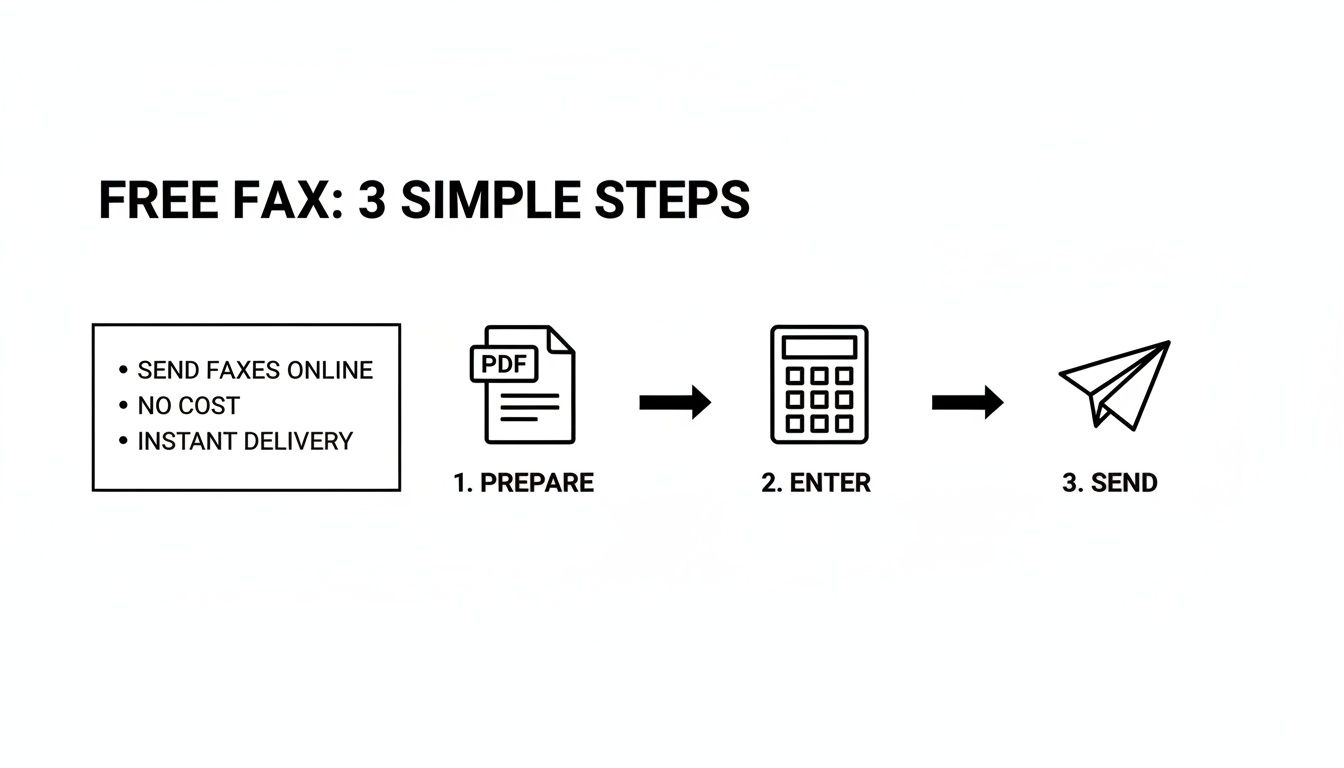
    A diagram illustrating three simple steps for sending a free fax online: prepare, enter, and send.

    As you can see, it really just boils down to getting your file ready, typing in the fax number, and clicking send.

    The Freemium Trade-Off: Branding and Ads

    Don't be surprised to see the service's branding on your fax. To pay the bills, many free providers will add their logo or a small ad to the cover sheet that goes with your document. It's a small price to pay for the convenience, but it's something to keep in mind if you need a spotless, professional look for an important client.

    These free tiers are a fantastic modern convenience. They bridge the gap for people who need to fax something but don't have a machine, usually offering a handful of free pages before asking for payment.

    To give you a clearer picture, I've put together a table that breaks down what you typically get with a free plan versus a paid one.

    Free vs Paid Online Faxing Features

    Feature Typical Free Plan Typical Paid Plan
    Sending Faxes Yes, with page and daily limits (e.g., 10 pages/day) Yes, with much higher or unlimited monthly pages
    Receiving Faxes No Yes, includes a dedicated local or toll-free fax number
    Branding Provider branding/ads on the cover page No branding, professional and clean cover pages
    Customer Support Limited (email or FAQ/knowledge base only) Priority support (phone, chat, and email)
    Security Basic security measures Enhanced security, often with HIPAA compliance options
    File Storage Limited or no storage of sent faxes Secure cloud storage and fax archiving
    International Faxing Usually not supported or very limited Supported, often with competitive international rates

    This comparison makes it clear: free services are ideal for occasional, non-critical faxes. If you find yourself needing to fax regularly or handle sensitive information, a paid plan quickly becomes the better option. You can get more details on how different free online fax services operate to see which might fit your specific needs.

    Is Sending a Fax From My Computer Actually Secure?

    A person uses a laptop displaying 'ENCRYPTED FAXING' with a padlock icon, in a server room.

    Security has always been the quiet superstar of faxing. It’s a huge reason why industries like healthcare and law still rely on it for sensitive documents. When you send a fax from computer for free, you're tapping into services that take this legacy of security very seriously, but with a modern digital twist.

    The moment you upload a file and hit send, it isn’t just floating unprotected across the web. Reputable services use strong encryption like Transport Layer Security (TLS). This is the same stuff that protects your credit card information when you shop online, creating a secure, scrambled tunnel between your computer and the fax service's servers.

    Once your fax hits their data center, another layer of protection kicks in. The files are kept on secure servers before being sent out over traditional phone lines to the recipient's machine. It's this blend of new-school digital encryption and old-school analog transmission that makes online faxing a surprisingly robust way to send confidential info.

    Your Part in Keeping Faxes Private

    While the fax service handles the heavy lifting on the tech side, you still play a crucial role in keeping your information private. A few simple habits can make all the difference.

    First and foremost, always double-check the recipient's fax number. Seriously. A single wrong digit is all it takes to send your private documents to a complete stranger. It’s the simplest step, but it’s also where things most often go wrong.

    If you’re using a service that requires an account, your password is your front-line defense.

    • Make it strong: Mix upper and lowercase letters, numbers, and symbols. Don't make it easy to guess.
    • Keep it unique: Never reuse passwords from your email or social media accounts. A breach on one of those sites could expose your fax account.

    One of the biggest, and often overlooked, privacy wins for online faxing is that it completely bypasses the shared office fax machine. A confidential document arriving at a communal machine can sit in the output tray for anyone to see. A digital fax, on the other hand, lands securely in the right person's inbox.

    Not All Fax Services Are Created Equal

    It's important to remember that security measures can vary wildly between different free faxing platforms. You need to do a little homework on what protections a service actually offers.

    People often ask about the safety of specific providers, and it’s a valid concern. We dig into this very topic in our deep dive on whether platforms like FaxZero are safe, which can give you a good checklist for vetting any service you're considering.

    By choosing a service that's transparent about its encryption and by following smart security practices yourself, you can send sensitive information with confidence. You’re ensuring your documents stay private from the second they leave your computer until they land securely at their destination.

    Solving Common Problems When Faxing Online

    A person types on a laptop next to a wireless mouse, with a document titled 'Fix Fax Errors' in the foreground.

    Even with a great tool to send a fax from computer for free, sometimes things just don't go as planned. You hit send, walk away, and a few minutes later you get that sinking feeling when the "failed transmission" email lands in your inbox. It’s frustrating, but don't panic. The fix is usually surprisingly simple once you know where to look.

    Most of the time, fax failures can be traced back to just a few common culprits. The number one offender? A simple typo in the recipient's fax number. It happens to the best of us. Another frequent problem is a busy signal—the machine on the other end could be tied up or even switched off. The best approach here is often just a bit of patience.

    Why Did My Fax Fail?

    When a transmission doesn't go through, your first move should be to check the confirmation email from the service. It often contains an error code or a brief explanation. If the message is vague, run through this quick mental checklist to figure out what went wrong.

    • Wrong Number: Did you double-check every digit? Make sure you included the +1 prefix for any U.S. or Canadian numbers.
    • Busy Signal: The receiving line was occupied. This is super common. My advice? Wait 10-15 minutes and then try resending it.
    • Unsupported File: Online fax services love PDFs. If you sent a complex spreadsheet or a massive image file, the system might have struggled to convert it properly.
    • No Answer: This means the receiving fax machine might be turned off, out of paper, or having technical difficulties of its own.

    The real beauty of online faxing is that a failure isn't the end of the world. Unlike the old days of standing over a machine, you don't have to start from scratch. Your digital file is saved and ready, so resending is usually just a one-click affair.

    Making Sure Your Faxes Look Clean and Professional

    Sometimes the fax goes through, but the feedback you get is that it looked awful—blurry, smudged, or just plain unreadable. This is almost always an issue with the original document, not the fax service itself. You have to remember that a fax is basically a low-resolution, black-and-white picture of your document.

    To ensure your faxes always arrive looking crisp and professional, the trick is to start with a high-quality source file. A clean, high-resolution PDF is your best friend here.

    For maximum clarity on the receiving end, follow these simple tips:

    • Use simple, bold fonts. Stick with classics like Arial or Times New Roman. Thin, fancy, or decorative fonts tend to break apart and become illegible during transmission.
    • Think high contrast. You can't go wrong with black text on a plain white background. Avoid colored text or shaded backgrounds, as they often turn into a gray, murky mess.
    • Watch your font size. Anything smaller than a 10-point font is a gamble. Keep it readable.

    By prepping your document with these things in mind and methodically checking for issues when a transmission fails, you’ll get your message across clearly and reliably every single time.

    Knowing When It's Time to Upgrade Your Fax Service

    Let's be honest, being able to send a fax from computer for free is fantastic for those rare, one-off situations. Need to send a signed rental agreement or a quick medical form? A free service gets the job done without you having to leave your chair.

    But these free options are really just a starting point. Think of them as a trial run. If you find yourself faxing more than just occasionally, you'll eventually hit a wall where the free plan's limitations start causing more headaches than they're worth.

    Recognizing that tipping point is crucial. It’s the moment your faxing needs shift from "once in a blue moon" to "part of my regular workflow." If you're sending faxes multiple times a week, a paid plan will almost certainly pay for itself in saved time and a more professional appearance.

    Signs You've Outgrown Free Faxing

    The biggest red flag? You need to receive a fax. Free services are strictly a one-way street—you can send documents out, but you don't get a dedicated number for anyone to send faxes back to you. If a client, doctor's office, or partner needs to fax you something, a paid plan with your own number isn't just a nice-to-have; it's a necessity.

    Here are a few other clear indicators that it's time for an upgrade:

    • You want to look professional. Paid services remove all the provider's branding and ads from your cover pages. Your documents arrive looking clean, polished, and all about your business.
    • You're sending more than a handful of pages. Constantly hitting daily or monthly page limits is a real drag on productivity. Paid tiers give you a much larger allowance to work with.
    • You need more advanced tools. If your workflow requires features like electronic signatures, API access to integrate with other software, or HIPAA-compliant security for sensitive data, a paid service is the only way to go.

    Once faxing becomes a consistent part of how you do business, a paid plan stops being an expense and starts being an investment in efficiency. The dedicated support, better reliability, and professional features save you from hassles that are far more costly than the small monthly fee.

    The online fax market is growing fast and is expected to hit $4.48 billion by 2030. As it expands, the line between casual free tiers and powerful business plans is getting sharper. You can dig into these fax market trends to see how technology is shaping the industry.

    Ultimately, upgrading comes down to value. When you need reliability and a professional toolkit for serious work, a paid plan is the clear winner. To see how different providers measure up, check out our in-depth online fax services comparison and find the perfect fit.


    Ready to step up from the limitations of free faxing? With SendItFax, our Almost Free plan is just $1.99 per fax for up to 25 pages and includes priority delivery with no branding. Get the professional features you need at https://senditfax.com.