Think of a HIPAA fax cover sheet as the confidential envelope for a fax. It's the first page that goes through, and its job is to protect sensitive patient information—what the law calls Protected Health Information (PHI)—as it travels from one machine to another. It ensures the documents get to the right person and provides a clear legal warning if they accidentally land in the wrong hands. In healthcare, using one isn't optional; it's a must-have for compliance.
The Critical Role of a HIPAA Fax Cover Sheet
Sending medical records without a cover sheet is like mailing a postcard with a patient’s private diagnosis written on the back for anyone to read. It's a huge, unnecessary risk. The cover sheet acts as the first line of defense against accidental disclosure of PHI.
It works as both a guide and a guard. By clearly marking who the sender and intended recipient are, it drastically cuts down the odds of human error. And if the fax does end up on the wrong machine, the cover sheet immediately alerts whoever sees it to the sensitive nature of the following pages.
Why Faxing Still Matters in Healthcare
It might seem old-school, but faxing is still a workhorse in healthcare. A surprising 70% of healthcare providers continue to use fax machines for transmitting everything from lab results to specialist referrals. Because it’s so common, mastering the rules around it, like using a proper cover sheet, is more important than ever.
The Health Insurance Portability and Accountability Act (HIPAA), passed back in 1996, set the national standards for protecting patient health information. Since anyone can misdial a fax number or leave documents sitting on a shared machine, faxing creates a specific kind of compliance challenge. Skipping a proper cover sheet isn't just a simple mistake—it can lead to serious penalties, with fines that can climb as high as $50,000 per violation. You can find more details on HIPAA enforcement guidelines on faxplus.com.
The Three Primary Jobs of a Cover Sheet
A well-designed HIPAA fax cover sheet really has three key jobs to do, all of which are vital for protecting patient privacy and staying compliant:
- Ensures Proper Delivery: It clearly states who the fax is meant for, reducing the chance it gets picked up or read by unauthorized staff. This is especially important in a busy hospital or large clinic where a single fax machine serves multiple departments.
- Provides Immediate Warning: The required confidentiality statement lets anyone who lays eyes on it know that the attached documents contain legally protected health information.
- Gives Clear Instructions: It tells an unintended recipient exactly what to do (and what not to do) if they receive the fax by mistake. The instructions are usually simple: destroy the documents and notify the sender immediately.
A HIPAA fax cover sheet isn't just administrative paperwork; it's a fundamental security measure that demonstrates due diligence in protecting patient data, forming a critical part of any healthcare organization’s compliance strategy.
Anatomy of a Compliant HIPAA Fax Cover Sheet

A compliant HIPAA fax cover sheet isn't just a formality—it’s a critical security tool. Think of it as the first line of defense for protecting sensitive patient information. Every field on that page has a specific job, working together to guide the fax to its proper destination and shield it from prying eyes.
If you're building a cover sheet from scratch, it’s not enough to know what to include. You need to understand why each piece of information matters. Getting this right is a proactive step that shows you're serious about patient privacy and staying on the right side of regulations.
Core Components You Cannot Skip
Some elements are simply non-negotiable when you're faxing Protected Health Information (PHI). These required fields are the absolute backbone of a compliant document, creating a clear and secure trail for every transmission.
Since HIPAA was enacted back in 1996, the rules have been refined to demand specific information that protects PHI. This includes the sender's full name and contact info, the recipient's name and fax number, the date, and the total number of pages. You'll also need a powerfully worded confidentiality disclaimer. While HIPAA doesn't give you a script, the message has to be unmistakable.
At its core, a compliant fax cover sheet answers three critical questions for anyone who sees it: Who sent this? Who is it for? And what should I do if I’m not the right person?
These essential details are the foundation of secure communication.
Recommended Fields for Enhanced Security
Beyond the must-haves, you can add extra layers of information to really tighten up your security. These recommended fields aren't strictly required by HIPAA, but they go a long way in preventing mistakes and demonstrating a commitment to best practices.
For example, adding a simple subject line can provide immediate context without revealing any PHI. Mentioning the sender’s department can also help a large hospital or clinic route the fax to the right person much faster, which means less time sitting on a shared machine.
If you're looking for a solid starting point, downloading a pre-made HIPAA fax cover sheet template PDF can show you how to structure both the required and recommended information effectively.
HIPAA Fax Cover Sheet Checklist Required vs Recommended Fields
To make things easy, I've broken down what’s absolutely essential versus what’s just a really good idea. You can use this table as a quick checklist to review your current cover sheets or to build a new one that’s 100% compliant.
| Field | Requirement Level | Purpose and Example |
|---|---|---|
| Sender Information | Required | Identifies who sent the fax for accountability. Example: Dr. Emily Carter, Oak Valley Medical |
| Recipient Information | Required | Ensures the fax goes directly to the intended person. Example: Dr. John Smith, Pine Ridge Specialty Clinic |
| Date and Time | Required | Creates a timestamp for the transmission, which is vital for audit trails. Example: Oct 26, 2026, 2:15 PM |
| Total Page Count | Required | Helps the recipient confirm the entire document arrived. Example: "Pages: 5 (including cover)" |
| Confidentiality Notice | Required | The legal disclaimer warning against unauthorized access or sharing of PHI. |
| Subject Line | Recommended Best Practice | Adds context without exposing sensitive data. Example: "Patient Referral Information" |
| Sender's Department | Recommended Best Practice | Helps get the fax to the right place faster internally. Example: "Cardiology Department" |
| Sender's Fax Number | Recommended Best Practice | Makes it easy for the recipient to reply or confirm they got it. |
| Urgency Indicator | Recommended Best Practice | Flags the document for time-sensitive review. Example: "Urgent," "For Immediate Review" |
By carefully including these fields, you're not just sending a fax—you're transforming a simple cover page into a powerful tool for HIPAA compliance and ensuring every piece of patient information gets the protection it deserves.
Crafting a Bulletproof HIPAA Confidentiality Statement
If the sender and recipient details are the address on an envelope, then the confidentiality statement is the legally binding seal. It's easily the most critical block of text on your HIPAA fax cover sheet. This isn't just polite boilerplate; it's a powerful legal notice that turns a simple message into a protected communication.
This statement is your first line of defense against accidental disclosure. Faxes sometimes land on the wrong machine—it’s a common and potentially costly mistake in healthcare. When that happens, this disclaimer immediately puts the unintended recipient on notice about their legal obligations. It’s not a suggestion; it’s a clear directive with the full weight of federal law behind it.
Think of it as a digital "do not enter" sign. It clearly marks the information as private, confidential, and meant for one specific person's eyes only. Without that explicit warning, someone who gets a fax by mistake might not realize the sensitive nature of the documents, raising the risk of a breach.
Decoding the Legal Language
The language in these statements can feel a bit dense, but every phrase serves a specific and vital purpose. Once you understand the key components, you’ll see why they are non-negotiable for staying compliant. Let's break down what makes a strong HIPAA disclaimer work.
Protected Health Information (PHI): This phrase is the heart of HIPAA. Including it makes it crystal clear that the documents contain sensitive patient data protected by federal law. This immediately raises the legal stakes for anyone who handles the fax.
Intended Recipient Only: Simple but powerful, this phrase draws a clear line in the sand. It establishes that the information is privileged and legally addressed to a single person or entity, making it obvious that anyone else is an unauthorized viewer.
Prohibited from Further Disclosure: This is the core instruction. It tells anyone who reads it that they cannot legally share, copy, or distribute the information in any way. If someone receives the fax by mistake, this clause forbids them from forwarding it or showing it to others.
A well-crafted confidentiality statement is your organization's legal armor. It demonstrates due diligence, minimizes liability, and provides clear, actionable instructions that protect patient privacy in the event of a misdelivery.
Sample Confidentiality Statements for Your Fax Cover Sheet
While HIPAA doesn’t demand exact wording, the message has to be direct and unambiguous. Your organization's legal counsel is always the best resource, but the examples below provide a solid starting point. You can adapt the structure and content to fit your specific needs, much like you'd tailor a general fax cover letter for different situations.
Example 1: Concise and Direct
This shorter version is perfect for routine communications where you need to be clear without taking up too much space.
"CONFIDENTIALITY NOTICE: The documents accompanying this fax transmission contain confidential health information that is legally privileged. This information is intended only for the use of the individual or entity named above. If you are not the intended recipient, you are hereby notified that any disclosure, copying, distribution, or action taken in reliance on the contents of these documents is strictly prohibited. If you have received this fax in error, please notify the sender immediately to arrange for the return or destruction of these documents."
Example 2: Comprehensive and Detailed
For highly sensitive records, a more detailed statement adds an extra layer of legal protection and gives more specific instructions.
"IMPORTANT WARNING: This facsimile is intended for the exclusive use of the person or entity to whom it is addressed and contains confidential information protected by the Health Insurance Portability and Accountability Act (HIPAA). Unauthorized review, use, disclosure, or distribution is prohibited. If you are not the intended recipient, please contact the sender by reply fax or telephone immediately and destroy all copies of the original message. Your cooperation is required by law to protect this privileged information."
Best Practices for Secure and Compliant Faxing
A compliant HIPAA fax cover sheet is just the starting point. Truly secure faxing is about the entire process—from the moment you decide to send a document to the second you get a confirmation of receipt. Think of it like a chain of custody for sensitive information; every single link in that chain has to be strong to protect patient privacy and stay compliant.
Adopting a solid set of best practices turns faxing from a routine task into a genuine security protocol. It means looking beyond the cover sheet and building in checks and balances before, during, and after you send anything. After all, a simple human error like misdialing a number can snowball into a major data breach. A clear, well-defined process is your best defense against these risks.
Pre-Transmission Security Checks
Before your finger even gets near the "send" button, a few simple checks can head off the most common—and costly—mistakes. This first stage is all about verification and making sure you’re only sending what’s absolutely necessary.
Verify Recipient Fax Numbers: This is a big one. Never, ever rely on memory or a scribbled sticky note. Always confirm the recipient's fax number against a trusted source, like an official provider directory or their verified letterhead. Double-checking the number is probably the single most effective thing you can do to prevent a misdirected fax.
Apply the Minimum Necessary Rule: HIPAA is clear on this: you should only disclose the minimum amount of Protected Health Information (PHI) required to get the job done. Before you send, give the documents a quick once-over to ensure you aren't accidentally including extra, unneeded patient data.
Prepare a Compliant Cover Sheet: Make sure every required field is filled out correctly, especially the confidentiality statement. This sheet is your first line of defense if the fax ends up in the wrong hands.
The moments right before you send a fax are your best chance to prevent a breach. Taking a deliberate, methodical approach to verification is the hallmark of a truly secure faxing policy.
Post-Transmission Protocols and Documentation
Okay, the fax is sent. But you're not done yet. What happens next is just as critical for confirming delivery and creating the audit trail that HIPAA demands. This documentation is your proof that you took every reasonable step to protect PHI.
It’s important to remember that HIPAA's allowance for faxing isn't a free pass; it's a regulated process that requires strict safeguards. To put it in perspective, the healthcare industry saw a staggering 276 million records breached last year, and misdirected faxes are often a contributing factor. The penalties for non-compliance are no joke either, reaching up to $50,000 per violation. For more on this, you can read the full breakdown of HIPAA faxing rules and best practices on accountablehq.com.
Here’s what you need to do after every transmission:
Confirm Successful Transmission: Don't just assume it went through. Check for a confirmation receipt from your fax machine or digital service that verifies the transmission was completed successfully.
Follow Up with the Recipient: Whenever possible, especially for highly sensitive information, a quick phone call to the intended recipient to confirm they received the document is a powerful best practice.
Maintain an Audit Trail: Keep a log of every fax containing PHI. This log should include the date, time, recipient's name and number, and a short description of what was sent. Most digital fax services do this for you automatically, creating a permanent, unchangeable record.
Modernizing Your Faxing Strategy
While traditional fax machines are still around, they come with built-in physical security risks. How many times have you seen a document with PHI just sitting on a shared machine, visible to anyone who walks by? Modern digital fax services solve this problem by delivering faxes directly to a secure, password-protected email inbox or online portal.
These services also offer features like end-to-end encryption, which scrambles the data as it travels, making it unreadable to anyone trying to intercept it. If you’re looking to update your systems, you can learn more about the security of fax technology in our detailed guide. By pairing a proper cover sheet with modern technology and a rigorous workflow, you can build a faxing environment that is both secure and compliant.
How to Send a HIPAA Compliant Fax with SendItFax
Knowing the rules for a HIPAA fax cover sheet is one thing, but actually putting them into practice day-to-day is where compliance really happens. This is where modern online fax services like SendItFax come in, turning a potentially tedious task into just a few simple clicks. These platforms are built with security and compliance baked right in, making it much easier to protect sensitive patient information.
Let's walk through the exact steps for sending a secure, compliant fax using SendItFax. This isn't just theory; it's a practical guide showing how the right tool can help you sidestep the common pitfalls of old-school fax machines.
The whole process boils down to a simple, repeatable workflow: verify your recipient, send the document securely, and get confirmation that it arrived safely.
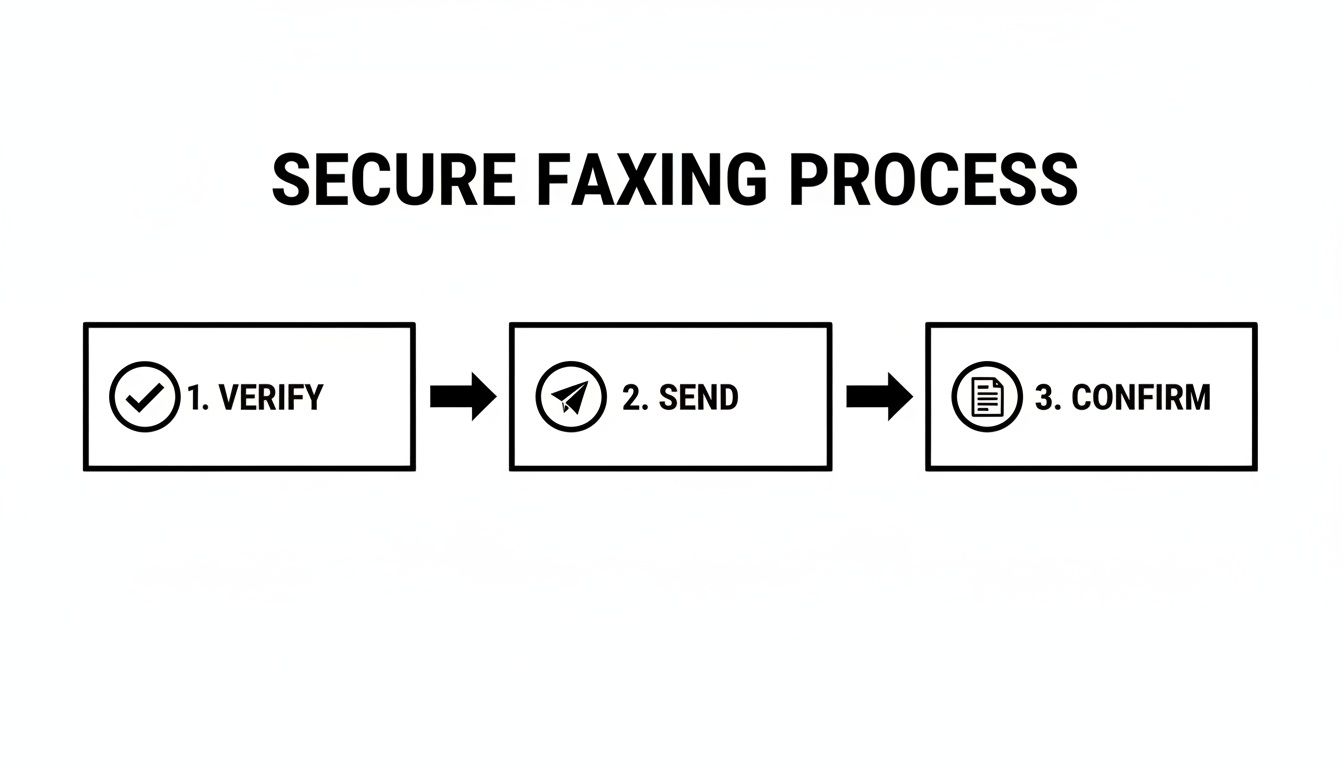
This three-stage approach is the backbone of secure faxing. Each step plays a critical role in ensuring your transmission is both compliant and reliable.
Step 1: Enter Sender and Recipient Information
First things first, you need to clearly identify who's sending the fax and where it's going. SendItFax starts you off with a clean, straightforward interface for all the essential contact details.
You’ll begin by entering your information—name, company, email, and phone number. Next, you'll do the same for your recipient. This step is more than just busywork; the platform uses these details to automatically populate the fax cover sheet, which helps ensure accuracy and saves you from typing it all out yourself.
Step 2: Upload Your Documents and Add a Cover Page Message
With the "to" and "from" fields sorted, you're ready to attach the actual documents. SendItFax handles common file types like PDF, DOC, and DOCX, so you can easily upload patient records, referral forms, or any other sensitive files right from your computer.
This is also your chance to add a message to the cover page. Think of this as the subject line for your fax—a spot for a brief, non-confidential note. Just remember to keep any and all Protected Health Information (PHI) out of this message. The goal is to keep the cover sheet itself clean of any sensitive data.
SendItFax then generates a professional cover sheet that automatically includes:
- All the sender and recipient details you just entered.
- A precise date and time stamp, creating a perfect record for your audit trail.
- Your cover page message, placed prominently for the recipient.
By automatically generating the cover sheet, SendItFax ensures no critical information gets left out by mistake. This built-in feature strengthens your compliance by standardizing the information included on every single fax you send.
Step 3: Review and Send Your Secure Fax
Before hitting send, you get a chance to review everything. This is your final checkpoint—a crucial moment to double-check that recipient's fax number and confirm you've attached the right files. A quick review here can prevent a misdirected fax, which is a major HIPAA headache.
Once you’re confident it’s all correct, you can send it on its way. This is where SendItFax really shines. Behind the scenes, your documents are transmitted over an encrypted connection, a world away from the unsecured phone lines used by traditional fax machines.
This digital approach has some huge advantages:
- Eliminates Physical Risks: Your documents go from your secure device straight to the recipient's fax or digital inbox. There's no shared office machine where confidential papers can be left sitting out in the open.
- Creates an Automatic Audit Trail: The service logs every single transmission—date, time, recipient, and delivery status. This unchangeable digital record is your proof of compliance if you ever need it.
- Provides Solid Delivery Confirmation: You'll get an email notification confirming whether the fax went through successfully or if it failed. No more standing by the machine, wondering if your important documents actually arrived.
Using a service like SendItFax transforms a manual, error-prone chore into an automated, secure, and fully documented workflow. It not only makes sending a HIPAA fax cover sheet and its attachments easier but also gives your organization a much stronger and more defensible compliance posture.
Got Questions About HIPAA Faxing? We've Got Answers.
When you're dealing with HIPAA-compliant faxing every day, you know the real world doesn't always fit neatly into a textbook. You run into specific situations and tricky "what-if" scenarios that can leave you wondering if you're making the right call.
This section tackles some of the most common questions we hear from healthcare professionals and administrators about using a HIPAA fax cover sheet and keeping the whole process secure. Think of it as your quick-reference guide for handling those gray areas with confidence. Getting these details right is crucial, because even a small slip-up can lead to big compliance headaches.
Is a HIPAA Fax Cover Sheet Actually Required by Law?
This is the big one, and the answer isn't a simple yes or no. The HIPAA Security Rule doesn't have a line that says, "You must use a fax cover sheet." What it does require is that you put "reasonable and appropriate" safeguards in place to protect Patient Health Information (PHI) from being seen by the wrong people.
In the real world, a cover sheet is considered one of the most fundamental and effective safeguards you can use. It’s a universally accepted best practice for preventing accidental breaches.
While the law doesn't name it directly, not using a cover sheet is seen as failing to take a basic, reasonable precaution. If you were ever audited, an investigator would almost certainly flag its absence as a major compliance gap. It's become a de facto requirement for any organization that's serious about protecting patient data.
Can I Put Patient Information on the Cover Sheet Itself?
An emphatic no. The whole point of a HIPAA fax cover sheet is to shield the PHI, not advertise it. Putting any patient-specific details on that front page—like their name, a diagnosis, or a medical record number—completely defeats its purpose.
Here’s a simple analogy: think of the cover sheet as a sealed envelope and the PHI as the confidential letter inside. You wouldn't write the private details of your letter on the outside of the envelope for everyone to see. The same logic applies here. The cover sheet should only ever include contact information for the sender and recipient, the page count, and the confidentiality statement.
What Happens If a Fax Goes to the Wrong Number?
Mistakes happen. A single wrong digit is all it takes. For HIPAA compliance, what really matters is how you prepare for and respond to that mistake. A well-written cover sheet is your first line of defense when a fax ends up in the wrong hands. That confidentiality statement immediately tells the unintended recipient what their legal obligations are.
If a misdirected fax occurs, here’s the protocol you should follow:
- Immediate Contact: The recipient should see your contact info on the cover sheet and notify you right away.
- Destruction Confirmation: You need to ask them to securely destroy the documents. For physical pages, that means shredding them.
- Breach Assessment: Back at your office, you must conduct a risk assessment to figure out if the incident qualifies as a reportable breach under the HIPAA Breach Notification Rule. This involves looking at what kind of PHI was sent and the chances it was compromised.
Are Digital Fax Services More Secure Than Old-School Machines?
In almost every case, yes. Modern online fax services offer security features that are light-years ahead of traditional analog fax machines. A physical machine just sends data over a phone line, but a digital service wraps that data in multiple layers of protection.
Here’s why they’re better:
- Encryption: Services like SendItFax scramble the data during transmission, making it unreadable to anyone who might try to intercept it.
- Secure Delivery: Faxes arrive in a password-protected online inbox instead of sitting on a communal printer tray where anyone can see them.
- Automated Audit Trails: Every single fax you send or receive is automatically logged with a timestamp and delivery status. This creates a perfect, unchangeable record for any compliance audits.
Do I Need a Patient's Consent Before Faxing Their Records?
This is a nuanced part of HIPAA. For routine activities falling under TPO (Treatment, Payment, and Healthcare Operations), you generally do not need to get a separate, specific authorization from the patient to fax their records.
For example, faxing a patient’s chart to a specialist you're referring them to is a normal part of "treatment." Faxing a claim to their insurance company is a core part of "payment." These activities are expected and are covered by the general consent forms patients sign when they first come to your practice. However, if you need to send PHI for any reason outside of TPO, you would absolutely need to get explicit patient authorization first.
Can My Staff Use Any Old Fax Machine in the Office?
Definitely not, at least not without strict controls. If your office still uses physical fax machines, they need to be in a secure, low-traffic area that only authorized staff can access. A fax machine sitting out in a busy hallway or at the main reception desk is a huge security risk.
Think about it: sensitive documents could easily be seen, picked up by the wrong person, or just forgotten on the tray. The best practice is to have a designated, secure room or office for faxing and a clear policy that everyone understands about sending and retrieving documents safely.
Ready to make your faxing process simpler and lock down your HIPAA compliance? SendItFax offers a secure, web-based solution that automatically generates compliant cover sheets and protects every transmission with end-to-end encryption. You can send your first fax in minutes and see just how easy secure document delivery can be.