Tag: secure online fax

  • HIPAA Compliant Fax Service: A 2026 Implementation Guide

    HIPAA Compliant Fax Service: A 2026 Implementation Guide

    You’re probably here because fax is still part of your workflow, even though nobody in your office likes admitting it.

    A referral has to go out. A records request is waiting. An insurer wants a signed form today. Someone in the practice asks, “Can’t we just use the old fax machine?” and someone else asks, “Is an online fax service HIPAA compliant?” That’s the moment small practices get into trouble. They either overbuy a complex system they won’t use, or they keep using a process that creates avoidable risk.

    A hipaa compliant fax service should solve a narrow problem well. It should let your staff send protected health information without exposing it to the wrong person, and it should give you proof of what happened if anyone asks later. That’s the standard that matters.

    The good news is that vendor selection doesn’t have to be mysterious. If you focus on a few essential requirements, ask better questions before signing, and train staff on the daily habits that cause most mistakes, you can build a fax process that’s practical and defensible.

    Why Your Old Fax Machine Is a HIPAA Lawsuit Waiting to Happen

    A small office usually keeps the old fax machine for one reason. It’s familiar. The front desk knows how to use it. Specialists still ask for faxed records. Some payers still push forms through fax workflows. So the machine stays on a side table, loaded with paper, connected to a line nobody wants to touch.

    That setup feels harmless until you look at what can go wrong. Traditional faxing leaves documents sitting in output trays, sends PHI to shared areas, and gives you almost no usable record of who handled what. If the wrong person picks up a page, if a number is entered incorrectly, or if staff can’t reconstruct what happened afterward, you’ve got a compliance problem.

    A fax machine sitting on a desk with paper documents, symbolizing potential HIPAA security risks.

    What makes analog fax risky

    The issue isn’t that faxing is automatically forbidden under HIPAA. The issue is that ordinary fax workflows often lack the safeguards HIPAA expects.

    A legacy machine typically doesn’t give you encrypted transmission, controlled user access, or a searchable activity log. Staff may share one machine across roles. Printed pages may sit unattended. Confirmation pages may be incomplete or discarded. If you later need to prove how PHI moved through the office, the paper trail is usually weak.

    That matters because enforcement is expensive. HIPAA violations tied to insecure faxing can lead to fines from $100 to $50,000 per violation, and willful neglect can scale into millions according to fax usage risks in medical settings. The same source notes that hospitals average 59 fax-related claim delays annually, which shows the operational cost as well as the legal one.

    The mistakes small practices make most often

    Most bad fax processes aren’t malicious. They’re casual.

    • Shared machine in a visible area: Staff, patients, vendors, or visitors may see pages that shouldn’t be left out.
    • No access controls: Anyone near the machine can send, receive, or reprint documents.
    • No reliable audit trail: You can’t easily show who sent a fax, when it was sent, whether it went through, and who accessed it afterward.
    • False confidence in “old school” methods: Some practices assume fax is automatically compliant because healthcare has used it for years. That assumption is dangerous.
    • No breach response plan: If a fax goes to the wrong recipient, the office often has no documented process for evaluating whether notification rules apply.

    Practical rule: If your current fax process would leave you scrambling to explain an incident step by step, it isn’t good enough.

    If you need a plain-language review of what happens after an exposure, the HIPAA Breach Notification Rule is worth reading before you choose any vendor. It gives practice managers useful context for what follows a mistake. It’s much easier to build a safer workflow now than to reconstruct one after the fact.

    A good starting point is understanding the difference between ordinary faxing and secure digital controls. This overview of the security of fax is helpful if you’re sorting out whether your current setup is merely familiar or actually defensible.

    The Anatomy of a Genuinely Compliant Fax Service

    The market is crowded, which makes the label “HIPAA compliant” less useful than it sounds. The HIPAA-compliant fax market is projected to grow from around $500 million in 2025 to $1.53 billion by 2033, according to Data Insights Market. More options can be good for buyers, but it also means more marketing pages that blur the line between basic online faxing and a service built for PHI.

    When I review vendors for small practices, I don’t start with price. I start with whether the service can support a compliant workflow on a bad day, not just on a good one.

    The non-negotiable controls

    Here’s the short version of what a real hipaa compliant fax service needs to provide.

    • Encryption in transit and at rest: The service should protect documents while they’re being sent and while they’re stored. The verified guidance in this topic consistently points to encryption as a core safeguard.
    • Business Associate Agreement availability: If the vendor handles PHI on your behalf, you need a signed BAA.
    • Access controls: Staff shouldn’t all have the same permissions. Front desk, billing, clinical staff, and management usually need different levels of access.
    • Multi-factor authentication: Password-only access is weak, especially for remote use.
    • Audit trails: You need logs showing access and transmission activity.
    • Secure routing and storage: Faxes shouldn’t bounce into unsecured personal email inboxes or unmanaged local folders.
    • Support for reliable transmission methods: The implementation guidance in this space points to T.38 Fax-over-IP as a better operational choice than older analog approaches.

    What these features mean in plain English

    A lot of compliance writing gets abstract. Here’s what matters in daily use.

    Encryption means a document isn’t exposed in ordinary transit or storage. If your staff sends lab results, prior auth forms, or records requests, you don’t want those materials moving through a weak chain.

    Role-based access control means your receptionist can send intake forms without gaining access to everything compliance or billing can see. That’s cleaner operationally and safer legally.

    Audit logs mean you can answer simple but critical questions. Who sent the fax? Which number received it? Did it fail? Was it resent? Who viewed it afterward? If a vendor can’t show that cleanly, keep looking.

    A BAA means the vendor is contractually acknowledging responsibility for protecting PHI in the parts of the workflow they control.

    A vendor saying “we use secure technology” is not the same as a vendor giving you controls, logs, and contractual accountability.

    What to look for when comparing services

    A practical comparison should separate cosmetic features from compliance features. Mobile apps, browser upload, and templates can be useful, but they don’t replace core safeguards.

    Use this quick evaluation lens:

    Requirement Why it matters Red flag
    BAA offered Establishes legal obligations for PHI handling Vendor avoids the topic or says it’s unnecessary
    User permissions Limits who can send, receive, and review faxes One shared login for the whole office
    Audit trail export Helps with investigations, incident review, and documentation Logs are partial, hard to export, or unavailable
    MFA support Reduces account compromise risk Password-only access
    Secure delivery workflow Keeps PHI from spilling into insecure endpoints Auto-forwarding to personal email

    If you’re comparing products side by side, this review of online fax services comparison is a useful companion. Read it with one question in mind: “Can this service support the way my office functions?” Not, “Does the homepage sound polished?”

    The low-volume buyer problem

    Small and occasional users often get bad advice here. One camp says every office needs a full enterprise platform. The other says any cheap online fax tool is fine if you only send a few pages.

    Neither view is reliable. Low-volume use doesn’t remove HIPAA obligations. It just changes what you should prioritize. If you only send occasional documents, you may care less about advanced routing and more about straightforward controls, clear BAA terms, simple logs, and a workflow staff will follow.

    That’s why the best vendor isn’t the one with the longest feature list. It’s the one that addresses the compliance basics without encouraging sloppy behavior.

    How to Vet Vendors and Demystify the BAA

    Most practice managers don’t struggle with finding vendors. They struggle with sorting real safeguards from polished wording.

    If a vendor claims its fax platform is HIPAA compliant, don’t reward the claim with trust. Make them prove it. You’re looking for evidence in three places: the security materials, the contract set, and the operational answers a sales rep gives when you ask direct questions.

    A seven-step checklist infographic titled How to Vet HIPAA-Compliant Fax Vendors for healthcare professionals.

    Start with the vendor’s own paperwork

    Open the site and look for four things before you even book a demo.

    • A clear statement about BAAs: Not “available upon request” buried in legal text with no explanation. You want to know whether they routinely sign them and for which plans.
    • Specific security controls: Look for discussion of encryption, access controls, authentication, and logging.
    • Data handling language: The vendor should explain where documents are processed and how access is restricted.
    • Administrative support: Good vendors don’t stop at technology. They should have onboarding help, documentation, and some guidance for setup.

    If you’re comparing faxing with other PHI-heavy workflows, this guide to HIPAA compliant transcription services is useful because it sharpens the same buying skill: don’t accept a compliance label without contract terms and operational detail behind it.

    What a BAA actually does

    A Business Associate Agreement, or BAA, is the contract that sets the vendor’s duties when it handles PHI for your practice. It’s not a marketing badge. It’s not optional paperwork. It’s a legal document that should match the reality of how the service works.

    Small practices often make one of two mistakes. They either sign the BAA without reading it, or they never ask for it because they assume checkout or signup made the relationship compliant. Both are risky.

    A useful BAA should tell you, in workable terms, how the vendor handles PHI, what it will do if something goes wrong, and where your responsibilities begin and end. If it’s vague on breach response, subcontractors, logging, or retention, ask follow-up questions before signing.

    Vendor screen: If a sales rep gets evasive when you ask about the BAA, stop the process there.

    The broader issue isn’t just faxing. It’s secure document handling across your systems. This piece on HIPAA compliant document sharing is a good sanity check because it forces you to evaluate whether the fax tool fits the rest of your PHI workflow.

    Critical questions to ask before signing a BAA

    Use the table below in demos or procurement emails. The exact wording matters less than getting direct answers in writing.

    Area of Concern Question to Ask What a Good Answer Looks Like
    BAA scope Does your standard BAA cover fax transmission, storage, user access, support handling, and subcontractors involved in the service? The vendor explains coverage clearly and identifies where PHI may be handled.
    Breach handling If there is a suspected exposure involving our faxes, what is your notification process and what information will you provide us? The vendor has a documented response process and can describe what evidence and timing they provide.
    Audit logging What events are captured in the audit trail, and can we export those logs for our own records? The vendor logs key access and transmission events and offers practical export options.
    Access control Can we restrict sending, receiving, and reporting access by job role? The vendor supports role-based permissions and can explain how to configure them.
    Authentication Do you support MFA for all users, including admins? The answer is yes, with simple instructions on enforcement.
    Data retention How long are fax records and logs retained, and can retention be aligned with our policy? The vendor can explain retention behavior and whether customer controls exist.
    Support access When your support team assists us, how is PHI exposure limited and logged? The vendor describes restricted support procedures and accountability.
    Disaster recovery How do you maintain continuity if there is an outage or infrastructure failure? The vendor can explain redundancy and recovery procedures in plain language.
    Number porting If we move our existing fax number, what does the transition look like and how do you minimize disruption? The vendor gives a step-by-step process with realistic expectations.
    Exit process If we leave, how do we retrieve our records and confirm data is handled appropriately afterward? The vendor has a documented offboarding process and clear data handling terms.

    Read between the lines

    A weak vendor often sounds confident right up until the questions get specific.

    Be cautious if you hear phrases like “our platform is secure by design” without details, “most customers don’t ask for that” when you request logs or BAA clarity, or “our standard terms should be enough” when you ask how PHI is handled. A solid vendor can answer operational questions without acting annoyed that you asked them.

    Reputation matters, but not in the shallow sense of star ratings. What you want is consistency. Does the vendor explain the same workflow in the product, the BAA, the help docs, and the sales call? If those pieces don’t line up, the platform usually becomes harder to defend later.

    Your Implementation and Testing Workflow

    Monday morning is a bad time to discover your new fax system sends documents to the right number but the wrong inbox, or that nobody knows where the audit log lives. Implementation is where a compliant purchase either turns into a defensible process or a recurring source of risk.

    For a small practice, the goal is simple. Get the system live without sending PHI through an untested workflow. That usually takes a few focused steps over several days, not a drawn-out project.

    A careful rollout includes access controls, a backup plan for outages, and a check that the service can handle the fax traffic you send and receive. HIPAA Vault’s implementation guidance also points to practical setup items such as role-based access and fax transmission reliability. For low-volume users, the same rule applies. Light usage does not excuse a weak setup.

    A professional woman in a green uniform working on a laptop displaying a workflow process diagram.

    Set up access before anyone sends a fax

    Start with a small admin group and configure the account before adding the full team. Decide who can send, who can receive, who can view logs, and who can change settings.

    In a small office, one person may cover front desk, referrals, and billing support. Permissions should reflect job duties. If someone does not need broad access to inbound clinical records, do not grant it out of convenience.

    A practical starter model looks like this:

    • Front desk users: Send routine forms and view only the faxes tied to intake or scheduling.
    • Clinical users: Access treatment, records, and care coordination fax workflows.
    • Billing users: Handle payer and authorization traffic without access to unrelated clinical documents.
    • Practice admin or compliance lead: Manage settings, review logs, and handle exceptions or incidents.

    Before go-live, confirm who will serve as the backup admin. Small practices often miss this step. Then the only person who knows the setup goes on vacation or leaves the practice.

    Decide whether to port your existing number

    Porting the current fax number usually makes sense when referral sources, specialists, pharmacies, and payers already use it. Keeping the number reduces confusion and lowers the chance that records get sent to an old destination during the transition.

    A new number can still be the better choice if the old line is tied to a messy workflow, shared across too many departments, or used in ways you cannot easily control. The trade-off is cleanup work. Forms need updating, outside contacts need notice, and staff need a clear cutoff date for the old number.

    If dozens of outside contacts already know your current fax number, porting is usually the safer operational choice.

    If your team would benefit from seeing a browser-based workflow before training day, use a short demo link in your internal rollout notes rather than embedding a video in the middle of your procedure document.

    Run a test with mock data, not real PHI

    Do one controlled test before staff use the system for live patient work. Document it.

    Use a fabricated patient file that looks like a real referral, records request, or authorization packet. Include the fields your staff deal with every day so you can test cover sheets, attachments, confirmations, and routing without exposing patient information.

    Then walk through the full chain:

    1. Send from an authorized user account.
    2. Verify the recipient number and contact record.
    3. Confirm the document arrives at the intended destination.
    4. Review the transmission confirmation inside the platform.
    5. Check the audit log to confirm the event was recorded.
    6. Save a screenshot or exported report in your compliance file.

    Run at least one failed test on purpose. Use an invalid number or incomplete destination record and confirm the system shows the failure clearly. This is the kind of detail that matters later, because staff need to recognize the difference between a sent fax, a queued fax, and a failed fax.

    Document what you configured

    Write down the setup while it is fresh. A one-page implementation record is usually enough for a small practice.

    Include:

    • Which vendor was selected
    • Where the signed BAA is stored
    • Who has admin rights
    • How number porting was handled
    • What your test procedure was
    • Where audit logs are reviewed and stored
    • What staff were trained on before go-live

    Include the BAA in this record for a reason. Many practices sign it during vendor selection and never revisit the operational terms. During implementation, confirm the workflow your staff will use still matches what the BAA and service terms allow. That matters if the vendor offers multiple ways to send documents, especially if one method is approved for HIPAA use and another is not.

    For low-volume users, keep the process simple. Limit access, test the exact workflow the person will use, and train them on the same number verification and confirmation steps as heavier users. Occasional faxing still needs the same discipline.

    Establishing Safe Faxing Habits for Your Team

    The vendor can give you a secure platform. Your staff can still break the workflow in one rushed afternoon.

    Daily habits matter more than most practices admit. The common office failures aren’t dramatic security events. They’re ordinary mistakes made under time pressure. Wrong number. Missing cover sheet. Downloading a file to the wrong device. Forwarding a fax to an unsecured email address because “it was faster.”

    Build one sending routine and make everyone use it

    A strong fax routine should be boring. If each staff member has a personal method, mistakes multiply.

    One especially important risk area is number entry. Misdials are a top pitfall and account for 15 to 25 percent of PHI leaks via fax, which is why best practices call for verifying recipient numbers through pre-programmed directories and using coversheets with confidentiality disclaimers on every transmission containing PHI, as noted in Accountable HQ’s guidance on HIPAA faxing.

    That means your team shouldn’t type destination numbers from memory when a directory can be used instead.

    The daily rules worth enforcing

    Use rules that are easy to observe and easy to audit.

    • Use saved directories first: Staff should select approved recipient numbers from a maintained directory whenever possible.
    • Pause before sending: If a number must be entered manually, staff should verify it carefully before transmission.
    • Always include a cover sheet for PHI: The cover should carry the office’s confidentiality language and help the receiving side route the document correctly.
    • Don’t auto-forward to personal inboxes: Convenience creates spill risk.
    • Handle failed transmissions deliberately: If a fax fails, staff should stop and confirm the number or workflow before retrying.
    • Download only when necessary: If staff save documents locally, those files need to remain inside approved devices and processes.
    • Escalate unusual requests: If someone asks for records to be sent to a new or odd destination, staff should verify before acting.

    “Fast” is not a compliance defense. Staff should be trained to treat faxing like medication labeling. Routine, careful, and repeatable.

    Train for the moments people usually improvise

    Annual training alone won’t fix poor fax habits. Staff need examples tied to the actual work they do.

    Try scenario-based training with questions like these:

    Scenario Correct response
    A specialist’s office says their fax number changed today Verify the change through an approved process before sending PHI
    A front desk employee can’t find the usual contact in the directory Stop and confirm the destination instead of guessing
    A fax fails and the patient is waiting Confirm the number and retry through the approved workflow, not a personal workaround
    Someone asks to receive the fax at a personal email because they’re remote Decline and use the approved secure process

    What good managers watch for

    You don’t need to hover over every transmission. You do need to look for patterns.

    Review whether staff use the saved directory, whether cover sheets are consistently attached when needed, whether failed faxes are being retried blindly, and whether anyone has started creating side processes outside the platform. Those “temporary” habits are where breaches usually begin.

    A short refresher during staff meetings works better than a thick policy binder nobody reads. Keep the message simple: the secure path must also be the easiest path.

    Maintaining Proof of Compliance for Audits

    A lot of offices confuse secure behavior with provable compliance. They aren’t the same thing.

    If HHS investigates, your practice needs to produce complete audit trails showing how PHI was handled, and those logs must be retained for at least six years under the HIPAA Security Rule, according to Compliancy Group’s discussion of fax compliance documentation. Incomplete trails are a common source of violation findings.

    A magnifying glass resting on a book titled Compliance Documentation against a bright green background.

    What your audit trail should show

    An adequate fax log should let you reconstruct the transaction without guesswork.

    That usually includes who accessed the system, who sent the fax, the destination used, when transmission occurred, whether it succeeded or failed, and any follow-up actions tied to that item. If your platform stores only a thin confirmation message, that may not be enough for internal review, much less an investigation.

    A simple review routine for small practices

    Don’t wait for a complaint to look at logs. Build a recurring check.

    • Export logs on a schedule: Monthly is a practical rhythm for many small offices.
    • Store them in an approved location: Keep exports where only appropriate staff can access them.
    • Match logs to internal events: If a patient questions a transmission or a fax fails repeatedly, note the follow-up.
    • Retain the documentation consistently: The six-year requirement applies to your documentation habits, not just your vendor’s marketing promises.

    Audit mindset: If a staff member left tomorrow, could another person understand what happened from the records alone?

    Keep the supporting records together

    The log is only one part of your proof file. Keep related documents organized in the same place: the signed BAA, your fax policy, training records, test results from implementation, and notes on any incidents or corrective actions.

    That collection tells a much stronger story than a vendor dashboard screenshot pulled in a panic. It shows your office didn’t just buy a tool. It built a controlled process and maintained it over time.

    HIPAA Compliant Faxing Frequently Asked Questions

    Is faxing itself HIPAA compliant

    Faxing can fit within a HIPAA-compliant workflow if your office controls how PHI is sent, received, stored, and reviewed. A hallway fax machine that prints records in the open creates very different risk than a secure digital service with user permissions, access logs, and documented procedures.

    The important question is whether your fax process is secure and documented.

    Do I always need a BAA for an online fax vendor

    If the vendor will receive, store, transmit, or otherwise handle PHI on your behalf, ask for a Business Associate Agreement early in the evaluation process. Do not wait until purchase approval. Some low-cost services avoid signing BAAs or offer one only on higher-tier plans, which is a useful screening point for a small practice.

    A compliance claim without clear contract support is not enough.

    Can a small or low-volume practice use a simpler service

    Yes. Low volume changes the type of plan you need, but it does not change the compliance standard.

    For a small office, the practical goal is a service that staff can use without workarounds, with a BAA available, basic access controls, clear transmission records, and a simple way to confirm the right number before sending. You may not need complex routing rules or department-level admin tools. You still need a controlled process.

    Is email safer than fax

    It depends on the system and the habits around it. Standard office email often leads to common mistakes such as autofill errors, local downloads, broad forwarding, or messages sitting in personal inboxes longer than intended.

    Many healthcare organizations still ask for records by fax. If your referral partners, labs, or payers use fax, the safer approach is to make that channel disciplined and traceable rather than treating it like an exception no one manages closely.

    What should I ask a vendor first

    Start with a short list:

    • Will you sign a BAA before we send any PHI?
    • What shows up in the audit log for each fax?
    • How do you handle user access, role changes, and former employees?
    • Where do inbound faxes go, and who can see them by default?
    • What is the process for failed sends, number changes, and support issues?

    If the answers are vague, incomplete, or buried in marketing language, keep looking.

    Do I need staff training if the platform is easy to use

    Yes. Easy software reduces frustration. It does not prevent avoidable mistakes.

    Train staff on the moments where problems happen: selecting numbers from saved contacts, checking cover sheets, handling misdirected faxes, retrying failed transmissions, and deciding whether a faxed file can be downloaded or printed. In small practices, one rushed front-desk employee can create most of the fax risk in a month.

    How often should we review our fax process

    Review it at setup, after staffing changes, when fax numbers are updated, after any mistake or complaint, and on a schedule your office will keep. Quarterly works well for many small practices. Monthly may make more sense if several people send PHI or if referrals are heavy.

    Consistency matters more than writing an impressive policy and never checking whether anyone follows it.

    If you only send occasional faxes to U.S. or Canadian numbers and want a browser-based option instead of a fax machine, SendItFax may suit basic document delivery. For healthcare use, apply the checklist from earlier sections first. Confirm the BAA terms, user controls, audit records, and staff workflow before sending PHI.

  • Send Fax Online for Free Your Complete Guide

    Send Fax Online for Free Your Complete Guide

    Sending a fax online for free is surprisingly straightforward. All it really takes is a web browser, the document you need to send, and the recipient's fax number. These services cut out the need for a clunky fax machine, letting you send documents straight from your computer or phone. It’s a modern twist on an old-school technology, and it's more relevant than ever in many professional fields.

    Why Online Faxing Is Still Essential Today

    A person sending a document from a laptop, symbolizing the ease of online faxing.

    It might feel a bit old-fashioned to talk about faxing when we have email and instant messaging. But faxing has come a long way from the screeching, paper-jamming machines of the past. For industries like healthcare, law, and government, it’s still a crucial—and legally binding—way to send sensitive documents securely.

    The Modern Advantages of Internet Faxing

    Moving fax technology online has given it a new lease on life, making it incredibly accessible. The most obvious win? No more hardware. You can ditch the dedicated phone line and the machine itself, which means no more spending on paper, ink, or repairs. If you've ever wondered how to send a fax without a landline, online services are your answer.

    This convenience is a game-changer. Whether you're working from home, traveling, or just not at the office, you can zap a critical document over in minutes from any device with an internet connection. It’s become a go-to tool for remote professionals everywhere.

    Let’s not forget the environmental bonus, either. Going digital with your faxes cuts down on paper waste, helping your office operate a little greener.

    Faxing isn't just surviving; it's thriving by adapting. The core principles of security and legal validity that made traditional faxing essential are now paired with the convenience and cost-efficiency of modern technology.

    This fusion of old-school reliability and new-tech ease is fueling some serious growth. The global fax services market was valued at USD 3.31 billion and is expected to hit USD 4.48 billion by 2030. This boom is almost entirely driven by cloud-based faxing solutions that are simply more secure and convenient than their physical counterparts. Millions of people now choose to send a fax online for free to handle everything from legal contracts to medical records.

    Making Sense of Free Online Fax Services

    A quick search for how to send a fax online for free will turn up a ton of options, all claiming to get the job done at no cost. But as with most things in life, "free" usually comes with a few catches. Knowing what these are from the get-go will save you a lot of time and frustration.

    Most of these services run on what's called a "freemium" model. They give you a basic, no-cost way to send a fax, hoping that if you need more advanced features, you'll upgrade to a paid plan. It's not a scam—it's just a trade-off. You get to send your document for free, and in return, you accept a few limitations.

    What to Expect from Freemium Faxing

    The most common restrictions you'll run into are related to how much you can send and how it looks. If you just need to send a one-off, urgent document, these trade-offs are usually no big deal. But for a multi-page contract or something that needs to look ultra-professional, you'll want to read the fine print.

    Here's a breakdown of the usual limitations:

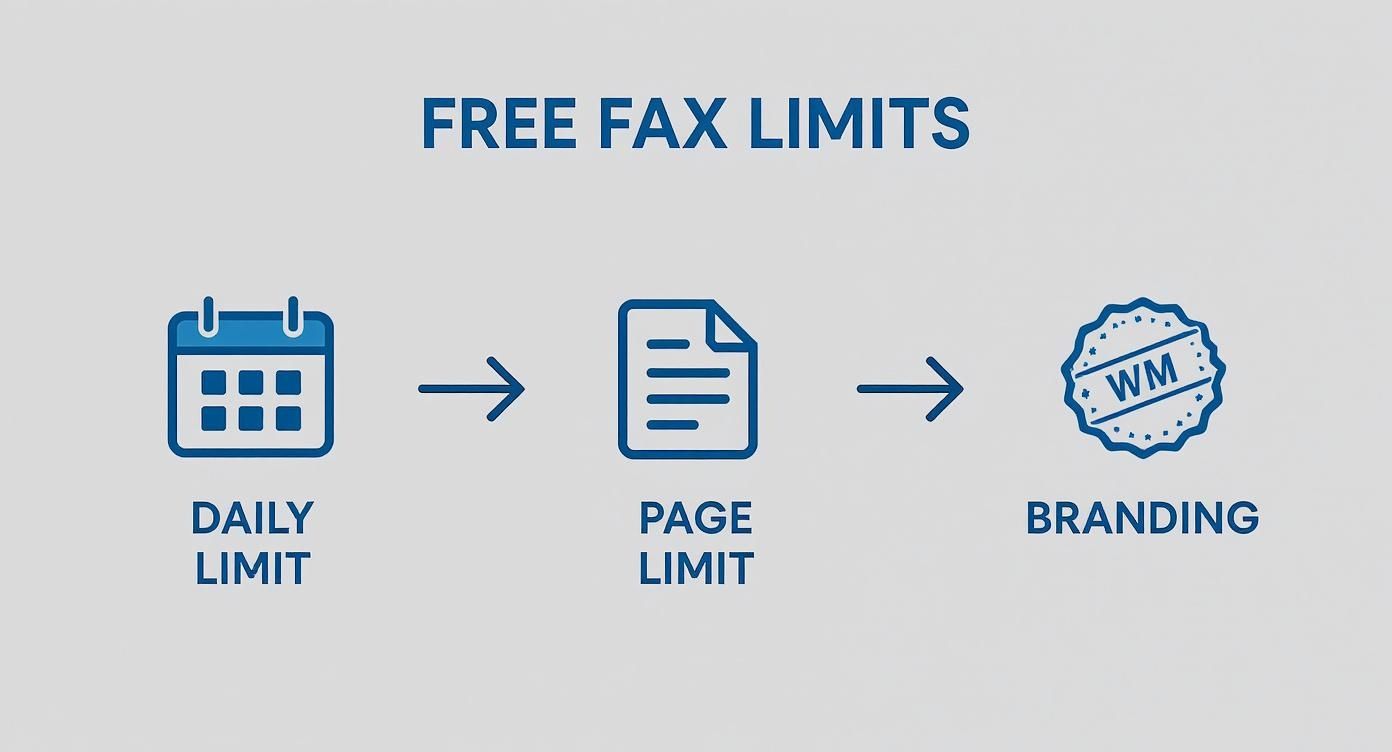
    • Daily Fax Limits: Most free platforms cap the number of faxes you can send within a 24-hour period, typically somewhere between two and five faxes per day.
    • Page Caps: This one is a biggie. You'll almost always find a limit on the number of pages you can send in a single fax. This is often just three to five pages, and that usually doesn't include the cover sheet.
    • Branded Cover Pages: To pay the bills, free services will almost always put their logo or a small ad on the cover page of your fax. It's their way of advertising.

    Before you jump in, it’s helpful to see these limitations laid out. They're pretty standard across the industry and are designed to handle casual, low-volume needs.

    Common Limitations of Free Online Fax Services

    Limitation Type Common Restriction What This Means for You
    Sending Volume 2-5 faxes per 24-hour period. Great for an occasional form, but not for sending multiple documents in one day.
    Page Count 3-5 pages per fax (excluding cover page). Your 10-page report won't make the cut. You'll need to use a paid service or split it up.
    Branding The service's logo or ad is placed on the cover page. Fine for personal use, but might not look professional for business communications.
    No Inbound Faxes You can only send faxes, not receive them. If you need a reply faxed back, a free service won't provide you with a number to receive it.

    Understanding these trade-offs is the key. They aren't meant to trick you; they're set up to make sure the service remains viable for those who truly need a quick, one-off solution.

    How These Limits Affect Your Decision

    These restrictions are tailor-made for common, simple tasks—think sending a signed permission slip back to your kid's school or faxing a single-page invoice. Platforms like CocoFax and FaxZero are popular because they nail this. They let you send a couple of faxes a day with a 3-page limit, and you don't even have to pull out your credit card. It's a straightforward deal that works, which is why some of these services see user satisfaction rates over 94%.

    But if you have a 10-page business proposal to send, a free service is probably not the right tool for the job. Likewise, that branded cover page might not project the polished image you want when sending a formal quote to a client.

    It all comes down to matching the service to your specific task. If you find you're constantly bumping up against these free limits, it might be time to look at other options. Our guide on how to fax from a computer without a fax machine dives into more flexible alternatives for when "free" just isn't enough. By weighing your needs against these common trade-offs, you can pick the right service with confidence.

    How to Send Your First Free Fax Online

    Ready to send that document? Let’s walk through the process. It's pretty similar across most platforms offering to send a fax online for free. We'll cover everything from prepping your file to confidently hitting that send button.

    Getting Your Document Ready for a Clean Transmission

    This first part happens before you even open a web browser. The quality of your original file is everything—it directly affects how clear the fax looks on the other end. A fuzzy or poorly formatted document will only get worse after going through the faxing process.

    To make sure your fax arrives looking crisp and professional, stick with the most common file formats. I've found these to be the most reliable:

    • PDF (.pdf): This is the undisputed champion for online faxing. PDFs lock in your formatting, so what you see is exactly what they get. No surprises.
    • Microsoft Word (.docx, .doc): A safe bet for any text-heavy documents. Almost every service supports it.
    • Image Files (.jpg, .png): Perfect for sending scans of signed papers or photos, but make sure the resolution is high enough to be readable.

    My Pro Tip: Before you upload anything, convert your document to a black-and-white PDF. Not only does this shrink the file size for a quicker transmission, but it also boosts the clarity. Remember, fax machines are built for high-contrast black and white, not shades of gray.

    Filling in Sender and Receiver Details—Accurately!

    This step seems almost too simple, but you'd be surprised how often a tiny typo here causes a fax to fail. It's the number one culprit. Take a few extra seconds to double-check every single detail.

    You'll need to pop in your name and email. The service uses your email to send you that all-important delivery confirmation.

    For the recipient, the fax number is critical. You absolutely have to include the full number with the area code. Sending internationally? You'll need the country code, and don't forget to drop any leading zeros. For instance, a number in the UK should start with +44.

    Keep in mind that free services always come with a few strings attached. This is where you’ll run into daily send limits, page caps, and branding on your faxes.

    Infographic showing a three-step flow of free online fax limits: Daily Limit, Page Limit, and Branding.

    This flow really captures the trade-offs: how many faxes you can send, how long they can be, and the fact that there will be a logo on the cover page. It’s the price of "free."

    What to Put on the Cover Page

    Most free services will create a cover page for you using the details you just entered. This is your chance to add a quick, clear message for the person on the other end, much like the body of an email.

    Make sure you write a clear subject line, like "Signed Contract for Project Alpha" or "Invoice #5821 Attached." Then, add a brief note explaining what the document is. Don't write a novel; just be concise. This cover page is also where the service will almost certainly place its logo or advertisement—that's how they keep the lights on.

    If you need more pointers, our guide on sending a free fax from your computer has some great extra tips.

    Uploading and Sending Your Fax

    Okay, you've prepped your file and filled in all the details. The last move is to upload your document. Look for a button that says "Browse" or "Upload File." Find your document, select it, and give everything on the screen one final once-over.

    Once you hit "Send," the system puts your fax in a queue. Now, you just have to be a little patient. It can take a few minutes for the fax to go through, especially if the recipient's line is busy or there's a lot of network traffic.

    The best part is the confirmation email. When that lands in your inbox, you have proof that your document arrived safe and sound.

    Keeping Your Documents Secure When Faxing Online

    A digital lock icon overlaid on a document, symbolizing online fax security.

    Let's be honest, you're usually faxing something important. Contracts, medical forms, tax documents—this isn't stuff you want floating around the internet. When you send a fax online for free, convenience is great, but the security of that information has to be priority number one. Free services can be a mixed bag when it comes to protecting your data, so you need to know what to look for.

    The absolute baseline for any secure service is encryption. It's the digital equivalent of putting your document in a locked safe before it travels. Look for services that use modern standards like SSL (Secure Sockets Layer) or its successor, TLS (Transport Layer Security). This scrambles your data during transit, making it completely unreadable to anyone who might try to intercept it.

    But what happens after your fax arrives at their server? That’s where the privacy policy comes in, and it's just as important.

    Spotting Privacy Red Flags

    A vague or missing privacy policy is a giant red flag. If a company isn't clear about how they handle your documents, you should assume the worst. Some free platforms make money by selling user data to third parties, and the last thing you want is the contents of your faxes getting scooped up.

    Here’s what I always check for in a privacy policy:

    • Data Retention: How long are they hanging onto your fax? A good service will delete your files from their servers right after the fax is successfully sent. There's no reason for them to keep it.
    • Information Sharing: The policy should have a crystal-clear statement saying they won't sell or share your personal info or the content of your faxes. If it's not there, walk away.
    • Clear Language: Is the policy written in dense legalese that no normal person can understand? That can be a deliberate tactic to obscure shady practices. Trustworthy companies are transparent.

    The gold standard for any online fax service is a commitment to user privacy that includes both strong technical safeguards and a clear, user-friendly policy. Your data's journey should be secure from the moment you click "send" until it's confirmed as delivered.

    Proactive Steps for Maximum Security

    You aren't just at the mercy of the service provider; you can take steps to protect yourself, too.

    Before you even upload a document, take a moment to review it. Is there any information the recipient absolutely doesn't need? Think about blacking out details like a full Social Security number or a bank account number if it's not essential. It’s a simple step that adds a powerful layer of protection.

    And finally, that delivery confirmation email is more than just a heads-up. It's your record that the document landed securely where it was supposed to go, not lost somewhere in a digital void. By choosing a reputable service and being a little cautious yourself, you can make sure your private information stays exactly that—private.

    Troubleshooting Common Online Faxing Problems

    So you’ve followed all the steps, hit "send" on your free fax, and… nothing. Or worse, you get a failure notification. Don't worry, it happens to the best of us. Even with a straightforward process, a small hiccup can derail a transmission. The good news is that most of these issues are easy to fix yourself.

    Nine times out of ten, the problem is a simple typo in the fax number. It's so easy to do. One wrong digit is all it takes for the whole thing to fail. Before you dive into any complex troubleshooting, your very first move should always be to double-check that number, area code and all.

    When Your Fax Just Won't Send

    If you’re sure the number is correct, the next place to look is the file you’re trying to send. Free services are fantastic, but they often have strict limits. A file that’s too big or in a weird format will get rejected outright. Most platforms handle standard PDFs and Word documents just fine, but if you're sending a massive high-resolution photo, you might be pushing the limits of the free plan.

    Another classic issue is simply a busy signal. Remember, unlike email, a fax machine is a one-track mind—it can only handle one thing at a time. If someone else is sending a fax to that same machine, your attempt will fail.

    A Little Trick I've Learned: When I suspect a busy line, I resist the urge to immediately hit "resend." I give it a solid 10-15 minutes. Just taking a short break often gives the other person's machine enough time to clear up, and my next attempt goes through without a hitch.

    If you’re still stuck, here are a few more things to try:

    • Make it a PDF: If you're working with an image or a complex document, try saving it as a simple, black-and-white PDF. This not only shrinks the file size but also puts it in a universally accepted format, which dramatically improves its chances.
    • Check the Service Status: Sometimes, the problem isn't on your end or the recipient's end. The online fax service itself could be having a momentary glitch. A quick look at their website or social media pages usually reveals if there are any system-wide issues.
    • Simplify the Document: Is your file loaded with colorful charts and high-res photos? Remember, traditional faxing strips all that away, converting everything to black and white anyway. Creating a simplified, text-focused version can often solve the problem.

    The Mystery of the "Sent but Not Received" Fax

    This is one of the most frustrating scenarios: you get a confirmation email saying your fax was sent successfully, but the person on the other end swears they never got it. What gives?

    Often, the fax did arrive, just not where they were expecting it. In a big office, it might have landed on a different machine down the hall. Or, it could be sitting unread in a digital fax folder if they use a fax-to-email service.

    Your best bet here is to follow up with the recipient. Give them the exact time of transmission from your confirmation receipt. That little piece of data can be a huge help for them to track it down on their side, whether it's in a paper tray or a digital inbox.

    Knowing When to Upgrade from a Free Service

    Being able to send a fax online for free is a lifesaver when you just need to send a quick, one-off document. It’s perfect for those rare moments. But at some point, the limitations of a free service can go from a minor inconvenience to a major headache. Knowing when you’ve hit that point is key to keeping your workflow smooth and professional.

    Think of it like this: a free photo editor is great for cropping a picture for social media, but you wouldn't use it to design a company's entire marketing brochure. Free fax services are built for the same kind of light-duty work—quick, infrequent, and non-critical tasks. The minute faxing becomes a regular part of how you do business, it’s probably time to look for a better tool.

    Recognizing the Tipping Point

    So, when have you officially outgrown a free plan? The most obvious sign is the page limit. Let's say you need to send a signed, 12-page lease agreement. A free service that caps you at three pages just isn't going to cut it. Trying to split that document into four separate faxes is clunky, unprofessional, and a surefire way to confuse the person on the other end.

    Another big one is the need to get a fax back. Free services are almost always a one-way street; you can send, but you can’t receive. If you're negotiating a contract and need the other party to fax back their signed copy, you’re stuck. You need a dedicated fax number for that, and that's a feature reserved for paid plans.

    Here are a few real-world scenarios that scream "it's time to upgrade":

    • You consistently need to send documents that are longer than 5 pages.
    • The mandatory branding on the free cover page just looks amateurish, and you need to maintain a professional image.
    • You absolutely need a dedicated number so clients, vendors, or colleagues can send faxes directly to you.
    • Sending a couple of faxes a day has become routine, and you keep bumping up against those daily limits.

    When your professional reputation is on the line, a clean, unbranded fax that sends reliably is worth the small cost. It tells the recipient you’re serious about your business.

    Exploring the "Almost Free" Middle Ground

    The good news is that "upgrading" doesn't have to mean jumping into an expensive monthly subscription. There’s a sweet spot in the middle—"almost free" or pay-per-fax plans. These are built for people who need more than what free offers but don't fax nearly enough to justify a full-blown subscription.

    For example, a service like SendItFax's Almost Free plan lets you pay a small, flat fee for each fax you send. This tiny investment gets you past the biggest hurdles of free services—like page limits and branding—without locking you into a recurring bill.

    Free vs Paid Online Fax A Quick Comparison

    Deciding when to upgrade? This table breaks down the key differences between free and paid services.

    Feature Free Plans Paid/Almost Free Plans
    Page Limit Typically 3-5 pages per fax Often 25+ pages, sometimes hundreds
    Cover Page Mandatory, with provider branding Optional, with no external branding
    Receiving Faxes Not available; send-only Yes, with a dedicated fax number
    Sending Volume Capped at 2-5 faxes per day High volume or unlimited sending
    Support Limited to FAQs or community forums Dedicated customer support available

    In the end, it's all about matching the tool to the task. If you’re spending more time figuring out how to work around the limitations of a free service than you are actually getting work done, that’s your cue. Stepping up to a low-cost paid plan can save you a ton of frustration and help you present a much more polished, professional image.

    Common Questions About Sending a Fax Online

    Even with a straightforward process, you probably have a few questions before you hit send. Let's tackle some of the most common ones I hear from people new to online faxing.

    Is Sending a Fax Online Actually Secure?

    This is a great question, and the short answer is: it depends on the service.

    The good ones use standard security measures like SSL/TLS encryption. Think of it as the same technology that protects your credit card information when you shop online—it scrambles the data so it's just gibberish to anyone trying to snoop.

    The real difference-maker, though, is the provider's privacy policy. A reputable service will be upfront about how long they store your faxes and will explicitly state they don't share or sell your data. If you're sending anything with sensitive personal or financial information, take five minutes to check their security promises. It's well worth the peace of mind.

    Can I Get Faxes Sent to Me for Free?

    Almost certainly not. Think of free online fax services as a one-way street: they’re fantastic for sending documents out, but they don't give you a number to receive them.

    Getting your own fax number is what allows people to send documents to you. That feature is pretty much always a part of a paid or "almost free" plan. If you need two-way faxing, you'll have to look beyond the completely free options.

    The bottom line is that free services trade features for cost. You get the core ability to send a document, but things like receiving faxes, removing ads, or sending large files are reserved for paid tiers.

    Do I Have to Install Special Software?

    Nope, and that’s the beauty of it. You don't need to download or install anything.

    Modern online faxing is completely web-based. If you have a web browser—like Chrome, Firefox, or Safari—on your computer or smartphone, you have everything you need. Just upload your file, enter the details, and you're good to go.

    Will the Person on the Other End Know I Used a Free Service?

    Yes, they probably will. This is the most common catch with free faxing.

    To pay their bills, free services typically add their own branding—a logo or a small ad—to the cover page that goes with your fax. For casual situations, like sending a signed permission slip to your kid's school, this is no big deal.

    But if you're sending a resume, a business contract, or anything where a professional image matters, that branding might look a bit out of place. For a completely clean, professional-looking fax, a paid plan is your best bet.


    Ready for a faxing solution that balances power with simplicity? SendItFax offers an Almost Free plan that removes branding, increases your page limit, and gives you priority delivery for just a tiny one-time fee. Send your next fax with confidence.