Tag: send fax from gmail

  • Send a Free Fax with Google A Practical Guide for 2026

    Send a Free Fax with Google A Practical Guide for 2026

    You might be surprised to learn that Google doesn't offer a direct, built-in fax service. But don't worry, that doesn't mean you're out of luck. You can absolutely send a free fax using your Google account—you just need to pair it with the right third-party tool. It’s a clever workaround that combines the convenience of your Google Drive documents with a web-based service like SendItFax to handle the transmission.

    Your Guide to Sending a Free Fax with Google

    A laptop on a wooden desk displays a 'Send Free Fax' webpage, alongside documents and a smartphone.

    The appeal of sending a free fax with Google is pretty clear: it lets you stick with the tools you already know and use every day. Your documents are probably already sitting in Google Drive or attached to an email in Gmail. So why not fax them directly from there? This guide will show you how to get it done without ever touching a physical fax machine.

    This method is a lifesaver for those occasional, urgent situations. Think about it—you need to send a signed contract, a time-sensitive medical form, or an invoice to a client who, for whatever reason, only accepts faxes. Instead of scrambling to find a local print-and-ship store, you can handle the entire process from your desk in just a few minutes.

    What You Need for Google Faxing

    So, what does it take to pull this off? The setup is refreshingly simple and only requires a couple of things working in tandem.

    • Your Google Account: This is your home base. It’s where your document—whether it’s a PDF in Drive or a file in a Gmail message—is stored and ready to go.
    • An Online Fax Service: A service like SendItFax acts as the digital middleman. It takes your file from the web and translates it into a signal that a traditional fax machine can understand.

    This combination provides a modern, practical solution to a surprisingly persistent need. If you want a broader overview of how these services work, our general guide on how to send a fax online is a great place to start.

    Key Takeaway: There’s no official "Google Fax" product. The magic happens when you use your existing Google account for document management and an external service to handle the actual faxing.

    To make it even clearer, this table breaks down the essential parts and why this method works so well.

    Google Faxing Essentials at a Glance

    Component Role in the Process Key Benefit
    Google Account Document storage and access (Drive/Gmail) Work with tools you already know and trust.
    Online Fax Service Transmits the document to a fax number No need for a clunky fax machine or phone line.
    Your Digital Document The file you need to send (PDF, DOCX) A completely digital and paperless workflow.

    Putting these pieces together gives you a powerful and efficient way to send faxes in 2026 without disrupting your digital routine.

    Why Is Faxing Still a Thing in 2026?

    Two people at a counter exchanging a document, with a 'FAX STILL NEEDED' sign prominently displayed.

    It sounds like a question with an obvious answer, but here we are in 2026, and faxing is far from obsolete. While email and cloud storage are king for most of our work, faxing still holds its ground in a few key, high-stakes industries. That’s exactly why you see so many people searching for "free fax with Google."

    Let's be honest: nobody wants a clunky fax machine. What they need is the ability to send a document with the same legal weight and verifiable delivery that a fax provides. Think of a freelancer who needs to send one signed W-9 form or a legal assistant transmitting time-sensitive court filings. They need the function, not the hardware.

    It's All About Security and Legal Weight

    For some professions, faxing isn't just an old habit—it's a hard requirement. The point-to-point connection of a traditional fax is seen as a secure channel with a built-in receipt, a paper trail that’s crucial where privacy and legal proof are non-negotiable.

    • Healthcare: Many doctors' offices and hospitals still depend on faxes to send patient records. It’s a long-established method for staying compliant with strict privacy laws like HIPAA.
    • Legal: Law firms often fax documents because the transmission receipt can serve as proof of delivery in legal proceedings.
    • Government: You'd be surprised how many local, state, and even federal agencies require you to submit official forms and applications by fax.

    The global market for fax services hit USD 3.31 billion in 2024 and is expected to climb to USD 4.48 billion by 2030. This isn't just a technology hanging on; it's a growing industry. You can dig into the full research about these market trends to see just how strong the demand remains.

    This growth is driven by the very people looking for a free fax with Google. They’re the ones who need the reliability of a fax but expect the ease of a modern digital tool. Online services like SendItFax are the perfect bridge, proving that faxing isn’t dead. It’s just moved online.

    Getting Your Fax Sent with Google and SendItFax

    Alright, so you see why online faxing is still a thing. Now for the practical part: how do you actually send one? Combining a service like SendItFax with your Google account makes this surprisingly simple. You can be done in just a few minutes, all from your browser.

    Let's imagine a common scenario. You're a freelancer who just landed a new client. They need the signed contract back ASAP, but their accounts department lives in the past and only accepts faxes. You have the signed PDF ready to go in your Google Drive. No need to hunt down a Kinko's.

    Prepping and Sending Your Document

    First, head over to the SendItFax website. You’ll immediately see that it’s built for one thing: getting a fax out the door, fast. There are no complicated sign-up hoops to jump through, which is exactly what you want when you're in a hurry.

    You'll start by plugging in the recipient’s fax number. The free service is limited to U.S. and Canadian numbers, so keep that in mind. Then, pop in your own details so they know who sent it. This is also where you can type a quick cover page note—something like, "Attn: Accounts Payable – Signed Contract for Project Alpha."

    Here's a look at the simple interface you'll be working with.

    As you can see, it's clean and to the point. The design strips away all the usual clutter, which makes sending your first free fax with Google a breeze.

    The last piece of the puzzle is your document. You can grab the file directly from your computer. If you have it stored in Google Drive, you’ll just need to download it to your desktop first, which only takes a second. Attach your file (the free service allows up to three pages) and hit "Send Fax."

    Real-World Tip: Before you hit send, triple-check the fax number. I can't tell you how many times a fax fails because of a single wrong digit. It’s the most common mistake and the easiest one to avoid.

    Once you send it, SendItFax takes over, translating your digital file into a signal a traditional fax machine can understand. You'll get an email confirmation as soon as it's delivered, giving you a handy record and some well-deserved peace of mind.

    If you're curious about the tech that makes this work, our guide on sending faxes by email offers a deeper look into how email gateways connect your digital world to old-school office hardware.

    Know The Limits: What "Free Faxing" Really Means

    Let's be realistic—while sending a free fax through Google is a fantastic trick to have up your sleeve for one-off tasks, you need to know where the guardrails are. Think of these free services as the perfect tool for a very specific job, not a full-blown replacement for a business-grade fax solution. They're built for convenience, not for volume.

    With a service like SendItFax, for instance, the free tier is pretty straightforward. You can send a document that's up to three pages long, and you're capped at five faxes per day. It's also worth noting that every fax you send will have a small SendItFax branding on the cover page. This is absolutely fine for firing off a signed permission slip or a quick proof of purchase.

    But what happens when "good enough" isn't enough?

    When the Free Tier Hits Its Ceiling

    The real decision to upgrade pops up when you run into issues of volume, document length, or just plain professionalism. I’ve seen it countless times: someone tries to send a 20-page legal filing or a new client proposal, and the free service just isn’t cut out for it. You can't have third-party branding all over a critical business document.

    That's where the limitations become a roadblock. This little decision path can help you visualize when to stick with free and when to consider a paid send.

    A black and white flowchart titled 'FAX DECISION PATH' detailing steps to prepare and send a fax.

    This flowchart simplifies the choice: is your document ready to go and does it fit within the free service's rules? If not, you have other options.

    The appeal of free is obvious. Data shows that around 45% of home offices rely on free apps for occasional faxing needs, saving themselves the $100-$300 annual cost of a dusty old fax machine. But there's a trade-off. Free tiers often have lower success rates with longer, more complex documents. It's how these services gently nudge frequent users toward paid plans, like paying just $1.99 for a 25-page fax that gets priority handling.

    My Two Cents: If your document is longer than three pages or needs to look completely professional and unbranded, a paid, one-time send is easily the better call.

    For those moments, upgrading to a "pay-as-you-go" option makes a world of difference. On SendItFax, that $1.99 plan not only removes the branding but also bumps your page limit to 25 pages and puts your fax in the priority queue.

    If you’re trying to figure out which plan makes the most sense for you, learning how to evaluating a fax online free trial is a great next step.

    Pro Tips for Secure and Professional Online Faxing

    Close-up of a person's hands writing on documents with a pen next to a tablet, with "Professional FAX TIPS" text overlay.

    It’s one thing to send a free fax with Google, but it’s another to make sure it lands on the other side looking sharp and staying private. I’ve learned over the years that a few simple habits can make all the difference between a successful transmission and a frustrating failure.

    First, always convert your file to a PDF before you attach it. I can't stress this enough. While most services accept different file types, PDFs are your best friend for locking in formatting. This simple step guarantees that the meticulously formatted contract or resume you see on your screen is exactly what the recipient sees on theirs—no weird font substitutions or broken layouts.

    Improving Delivery and Security

    Never underestimate the power of a good cover page. It’s not just a formality; it’s your fax’s personal GPS. Think about your document arriving at a large company with a single, shared fax machine. A simple cover sheet with a clear message, like "Attn: John Smith, HR Department – Signed Offer Letter," ensures your sensitive document goes directly to the right person, not lost in the shuffle.

    Speaking of sensitive documents, security is a huge reason to ditch that old public fax machine at the local library. When you use a reputable online fax service, your data is encrypted from the moment you hit send. Plus, you’re not leaving a physical copy of your private information sitting on a machine's tray for anyone to wander by and pick up.

    Key Insight: The move to online faxing has exploded. Since 2020, its use has shot up by a staggering 250%. Even more telling, free services now handle about 60% of all low-volume faxes, showing just how much people trust these platforms for important, one-off tasks.

    Sooner or later, you'll hit a busy signal. It happens. If your fax fails to send, don't panic. The service will almost always email you an alert. My advice? Just give it a few minutes and try again. More often than not, it's a temporary issue on their end, not yours.

    Following these practices elevates your fax from just "sent" to "delivered with professionalism." If you're curious about how tightly these tools work with Google, you can see the details on marketplace apps and their impressive success rates.

    Your Top Questions About Google Faxing Answered

    Even after walking through the steps, you might still have a few questions. That’s perfectly normal. Let's tackle some of the most common ones that come up when people start faxing from their Google accounts.

    Can I Receive Faxes This Way?

    This is probably the number one question I get. The short answer is no. The method we've covered is a one-way street, designed specifically for sending faxes from your Gmail or Google Drive.

    Receiving faxes requires a dedicated virtual fax number. This is a standard feature you'll find in the paid plans of most online fax services, which gives you a personal number where people can send faxes directly to your inbox.

    How Secure Is It, Really?

    It’s natural to worry about security, especially if you’re sending contracts or personal records. Is it safe? Absolutely. Using a reputable web fax service like SendItFax is actually much more secure than the old-school fax machine sitting in an open office.

    Your transmission is encrypted, and your documents never sit out in the open on a shared machine for anyone to see.

    A Quick Word on Privacy: For highly sensitive documents, I always recommend taking a minute to read the service's privacy policy. A trustworthy provider will be upfront about how they handle and protect your data.

    What if My Fax Fails to Send?

    Don't panic! If your fax doesn't go through, you'll get an email letting you know. Most of the time, the culprit is simple—a typo in the fax number or the receiving line being busy. Just give the number a quick double-check and try sending it one more time.

    By the way, if you run a business, providing clear answers like these is a great way to build trust with your own customers. If you want to get better at it, you can learn how to create an effective FAQ page for your own site.


    Ready to skip the machine and send a fax the easy way? Give SendItFax a try for a quick, secure, and free solution to get your documents delivered. Head over to https://senditfax.com to get started.

  • Your Guide to Sending a Fax via Email

    Your Guide to Sending a Fax via Email

    Ever wondered how an email can magically turn into a physical document coming out of a fax machine? It's not magic, but it's a clever bit of technology that uses an online fax service as a translator between your inbox and a traditional fax machine.

    You just write an email like you normally would, attach your document, and send it to a unique email address. This address is usually a combination of the recipient's fax number and the service's domain name, something like 15551234567@senditfax.com. From there, the service handles the rest, converting your digital file into a standard fax and sending it over the phone lines.

    How Sending a Fax via Email Actually Works

    For a lot of us, "faxing" still conjures up images of clunky office machines, constant paper jams, and that screeching dial-up sound. But the truth is, faxing is still a go-to method in fields like healthcare, law, and finance because it’s secure and legally recognized. Sending a fax from your email gives you the best of both worlds: the reliability of a fax with the convenience of an email.

    The process itself is surprisingly straightforward. You're not plugging your computer into a phone jack. Instead, you're using an online fax provider as the middleman. Think of the service as a digital courier that takes your email and makes sure it gets delivered to a fax machine.

    The Role of the Online Fax Service

    The online fax service is the engine making this all happen. The moment you hit "send" on your email, it travels to the provider's secure servers, where a few critical steps take place behind the scenes:

    • Conversion: The service takes your attachment—whether it's a PDF, DOCX, or another common file type—and converts it into a black-and-white image format (usually a TIFF file) that fax machines can understand.
    • Transmission: It then dials the recipient’s fax number using its own phone network and transmits the converted document, just as if it were sent from a physical fax machine.
    • Confirmation: Once the fax goes through successfully, the service sends a confirmation receipt right back to your email. You'll know for sure that your document was delivered.

    This whole process is completely seamless and usually takes just a few minutes. The person on the other end gets the fax on their machine as they normally would, with no idea it started its journey from an email inbox. No special equipment or software is needed on their end.

    To give you a clearer picture, here’s a quick breakdown of how the different pieces fit together.

    Fax via Email Process at a Glance

    Component What It Is Why It Matters
    Your Email Account Any standard email client (e.g., Gmail, Outlook). This is your starting point. It’s the familiar interface you use to compose and send the fax.
    Recipient Address The fax number combined with the service's domain. This special address tells the service exactly where to send the fax.
    Attached Document The file you want to fax (PDF, DOCX, etc.). This becomes the body of the fax itself after being converted by the service.
    Online Fax Service The intermediary platform (like SendItFax). It handles the technical heavy lifting: conversion, dialing, and transmission.
    Recipient's Fax Machine A standard, physical fax machine. Receives the document over a phone line, just like any other fax.

    This setup ensures that you can communicate with anyone who uses a fax machine, without ever needing one yourself.

    The process works just as smoothly in reverse, too. When someone sends a document to your virtual fax number, the service converts the incoming fax into a PDF and delivers it straight to your inbox. If you want to dive deeper, you can explore our guide on how fax to email services work. It’s a two-way street that makes professional communication incredibly flexible.

    How to Compose and Send Your First Email Fax

    Sending a fax from your email inbox is surprisingly simple once you get the hang of it. The biggest mental shift is learning how to "address" the fax. Instead of typing in a regular email address, you'll use a special format that combines the destination fax number with your service provider’s domain.

    Let's say you need to send a signed contract to a partner at fax number 1-555-123-4567. If you're using SendItFax, you’d simply pop this into the "To" field of your email: 15551234567@senditfax.com. That's it. This unique address is the magic command that tells the service to convert your email into a fax and dial the number.

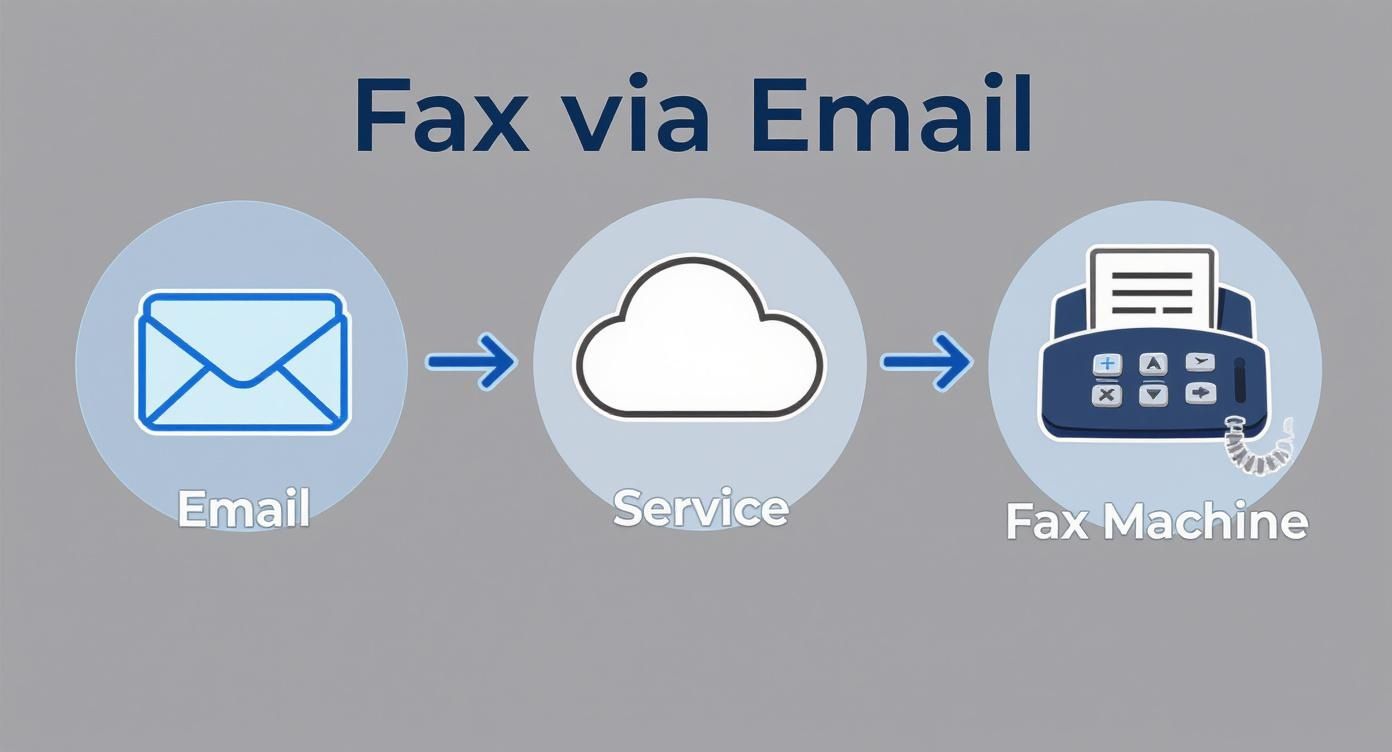
    This diagram breaks down exactly what happens behind the scenes after you hit send.

    Diagram showing the process of sending a fax via email through a cloud service to a fax machine.

    As you can see, your email doesn't go directly to the fax machine. It's routed through a cloud service that acts as a translator, converting your digital files into a format the fax machine can understand and print.

    Your Email Becomes the Cover Page

    Now for the cover page. The great thing about email faxing is that you don’t need to create a separate one. The service automatically generates a professional-looking cover sheet using the subject and body of your email.

    Think of the email's subject line as the headline for your fax. Make it count. Something direct like "Subject: Signed Agreement for Project Phoenix" immediately tells the recipient what they're looking at.

    The body of your email is where you'll put the standard cover page details. I always recommend including the basics to make sure your fax gets to the right person without any confusion.

    • To: Recipient's Full Name and Company
    • From: Your Full Name and Company
    • Date: The date you're sending it
    • Pages: Total page count (including the cover sheet itself)
    • RE: A quick one-liner about the document's purpose

    Pro Tip: Don't skip the details in the email body. A busy office might receive dozens of faxes a day. A clear, informative cover page ensures your important document doesn't end up in the wrong hands or get lost in the shuffle.

    If you're sending faxes internationally and need a refresher on country codes and proper formatting, our guide on what is a fax number has all the details you’ll need.

    Attaching Your Document for a Perfect Send

    The last piece of the puzzle is attaching your file. Most modern fax services, including SendItFax, handle the most common formats with ease—think PDF, DOC, and DOCX.

    But here's a lesson from experience: fax is a black-and-white medium. Fancy formatting, colorful graphics, or complex tables in a Word document can sometimes get scrambled in translation, resulting in a messy or unreadable fax on the other end.

    For anything important—contracts, legal notices, invoices—my advice is to always use a PDF. A PDF locks in the layout, fonts, and formatting. This ensures what you see on your screen is exactly what prints out of the recipient's machine. It's a simple step that prevents a lot of potential headaches like blurry text or jumbled pages.

    Why Businesses Still Depend on Digital Faxing

    It’s easy to think of faxing as something that went out with dial-up modems, but sending a fax via email is still a critical tool in many industries. It all boils down to two things you just can't get from a standard email: rock-solid security and legal proof of delivery.

    When you're dealing with sensitive information, regular email is often a weak link. It’s typically unencrypted, which means it can be intercepted. Online faxing, however, is a different beast. It sends your documents through secure, private networks, giving you the kind of protection needed to meet tough regulations.

    Person reviewing a document in front of a laptop with SecureFaxing logo, suggesting online document processing.

    This is why you'll still find it heavily used in healthcare, law, and finance. A doctor's office can send patient files knowing the process is HIPAA compliant, or a legal team can securely send a contract without the risk of it being intercepted.

    The Power of Verifiable Proof

    What truly sets online faxing apart is the delivery confirmation receipt. Think of it as a certified letter for the digital age. Unlike an email's "read receipt," which is easily ignored, a fax confirmation is legally binding proof that your document arrived.

    This little report is packed with metadata that can hold up in court:

    • The exact date and time the transmission finished.
    • The sender's and recipient's fax numbers.
    • A count of the pages that were successfully sent.
    • A clear status message, like "OK" or "Success."

    For anyone who's ever needed to prove they sent something by a deadline—like a contractor submitting a bid—this confirmation is priceless. It eliminates any "I never got it" arguments.

    Sending a fax via email isn't just about getting a document from here to there. It's about creating a secure, legally-binding paper trail that standard email simply can't match.

    A Technology That Refuses to Fade

    Believe it or not, faxing is still a massive industry. Back in 2019, the U.S. healthcare system alone sent over 9 billion faxes out of a global total of 17 billion. In fact, 70% of all communication in healthcare still happens via fax.

    The numbers don't lie. The global fax services market was valued at $3.3 billion in 2024 and is expected to grow to $4.47 billion by 2030. You can read a full breakdown of fax technology's continued growth to see just how relevant it remains.

    This isn't about being old-fashioned; it's about being practical. When security, compliance, and legal proof are on the line, the ability to send a fax via email is still an indispensable business tool.

    How to Choose the Right Online Fax Service

    Picking the right service to send a fax via email isn't a one-size-fits-all deal. It really boils down to your specific needs. Are you just sending one document, or do you need a rock-solid solution for your business day in and day out? Figuring that out first will point you in the right direction.

    The choice often comes down to free versus paid services, and each has its place. Free options are great for that rare, one-off fax that isn’t super sensitive. Need to send a signed permission slip to your kid's school? A free service will get the job done just fine.

    But there's always a catch. Free tiers usually have strict page limits, slap ads on your cover sheet, and offer little to no customer support if something goes wrong.

    A person works on a laptop and fills out paperwork, with a text overlay promoting a fax service.

    Paid plans, on the other hand, are built for more serious work. They typically give you a dedicated fax number, much higher page limits, and essential features like HIPAA compliance, which is non-negotiable if you’re handling medical records.

    Comparing Free vs Paid Fax via Email Services

    To make an informed choice, it helps to see the key differences side-by-side. Here’s a quick breakdown of what you can generally expect from free versus paid online fax providers.

    Feature Free Services Paid Services
    Cost $0 upfront cost Monthly or annual subscription fee
    Page Limits Very limited (e.g., 5-10 pages per fax/month) High volume (hundreds or thousands of pages)
    Dedicated Number Not usually offered Yes, often with a choice of local or toll-free
    Security Basic; may lack advanced encryption Enhanced security, often with HIPAA compliance
    Cover Pages Often branded with service provider's ads Customizable, professional, and ad-free
    Support Limited to email or community forums Priority support (phone, chat, email)
    Receiving Faxes Typically not supported Full send and receive capabilities
    Best For Occasional, non-sensitive personal use Business, legal, and healthcare communications

    Ultimately, free services are a great entry point, but businesses and professionals who rely on faxing for critical documents will find the features and reliability of a paid plan to be a worthwhile investment.

    Look Beyond the Price Tag

    Once you've decided between free and paid, it's time to dig into the details. The little features can make a huge difference in how smoothly things run.

    Keep an eye out for these key capabilities:

    • International Faxing: Planning to send documents overseas? First, check if the service even supports international numbers and then look at the rates. They can vary quite a bit.
    • Mobile Apps: If you’re not always at your desk, a good mobile app is a lifesaver. It lets you send and manage faxes right from your phone.
    • Cloud Storage Integrations: Services that link up with Google Drive, Dropbox, or OneDrive are incredibly convenient. You can attach files directly from the cloud without having to download and re-upload them.
    • API Access: This is a big one for businesses. API access lets your developers integrate faxing directly into the software you already use, like a CRM or an electronic health record (EHR) system.

    Thinking through these features will help you find a service that genuinely matches how you work. For a direct comparison of different providers, check out our detailed online fax services comparison.

    Understanding the Pricing Models

    Online fax providers generally stick to one of two pricing structures: a monthly subscription or a pay-per-fax model. Subscriptions are perfect if you send a steady stream of faxes. You get a set number of pages each month and pay a small fee for any you send over the limit.

    On the flip side, a pay-per-fax model—like we offer at SendItFax—is ideal if you only send faxes every now and then. You just pay for what you use, with no monthly commitment. It’s a great fit for individuals and small businesses with unpredictable faxing needs.

    Unlike a standard email, a fax gives you a verifiable receipt that proves your document was successfully delivered. This is a huge deal for contracts, legal notices, and other time-sensitive paperwork. It’s a major reason why faxing is still so trusted.

    In fact, that security and reliability are why 90% of organizations are looking into modern online faxing solutions. They’re actively trying to bring this trusted technology into their current workflows. Choosing the right service is the first step in making that upgrade.

    Troubleshooting Common Email to Fax Issues

    So you've hit "send" on your fax. What happens next? Unlike a regular email that just lands in your sent folder, sending a fax this way involves a critical feedback loop: the delivery confirmation. Think of it as your official receipt for the transmission.

    When everything goes right, you'll get a success notification. This email is your proof of delivery, confirming the recipient's fax number, the exact time the fax went through, and how many pages were sent. It’s a good habit to save these confirmations, especially for important documents, as they can serve as a legally recognized record.

    But what if you get a failure notification? Don’t worry. This isn’t just a dead end; it’s a diagnostic tool designed to tell you exactly what went wrong so you can fix it.

    Decoding Common Fax Failure Notices

    Figuring out why a fax failed is the first step to resending it successfully. Most of the time, the error message points to just a handful of common issues.

    For instance, the classic "busy signal" means the fax machine on the other end was already in use when the service tried to call. Most online fax services are smart enough to automatically retry a few times. If it keeps failing due to a busy signal, it might be worth giving the recipient a quick call to make sure their machine is on and ready.

    Another common slip-up is an invalid number. It’s surprisingly easy to mistype a digit in the email address format. A simple typo in an address like 15551234567@senditfax.com is enough to stop the transmission in its tracks. A quick double-check of the numbers before sending can save you a headache.

    Key Takeaway: A failure notice isn't just an error—it's a diagnostic tool. Read it carefully. It almost always contains the specific reason your fax didn't go through, saving you from guessing what went wrong.

    A Practical Troubleshooting Checklist

    If the failure notice isn't about a busy line or a wrong number, it's time to look at what you sent. Here are the most frequent user-side issues I’ve seen that can cause a fax to fail.

    • Check Your File Format: Did you attach the right kind of file? Most services, including SendItFax, are built to handle common document types like PDF, DOC, and DOCX. Trying to send something like an image file (PNG, JPG) or a spreadsheet will usually result in an immediate rejection.

    • Watch the File Size: Is your document massive? If you’ve got a file loaded with high-resolution images, its size might exceed the service's limit. The fix is usually simple: try compressing the file or re-saving it as a smaller PDF.

    • Confirm Your Email Address: If you're on a paid plan, your account is likely tied to a specific email address for security. Trying to send a fax from an unregistered or unauthorized email account will cause the service to block it.

    • Review Page Limits: This is a big one for free services. They often have hard limits on how much you can send. SendItFax’s free plan, for example, has a three-page maximum. If your document is four pages long, it just won't go through.

    Running through this quick checklist usually helps pinpoint the problem in just a minute or two, letting you correct the issue and get your document successfully on its way.

    Common Questions About Email Faxing

    It's natural to have a few questions when you're moving from a classic fax machine to a more modern approach. People often wonder if the convenience of email comes at the cost of what makes faxing reliable in the first place. Let's dig into some of the most common concerns.

    Can I Get Faxes in My Email, Too?

    Absolutely. This is one of the best parts of switching to an online fax service. When you sign up for a paid plan, you're assigned your own dedicated virtual fax number. Anyone can send a fax to that number from a traditional machine, just like they always have.

    The magic happens on the backend: the service catches the incoming fax, converts it into a PDF, and drops it right into your email inbox. It essentially turns your email into a two-way street for all your faxing needs, letting you send, receive, and manage everything digitally. No paper, no ink, no clunky machine.

    Is It Secure and Legally Binding?

    This is the big one, and for good reason. Security and legal validity are often the entire point of faxing. The good news is that high-quality online fax services are built from the ground up with security in mind.

    When you send a fax via email, the service doesn't just forward your email. It uses robust encryption, like SSL/TLS, to protect the data from the moment you hit "send" until it's delivered. This is the same level of security that protects your online banking and shopping, which is a world away from the generally unencrypted nature of a standard email.

    Beyond that, professional-grade services are often built to meet tough industry standards.

    • HIPAA Compliance: This is a deal-breaker in the medical field. Compliant services are designed to safeguard Protected Health Information (PHI) according to strict federal privacy and security rules.
    • Legal Validity: That delivery confirmation you get in your email is more than just a notification—it's your proof of delivery. It contains all the metadata needed (time, date, page count) to stand up as legally admissible evidence that your document was successfully transmitted.

    Because of these security protocols and the detailed transmission records, a document faxed through a reputable online service is considered just as legally binding as one sent from a traditional fax machine. You get a secure, verifiable paper trail without the paper.

    How Do I Send a Fax Internationally?

    Sending documents across the globe is surprisingly straightforward. The process is almost exactly the same as sending one domestically, with just a small tweak to the "To" address. You just have to add the country code and city/area code before the local fax number.

    For instance, if you were sending a fax to London (country code 44, city code 20), the email address would look something like 442071234567@faxservice.com. Just be sure to drop the leading zero from the city code if it has one—that's a common mistake.

    Of course, international rates will likely be different from domestic ones, so it's always a good idea to check your provider's pricing plan first. Still, being able to securely send a document to another country from your desk in a matter of minutes is a huge plus.


    Ready to send a fax the easy way? With SendItFax, you can send your documents securely from any browser without needing an account. Try SendItFax for free today