Receiving a fax through your email is surprisingly simple. You just sign up with an online fax service, they give you a virtual fax number, and you set it up to send any incoming faxes straight to your inbox as a PDF. It’s a modern twist that completely sidesteps the need for a physical machine, paper, or ink, effectively pulling a legacy tool into today's digital workflow.
Why Receiving Faxes By Email Is a Game Changer
Let's be honest—the screech and buzz of an old-school fax machine feels like a relic. But the reality is that for a lot of fields like healthcare, law, and real estate, faxing is still a non-negotiable, secure way to send signed documents. Figuring out how to receive a fax via email isn't just a neat trick; it's about making a necessary tool fit the way we actually work now.
This approach blends the tried-and-true security of faxing with the sheer convenience of email. Instead of being chained to a desk, you can get critical documents on your laptop, tablet, or even your phone, as long as you have an internet connection.
The Core Benefits of Email-Based Faxing
The upsides to making this switch are pretty clear right from the start. First off, you'll see some real cost savings. Forget about buying and maintaining a clunky machine, and say goodbye to the constant drain of paying for paper, ink, and a dedicated phone line. It's also a great move toward a greener, paperless office.
But it’s not just about the money. The freedom you get is huge. Imagine getting a time-sensitive legal document while you're on a business trip or a signed contract when you're working from home. Online faxing makes that a reality by dropping faxes right into your inbox like any other email attachment.
Here are a few of the key advantages:
- Instant Access: You can read, save, or forward faxes from any device, anywhere in the world.
- Improved Organization: Digital faxes are easy to search for in your email. No more digging through filing cabinets.
- Enhanced Security: The best services use encryption, so sensitive documents aren't just sitting out in the open on a shared fax machine tray.
How Does It Actually Work?
The tech behind these fax-to-email services is refreshingly straightforward. When someone sends a fax to your special virtual fax number, the service's servers catch it. They act as a digital translator, taking that old analog signal, converting it into a file (usually a PDF), and then shooting it over to you as an email attachment.
The brilliant part is that the sender has no idea anything is different. They just use their regular fax machine, dial your number, and send the document. On their end, it's business as usual; they don't know it's landing in your inbox instead of printing out on paper.
This behind-the-scenes conversion is what bridges the gap between old and new technology so effectively. It doesn't force anyone to change their habits. The global fax services market is now valued at $3.3 billion in 2024, and that growth is almost entirely because of these online solutions. Even with over 17 million fax machines still humming away worldwide, this digital shift offers a modern, practical way for businesses to keep up. If you're curious, you can learn more about the persistent relevance of business faxing from Business.com.
Choosing the Right Fax to Email Service for Your Needs
Picking the right fax-to-email service is honestly the most important part of this whole process. There are dozens of options out there, and it’s way too easy to get bogged down in endless feature lists and confusing pricing tiers.
The secret is to think beyond the monthly price tag. You need to find a service that actually fits how you work, whether you’re a freelancer who just needs to send one contract a year or a busy medical office that handles sensitive patient files all day long. Getting this right saves you money and headaches. Getting it wrong means surprise fees and a lot of frustration.
Cost Versus Value: Finding the Right Pricing Model
First things first, let's talk about money. Online fax services typically come in three flavors, and each one is built for a different kind of user.
Subscription Services: This is the go-to model for most businesses. You pay a set fee each month for a certain number of pages. If you have a pretty good idea of how many faxes you'll be handling, this almost always offers the best cost-per-page and is perfect for predictable workflows.
Pay-Per-Use Services: Just need to fax something occasionally? This is for you. You only pay for the pages you actually send or receive, with no monthly commitment hanging over your head. The per-page cost is higher, sure, but you’re not paying for a service you barely touch.
Free Tiers: A lot of providers have a free plan, and they can be great for receiving a few faxes here and there. But be aware of the trade-offs—they usually come with strict page limits, the provider’s branding slapped on your faxes, and little to no customer support when you need it.
As a rule of thumb, if you expect to receive more than 20-30 pages a month, a subscription plan is almost always the smarter financial choice.
Core Features That Actually Matter
Once you have a pricing model in mind, it's time to dig into the features. Don’t get distracted by a long list of shiny objects you’ll never use. Focus on the practical stuff that makes a real difference day-to-day.
A big one is your virtual fax number. Do you need a local number to look like you have an office in a specific city? Or is a toll-free number better for your national customer base? Right after that, you need to ask if the service lets you port your existing fax number. This is a huge deal for established businesses.
Porting your number is a game-changer. It lets you keep the fax number your clients and vendors have used for years, avoiding the nightmare of updating business cards, websites, and all your contact lists. The process can take a few weeks, but it's completely worth it for that seamless continuity.
Here are a few other must-haves to look for:
- File Format Support: Everyone supports PDFs. But what about Word documents (DOCX), images (JPG), or high-quality scans (TIFF)? Make sure the service can handle the file types you actually work with.
- Mobile Apps: If you're not chained to your desk, a good mobile app for iOS or Android is a necessity. It lets you check, sign, and manage faxes right from your phone.
- International Faxing: Working with clients overseas? Double-check that the service can send and receive faxes internationally and get a clear picture of the costs—they're almost always higher than domestic rates.
To see a head-to-head breakdown of what different providers offer, check out our online fax services comparison for a much deeper analysis.
Security and Compliance: The Non-Negotiables
For anyone in healthcare, law, or finance, security isn’t just a nice-to-have; it's a legal requirement. If your faxes contain Protected Health Information (PHI) or other sensitive data, HIPAA compliance is non-negotiable.
A truly HIPAA-compliant service will use strong encryption for your faxes both in transit and while stored on their servers. More importantly, they must be willing to sign a Business Associate Agreement (BAA) with you. Without a BAA, you are not compliant.
Even if you don't fall under HIPAA, strong security is just smart business. Look for services that offer two-factor authentication (2FA). It adds a critical second layer of protection to your account, so even if someone gets your password, they can't access your private faxes.
Making Your Final Choice
To tie it all together, here’s a quick look at what you can generally expect from each type of service.
Online Fax Service Feature Comparison
This table breaks down the typical features you'll find with each pricing model, helping you match your needs to the right kind of service.
| Feature | Free Tier Services | Pay-Per-Use Services | Subscription Services |
|---|---|---|---|
| Best For | Very infrequent users, personal one-off needs | Occasional business or individual users | Businesses with consistent, moderate-to-high volume |
| Fax Number | Usually a shared or randomly assigned number | Dedicated number often included | Dedicated local or toll-free number included |
| Page Limits | Very low (e.g., 10-20 pages/month) | No monthly limit; you pay for each page | Generous monthly allowance (e.g., 300+ pages) |
| Security Features | Basic security, rarely HIPAA compliant | Standard encryption, some offer compliance | Advanced security, HIPAA compliance is common |
| Porting Existing Number | Almost never available | Sometimes available for an additional fee | Usually a standard feature |
By weighing these factors against what you truly need, you can pick a service that doesn't just work, but actually makes your job easier.
Your Guide to Setup and Configuration
Alright, let's get into the practical side of things. Once you’ve picked your fax-to-email provider, the actual setup is usually a breeze—you can often be up and running in just a few minutes. This is where the concept of digital faxing becomes a real, working tool for your business.
The first thing you'll do is create your account. Right after that, you’ll face the most important choice in the whole process: what your fax number will be.
Selecting or Porting Your Fax Number
Think of your virtual fax number as the digital mailbox for your faxes. Providers almost always give you two ways to go about this, and the right choice really just depends on your current business situation.
Get a New Number: This is the quickest way to get started. You can pick a brand-new number and often choose a local area code to establish a community presence. Or, you could opt for a toll-free prefix like 800 or 888 to give your business a more professional, nationwide feel.
Port Your Existing Number: What if your clients already know and use your current fax number? No problem. You can bring it with you through a process called porting. This just means you're transferring your number from the old service to the new one. You'll have to sign a Letter of Authorization (LOA) to prove you own the number, but it's a critical step for a smooth transition.
A Quick Word of Advice: If you decide to port your number, be patient. It can take anywhere from a few days to a couple of weeks. Whatever you do, don't cancel your old fax service until the new provider gives you the green light that the port is complete. Jumping the gun can create a dead zone where you miss incoming faxes.
With your number sorted, the next step is to tell the service where to actually send your faxes.
Configuring Your Email Forwarding
This is the heart of receiving a fax via email. Dive into your service’s dashboard or account settings, and you'll find a section for notifications or inbound routing. This is where you’ll enter the email address (or addresses) that should receive your faxes.
If you're a one-person shop, just pop in your main email address and you're done. But what if a whole team needs to see the faxes? Most services let you set up a distribution list.
For instance, you could have faxes automatically sent to:
invoices@yourcompany.comsarah.p@yourcompany.comjohn.d@yourcompany.com
This is a game-changer for an accounting team. An invoice comes in, and everyone who needs to see it gets it instantly. No more bottlenecks or papers getting lost on a desk. For a deeper dive, you can explore the best ways to manage your fax-to-email workflow in our other guide.
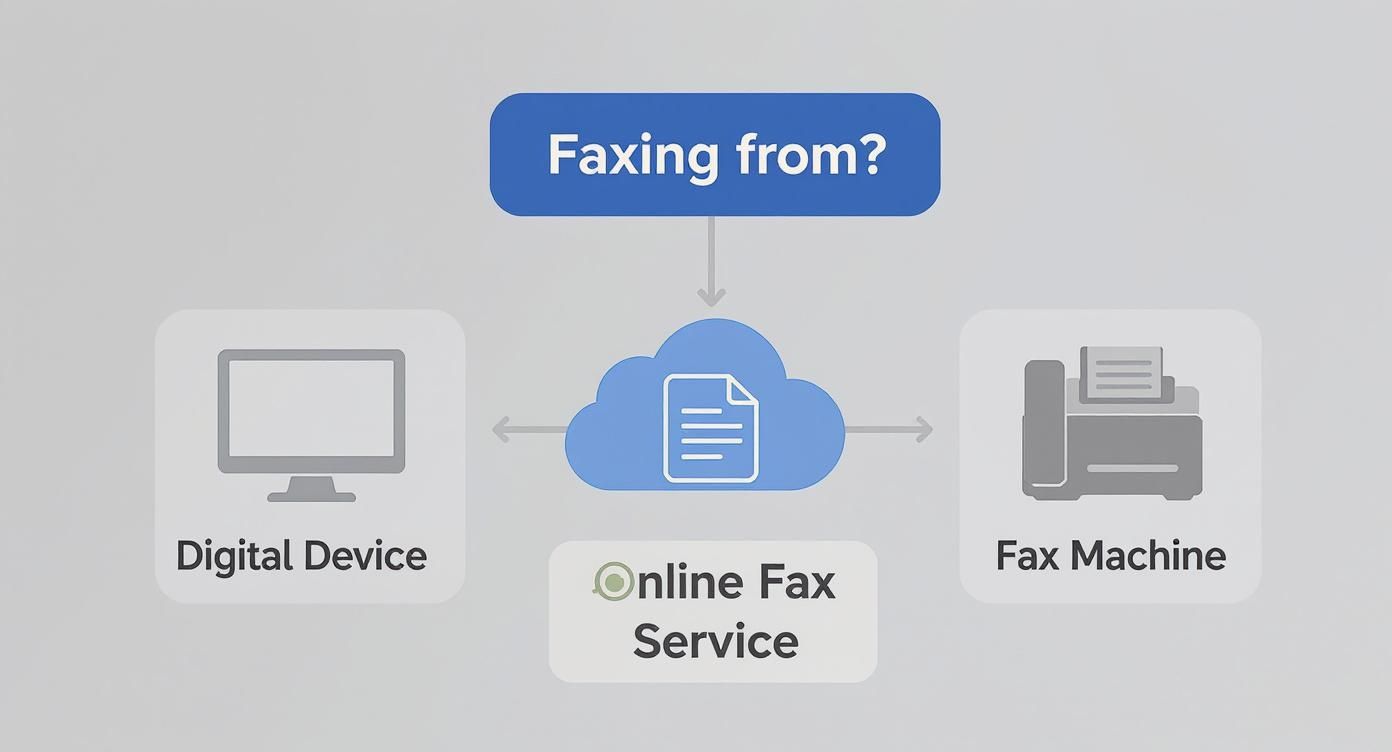
This simple flowchart breaks down the main things to think about when choosing a service, which in turn affects how you'll set it up.
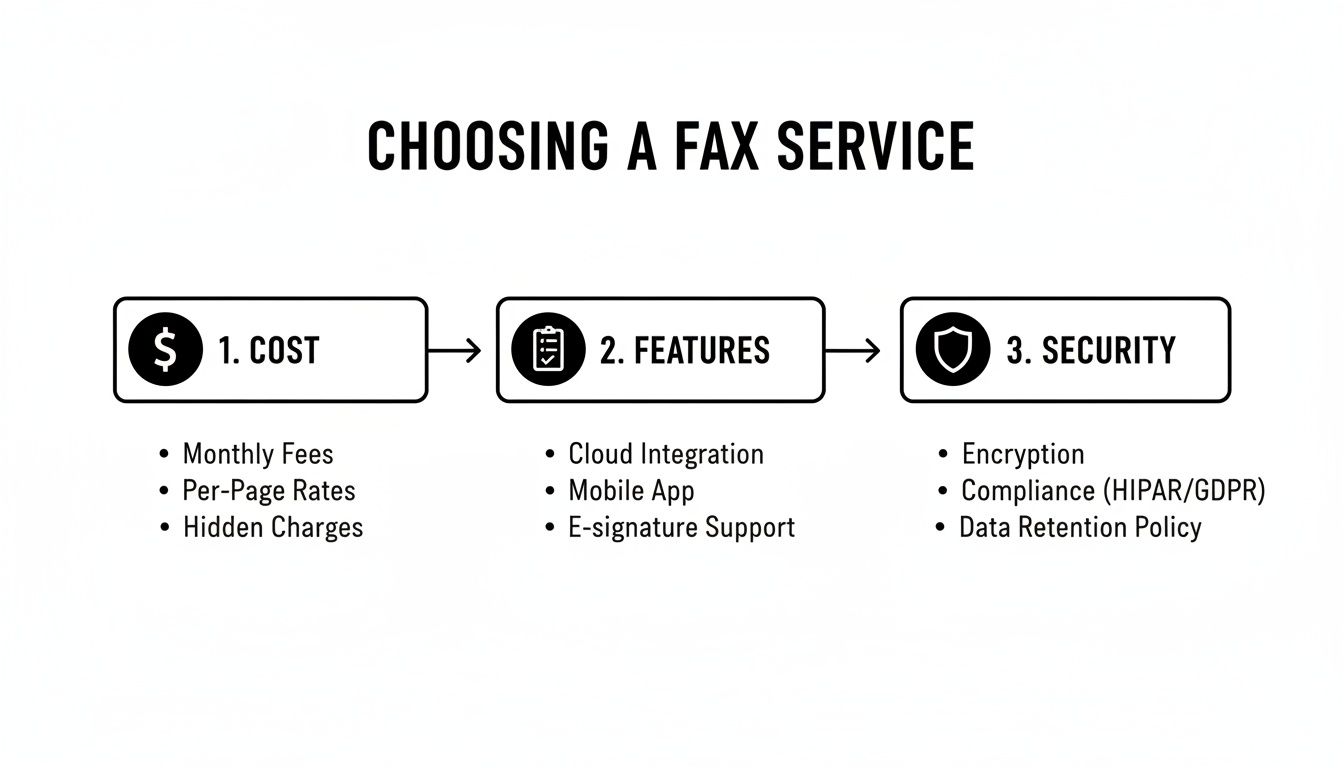
As you can see, the decisions you make around cost, features, and security will directly shape how you configure the system for your specific needs.
Customizing Attachment and Notification Settings
You’re almost there! The last few tweaks involve deciding how you receive your faxes. These might seem like small details, but they can make a huge difference in your day-to-day efficiency.
Choosing Your File Format
By default, virtually every service delivers faxes as PDF attachments. It’s the universal standard for a reason. That said, some providers give you other choices for specific situations.
| File Format | Best For | Considerations |
|---|---|---|
| Just about everything; easy to open, share, and store. | This is the industry-standard choice. | |
| TIFF | High-quality archives, especially for detailed scans. | Files can be quite a bit larger. |
| JPG/PNG | Faxes that are mostly images instead of text. | Not great for documents with multiple pages. |
Honestly, for 99% of users, sticking with PDF is the smartest move. It’s secure, compatible with everything, and keeps your documents looking just as they were sent.
Setting Up Notifications
Your provider might offer more than just an email when a fax arrives. For anyone in a time-sensitive field, getting an immediate SMS text alert can be incredibly valuable.
Think about a contractor waiting on a signed change order. Instead of nervously checking their inbox, a quick text message lets them know the document has landed, so they can take action right away. Check your account settings for these options—they can be a fantastic tool for staying on top of your game.
And with that, your system is fully configured and ready to go. You’ve successfully brought a classic piece of business technology into your modern workflow.
Getting Your Digital Faxes Organized
So, faxes are now hitting your inbox. Great! But let's be honest, a digital mess is still a mess. If you just let those faxes pile up, you’re trading a teetering stack of paper on your desk for a chaotic, overflowing inbox. The real win comes from building a smart system to organize and archive these documents automatically.
This isn't just about being neat. It's about being able to pull up a specific contract or client invoice in seconds, not minutes. It’s about cutting out the administrative drag that slows everyone down.
Let Your Inbox Do the Heavy Lifting
First things first: stop sorting faxes by hand. Your email client is smarter than you think. Both Gmail and Outlook have powerful filtering tools that can act as your personal filing assistant.
The easiest way to start is by creating a rule that spots emails coming from your fax service’s address (something like fax@yourprovider.com). Tell the rule to whisk any email from that sender straight into a dedicated folder, maybe named "Incoming Faxes."
Just like that, your main inbox is clean again, and all your faxes are neatly corralled in one place.
Pro Tip: Don't stop at just one folder. Get granular. You can create rules that scan the subject line for a client’s name or a specific fax number and file the message into a subfolder like “Faxes from Client ABC.” This is where the real automation magic happens.
Name Your Files Like You Plan to Find Them Again
With your faxes sorted, the next hurdle is the attachments themselves. A file named "Fax_2024-10-26.pdf" is practically invisible when you're frantically searching for something three months from now. A consistent, descriptive naming convention is your best friend here.
Think about what information you'd need to identify a file at a glance.
- Invoices:
INV_ClientName_ProjectName_YYYY-MM-DD.pdf - Contracts:
CONTRACT_VendorName_ServiceType_YYYY-MM-DD.pdf - Medical Records:
PATIENTID_RecordType_YYYY-MM-DD.pdf
This kind of discipline transforms your digital files from a random heap into a searchable database. Finding a document becomes as simple as typing a client's name or a project code into your computer's search bar.
Connect Everything to the Cloud
Saving faxes to your computer is fine, but syncing them with a cloud storage service like Google Drive, Dropbox, or OneDrive is a game-changer. It creates a single, secure, and shareable archive that your whole team can access.
Many online fax services offer direct integrations for exactly this reason. You can often set up a rule within the fax service itself to automatically send a copy of every incoming fax attachment straight to a specific cloud folder. This creates a bulletproof backup and a central hub for all your faxed documents, completely separate from your email.
The efficiency gains are undeniable. A 2022-2023 healthcare study that processed 4,504 electronic faxes found the average document was just 5.6 pages. In fact, 43.3% of the faxes were only three pages long, making them perfectly suited for quick email delivery and cloud storage. It’s a world away from a traditional fax machine, which can waste minutes on redial delays. You can read more about the speed and reliability of modern faxing on FaxBurner.com.
By combining automated email rules, smart file naming, and cloud storage, you build a hands-off system that just works. Receiving a fax via email becomes a genuinely streamlined part of your workflow, not just another task to manage.
Navigating Security and Compliance in Digital Faxing
When you’re dealing with sensitive information, security isn’t just another feature on a list—it's everything. The good news is that learning how to receive a fax via email almost always means you’re upgrading your security, not compromising it.
Just think about that old fax machine in the corner office. It spits out documents and leaves them sitting in a tray, in plain sight for anyone walking by. That’s a physical security risk that online faxing eliminates from day one. A digital fax lands securely in your password-protected inbox, giving you a level of privacy that old-school hardware never could.
Understanding Encryption and Compliance
The real muscle behind digital fax security is encryption. Any reputable service uses SSL/TLS encryption to shield your documents as they travel from the sender to their servers, and then from their servers to your email. It's the same trusted technology that protects your financial data when you shop online.
But it doesn't stop there. The best services also use at-rest encryption, meaning your faxes are stored in a scrambled, unreadable format on their servers. For anyone in healthcare, finance, or law, this isn't just a nice-to-have; it's a must.
If you handle patient information, HIPAA compliance is non-negotiable. A truly compliant provider will do more than just use strong encryption—they'll sign a Business Associate Agreement (BAA). This is a critical legal document that proves the provider is committed to safeguarding protected health information as required by federal law.
A healthcare study that put eFax systems to the test underscored just how important a reliable setup is. The initial fax failure rate was a surprisingly high 37.7%, but with automated retries, that number plummeted to just 9.9%. This really shows how modern services build in a resilience that’s crucial for protecting sensitive data. You can find more about these findings on secure digital communication in healthcare here.
Your Security Checklist Before Choosing a Provider
Before you sign up for any service, you need to ask some direct questions to see how serious they are about security. Their answers will tell you all you need to know. For a deeper dive, you can explore our full guide on faxing security protocols and best practices.
- Do you offer end-to-end encryption? Make sure they protect data both in-transit and at-rest.
- Are you HIPAA compliant and will you sign a BAA? This is a hard yes or no. There's no gray area when it comes to medical records.
- What are your data retention and deletion policies? You need to know how long your faxes are stored and how you can wipe them for good.
- Do you support two-factor authentication (2FA)? This adds a powerful layer of security to protect your account from unauthorized access.
Securing Your End of the Connection
Remember, the fax provider is only one half of the security equation. The other half is you. It all starts with the email account you’ve designated to receive faxes.
First, use a strong, unique password for that email account. Don’t reuse the same password you use for other websites.
Even better, turn on two-factor authentication (2FA). This is a game-changer. It means that even if a thief somehow steals your password, they can't get into your inbox without a second code, which is typically sent to your phone. Taking these simple precautions helps ensure your entire digital faxing process is locked down from end to end.
Troubleshooting Common Fax to Email Problems
Even with a rock-solid setup, technology has its moments. When you're expecting a fax and it doesn't show up in your email, it's easy to assume the worst. But the good news is that most of these little hiccups are easy to diagnose and fix yourself in just a few minutes.
The most common issue I see is a fax that was supposedly sent but never landed in your inbox. Before you do anything else, take a deep breath and check your spam or junk folder. It's the simplest step, but you'd be surprised how often aggressive email filters misfile a legitimate fax, especially when you’ve just signed up for the service.
If a thorough search of your spam folder comes up empty, your next move is to log into your online fax provider's web portal. Think of this dashboard as your mission control—it logs every single transmission, including the ones that failed.
Diagnosing Missing Faxes
Your service's activity log is your best friend for figuring out what went wrong. It gives you a clear picture of whether the fax ever reached their system in the first place.
- It's in the log, but not your email: If you see a "successful" transmission logged on the dashboard, the problem is almost certainly on your email's end. This means your fax service did its job, but your email provider (like Gmail or Outlook) blocked it. The quick fix is to whitelist your fax service's sending address or simply add it as a contact.
- It's marked as "failed" in the log: If the log shows an error like "busy signal" or "failed transmission," the issue wasn't with you or your service. This tells you the sender's fax machine couldn't connect. You can confidently let them know the problem was on their end and ask them to try again.
Handling Unreadable or Corrupted Attachments
What if you get the email, but the attachment is a mess? Sometimes the PDF is garbled, or your computer says it's a corrupted file that won't open. This usually points to a file format mismatch, which is often an easy fix.
I've found the quickest way to solve a corrupted attachment is to log into the fax service's settings and change the default file format. While PDF is the universal standard, sometimes switching it to TIFF for a particular fax can resolve the issue, especially if the sender is using an older, finicky fax machine.
Many services also let you adjust the quality settings. If you're having trouble, try switching from a "high-resolution" setting to "standard." A lower-quality file is sometimes more compatible and less prone to corruption. These small tweaks can get your workflow back on track without ever needing to contact support.
Answering Your Questions About Faxing to Email
Even after laying out the steps, a few questions always pop up. It's completely normal. Let's tackle some of the most common ones I hear from people making the switch to getting their faxes by email.
Can I Keep My Old Fax Number?
Absolutely. This is probably the number one question people ask, and the answer is a resounding yes. Reputable online fax services all offer something called number porting.
Think of it like moving your cell phone number to a new carrier. You're just moving your existing fax number to your new digital provider. You'll have to fill out a bit of paperwork—usually a Letter of Authorization (LOA)—and the process can take anywhere from a few days to a couple of weeks. But once it's done, you get to keep the number all your clients and contacts already have.
The most important tip I can give you here is to not cancel your old fax line until you get confirmation that the port is 100% complete. If you cancel too early, you could lose the number for good and miss important faxes during the switch.
Are Faxes I Get in My Email Legally Binding?
Yes, they are. A fax that lands in your inbox as a PDF is legally the same as one that spits out of a clunky old machine. The file is a perfect digital copy of the original document.
For things requiring signatures, these digital transmissions are widely accepted and hold up under laws like the ESIGN Act here in the U.S. That said, if you're dealing with a high-stakes legal contract or a very specific government form, it never hurts to double-check the requirements with your lawyer.
What if My Internet Goes Out? Will I Miss a Fax?
This is actually one of the best parts of using an online fax service. If your local internet connection drops, you won't miss a thing.
Your fax provider receives the transmission on their own secure servers, not your computer. They hold onto it for you, and the moment you're back online, it will be waiting in your inbox. This completely eliminates the old-school problems of busy signals or missed faxes because of a power outage or a paper jam.
Ready to simplify your workflow? SendItFax makes it easy to send faxes directly from your browser without needing an account or subscription. Send up to three pages for free, or handle larger documents with our affordable Almost Free plan. Visit SendItFax to send your first fax in minutes.