You do not need your own fax number to send a fax, but you do need the recipient's fax-capable number, including the country and area codes where applicable. The recipient's number routes the fax, while your own number is usually an identification and callback detail rather than a requirement for basic delivery.
You may be trying to send a signed medical release, a lease document, or a time-sensitive form before the office closes. You have the file ready, but the form asks for a fax number and you don't have a fax machine, a fax line, or a number of your own. That situation is common, and it doesn't prevent you from sending the document.
The important distinction is simple: the recipient's number tells the fax network where to call. A web-based service can place that call for you, so your personal phone line never has to act as the sending endpoint. The risk isn't the absence of your own fax number. It's entering a valid-looking destination that belongs to the wrong department or organization.
The Quick Answer for First-Time Senders
A clinic may ask for a signed authorization form before the day ends. If you have no fax machine, dedicated fax line, or number of your own, you can still send it as a one-time outbound fax.
You need three practical items:
- A document: Save the form in a supported digital format, such as a PDF, Word document, or image.
- A destination: Enter the recipient's complete fax-capable telephone number, including country and area codes when required.
- A sending method: Choose a browser-based fax service, email-to-fax workflow, or another system that can place the outbound call.
The online service acts as the calling party. It accepts your file, prepares the pages for fax transmission, and calls the destination you entered. International telecommunications guidance describes a fax number as a telephone number assigned to a terminal that can receive facsimiles. ITU-T Recommendation E.123 explains the national and international formatting conventions used for telephone numbers, which also helps when checking whether a destination is written correctly.
Your own number may appear on a cover page or transmission header. It can identify you, provide a callback detail, or support your records. That sender information does not tell the fax network where to deliver the pages.
Practical rule: The recipient's number is the routing instruction. Get that number right, and your own number is identification paperwork, not a delivery requirement.
Check the destination before sending. A valid-looking number may belong to the wrong organization, department, or intake queue. A completed transmission confirms that an endpoint answered and accepted the pages. It does not confirm that the intended person received or reviewed them.
How a Fax Call Actually Reaches the Recipient
A fax is best understood as a document sent through a telephone call. The internet may carry your file to the online service, but the service still needs a telephone destination for the fax portion of the journey.
The process usually works like this:
- You upload a document to a web or email-based fax service.
- The service converts the pages into a fax-compatible transmission.
- Its telecommunications system dials the recipient's number.
- The receiving endpoint answers and exchanges fax signals with the sender.
- The receiving system decodes the transmission into pages.
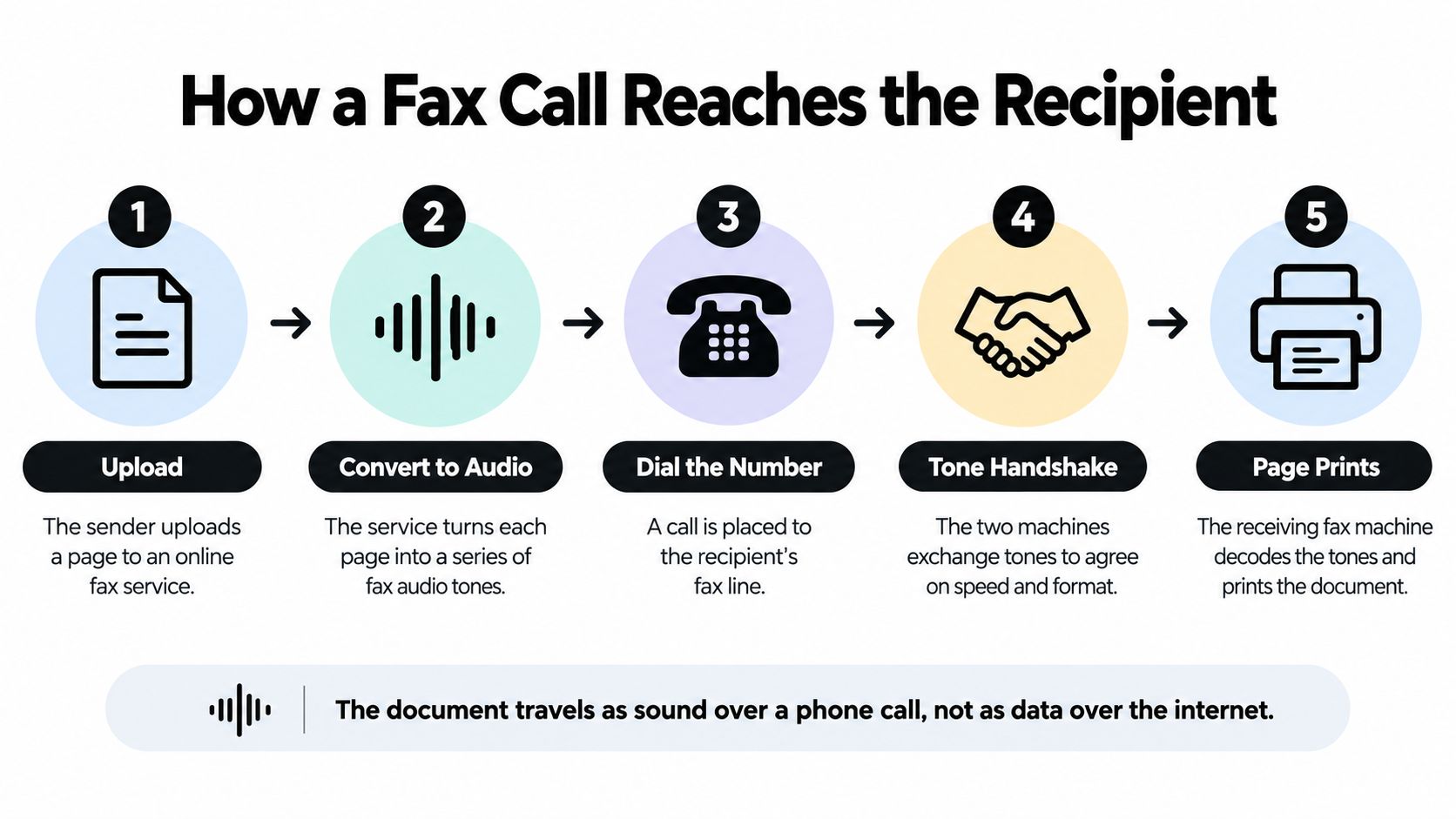
The destination might be a traditional fax machine, a multifunction printer with fax capability, a telephone adapter connected to a fax device, or a digital fax server. The receiving organization may publish one number for a general office, another for medical records, and a separate number for a billing or legal department. Those numbers can look similar, but each one may route to a different intake process.
During the call, the systems negotiate how to exchange the pages. ITU-T T.30 defines procedures for facsimile transmission over the public switched telephone network. The standard helps explain why the recipient number matters so much. The sending service must reach a compatible endpoint, not merely a telephone that happens to answer.
An international number also needs the correct country information, and a domestic number may require an area or national code depending on the service and location. RFC 2806 describes a fax address as a telephone number used to contact a terminal capable of receiving telefaxes, with local and international notation available for different contexts.
The network doesn't care whether you clicked a button in a browser or loaded paper into a machine. It needs the correct destination and a receiving endpoint that can negotiate the fax call.
Sender Number vs Recipient Number
A first-time sender may enter a valid-looking number, upload a sensitive document, and assume the service will recognize the right department. Fax forms create confusion because several fields appear together, yet they serve different parts of the transmission.
The recipient number is the telephone number the fax service dials. It directs the call to the receiving endpoint, such as a fax machine, multifunction printer, or digital fax server. The sender number identifies the person or organization submitting the pages. It may appear on the cover page, transmission header, or account record.
In fax terms, the recipient number is the dialed destination. The sender number is a label that travels with the pages and helps the recipient identify the source.
| Attribute | Recipient Number | Sender Number |
|---|---|---|
| Main purpose | Routes the fax call to the receiving endpoint | Identifies the person or organization sending |
| Required for basic outbound routing | Generally yes | Generally no, if the service supplies an outbound identity |
| Where it appears | Destination field and dialing instructions | Cover page, header, or account details |
| What happens if it's wrong | The fax may fail or reach the wrong endpoint | The recipient may not know who sent it or how to reply |
| What to verify | Department, country, area code, and fax capability | Name, organization, callback details, and any recipient rules |
A web form may request your name, organization, email address, and phone number. These fields support identification, delivery notices, or account records. The service supplies the outbound line, so your sender field functions as identification. Some providers still require a sender entry for their own workflow, which is a service rule rather than a requirement for the receiving network.
The distinction matters most when an organization has several fax endpoints. A general office number, medical-records line, billing number, and legal department number may share a familiar format while feeding separate intake queues. Verify the department and fax capability before sending, especially for private records or signed documents.
The FCC fax advertising policy explains why sender information matters in certain contexts. Fax advertisements must identify the sender and provide contact information, and applicable rules include a method for recipients to stop future advertisements. Those requirements make sender details important for identification and compliance.
For a medical, legal, or real-estate document, include a clear sender name and callback method even if you do not own a fax line. The recipient number controls routing. Accurate sender details help the receiving team review, identify, and respond to the transmission.
Online Fax, Email to Fax, and One-Off Web Sends Compared
You can send a fax without a machine through several workflows. The right choice depends on whether you need occasional outbound delivery, recurring two-way communication, or a permanent number for incoming documents.
| Feature | Dedicated Online Fax | Email-to-Fax | Web One-Off, such as SendItFax |
|---|---|---|---|
| Setup | Usually requires an account and service configuration | Requires an account plus the provider's email format | Uses a browser form for a single transmission |
| Sending method | Dashboard or mobile application | Email with an attached document | Upload a file and enter the destination |
| Own fax number | Often includes a provider-assigned number | Usually tied to the provider account | Not required for a one-time send |
| Receiving capability | Commonly available, depending on the plan | Available when the service supports inbound faxing | Primarily suited to outbound sending |
| Best fit | Regular users and teams | People who manage documents in email | Occasional or urgent senders |
A dedicated online fax service makes sense when your organization sends and receives documents repeatedly. It can centralize records, users, and inbound messages, but it also introduces account setup and ongoing service decisions.
Email-to-fax is convenient when the document already lives in Outlook, Gmail, or another inbox. The provider determines the exact address format, so you must follow its instructions rather than inventing a destination pattern. The recipient's fax number still remains the routing detail inside that workflow.
A browser-based one-off service is more direct. You upload the file, enter the destination, provide any requested sender details, and submit the transmission. For a fuller comparison of service models, see this guide to online fax services and their differences.
Choose the simplest method that matches the job. Don't obtain a permanent fax number merely to send one document, but don't rely on a one-off workflow if people need to fax your organization back regularly.
Sending a Fax Through SendItFax Step by Step
For a single outbound fax to a U.S. or Canadian destination, the process begins with the document, not with your own fax line. Open the web form, select the file you need to transmit, and prepare the recipient information before you upload anything sensitive.
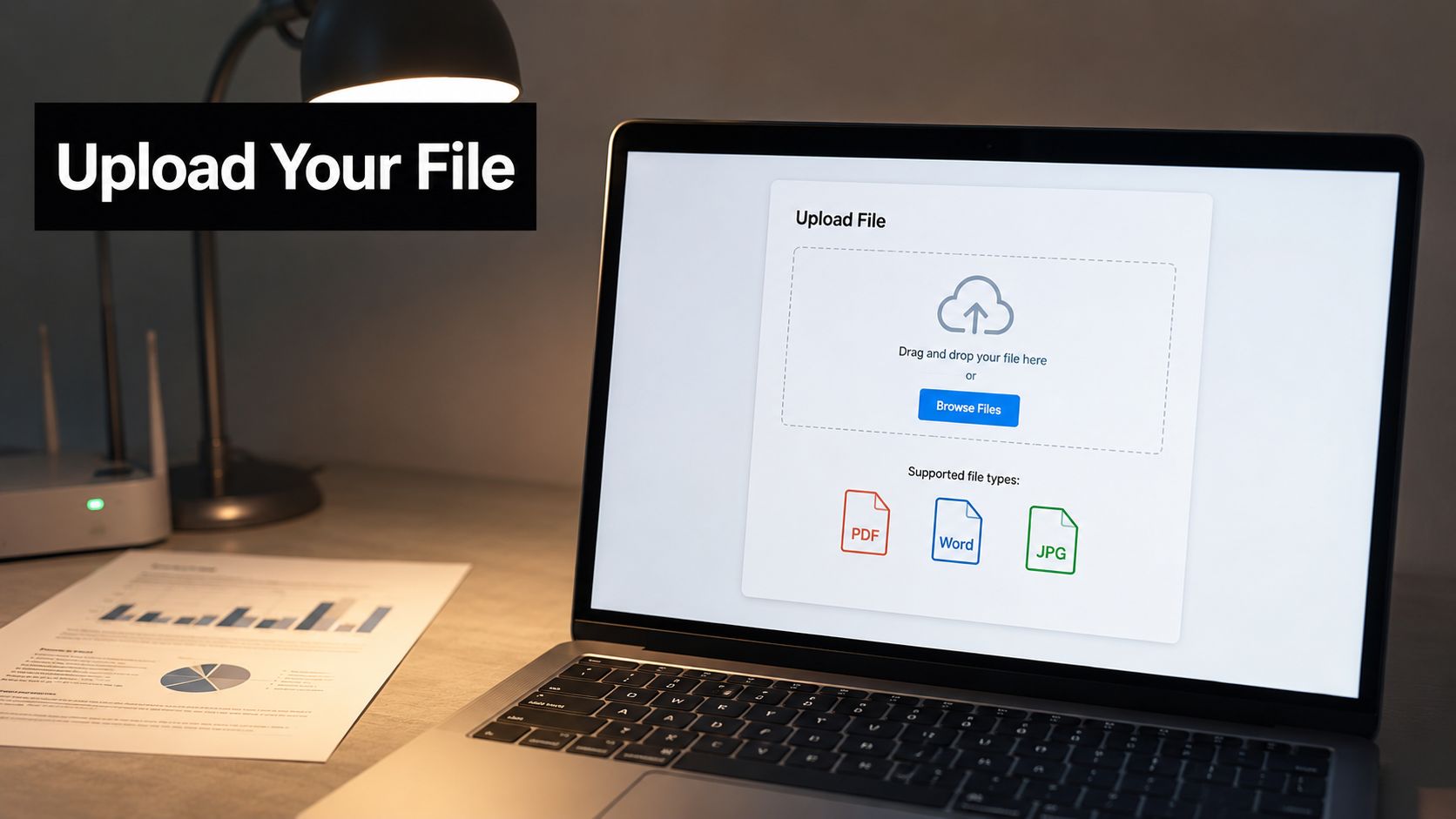
Prepare the file and destination
Choose a clear PDF, Word file, or image. Check that signatures, small print, and handwritten information are legible. A blurry scan can be transmitted successfully and still be unusable to the recipient.
Next, enter the recipient's fax-capable number. Select the correct country when the form offers that option, then verify the full number, including any required area or national code. Check the digits against the organization's official instructions or confirm them with the department before sending.
Add the recipient's name and department if the form provides those fields. A cover page can include your name, organization, callback email, subject, and the number of pages. Your phone number may help the recipient identify you, but it doesn't replace the destination number.
Review before submission
Pause at the preview stage. Compare the number on the form with the number you obtained from the recipient. Confirm that the file is the intended version, the pages are in order, and the cover page doesn't expose information to an unintended department.
The service's systems place the outbound call. Your personal phone doesn't dial the recipient, and you don't need to maintain a dedicated fax line for this one-time transmission.
After submission, retain the email or on-screen delivery result. A confirmation can show that the remote fax endpoint acknowledged the transmission, but it isn't proof that the intended employee opened or acted on the document. For sensitive records, contact the recipient through a known channel if the document is time-critical.
A short walkthrough can make the browser workflow easier to recognize:
Review the service's privacy policy and terms before uploading confidential material. Pay attention to how the provider handles uploaded files, delivery records, cookies, and deletion. For healthcare or legal documents, your transmission method should fit your organization's confidentiality and retention requirements.
When Your Own Fax Number Still Matters
Not needing a personal fax number for basic outbound routing doesn't mean a dedicated number is never useful. The question is whether the other party needs a stable way to identify your organization, send documents back, or treat your fax number as an official contact address.
A recurring two-way workflow is the clearest example. If a clinic, insurer, client, attorney, or government office must return forms by fax, an inbound number gives them a dependable destination. A one-off sending service may complete your outbound task but won't necessarily provide the receiving channel your workflow requires.
A sender number may also matter when:
- A recipient requires recognizable identification: The receiving office may reject or delay documents from an unrecognized sender.
- A cover sheet must include callback details: Medical, legal, and real-estate teams often need a clear organization name and return contact.
- A contract names a formal notice address: If an agreement specifies a fax number for notices, follow the contract instead of substituting an informal route.
- Your team needs an audit trail: A stable number can help staff match incoming and outgoing records.
- You publish business contact materials: Letterheads, intake forms, and instructions should point to a destination that remains monitored.
Before putting your phone number on a cover page, consider what information it reveals and who can use it. A resource on how your phone number exposes you can help you assess whether a business callback number is preferable to a personal mobile number.
The practical test is straightforward: if someone may need to fax a reply, receive a dedicated number. If you only need to send a document to a verified destination, your own fax number usually isn't the part that makes delivery possible. You can also review what a fax number means before deciding whether you need an inbound line.
Why Fax Numbers Are Still Common in Healthcare and Legal
A clinic may ask for a fax even when you can upload a file or send an email in seconds. That request usually reflects the clinic's routing system, not a preference for outdated technology. The fax number acts like the label on a delivery chute: it directs your document to the right department, queue, or platform.
Healthcare shows why this compatibility still matters. The healthcare IP fax guidance reports that U.S. healthcare organizations exchange more than 9 billion fax pages annually. Other estimates vary by setting, but fax remains a common channel for clinical and administrative communication. For a closer look at why clinics still rely on fax, see this guide to fax in healthcare workflows.
A hospital or clinic may publish separate numbers for medical records, referrals, billing, admissions, or a general intake queue. The number may terminate at a physical fax machine, a multifunction printer, an automated queue, or a digital fax service. It usually identifies a destination, not a particular employee. Confirming the department matters because a valid-looking number can still route sensitive documents to the wrong endpoint.
Healthcare privacy practices add another reason to verify the route. A misdirected fax containing protected health information may expose records to an unauthorized recipient. Use a confidentiality cover sheet and follow the safeguards required for the information you are sending. A transmission report confirms that the receiving endpoint accepted the pages. It does not prove that the intended clinician or records specialist reviewed them.
Legal offices and public agencies follow similar patterns. They may require fax for filings, signed documents, notices, or other records because their intake process is organized around that channel. Your ability to send email does not change the recipient's submission rule. The destination number remains a compatibility requirement, so check the office's current instructions before sending rather than relying on an old form or a directory listing.
Practical Checklist Before You Hit Send
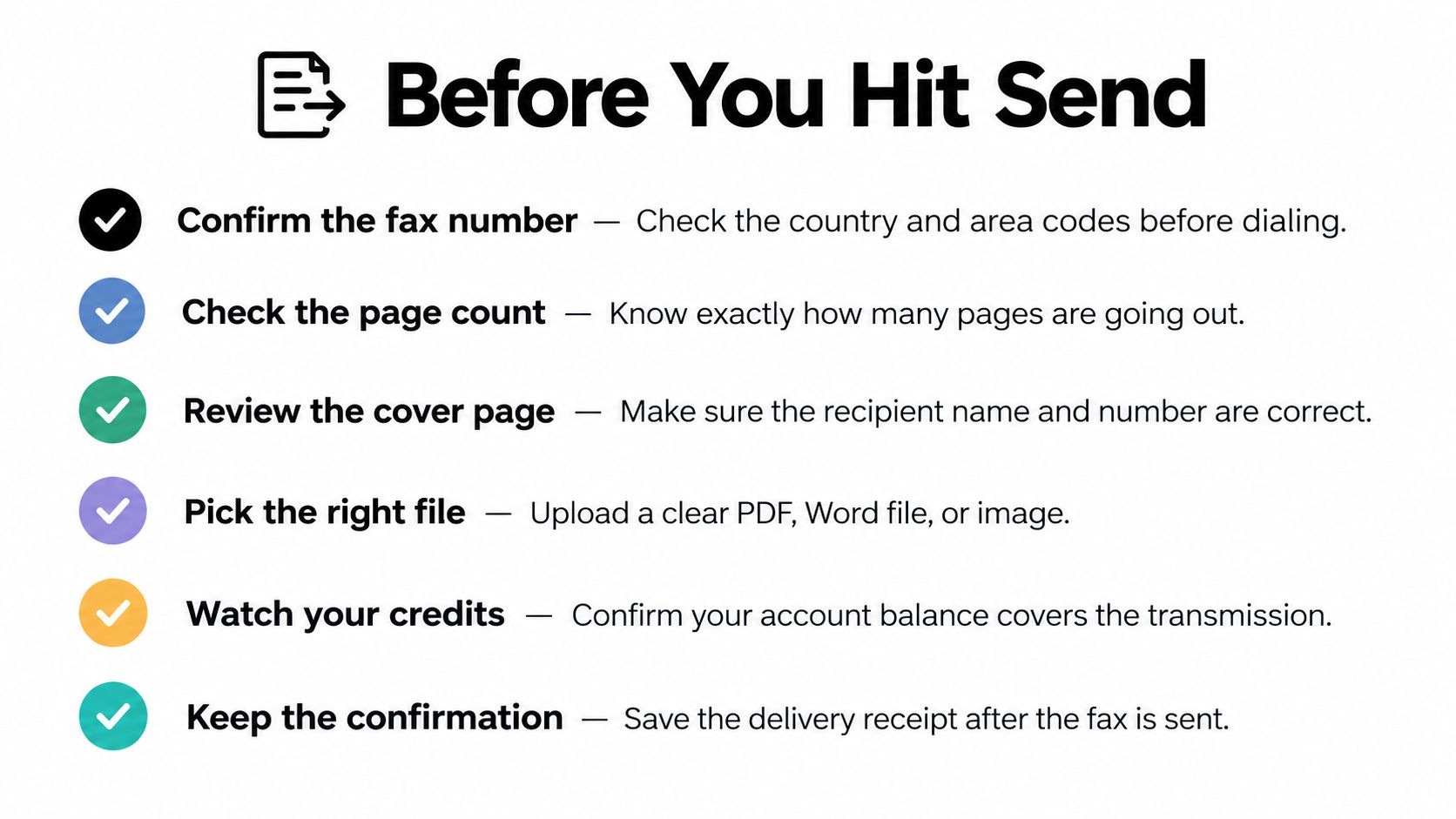
Run through these checks before submitting a document:
- Confirm the fax number: Match the department, country, area code, and remaining digits against the recipient's current instructions.
- Check the endpoint: Ask whether the number accepts faxes and whether the office uses a separate line for records, billing, or legal intake.
- Review the cover page: Include the recipient, sender, callback details, subject, and page information where appropriate.
- Pick the right file: Open the attachment and confirm that every page is readable, complete, and oriented correctly.
- Protect sensitive content: Use a confidentiality notice and follow the safeguards required for the information you're sending.
- Keep the confirmation: Save the delivery report with the final document and any related correspondence.
International transmissions generally require the full country code, while domestic dialing rules depend on the service and destination. Toll-free fax numbers may be restricted by a provider or by the receiving organization, so confirm acceptance instead of assuming that every published number works for fax.
A busy, unavailable, or unanswered line can delay delivery, and some services may retry according to their own process. If the document is time-sensitive, do not just wait. Contact the recipient through a trusted channel, ask whether the fax arrived, and keep the confirmation report.
Once the destination is correct and the cover page is clear, the service handles the technical call. You don't need to own a fax number just to send that document.
SendItFax lets you upload a document in your browser and send it to a valid U.S. or Canadian fax number without a fax machine or personal fax line. Visit SendItFax when you need an occasional outbound fax, then verify the recipient number carefully before submitting.