Tag: browser fax service

  • How to Send Fax PDF Files from Any Browser

    How to Send Fax PDF Files from Any Browser

    You've got a signed contract, referral form, or medical document open on your laptop, and the recipient wants a fax number instead of an email attachment. There's no fax machine nearby, the office is closed, and printing the PDF just to scan it again feels absurd. You can still get the document out from a browser, but reliable faxing depends on more than uploading a file and clicking Send.

    The hidden trouble usually starts with PDF preparation, page count, file-size limits, recipient details, and delivery evidence. A short, clean document sent through a suitable internet fax workflow can be straightforward. A long, image-heavy PDF with form fields, password protection, or marginal contrast can fail before the recipient ever sees it.

    Why Browser-Based Faxing Replaces the Machine

    The practical appeal is immediate. A remote worker can receive a completed form by email, open it on a laptop, and send it to a clinic without finding a physical fax machine. A legal assistant can transmit a signed agreement from a browser while keeping the original PDF intact. A small office can handle an occasional fax without maintaining a dedicated device, paper supply, toner, or fax line.

    Browser-based faxing works by acting as a bridge between a digital document and traditional fax infrastructure. You upload a PDF, the service renders it into a fax-compatible format, and the provider transmits it to the recipient's fax machine or online fax endpoint. You don't need to print the document first, and you don't need a fax modem attached to your computer.

    That workflow matters because fax remains embedded in regulated and organizational processes. Independent industry and policy sources estimate that roughly 70% to 75% of healthcare communication still occurs by fax, despite widespread electronic health record adoption, as summarized in this healthcare fax usage analysis. The same source cites an estimate of more than 9 billion fax pages exchanged annually in U.S. healthcare, which helps explain why a recipient may still require a fax even when both parties use modern software.

    Practical rule: Treat the fax number as a required destination, not as evidence that the recipient uses old equipment. The other side may receive the transmission in a digital portal or as a converted PDF.

    The browser approach also suits documents that must retain their layout. A PDF can preserve signatures, tables, page order, and form positioning better than copying text into an email. For a quick explanation of the broader workflow, the web-based fax service guide provides useful context.

    The trade-off is that online faxing doesn't remove technical constraints. It moves them into the provider's upload rules and transmission system. Before sending, check the PDF itself, the service's page and file limits, and the confirmation process you'll use to prove successful delivery.

    Preparing Your PDF for Flawless Transmission

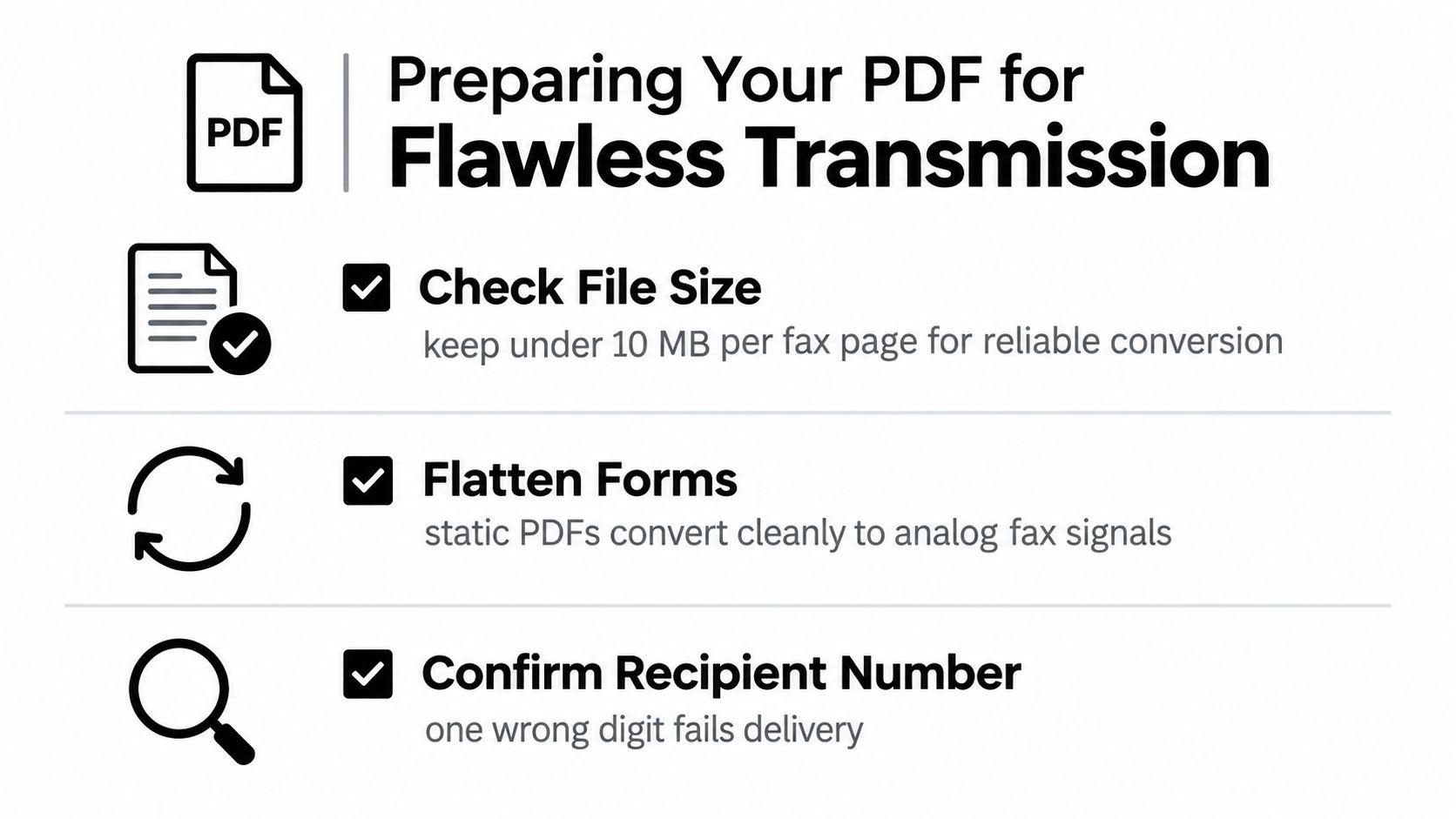
    Most avoidable failures happen before the file enters the fax network. Open the final PDF and inspect every page at normal reading size, then zoom into signatures, small print, stamps, and table borders. A file can look fine in a PDF viewer and still produce weak fax output if it relies on pale colors, complex transparency, or very fine lines.

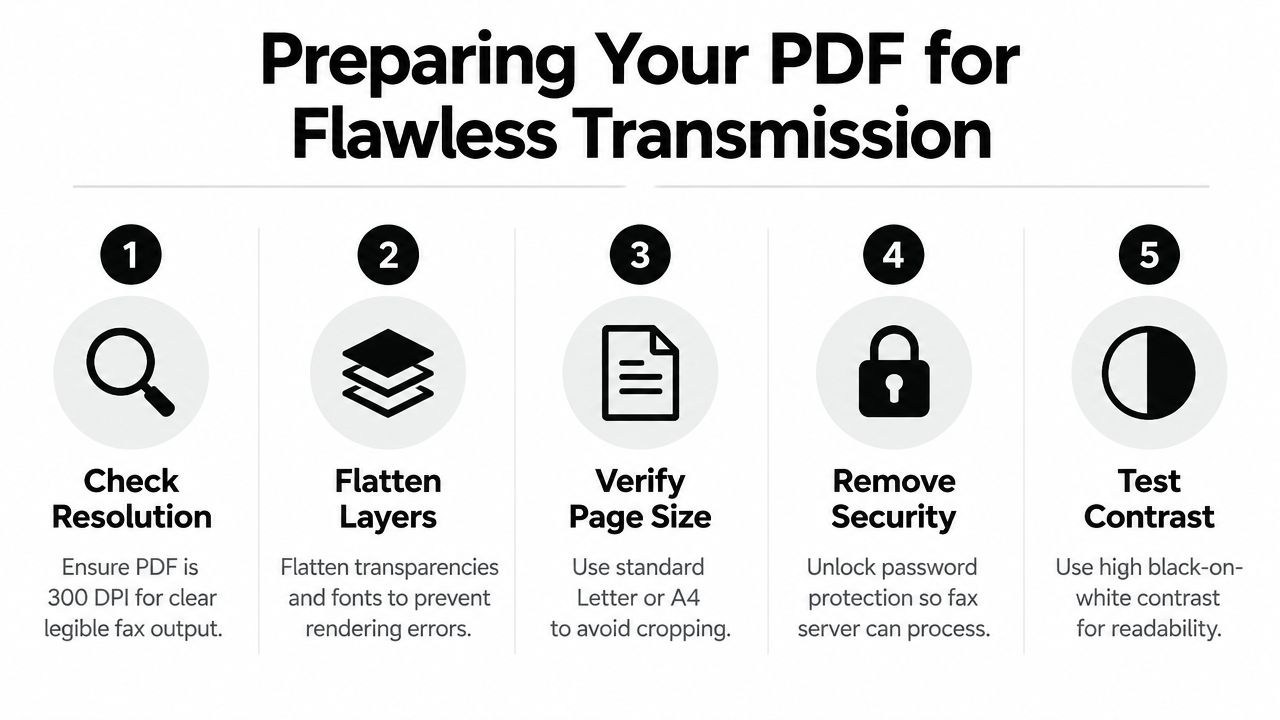
    A checklist of five tips for preparing a PDF file to ensure a flawless fax transmission.

    Clean the document before upload

    Use this preparation sequence:

    1. Confirm the file format. PDF is usually the safest choice for preserving layout, and SendItFax accepts PDF alongside DOC and DOCX files. Don't assume that a file ending in .pdf is fully self-contained. Export it again from the source application if fonts, layers, or interactive elements behave strangely.

    2. Flatten interactive content. Complete form fields, then flatten them so the entered information becomes part of the rendered page. Flatten transparency and unnecessary layers as well. Fax services process a visual representation, not the editable behavior you see inside a form editor.

    3. Check page size and orientation. Review portrait pages individually. A page with an unusual size or a rotated scan may be cropped or reduced in a way that makes fine print difficult to read.

    4. Remove processing barriers. Password-protected or restricted PDFs can prevent an upload service from reading or rendering the document. Save an authorized, open copy for transmission, while retaining the protected original in your controlled records.

    5. Reduce unnecessary weight. Large embedded scans and photographs can make the upload slower and extend transmission time. Compress images carefully, keeping signatures and small text legible. The tekRESCUE document size guide offers practical file-reduction techniques without treating compression as a one-click fix.

    Preserve readability, not maximum resolution

    A high-resolution scan isn't automatically a better fax. Fax output has its own rendering limits, so excessive image detail often adds file weight without improving what the recipient can read. Use strong black-on-white contrast, remove blank pages, and crop scanner borders that waste space.

    For documents with seals, handwriting, or faint signatures, make a test copy and inspect it after conversion if your workflow allows. The fax image quality guide is useful when the document's visual fidelity matters more than completing the upload.

    Keep the original PDF unchanged, then create a transmission copy. That gives you a clean source for your records and a deliberately optimized version for faxing.

    Choosing Between Free and Paid Delivery Options

    The right SendItFax option depends on what you're sending and how formal the recipient's process is. The free option is suited to a short, occasional transmission where branding on the cover page won't cause a problem. The Almost Free option is more appropriate when the document is longer, the recipient expects a polished presentation, or delivery priority matters.

    Feature Free Option Almost Free ($1.99)
    Document allowance Up to three pages plus a cover page Up to 25 pages
    Daily use Up to five free faxes per day Paid per fax
    Delivery handling Standard delivery Priority delivery
    Cover-page branding SendItFax branding included Branding removed
    Cover page choice Cover page included Cover page can be omitted

    A short intake form may fit comfortably within the free allowance. A signed agreement with exhibits may not. If you try to force a longer document into the free option, the issue isn't just inconvenience. You may need to split the file, remove useful context, or send multiple transmissions that the recipient must reconstruct.

    A simple decision test

    Choose the free option when all of these conditions apply:

    • The document is short: It stays within the stated page allowance, including the cover-page rules.
    • The use is occasional: You don't need a recurring business workflow.
    • Branding is acceptable: The recipient won't object to a SendItFax-branded cover page.
    • Standard handling is sufficient: The fax isn't tied to a narrow deadline where priority delivery is important.

    Choose Almost Free when any of these conditions apply:

    • The PDF is longer: It falls within the larger page allowance.
    • The presentation is formal: A branded cover page would look out of place for a contract, legal filing, or client-facing packet.
    • The transmission is time-sensitive: Priority delivery is worth the fee.
    • You want a cleaner packet: You can omit the cover page when the recipient already has the necessary context.

    Don't select a plan based only on price. Match it to the recipient's expectations and the document's structure. A free fax can be practical, but it isn't always the professional choice.

    Executing the SendItFax Upload Flow

    Once the PDF is ready, the SendItFax browser flow is deliberately direct. You don't need to create an account for the stated sending process, which makes it useful when a one-time document has to leave your computer quickly. You'll need accurate sender information, the recipient's fax number, and the final document.

    Enter routing details carefully

    Start by opening the SendItFax form in your browser and complete the sender fields. Use a name and contact detail the recipient will recognize, particularly if the fax is going to a shared department or an organization that receives high document volume.

    Enter the recipient's fax number slowly. Check the country and area details, compare the digits with the request you received, and confirm that the number belongs to the intended department. Fax transmissions generally don't offer the same practical recall option as email, so a wrong number can become a privacy incident or a wasted attempt.

    Upload the prepared PDF, or use a DOC or DOCX file when that's what you have. PDF remains preferable when page positioning and signature placement matter because it gives the receiving system a fixed document to render.

    Decide whether the cover page earns its place

    The optional cover message should add routing context, not repeat the entire document. Include the recipient's department, the subject, your name, and a concise instruction such as “Please route to the claims team.” Don't place sensitive details in a cover note that doesn't need them.

    Omit the cover page when the recipient has given you a direct fax number and the document already identifies itself. Use one when the fax will arrive at a shared machine, when the packet needs page-count context, or when staff need a clear reason to route it.

    Before sending, review the preview or summary screen. Confirm the recipient number, sender details, attachment, page order, and cover-page choice. The browser fax sending walkthrough can help if you want a second reference for the web-based process.

    Click Send only after that final check. Save the resulting confirmation and the exact PDF copy you transmitted. Those two records connect your intended document with the transmission attempt.

    Managing Page Counts and Network Reliability

    A fax is not equally reliable at every length. Each page must be rendered, transmitted, and processed, so a problem that might be survivable on a short memo becomes more likely to interrupt a long packet. The technical comparison in this Fax over IP reliability overview reports approximately 80% success for G.711 passthrough, 85% to 92% for optimized T.38 relay, and 96% or higher for store-and-forward cloud fax, with results depending on the transport method and network conditions.

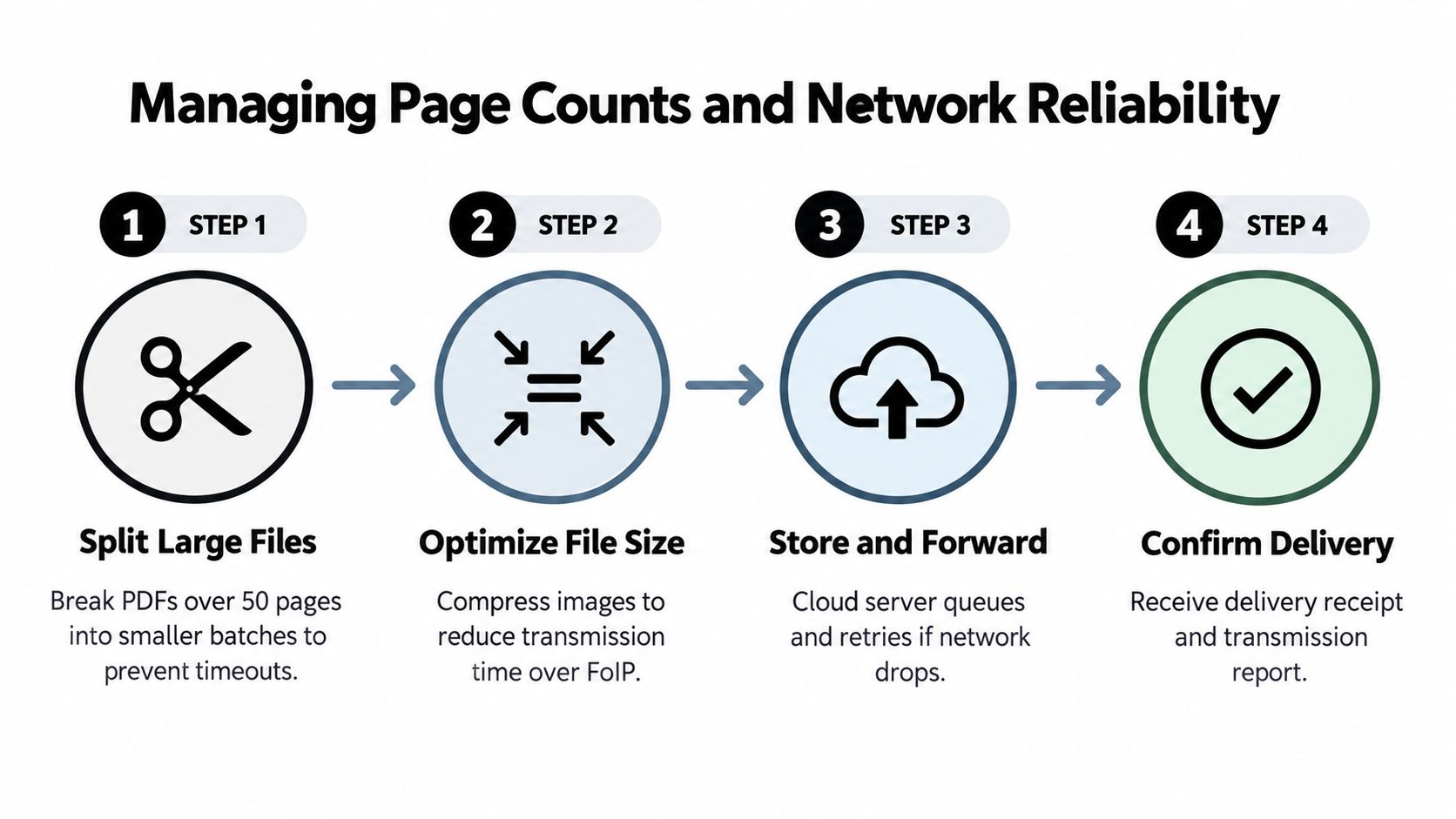
    G.711 passes fax audio through an IP call and can be sensitive to packet loss. T.38 treats fax tones as IP packets and adds redundancy, making it more tolerant of network problems. Store-and-forward systems upload the document to a cloud service first, then queue and retry transmission rather than depending entirely on a continuously stable connection between your browser session and the recipient.

    A four-step infographic illustrating methods to manage page counts and ensure network reliability when sending faxes.

    Why long PDFs deserve a separate plan

    The technical evidence becomes more severe as page count rises. A Dialogic fax reliability whitepaper reports that at about 1% packet loss, single-page success fell below 80% for most non-redundant configurations, while redundant fax relay stayed above 80% until packet loss exceeded 4%. It also states that when single-page success is only 80%, a fax longer than 20 pages has less than a 1% chance of completing successfully.

    That doesn't mean every long PDF will fail. It means you shouldn't treat page count as a cosmetic detail. A long packet multiplies the opportunities for a timeout, line renegotiation, or corrupted page.

    Use a controlled sequence for large documents:

    • Split by logical boundaries: Separate the cover material, main form, and supporting exhibits where possible.
    • Keep order visible: Label files or cover notes as Part 1, Part 2, and so on.
    • Send smaller batches: Avoid making one transmission carry the entire risk.
    • Wait for confirmation: Don't send the next batch until the prior transmission has a usable result.
    • Retain the sequence: Store the files and confirmations together so the recipient can reconstruct the packet.

    If the service has a page or upload ceiling, splitting is often more dependable than repeatedly retrying the same oversized file. File size and page count are related, but they aren't identical. A text-heavy PDF can be light, while a short scan can be large.

    Verifying Receipt and Meeting Compliance Needs

    Clicking Send proves that you initiated a transmission. It doesn't, by itself, prove that the recipient processed every page correctly. Review the delivery result, keep the timestamped confirmation or transmission report, and match it to the exact PDF copy you uploaded.

    For sensitive documents, create a simple record containing the recipient number, sender identity, document name, page count, transmission date, and delivery status. Store the confirmation with the sent file, and follow your organization's retention and access rules. If the result is ambiguous, contact the recipient through an established channel and ask whether the document arrived legibly, rather than assuming that a successful connection means a usable record.

    Fax persists partly because electronic exchange remains fragmented in sectors that need dependable document routing. Independent reporting estimates that U.S. healthcare routes roughly 70% to 90% of clinical communications through fax at some point, while only 43% of U.S. hospitals routinely interoperated across all four electronic-exchange domains in 2023, as discussed in this digital faxing and interoperability report. Those figures don't make fax automatically secure or compliant. They explain why organizations still use it as a fallback when systems can't exchange a form directly.

    A faxed PDF may serve as evidence that a transmission was completed, but its evidentiary value depends on the surrounding controls. Confirm the recipient, preserve the original and sent copy, retain the delivery report, and follow any applicable privacy, legal, or healthcare policy. For regulated material, ask whether the service, account configuration, and retention process meet your organization's requirements.


    SendItFax lets you upload PDF, DOC, or DOCX files from a browser and send them to recipients in the United States and Canada without creating an account for the stated sending flow. Prepare your PDF carefully, choose the appropriate delivery option, and visit SendItFax when you need a practical way to transmit a document without a physical fax machine.

  • Online Fax Number: What It Is and How to Get One

    Online Fax Number: What It Is and How to Get One

    You've just been told to fax a signed form before the end of the day. There's one problem: you haven't seen a fax machine in years, and the office, clinic, or government agency won't accept an email attachment. An online fax number solves that mismatch by giving you a fax destination without requiring a physical machine, paper, toner, or dedicated office line.

    The important distinction is whether you only need to send a document once or whether you need to receive faxes repeatedly. A browser-based sender may be enough for a one-off form, while a business or regulated organization may need a permanent number, an online inbox, delivery records, and documented safeguards. Understanding that difference helps you choose the right service instead of paying for features you won't use, or choosing a basic tool that can't handle inbound documents.

    Why You Might Still Need a Fax Number in 2026

    A job applicant may need to return a signed authorization form to an employer. A contractor may need to send an invoice or permit document to a municipal office. A patient may need to transfer records to a specialist whose intake department still lists fax as its preferred channel. None of these people necessarily owns a fax machine, but the receiving organization may still require a fax number.

    That requirement persists most visibly in healthcare, legal services, government offices, finance, and real estate. Faxing fits workflows built around signed pages, identifiable sender and recipient numbers, transmission confirmations, and established document-handling procedures. In healthcare, recent coverage still describes fax as a dominant route for record requests and clinical communication, with roughly 70% to 90% of healthcare communication continuing to move through fax, according to PCMag's coverage of online fax services. U.S. healthcare also exchanges billions of fax pages annually, so the channel remains embedded in operational systems rather than existing only as a legacy habit.

    Fax has changed more than it has disappeared

    IDC research cited by OpenText found that 82% of respondents said fax usage had increased or stayed the same year over year, and respondents who reported growth saw fax volumes rise by an average of 27%. The same research found that 36% of monthly fax pages were still sent or received on standalone fax machines, which shows that online fax numbers generally coexist with traditional equipment instead of replacing every machine at once. The IDC research PDF provides the underlying figures.

    This persistence doesn't mean fax is the best communication method for every document. Email, secure portals, electronic signatures, and cloud file sharing are often more convenient when the recipient accepts them. But if the other side says, “Fax this to us,” an online fax number lets you work within that requirement from a browser or phone.

    A long-running free online fax service reported handling 7.5 million fax submissions and delivering 5.8 million faxes between April 2009 and July 2026, totaling 19.2 million pages. That cumulative activity, documented in GotFreeFax's fax statistics, illustrates how browser-based faxing has remained a sustained channel rather than a short-lived experiment.

    How an Online Fax Number Actually Works

    Think of an online fax number as a digital PO box for documents. The number lives in a provider's communications infrastructure instead of being attached to a machine on your office wall. A sender dials that number from a traditional fax machine or another online service, and the provider places the resulting document in your web inbox, email account, or mobile app.

    A simple infographic showing the three steps of how an online fax number receives and delivers documents.

    Receiving a fax

    The inbound process usually follows these steps:

    1. A sender dials your fax number. The number may be local, toll-free, or international, depending on what the provider supports. Many online services use DID infrastructure, which means the number is assigned to your account and routes incoming communications to your digital mailbox.
    2. The provider's gateway answers the call. It negotiates with the sending fax equipment and converts the transmission into a digital document.
    3. The document reaches your account. You may receive a PDF attachment by email, a notification in an app, or a message inside the provider's secure web dashboard.

    The technology behind many online fax numbers is Fax over IP, or FoIP. ITU-T T.38 is the only standardized real-time FoIP protocol. It helps fax gateways carry a fax session across an IP network without treating modem tones like ordinary compressed voice, which is why T.38 is generally more dependable than passing fax tones through a voice-over-IP connection. The T.38 technical overview explains the protocol's role in this process.

    Sending a fax

    Outbound faxing reverses the direction:

    • You upload a PDF, DOC, DOCX, or another supported file.
    • The provider prepares the file for fax transmission.
    • You enter the recipient's fax number and send the job.
    • The provider's gateway contacts the destination and transmits the document page by page.
    • You receive a delivery result, such as a success notice, failure message, or retry status.

    T.38 can use redundancy and retransmission to handle some packet loss, but both endpoints need suitable support and the network path needs low loss and low jitter. Engineering guidance explains why providers usually favor T.38 over voice-codec pass-through, since lossy codecs can damage fax signaling. The same guidance notes that destination numbers may need E.164 format for correct routing across major markets. Dialogic's FoIP guidance offers technical detail, while this explanation of fax numbers covers the everyday meaning of the number itself. If you also need background on how virtual phone numbers differ from ordinary lines, what is a virtual number is a useful companion resource.

    Who Really Needs an Online Fax Number

    Not every fax user needs the same product. The deciding question is whether you need a temporary way to transmit a file or a persistent communication address that other people can use to reach you.

    The casual one-off sender

    A job seeker, freelancer, tenant, or individual may need to send a signed document only occasionally. This user usually doesn't need a permanent number, inbound delivery, shared access, or a long-term archive. A pay-per-use browser sender is often a better fit than a monthly subscription.

    The main checks are simple:

    • Does the service accept your file type?
    • Does it send to the recipient's country and number type?
    • Does it provide a delivery confirmation?
    • Does it clearly explain whether the free or low-cost option adds branding or limits pages?

    The small-business operator

    A small business may need a number printed on invoices, websites, contracts, or business cards. It may receive purchase orders, signed agreements, referrals, or documents from partners that still use fax. Here, number permanence matters. So do an online inbox, multiple users, searchable records, notifications, and predictable billing.

    A business should also decide whether it needs local recognition or a toll-free presence. A local number can support a regional identity, while a toll-free number can make it easier for customers and partners in different locations to send documents.

    The regulated professional

    Healthcare clinics, law firms, financial organizations, and government contractors face a different standard. They may handle protected health information, privileged legal material, financial records, or documents subject to retention rules. These users need more than a convenient upload form. They should look for access controls, audit logs, encryption, retention settings, incident procedures, and a signed Business Associate Agreement where HIPAA applies.

    User Profile Typical Monthly Volume Needs Inbound? Compliance Stakes Service Tier Fit
    Casual individual Occasional or one-off Usually no Low to moderate, depending on document Pay-per-use browser sender
    Small business Regular, moderate volume Often yes Business confidentiality and continuity Dedicated online fax number
    Healthcare, legal, or finance professional Recurring workflow volume Usually yes High, with sector-specific obligations Compliance-focused virtual-number plan

    The difference is practical. A one-off sender is buying delivery. A business is buying a reliable address and workflow. A regulated organization is buying documented controls around both.

    The Three Main Ways to Get an Online Fax Number

    You can approach online faxing through three broad paths. The right choice depends less on brand familiarity than on whether the service gives you a number, an inbox, inbound capability, or only a temporary sending form.

    Dedicated virtual-number providers

    Services such as eFax, HelloFax, and RingCentral generally assign a real fax number that can be local or toll-free, depending on availability. Incoming faxes route to an email inbox, web dashboard, or app, while outgoing documents leave through the same account. This model usually involves a recurring subscription tied to the number and its included usage.

    Choose this route when other people must be able to fax you repeatedly. It also makes sense when you need number permanence, shared access, searchable records, or business continuity. Setup is typically account-based, so you can normally begin after selecting a number and completing provider verification.

    Browser-based senders

    A browser sender doesn't necessarily give you a fax number at all. Instead, you upload a document, enter the destination number, add sender details, and submit the fax. SendItFax, FaxZero, and GotFreeFax represent this general approach.

    This path suits a single signed form, an occasional government submission, or a contractor who doesn't want a subscription. The trade-off is that it usually doesn't provide a permanent inbound number or a full receiving inbox. Free services may also impose page limits, branding, confirmation steps, or restrictions on the type of destination you can reach.

    Decision rule: If nobody needs to fax you back, don't pay for an inbound number just because the phrase “online fax” makes it sound necessary.

    Hybrid communication suites

    A hybrid setup places fax beside other channels. Examples include VoIP PBX systems, electronic-signature platforms with fax modules, and unified communications suites. You may get phone service, messaging, file storage, workflow automation, and fax under one administrative account.

    This option can reduce the number of vendors your team manages, but it can also introduce features you don't need. Review user permissions, number ownership, storage, export options, and compliance documentation before choosing a bundle. If you're also organizing a business identity process, practical guidance on how to avoid EIN filing mistakes can help keep administrative setup separate from fax-service decisions.

    Path Owns a Number? Inbound Fax? Typical Cost Best For
    Dedicated virtual-number provider Yes Usually yes Recurring subscription Businesses and regulated workflows
    Browser-based sender Usually no Usually no Free or pay per fax One-off transmission
    Hybrid communications suite Usually yes Often yes Bundled or tiered subscription Teams consolidating communications

    The fastest route to a first outbound fax is usually a browser sender. A dedicated number takes more setup, but it gives recipients a stable place to send documents.

    Security, Compliance, and Porting Considerations

    An online fax number can make document handling easier, but convenience doesn't answer the security question. Before uploading sensitive material, find out how the provider protects files while they travel, how it stores them, who can access them, and what happens after cancellation.

    A diagram outlining security, compliance, and porting considerations for selecting an online fax provider.

    Start with the provider's security language

    Look for encryption in transit and at rest. Encryption in transit protects data as it moves between your device, the provider, and the recipient. Encryption at rest protects stored documents inside the provider's systems. Basic TLS can protect a connection, but it doesn't automatically tell you how the provider controls staff access, backups, exports, or archived files.

    Healthcare organizations need a specific contractual answer. If a provider claims HIPAA support, ask whether it signs a Business Associate Agreement, often called a BAA. Legal teams should ask comparable questions about privileged documents, access logs, retention, and breach response.

    Retention matters as much as transmission

    A secure upload can still create a problem if files remain stored indefinitely. Ask:

    • Storage period: How long do inbound and outbound faxes remain available?
    • User control: Can authorized users download, delete, and export documents?
    • Cancellation: What happens to stored files when the account closes?
    • Audit records: Can you see who accessed, sent, downloaded, or deleted a document?
    • Residency: In which country or region are the documents stored?

    Porting is separate from security. It means transferring an existing fax number from a traditional line or another provider to the new service. Porting can preserve a number that customers, hospitals, courts, or suppliers already have, but eligibility varies. Local, toll-free, vanity, and international numbers may follow different rules, and the transfer can require account records or authorization from the current carrier.

    For a broader look at document handling, review this guide to the security of fax before choosing a provider.

    A practical provider checklist

    • Encryption claims: Confirm protection during transmission and storage.
    • Compliance contract: Get a BAA when your workflow involves protected health information.
    • Retention controls: Verify storage duration, deletion tools, and cancellation procedures.
    • Audit visibility: Confirm that logs cover access and delivery events.
    • Porting eligibility: Ask whether your existing number can transfer and whether downtime is expected.
    • Data location: Check residency requirements if your organization has contractual or regulatory restrictions.

    Pros and Cons of Using an Online Fax Number

    Online fax numbers remove the physical machine, but they don't remove every fax-related limitation. The technology is mature enough for everyday business workflows, yet the service model still varies sharply between providers.

    A comparison chart outlining the pros and cons of using an online fax number service.

    What improves

    You don't need to maintain a machine, replace toner, clear paper jams, or keep a phone line beside a desk. Staff can send and receive documents from a browser, email inbox, or mobile app, which helps distributed teams and people who travel.

    Digital storage also makes documents easier to search than paper stacks. A small business can route incoming faxes to selected users, download records, and keep a consistent process without placing a machine in a reception area.

    IDC's findings show why this convenience hasn't made traditional hardware irrelevant. With 36% of monthly fax pages still handled by standalone machines, online fax numbers are best understood as an additional access layer for a channel that many organizations continue to use. The cited IDC research supports that coexistence.

    What requires caution

    Many providers charge by page, cap free usage, or require a paid plan before they assign an inbound number. A document with dense images, signatures, or fine detail may also reproduce less clearly than the original, especially when the sender or receiver uses a weak connection or incompatible endpoint.

    The number itself can feel old-fashioned to customers who expect a secure portal or electronic-signature link. That isn't automatically a problem, but it can affect how you present the workflow. Consumer-grade fax tools may not satisfy a regulated process that requires specific delivery evidence, retention, contractual protections, or certified handling.

    An occasional sender may value low commitment above everything else. A business receiving documents daily may prefer a stable number and searchable inbox, even if that means a recurring fee. A healthcare or legal organization should put compliance documentation ahead of headline price.

    Choosing the Right Option for Your Situation

    Start with the task, not the brand. A person sending one signed form to a government office has a different problem from a clinic that must receive referrals every day.

    One-off sender

    If you only need to send, a browser-based service is usually the cleanest match. You upload the document, enter the recipient's fax number, and receive a delivery result without maintaining a permanent number. SendItFax, for example, supports browser-based outbound faxing to recipients in the United States and Canada without requiring an account, and its free option allows up to three pages plus a cover page, with a daily limit of five free faxes. The service's online fax services comparison can help you compare this type of workflow with number-based options.

    Small business

    Choose a dedicated virtual-number provider when customers, suppliers, or partners need to fax you. Look for a stable local or toll-free number, inbound notifications, multiple users, searchable storage, delivery history, and an export process. A lightweight hybrid plan may work for a remote worker who wants a recognizable number but sends only occasionally.

    Healthcare and legal workflows

    A regulated organization should require more than a working send button. Confirm inbound delivery, role-based access, audit logs, retention controls, encryption practices, and any required agreement before sending protected or privileged information. A provider that can't document those controls may be unsuitable even if its interface is easy to use.

    Use this three-step filter:

    1. Identify direction: Do you only send, or must you receive?
    2. Estimate usage: Is the need occasional, recurring, or shared across a team?
    3. Verify obligations: Do HIPAA, legal privilege, contractual rules, or retention policies apply?

    The answer points toward the right category. One-off sending suggests a browser service. A published business number suggests a dedicated virtual-number plan. A regulated workflow may require a compliance-focused provider or a hybrid system with documented controls.

    A funnel diagram showing four fax service tiers: One-Off Sender, Small Business, Healthcare/Legal, and Enterprise.

    If you only need to transmit an occasional document, visit SendItFax to upload a file and send it from your browser without setting up a permanent fax number. If your workflow later grows to require inbound delivery, a stable number, or compliance controls, use the criteria above to reassess the service category rather than treating every fax need as the same.