Tag: cloud faxing

  • Do Online Fax Services Work? Yes, and Here’s How

    Do Online Fax Services Work? Yes, and Here’s How

    Yes, online fax services work, and the fax ecosystem remains active at scale, with more than 17 billion individual fax documents sent in 2019 and 82% of surveyed German companies still using fax. They act as a cloud-based bridge that translates digital files into standard fax signals, allowing you to send documents to a traditional fax machine without owning hardware.

    You may be facing that need right now. A client has sent a contract that must be signed today, a hospital still requires a medical record by fax, or a government office won't accept an email attachment. Your laptop has the document, but there's no fax machine in sight.

    That gap is exactly what online faxing fills. You upload a file through a browser, the service handles the conversion and transmission, and the recipient receives the document through a traditional fax number or another digital fax service. You don't need to understand every part of the telephone network to use it, but understanding the basic transport and security layers helps you choose a service that can handle important documents reliably.

    The technology isn't a new communications standard competing with fax. It sits on top of the established fax ecosystem, preserving compatibility while removing the machine, paper, toner, and dedicated workspace. The global market signals that this model remains commercially relevant, with one industry summary estimating the fax services market at $3.31 billion in 2024 and projecting $4.47 billion by 2030, at a compound annual growth rate of roughly 5.15% (FaxSIPit's market overview).

    The Reality of Cloud Faxing

    A real estate agent working from a train station can open a document on a phone, enter a recipient's fax number, and send the paperwork without finding an office with a machine. A lawyer working from home can transmit a signed agreement from a browser. A clinic can send a record from a controlled digital workflow instead of printing it and leaving it in an output tray.

    The visible experience is simple, but the service is doing several jobs behind the screen. It accepts a digital file, renders the pages into a fax-compatible representation, connects to the recipient's fax destination, negotiates the transmission, and returns a delivery result. The recipient may use a traditional machine, a multifunction printer with fax capability, or another online fax platform.

    The practical mental model: online faxing is a cloud delivery layer on top of the long-standing fax network, not a replacement network that requires the recipient to use the same service.

    That distinction explains why browser-based faxing can work with an old-fashioned fax number. The online provider translates between two environments. On your side, the document is a PDF, DOC, DOCX, or image. On the recipient's side, it arrives through the fax infrastructure their organization already accepts.

    Why fax remains relevant

    Fax persists because some organizations have built approval, identity, and record-keeping processes around it. A fax number can be part of a known intake process, and staff may trust a transmission report as evidence that a document was sent. The overview of cloud-based fax solutions describes this role as a bridge between modern digital workflows and established fax destinations.

    The continued use isn't evenly distributed. The Association for Computing Machinery's report on fax usage cites a 2023 Bitkom survey in which 82% of 505 German companies with 20 or more employees still used fax, with about one-third using it frequently or very frequently. The same report says heavy users, defined as organizations sending or receiving more than 100 pages per week, were concentrated in healthcare, legal, and financial industries.

    That makes the answer to “do online fax services work” more specific than a simple yes. They work because they connect a modern upload experience to a communication method that many recipients still support. Reliability then depends on the service's transport path, file preparation, delivery confirmation, and security controls.

    How Delivery Mechanics Actually Function

    The file format usually isn't the main reason a fax fails. The transport path is. Once the service has prepared your document, it must move fax data through gateways and networks that can preserve the timing and signal quality expected by fax equipment.
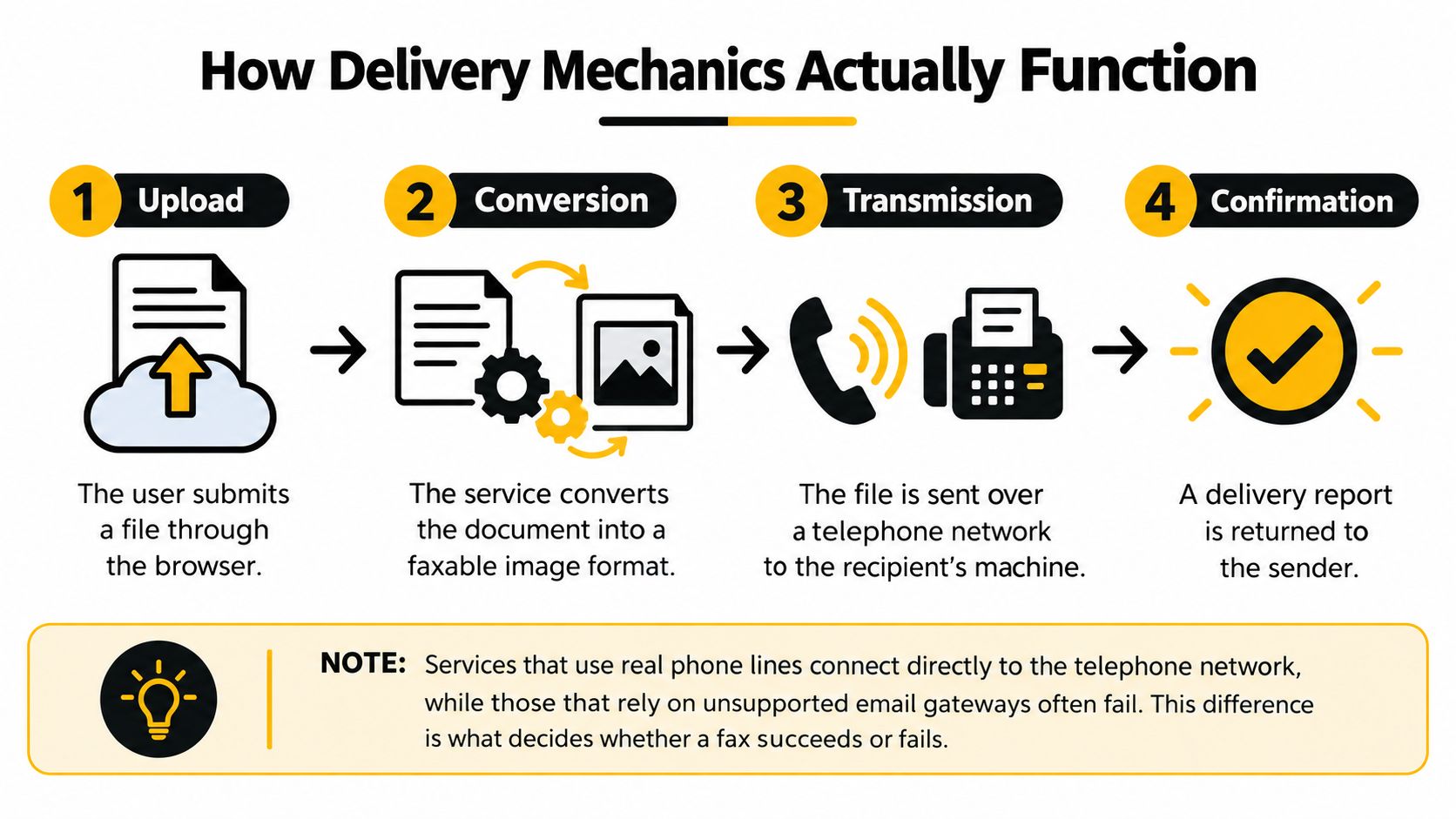
    A four-step infographic illustrating how online fax delivery mechanics work from file upload to final confirmation.

    A provider may use T.38, a protocol designed for fax over IP, or it may send fax tones through an audio channel. Those approaches behave differently under network stress.

    T.38 versus audio passthrough

    T.38 carries fax as real-time fax data instead of treating it like an ordinary voice call. That matters because voice systems often compress audio, smooth timing, or discard packets that seem unimportant to a conversation. A fax modem can't recover easily from those changes. It expects a stable, circuit-like exchange.

    With audio passthrough, the fax signal travels as sound. Lossy codecs, jitter, delay, packet loss, and poorly configured gateways can distort that sound before it reaches the recipient. The i3forum technical guidance on fax over IP identifies controlled bandwidth, low delay, low packet loss, and correct gateway configuration as important conditions for reliable fax-over-IP operation.

    T.38 doesn't make every network problem disappear. It gives the service a better way to represent and protect fax data across an IP path. A provider still needs properly configured gateways, sensible routing, and monitoring for failed attempts.

    The difference shows up in practical delivery results. One 2026 industry review reports that correctly implemented T.38 services can reach 95% to 98% delivery on standard internet connections, while G.711-style routing has substantially more failures on VoIP-heavy paths (mFax's review of online fax services). Treat that as a provider-specific technical benchmark, not a guarantee for every transmission.

    Here is what happens after you click send:

    1. Upload: The service receives your file and sender details.
    2. Conversion: It renders the document into a faxable page representation.
    3. Transmission: Its gateway negotiates with the recipient's fax endpoint and sends the pages.
    4. Confirmation: The service reports whether the attempt completed, failed, or needs another try.

    The service's delivery report is therefore more useful than a generic promise that it “supports fax.” Look for confirmation details, routing behavior, file compatibility, and a clear way to distinguish a completed transmission from an unsuccessful attempt.

    For a plain-language explanation of the user workflow, this guide to what internet faxing is can help connect the browser experience to the underlying transmission process.

    File Formats and Size Limits

    A fax service can often accept several document types, but PDF is usually the safest starting point because it preserves the page layout you approved. Word files can be useful when a provider supports them directly, but conversion may change fonts, spacing, page breaks, or embedded elements.

    The service may also impose a maximum file size, page count, or transmission limit. Those limits vary by provider and plan, so check them before sending a long contract or a scan made with a phone. A large file can take longer to process and may create a timeout or conversion problem even when the fax network itself is operating normally.
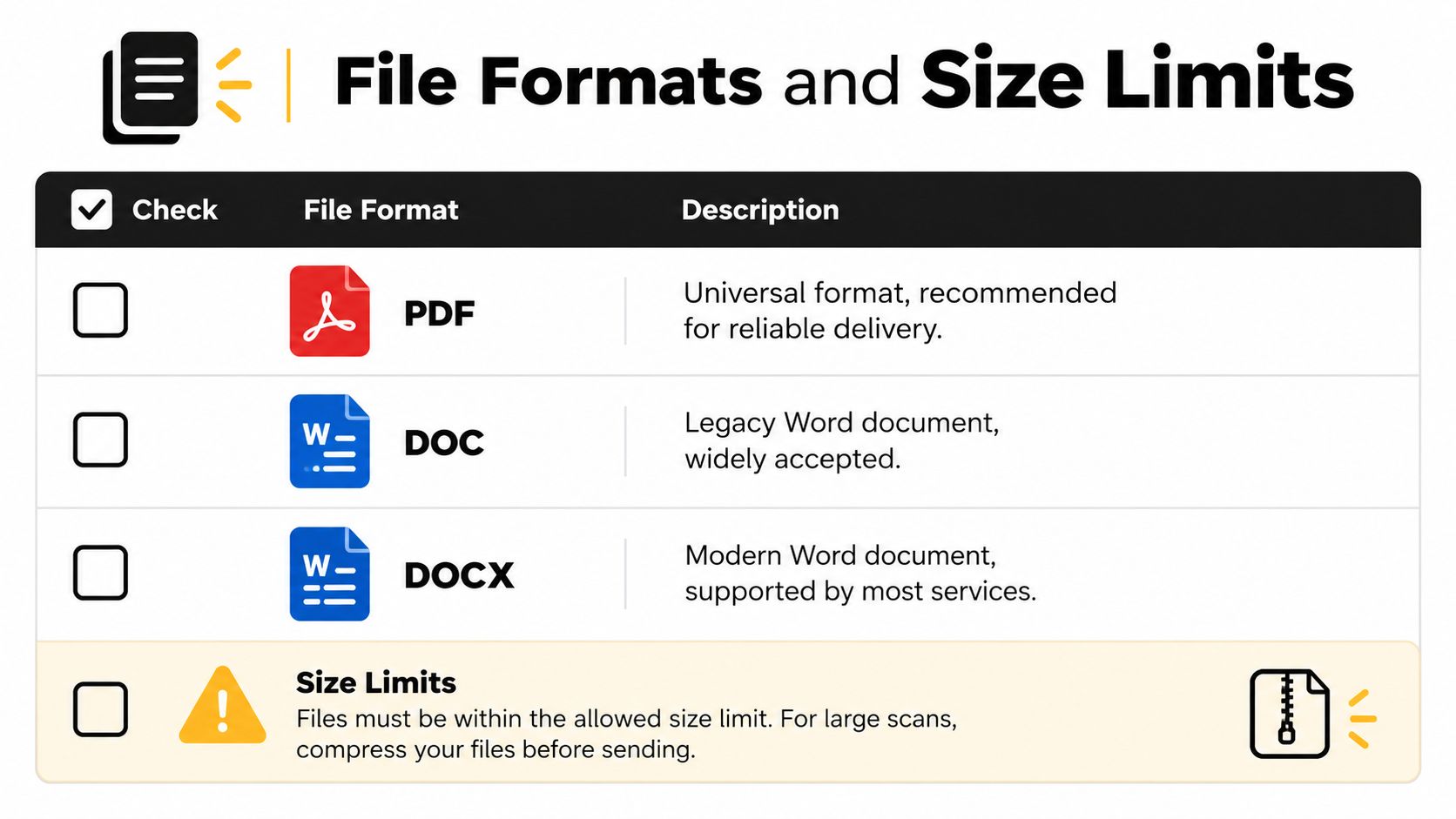
    A table showcasing common document file formats like PDF, DOC, DOCX and explaining file size limit requirements.

    Prepare the document before uploading

    Use this quick preparation routine:

    • Choose PDF when layout matters: Export the final version rather than printing and scanning it again. Open the PDF and check that signatures, tables, page numbers, and margins appear correctly.
    • Review DOC and DOCX files: Confirm that the recipient doesn't need editable content. If the document is only being reviewed or printed, a flattened PDF generally gives you more predictable output.
    • Reduce oversized scans: Crop empty margins, remove unnecessary pages, and compress high-resolution images. This guide to compressing documents provides a practical reference when a scan is too large to upload efficiently.
    • Keep text legible: Fax output may be less detailed than the file on your screen. Use clear contrast, avoid very small type, and inspect scanned pages for shadows or blurred handwriting.
    • Separate confidential material: Remove unrelated pages and metadata where appropriate. Sending only the required document reduces exposure and makes the recipient's intake process clearer.

    Build a useful cover page

    A cover page should identify the sender, recipient, subject, and total page count when the service supports those fields. Don't place essential content only in a cover note if the recipient may separate it from the document. For sensitive files, verify that the destination number is correct before including personal or confidential information.

    The guide to sending a fax as a PDF is useful when your workflow starts with a finished PDF and you need to understand how the service handles it. The core rule is simple: prepare a clean, readable file first, then let the provider convert it rather than relying on an improvised scan at the last moment.

    Security and Encryption Standards

    Online faxing can be appropriate for sensitive documents, but “online” doesn't automatically mean secure. Security depends on how the provider protects data during transmission, how it stores documents afterward, who can access them, and how long it retains them.

    Reputable services commonly use TLS to protect data in transit and AES-256 to protect stored files, according to recent coverage of online fax security (mFax's security review). Audit logs and access controls can help an organization establish who sent or viewed a document. Some providers also offer controls associated with formal compliance programs, including SOC 2 controls.

    Encryption is only one layer

    Think of security as a chain rather than a single feature.

    Layer Question to ask
    Transmission Does the provider protect the connection between your browser, its platform, and its delivery systems?
    Storage Are stored files encrypted, and can you control retention or deletion?
    Access Can administrators restrict documents to authorized users?
    Auditability Does the service record sending, receiving, access, and deletion events?
    Compliance Can the provider support the specific obligations of your industry and contract?

    Healthcare organizations need special care. A service may advertise encryption but still be unsuitable for protected health information if it doesn't offer the required contractual and administrative safeguards. For a HIPAA-regulated workflow, confirm whether the provider will sign a Business Associate Agreement, then review its access controls, retention rules, breach procedures, and administrative permissions.

    Legal and financial teams face a similar distinction. A confidential contract can be encrypted in transit yet remain exposed if copies sit in a shared inbox or cloud archive longer than necessary. Review the privacy policy and retention settings before sending client records, not after a dispute arises.

    Security question to ask before subscribing: “What happens to my document after delivery, who can access it, and when is it deleted?”

    Your own handling practices matter too. Use an approved device, avoid downloading sensitive files to unmanaged computers, confirm the recipient number, and store delivery records in the organization's controlled document system. This practical resource on how to keep PDFs safe covers document-level safeguards that complement a provider's platform security.

    Real-World Use Cases with SendItFax

    A remote worker may need to send a short contract from a laptop while traveling. A small business may have no reason to maintain a fax machine but still need to submit a form to a recipient in the United States or Canada. A legal professional may want a longer priority transmission without adding service branding to the cover page.

    A browser-based service can fit those situations because the workflow starts with the document, not with hardware installation. The user enters sender and recipient details, uploads a PDF, DOC, or DOCX file, optionally adds a cover message, and submits the fax. That approach resembles other remote communication tasks, including the varied use cases for expat calling, where people need communication tools that work across locations.
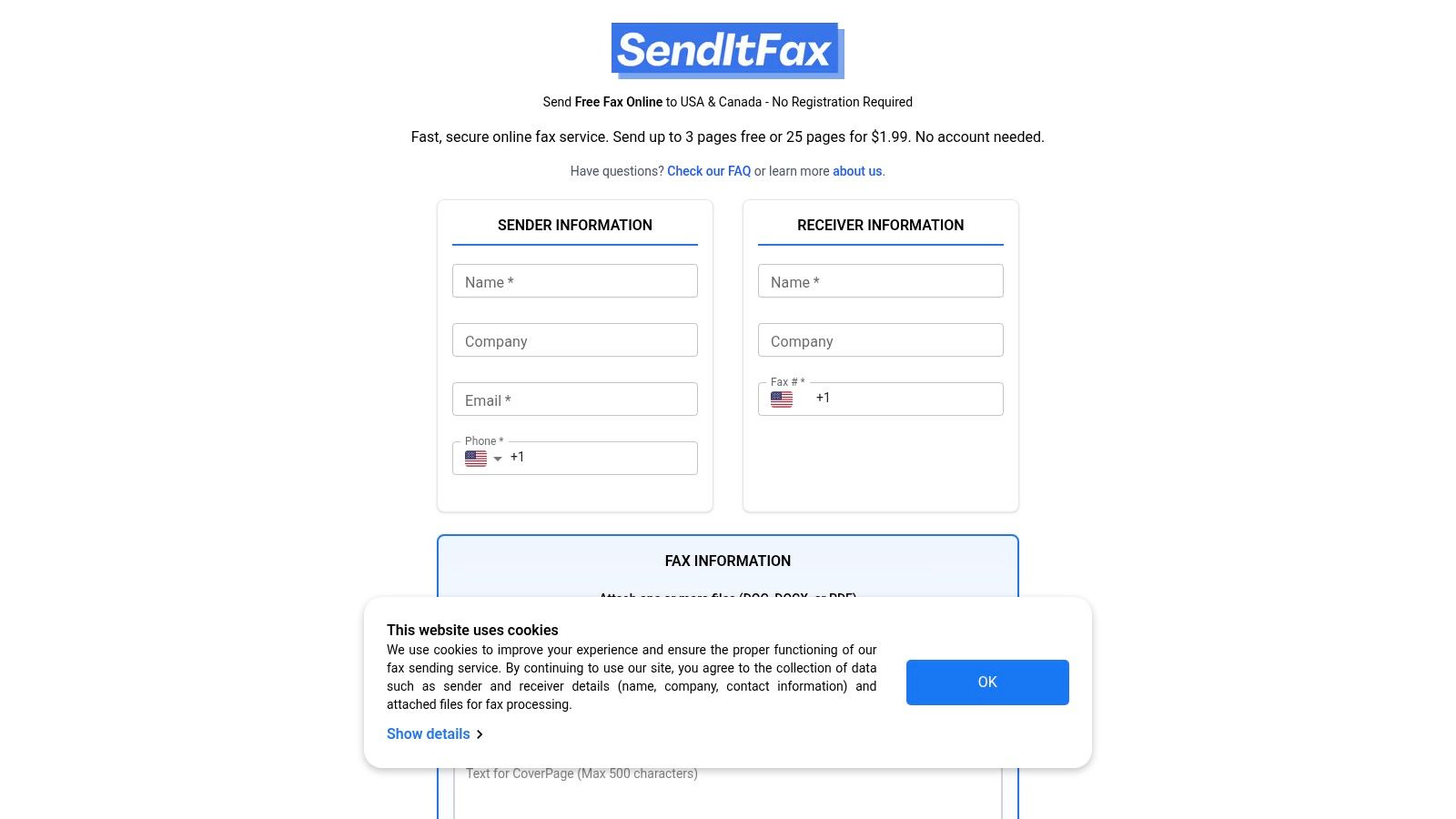
    Screenshot from https://senditfax.com

    Match the option to the job

    SendItFax offers browser-based sending to recipients in the United States and Canada without requiring an account. Its free option supports up to three pages plus a cover, allows up to five free faxes daily, and includes SendItFax branding on the cover page. That can suit an occasional personal or small-business transmission where branding isn't a concern.

    The Almost Free option costs $1.99 per fax through Stripe, supports up to 25 pages, provides priority delivery, and removes the service branding. Users can also omit the cover page. Those details matter when the document is longer, time-sensitive, or being sent on behalf of a professional practice.

    What this workflow doesn't replace

    A no-account service is not automatically the right choice for every regulated organization. Teams handling protected health information or records subject to internal retention policies should verify the provider's security and compliance terms before using it. They may need user accounts, audit logs, administrative controls, recurring fax numbers, or a Business Associate Agreement.

    For occasional transmissions, however, the value is practical. You don't need a physical machine, a dedicated fax line, or installed software to submit a prepared document from a browser. The decision should rest on destination coverage, file requirements, delivery confirmation, and the sensitivity of the material.

    Troubleshooting Common Delivery Failures

    A failed fax doesn't always mean the service is broken. The recipient's number may be wrong, the line may be busy, or the receiving machine may be out of paper or unable to store more pages. Start with the delivery report because it usually tells you whether the failure occurred before connection, during negotiation, or after transmission began.

    Use the error message as a diagnosis

    Check these issues in order:

    • Recipient number: Confirm the country code, area code, extension requirements, and destination digits. A fax sent to a voice number won't complete.
    • Busy destination: Retry after a short interval if the report indicates a busy signal. Repeated busy results may mean the recipient needs to clear or reset the line.
    • Receiving machine condition: Ask the recipient to check paper, toner, memory, power, and connection status. Their machine may answer but fail while receiving pages.
    • File conversion: Open the uploaded file locally. Replace a damaged document, flatten a complex PDF, or export the source again if the preview looks wrong.
    • Network route: If several destinations fail, contact the provider and ask whether it sees a gateway or route issue. Don't assume that changing the file will fix a transport problem.
    • Page readability: Ask the recipient which page failed or printed poorly. A successful connection doesn't guarantee that a faint scan or tiny text will be useful.

    If the report says the fax completed but the recipient can't find it, verify the destination number and ask whether the machine printed it under a different queue or stored it in memory. If the report shows a partial or interrupted transmission, resend the document after checking the file and recipient equipment.

    Keep the original file and each delivery report together. For a contract, medical record, or legal notice, that record helps you show what was sent, where it was sent, and how the provider reported the outcome.

    Ensuring Timely and Reliable Transmission

    Reliable online faxing comes from controlling the parts you can control. Verify the recipient number, prepare a readable file, use a provider with a suitable transport design, and preserve the delivery confirmation. The recipient's machine and network still matter, so allow time for a retry when the document has a firm deadline.

    Schedule international transmissions with the recipient's working hours in mind. A busy office line, a machine turned off overnight, or a destination that requires manual handling can delay completion even when your upload succeeds. For urgent documents, contact the recipient through another channel and confirm that the fax arrived clearly.

    Make the workflow repeatable

    Use a short pre-send routine:

    1. Confirm the fax number from a trusted record or direct contact.
    2. Open the final document and check every page.
    3. Remove unnecessary attachments and sensitive information.
    4. Add a clear cover page when the recipient needs context.
    5. Submit the fax and wait for the delivery result.
    6. Save the sent file and confirmation in the appropriate folder.
    7. Follow up if the report is ambiguous or the recipient doesn't confirm receipt.

    Independent reviews emphasize that practical performance depends on delivery confirmation, routing, and file compatibility, not just whether a service has a browser interface (PCMag's online fax service coverage). That is the useful conclusion for business owners. Online faxing is mature infrastructure when the provider connects to the fax network correctly and gives you enough evidence to manage failures.

    You don't need to become a telecommunications engineer. You do need to ask how the service transports fax data, how it protects stored files, what destinations it supports, and what happens when a transmission fails. Answer those questions before an urgent document is waiting in your outbox.


    SendItFax lets you upload a PDF, DOC, or DOCX file and send it to recipients in the United States or Canada from a browser, without creating an account or maintaining a fax machine. Visit SendItFax for a quick occasional transmission, then choose the free or Almost Free option based on your page count, delivery priority, and cover-page needs.
  • Fax Number in US: Format, Dialing and Cloud Routing

    Fax Number in US: Format, Dialing and Cloud Routing

    You've been asked to send a signed contract, referral, or medical record to a US fax number before a deadline. The recipient gives you a ten-digit number, but you still need to know whether it's current, how to dial it, and whether the fax ends at a physical machine or a cloud inbox. A correctly formatted number is only the starting point. Active routing and recipient verification determine whether the document reaches the right person.

    Why US Fax Numbers Still Matter Today

    A healthcare office may need to send a referral before a patient's appointment. A lawyer may need to transmit a signed filing or a confidential contract. In both cases, email might be available, but the receiving organization may still require fax because its workflow, audit process, or department intake system is built around fax delivery.

    Fax remains particularly persistent in US healthcare. Recent federal and industry reporting says roughly 70% of healthcare providers still exchange medical information by fax, while about 89% of healthcare organizations reported using fax machines in an MGMA poll of nearly 1,600 leaders, as summarized by healthcare fax statistics and automation reporting. The same source reports that US healthcare exchanges more than 9 billion fax pages annually, which shows why a fax number remains an active business endpoint rather than a historical curiosity.

    The reason isn't that professionals prefer old technology. Fax provides a defined destination, a transmission record, and a familiar process for regulated document exchange. Email can be encrypted, but ordinary email by itself doesn't guarantee that the recipient's mailbox, department, or document-handling process meets your requirements.

    Practical rule: Treat a fax number like a delivery address, not like a piece of contact information you can copy without checking.

    Fax also remains part of broader health-information exchange patterns. A summary of a federal report states that in 2019 nearly 8 in 10 hospitals used mail or fax to send and receive health information, and that fax or mail remained the most common method for care-record summaries, according to Medscape's overview of fax use in oncology practices. That context matters for anyone looking for a fax number in the US. The number may connect to a hospital department, an insurer, a law office, a shared intake desk, or a digital service that still accepts fax as part of its workflow.

    Anatomy of a US Fax Number Format

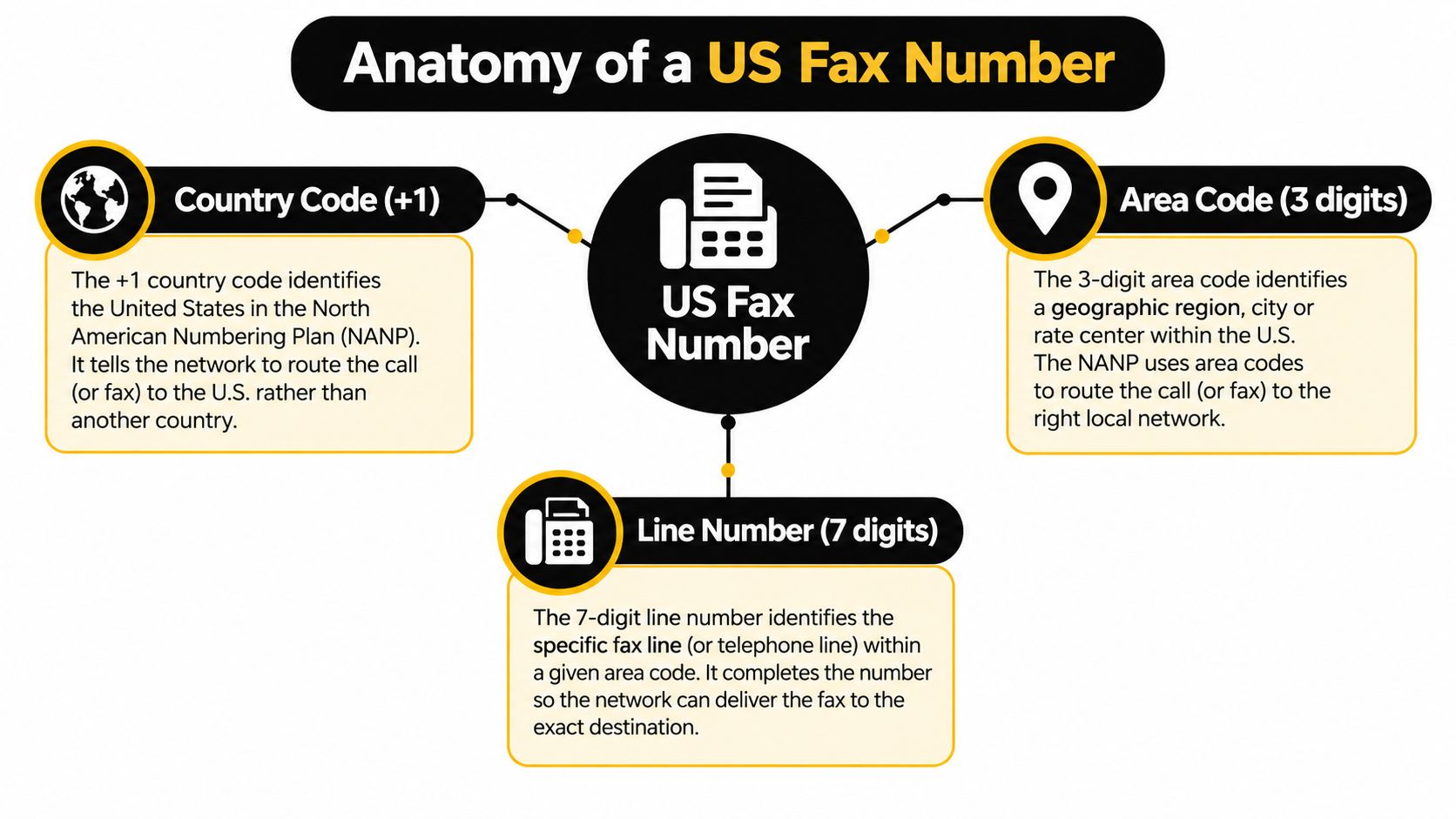
    A US fax number follows the same basic numbering structure as other US telephone numbers. The number has 10 domestic digits, divided into a 3-digit area code and a 7-digit local number. When you dial from outside the United States, or when a service requires international formatting, you'll commonly add the country code +1.

    A diagram explaining the anatomy of a US fax number including country code, area code, and line number.

    Think of the number as a postal address for telecom routing:

    1. Country code, +1. This identifies the North American Numbering Plan region when the sender is dialing internationally or entering a full international destination.
    2. Area code, three digits. This is the geographic or service routing key. A geographic area code points toward a numbering region, while a toll-free prefix identifies a non-geographic service.
    3. Local number, seven digits. This identifies the particular fax line or service endpoint within that numbering region.

    For a domestic workflow, the full sequence may be written as 1 plus the area code and local number, or as the ten-digit number alone, depending on the telephone system or online fax form. A company PBX may also require an outside-line prefix before the number. That prefix belongs to the sender's phone system, not to the recipient's fax number, so don't add it when saving the destination in a shared directory.

    You can find a useful visual explanation of this structure in how many numbers are in a fax number. The key distinction is between a geographic fax number and a toll-free fax destination. Reserved toll-free prefixes include 800, 888, 877, 866, 855, 844, and 833, and they replace a geographic area code rather than identifying a particular city or region, as explained in this guide to US fax number structure.

    A local-looking number also doesn't prove that the recipient operates a physical office in that area. The area code describes the numbering assignment, while the actual service may route calls and fax transmissions to another location or to cloud software.

    The Shift to Cloud Fax Endpoints

    The most important change in US faxing concerns where the number terminates. Years ago, a fax number usually pointed to a machine in an office. Today, it may route into a secure online inbox, a shared departmental queue, a document-management platform, or an electronic health record workflow.

    A modern, minimalist home office setup with a desk, chair, and view of the city.

    That shift changes how you should interpret a request for a “local” fax number. A number with a New York, Texas, or California area code may be assigned to a cloud fax account used by a remote team elsewhere. Conversely, an organization with a national toll-free number may use software routing to send documents to separate teams based on the destination number, cover-page details, or internal rules.

    Cloud fax services can accept documents through a browser or application instead of requiring staff to stand beside a machine. They may support digital attachments, cover-page fields, delivery notifications, searchable records, and routing to an individual inbox. The exact features vary, so confirm what the recipient's service supports before assuming that every fax endpoint handles attachments or automated notifications in the same way.

    A recent industry summary says 40% of US health system and hospital executives had adopted a cloud-based fax solution, indicating that fax is moving into software workflows rather than just disappearing, as described in coverage of the healthcare cloud fax transition. The practical implication is straightforward: the question isn't only “does this number belong to a fax machine?” It's “which system receives the transmission, and who monitors that system?”

    For an overview of the technology, see cloud-based fax solutions. A remote worker may send to a US number from a browser, while the recipient sees the document in a digital queue. That can make delivery faster to manage, but it can also hide changes in ownership, department routing, or access permissions. A number can remain active while the intended team no longer checks it.

    Verifying Active Routing Before Sending

    A valid-looking number doesn't guarantee a successful or appropriate delivery. The line may be disconnected, shared by several departments, forwarded to a different service, or active but no longer monitored by the person named in your records.

    That risk is serious for medical records, legal documents, financial forms, and any file containing personal information. Federal health-IT data reported through fax-use and interoperability analysis says 71% of US hospitals used mail or fax to send summary-of-care records and 68% used it to receive them in 2019. The same source says only 43% of hospitals were routinely interoperable across all four electronic-exchange domains in 2023, so fax continues to function as a fallback channel in many workflows.

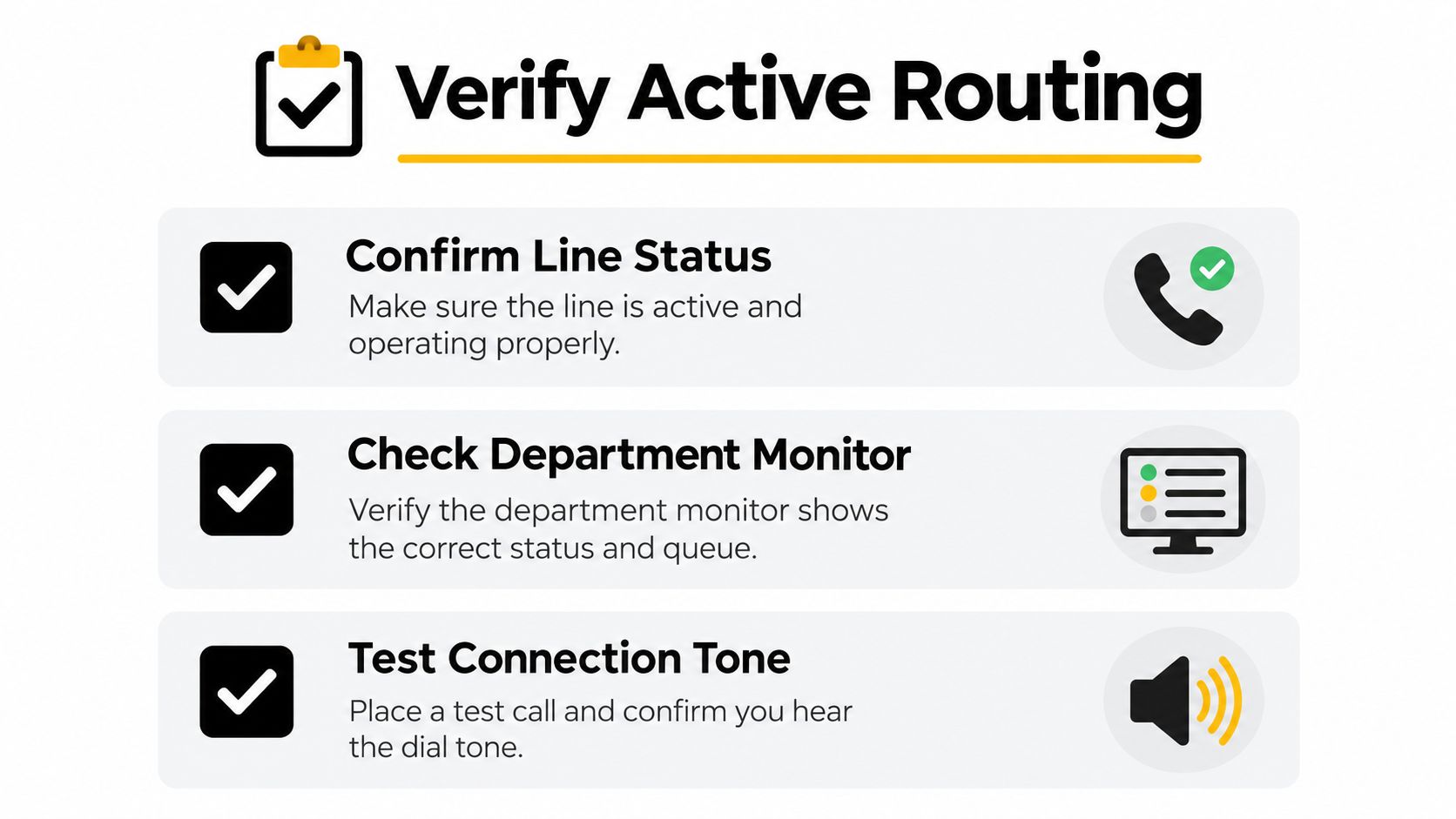
    An instructional graphic titled Verify Active Routing with three steps for checking phone line connections.

    Confirm the destination before transmission

    Use a short verification routine:

    • Confirm line status: Call the organization using a trusted phone number from its official website or an existing business record. Ask whether the fax number is still active.
    • Check department ownership: Confirm the exact department, recipient, and purpose of the line. “Medical records” and “referrals” may use separate endpoints.
    • Test the connection: If the recipient agrees, send a non-sensitive test page or ask whether the line is currently receiving transmissions. Don't use confidential information for testing.
    • Request delivery confirmation: Record the transmission result, time, recipient, and any confirmation number supplied by your fax service.
    • Update your directory: Replace outdated entries immediately so the next employee doesn't reuse an unverified number.

    A phone validation service can help clean and assess contact data before outreach, especially when a team maintains many business records. For example, a phone validation tool for real estate can support list checking, but validation isn't the same as confirming that a particular department actively monitors a fax endpoint.

    The safest process combines technical validation with human confirmation. Fax number verification guidance can help structure that process, but the recipient organization remains responsible for confirming its current routing.

    Dialing Rules and Browser-Based Delivery

    Once the recipient confirms the endpoint, enter the number in the format required by your sending system. For a US destination, that normally means the 10-digit area code and local number. If the service accepts international formatting, use +1 followed by those 10 digits. Some systems accept a leading 1 instead.

    Check your organization's PBX rules if you're dialing from a physical phone or office fax machine. Some systems require an outside-line access code, while others use a full ten-digit dialing pattern automatically. Never assume that a number copied from an email includes the correct exit code for your office telephone system.

    Browser-based delivery removes much of that uncertainty. Instead of entering a number on a machine, you can generally:

    1. Open the online fax service.
    2. Enter the recipient's confirmed US fax number.
    3. Upload the document in a supported format.
    4. Add the recipient, sender, and department details.
    5. Include a cover page when it helps the recipient identify the document.
    6. Review the number and attachment before sending.
    7. Save the delivery result for your records.

    A web service may also offer optional priority handling, digital cover-page messages, or a delivery status display. Those features don't replace recipient verification. They only make the transmission process easier to control after you've confirmed the destination.

    Before clicking send: Compare the number on screen with the number confirmed by the recipient, then check the attachment and cover page for unintended information.

    Fax over IP introduces another technical consideration. Many systems use T.38 as the fax relay mode because it preserves real-time modem signaling across packet networks. Guidance from a T.38 fax vendor recommends setting the default fax mode to T.38 auto, reflecting the fact that fax transmission over VoIP needs handling designed for packet loss, jitter, and voice-network behavior rather than ordinary audio alone, as described in this T.38 fax and VoIP guidance.

    If a transmission fails, don't repeatedly resend sensitive material without checking the cause. Confirm the number, ask whether the line is available, review the service's error message, and determine whether the recipient uses a machine, a hosted endpoint, or another managed workflow.

    Best Practices for Secure US Faxing

    Reliable faxing depends on a small set of repeatable habits. The number format gets the document to the right network destination, but operational controls help get it to the right human or department.

    Use a verification-first workflow

    Keep a shared directory with the fax number, organization, department, verification date, and the person who confirmed it. When a recipient changes offices or departments, update the entry rather than adding a second unverified number.

    Use a cover page when it supports safe handling. Include the intended recipient, department, sender contact details, document description, and a confidentiality notice appropriate to your organization. Keep sensitive information out of the cover page itself because the cover can be viewed before the rest of the document.

    Match the method to the document

    For an occasional transmission, a browser-based service can avoid maintaining a physical fax machine. SendItFax accepts DOC, DOCX, and PDF uploads for US and Canadian destinations, including toll-free fax numbers, and lets users add an optional cover-page message. Its free option supports up to three pages plus a cover, with a daily limit of five free faxes and branding on the cover page, while the Almost Free option costs $1.99 per fax, supports up to 25 pages, offers priority delivery, and removes that branding, according to the publisher's product information.

    For recurring regulated workflows, evaluate retention, access controls, audit records, recipient notifications, and integration with the systems your staff already use. A cheap transmission method may not satisfy your organization's document-handling requirements.

    Review every transmission

    Before sending, verify the destination, recipient, attachment, page order, and cover-page content. After sending, save the confirmation and follow up with the recipient when the document is time-sensitive.

    Operational standard: A fax isn't complete when the service reports transmission. It's complete when the intended department confirms receipt and can open the document.

    This process protects against the most common failure: sending a valid document to a valid number that no longer reaches the intended recipient.


    SendItFax lets you send documents to US and Canadian fax numbers from a browser, without a fax machine or account, with options for cover pages and higher-volume delivery. Review the destination carefully, then use SendItFax when you need a practical way to transmit an occasional fax from your computer.

  • Fax Machines Services: A 2026 Guide to Your Options

    Fax Machines Services: A 2026 Guide to Your Options

    You're probably here because someone asked you to fax something today, not because you wanted to think about fax technology in 2026.

    A client needs a signed contract. A clinic wants intake forms. A lawyer's office says, “Please fax it over.” Then you look at your options and none of them feel good. The old office machine is jammed, out of toner, or sitting in a building you're not even near. The local store can do it, but you have to drive there, wait in line, and hand sensitive paperwork to someone at a counter. An online service sounds easier, but it's not obvious which kind is secure, affordable, or worth using for occasional needs.

    That confusion is normal. “Fax machines services” now covers a much wider range of options than is generally realized. It can mean fixing a physical machine, renting one, running a fax server in your office, or using a browser-based service that sends the document without any hardware at all.

    Small business owners usually don't need a history lesson. They need a practical answer to a simple question: what's the easiest safe way to send this document without wasting time or money? That's the question this guide solves.

    Why Are We Still Talking About Fax Machines

    The fax machine usually becomes important at the worst possible moment.

    A real estate office needs to send a signed disclosure before the end of the day. The machine powers on, but the line won't connect. A medical practice has forms ready, but the staff member who knows how to use the machine already left. A freelancer gets told by a government office that email won't work and the document must be faxed.

    That's why faxing hasn't disappeared. It's old, but it still sits inside the workflows of industries that care about documented delivery, familiar processes, and accepted paper-based communication.

    Fax survived because businesses built around it

    Faxing didn't become common by accident. The adoption of the Group 3 fax standard in 1983 standardized document transmission, and by 1989 the United States had over 4 million fax machines, up from 300,000 in 1985, which locked faxing into everyday business communication in healthcare, legal work, and other document-heavy fields, according to EBSCO's history of fax machines.

    That legacy matters. A lot of offices still use fax because the people they work with still use fax. If a hospital department, court office, insurer, or title company expects fax, your modern tools don't change that requirement.

    Practical rule: The question usually isn't “Is fax outdated?” It's “What does the recipient still accept?”

    The machine is no longer the whole story

    Many readers get tripped up. They hear “fax service” and think only of a physical device with paper trays and a phone cord.

    Today, that's only one option.

    You can still use a machine in your office. You can also use a retail counter service, a managed office setup, or a web-based service from a laptop or phone. The important shift is that faxing has separated from the fax machine. The business process remains, but the hardware is often optional.

    If you need a plain-language primer on the kinds of documents people still send this way, this overview of what faxes are used for is useful context.

    Why this matters to small businesses

    For a small business, the biggest issue usually isn't the technology. It's the friction around it.

    You don't want to maintain a machine for something you only do occasionally. You also don't want to hand private records to a store clerk if you can avoid it. And if you do fax often, you need something dependable enough that your staff won't spend the afternoon retrying failed transmissions.

    That's why the right fax service depends less on nostalgia and more on your volume, privacy requirements, and how quickly you need to send documents.

    Comparing the Four Main Types of Fax Services

    When people search for fax machines services, they're often mixing together very different solutions. That creates bad decisions. A solo consultant might look at enterprise fax software they'll never need. A busy clinic might try to survive on a casual consumer tool and then hit workflow problems.

    The easiest way to sort the options is to divide them into four groups.

    An infographic comparing four types of fax services: traditional, online, server-based, and hybrid fax systems.

    Physical machine repair and maintenance

    This is the oldest category. You already own the fax machine, or it's built into a multifunction printer, and your “service” is really ongoing support to keep it alive.

    That support can include replacing consumables, servicing paper feeders, checking phone line issues, and troubleshooting failed transmissions. It works best for offices that already have an established fax workflow and send enough volume to justify keeping hardware around.

    The downside is simple. The machine becomes one more office asset that can fail at exactly the wrong time.

    Traditional fax machines convert pages into audio tones for transmission, and they face obsolescence because of high maintenance needs and a cost-per-page of $0.05 to $0.10, according to iFax industry faxing facts. That same source says cloud fax adoption among high-usage segments is projected to grow over the next three years, which tells you where many organizations are heading.

    Best fit: Offices with existing hardware, stable staff processes, and regular fax volume.
    Weak fit: Occasional users, remote workers, and anyone tired of machine upkeep.

    Fax machine rentals

    Rentals sit in the middle ground. You don't want to buy another device, but you need temporary on-site fax capability.

    This tends to make sense for short-term offices, events, legal war rooms, temporary clinics, or project spaces where documents still need to move through a known fax workflow. You get the familiarity of physical hardware without owning it long term.

    But rentals don't erase the old-world hassles. You still have paper, supplies, setup, line access, and user training. For a small team that only needs to fax now and then, rental often solves the wrong problem. It gives you hardware when what you really needed was just a way to send one document from a browser.

    Managed on-site fax servers

    This option is for organizations that treat fax as an internal communications system, not just an occasional task.

    A managed fax server centralizes faxing across teams. Staff can send through connected software while the organization controls logs, routing, permissions, and retention policies. Finance, legal, and healthcare organizations often prefer this model when they need tighter control over where documents go and how records are tracked.

    Here's the simplest way to understand it:

    Service type Who it suits Main advantage Main drawback
    Physical machine support Small offices with existing hardware Familiar workflow Breakdowns and supply management
    Rental machine Temporary sites or short-term needs No long-term purchase Still tied to hardware and setup
    On-site fax server Larger regulated organizations Centralized control More technical overhead
    Cloud or online fax Occasional users and distributed teams Fast access from anywhere Requires choosing the right provider

    If your team is already modernizing phone systems, it helps to understand the network side too. This overview of ARPHost, LLC infrastructure services gives useful background on how business voice traffic has shifted away from old line-based setups, which is often part of the same conversation.

    Cloud-based and online fax services

    This is the category most small businesses should examine first.

    Cloud fax services let you upload a document through a web app, email workflow, or integrated business system. The service handles the transmission to the receiving fax number. You don't maintain a fax machine, you don't need a dedicated phone line, and you can send from anywhere with internet access.

    For occasional users, this is usually the cleanest solution. For distributed teams, it's often the only practical one.

    Some online tools are built for enterprise routing and compliance. Others are made for quick one-off sending without a long signup process. That distinction matters. A small business owner who sends a few faxes a month doesn't need the same platform as a hospital system.

    If you want a broader view of how these options differ in practice, this breakdown of online fax services comparison is a good companion read.

    A good fax service should match your workflow. It shouldn't force you to build a workflow around the service.

    A Realistic Look at Fax Service Costs

    The cost of faxing gets misunderstood because people compare only the obvious expense.

    They'll compare a monthly online plan to the price of a machine already sitting in the office and think the machine is cheaper. That's rarely the full picture. The actual cost includes supplies, downtime, staff time, failed sends, and the hassle of physically handling documents.

    A modern computer monitor displaying a graphic with wavy lines and the text Fax Costs.

    What businesses forget to include

    A physical machine has a visible price only when you buy it. After that, the costs hide in small recurring problems.

    Think about what happens when:

    • Supplies run low: Someone has to order toner, paper, or replacement parts.
    • The machine fails: Staff stop what they're doing to troubleshoot or resend.
    • A document jams or prints badly: The sender scans and tries again.
    • The machine is location-bound: Someone has to be in the office to use it.

    Those interruptions don't show up neatly on an invoice, but they still cost money.

    Cost patterns by service type

    Physical machine support usually looks cheap until the machine starts aging. Then every problem becomes a decision: repair it, replace it, or work around it.

    Rental costs can make sense for short windows, but they don't usually work well for occasional low-volume use. You may avoid buying hardware, but you're still paying for a hardware-centered process.

    On-site fax servers shift spending into setup, administration, and vendor support. For larger organizations, that can be reasonable because they gain control and workflow consistency. For a smaller company, it can be more system than they need.

    Online fax changes the cost structure. Instead of paying to keep a machine available at all times, you pay for access when you need it. That's especially attractive for occasional users who fax only when a client, government office, law firm, or healthcare partner insists on it.

    Bottom line: The cheapest-looking fax option on paper often becomes the most expensive option in staff time.

    The small business view

    If you send faxes regularly every day, a more structured service may make sense.

    If you send them occasionally, the smarter move is usually to avoid owning the problem. You want a method that lets you send, confirm delivery, and move on. That's where no-account or low-friction online services stand out. They reduce the hidden cost of “figuring fax out again” every time the need pops up.

    For many small organizations, convenience isn't a luxury feature. It's a cost control strategy.

    Navigating Security and Compliance in 2026

    Security is where fax conversations often become muddy.

    People assume the old machine is automatically safer because it feels direct and tangible. Sometimes that's partly true. Sometimes it isn't. The key issue is whether the whole process, from document handling to confirmation and storage, protects sensitive information and creates a usable record.

    A 3D graphic featuring a stylized, multi-layered lock icon symbolizing data security and digital protection.

    Why traditional fax felt secure

    Traditional faxing built its reputation on point-to-point delivery over phone lines. That model feels contained. You send from one machine to another machine, and many organizations got comfortable with that routine.

    But secure transmission is only part of the story.

    A paper fax can still sit unattended on an output tray. It can be sent to the wrong number. A machine can fail without clear proof of what happened. A retail counter service adds another human hand into the process, which may be fine for a simple form but not ideal for sensitive records.

    What compliance actually needs

    In regulated work, people often need more than “it sent.” They need proof.

    That usually means asking questions like these:

    • Can you confirm delivery clearly?
    • Is there an audit trail?
    • Can authorized staff access records without exposing them to everyone else?
    • Can you document the transmission if a dispute comes up later?

    Online fax reliability is a compliance issue, not just a convenience issue. According to Angie's PNS fax services coverage, online services show 99.2% delivery success versus 94% for physical machines, and modern web services provide audit trails and receipts required by regulations like HIPAA.

    That's the part many buyers miss. Compliance isn't only about whether the signal is secure. It's also about whether your process produces records that stand up to scrutiny.

    How to evaluate a secure digital option

    If you're sending sensitive documents, look for these basics:

    • Receipt and logging: You need a record of what was sent and whether it went through.
    • Controlled access: Not every employee should be able to view every document.
    • Clear privacy practices: You should understand how the provider handles uploaded files and session data.
    • Workflow fit: A secure system that staff avoid using correctly won't stay secure for long.

    For healthcare teams, it helps to think about fax in the same category as other regulated communication tools. If your organization is reviewing broader digital communication policies, this guide to video conferencing for healthcare providers is a useful parallel example of how compliance decisions extend beyond one channel.

    If HIPAA-related fax requirements are part of your day-to-day work, this explainer on HIPAA-compliant fax service is worth reading.

    Security isn't just transmission security. It's process security.

    How to Choose the Right Fax Service Provider

    The easiest way to choose a provider is to stop asking, “Which fax service is best?” and start asking, “Best for what?”

    A solo accountant, a remote nonprofit worker, and a medical office manager all need different things. The right provider depends on how often you fax, who receives those documents, and how much setup you can tolerate.

    Start with your actual usage

    One of the clearest signs of demand in this area is that “online fax no sign up” searches were up 45% year-over-year in 2025, according to this analysis tied to physical fax-service content gaps. That tells you many people don't want a permanent fax setup. They want a simple way to send a document right now.

    That's a very different need from a business that sends faxes all day.

    Ask yourself:

    1. How often do you send faxes?
      If the answer is “rarely,” avoid buying or maintaining hardware.

    2. Do you need to fax from multiple places?
      If you work from home, travel, or split time between offices, browser access matters more than machine speed.

    3. Are your documents sensitive?
      If yes, pay close attention to delivery confirmation, privacy handling, and who can access sent records.

    4. Do you need your staff to share a workflow?
      A team may need shared access, routing, and internal controls. An individual usually doesn't.

    Match the provider to the job

    Here's a simple decision filter:

    • Occasional sender: Choose a low-friction online option, especially if you don't want a monthly commitment.
    • Retail walk-in user: Use only if convenience of location matters more than privacy or time.
    • Frequent office sender: Consider a more structured online plan or managed workflow.
    • Highly regulated team: Focus on logging, receipts, access control, and documented processes.

    Red flags to watch for

    Not every provider makes the tradeoffs obvious. Look carefully for:

    • Forced account creation for a one-time task
    • Unclear delivery confirmation
    • Hidden branding on business documents
    • Complicated upload steps
    • Privacy language that doesn't explain what happens to your files

    The best provider often isn't the one with the longest feature list. It's the one that removes the most friction from your real workflow.

    For small businesses and occasional users, no-account online fax often ends up being the most sensible path because it aligns with how infrequently many people fax.

    Migrating From a Physical Fax to an Online Service

    Switching away from a fax machine doesn't need to be a major IT project.

    For most small businesses, the cleanest transition is gradual. You don't rip out every old process on day one. You identify who still receives faxes, how often you send them, and what proof of delivery your team needs. Then you move the sending workflow online and keep the old machine only as a temporary fallback until everyone is comfortable.

    Screenshot from https://www.senditfax.com/

    Step 1 Review your current fax habits

    Start with a short audit.

    Look at the last few months of sent faxes and note:

    • Who receives them most often
    • What file types you usually send
    • Whether you need cover pages
    • Which staff members send the faxes
    • How often delivery confirmation matters for compliance or billing

    This usually reveals something useful. Many offices discover that only a small number of contacts still require fax, and only one or two staff members handle it.

    Step 2 Choose an online workflow your staff will use

    This part matters more than fancy features.

    If your team only needs occasional outbound faxing, the best online solution is usually the one with the fewest steps. Upload the file, enter sender and recipient details, send, and confirm. If the process feels complicated, people will keep walking back to the old machine.

    Cloud-based fax services dominate the market and are projected to reach USD 4.47 billion by 2030, and they use T.38 Fax over IP for reliable delivery over the internet, achieving over 99.9% success rates and cutting transmission times from minutes to seconds, according to Arizton's fax services market research.

    For more advanced document workflows, some organizations also connect fax traffic to automation tools. If you want an example of how incoming fax content can feed downstream processing, AI-powered Faxplus data parsing shows how teams extract structured data from faxed documents after delivery.

    If a cloud fax tool saves transmission time but creates more staff confusion, it's the wrong tool.

    Step 3 Test with a low-risk document first

    Don't begin with your most urgent contract.

    Send a simple internal test or a noncritical form to a trusted recipient. Check the quality, timing, confirmation details, and how easy it is for your staff to repeat the process. This gives you a safe way to spot issues before a deadline matters.

    A short walkthrough can help teams that are used to paper-based routines:

    Step 4 Update your internal habits

    Once the test works, document the new process in plain language.

    Keep it short. A one-page instruction sheet is usually enough:

    1. Prepare the file: Save it as PDF or another supported format.
    2. Enter recipient details carefully: Most fax problems are input problems.
    3. Attach a cover page only when needed: Some recipients want it, others don't.
    4. Save confirmation details: Especially for legal, healthcare, or billing records.

    This is also the time to decide who can send sensitive documents and where confirmations should be stored.

    Step 5 Retire the old machine responsibly

    Don't just unplug it and push it into a closet.

    Remove paper documents, clear stored numbers if the device keeps them, and decide whether the machine should be recycled, returned, or kept only for backup during a short transition period. If you used a multifunction printer, make sure staff know whether fax is still active or fully retired.

    A clean handoff matters because old equipment tends to linger. Then months later someone tries to use it, assumes it still works, and a deadline gets missed.

    The better approach is simple: one current workflow, one documented process, one clear place to confirm what happened.


    If you need to fax a document to a U.S. or Canadian number without dealing with hardware, signups, or office downtime, SendItFax gives you a fast browser-based option. You can upload a PDF, DOC, or DOCX file, add a cover message if needed, and send occasional faxes without creating an account. For quick one-off needs, it's a practical way to get the job done and move on.