Tag: send fax from computer

  • How to Send a Fax Online A Modern Professional’s Guide

    How to Send a Fax Online A Modern Professional’s Guide

    Sending a fax online is surprisingly straightforward. You just pick a service, upload your document, punch in the recipient's fax number, and hit send. It effectively turns your computer or phone into a fax machine, but without the bulky hardware or the need for a separate phone line.

    Why Online Faxing Still Matters in a Digital World

    An office worker is sending a fax online using a modern computer, symbolizing the blend of old and new technology.

    I get it. Faxing sounds like a relic from a bygone era, something you'd find collecting dust next to a Rolodex. But the truth is, in a lot of critical professions, it’s still an essential communication tool. This isn’t about being old-fashioned; it’s about security, legal weight, and compliance.

    For anyone working in law, healthcare, or finance, a simple email often isn't enough. These industries are governed by strict regulations like HIPAA, where protecting sensitive client and patient data is a legal mandate, not just a good idea. Online faxing bridges that gap, giving you the trusted security of a traditional fax with the ease of modern tech.

    The Enduring Relevance of Fax Technology

    Think about a real estate agent on a tight deadline to submit a signed purchase offer. Emailing a document that sensitive opens it up to all sorts of interception risks. Sending it through an online fax service, on the other hand, creates a secure, point-to-point transmission that’s legally recognized and provides a verifiable receipt of delivery.

    This combination of old-school security and new-school convenience is precisely why faxing is still around. We're not trying to bring back obsolete tech; we're just applying its strengths in a modern context. The numbers back this up, too. The global fax services market was valued at USD 3.31 billion and is expected to climb to USD 4.48 billion by 2030. That growth is fueled by the roughly 17% of businesses that still rely on faxing for their most important operations. You can discover more insights about the fax market on ResearchAndMarkets.com.

    A Practical Solution for Modern Needs

    Online faxing solves a few key problems that other digital communication methods can't always handle:

    • Legal Admissibility: Faxes are widely accepted as legally binding documents, which is crucial for things like contracts, court filings, and official records.
    • Enhanced Security: Unlike email, which is susceptible to hacking and phishing scams, fax transmissions travel over the public switched telephone network (PSTN), a much more secure channel.
    • Audit Trails: Good online fax services give you detailed confirmation reports. This creates a clear, auditable trail proving when a document was sent and successfully received.

    The real value of learning how to send a fax online is realizing it's a modern skill for secure communication, not an outdated task. It's the digital equivalent of a sealed, hand-delivered envelope for your most important documents.

    At the end of the day, knowing how to send a fax from your computer is a genuinely practical skill for anyone who deals with confidential information. It’s a simple way to ensure your documents are sent securely, arrive without being tampered with, and meet the strict compliance standards of many professional fields.

    A Practical Walkthrough to Sending Your First Online Fax

    A person is sitting at a clean desk, using a laptop to send a digital fax, with a satisfied expression.

    Jumping into any new technology can feel a little intimidating, but sending an online fax is surprisingly straightforward. Let's walk through it together. We'll use a popular service like SendItFax as our example, since its workflow is typical of most top-tier platforms.

    First things first, you need an account. Most services offer a few different plans, from free tiers for the occasional one-off fax to paid subscriptions for businesses that need more volume and features. Once you're signed up and logged in, you’ll land on the main dashboard.

    This is your command center. Just look for a big, obvious button that says something like “Send Fax” or “New Fax” to get started.

    Navigating the Sending Interface

    Clicking that button will take you to a simple form that should feel a lot like sending an email. This is where you’ll plug in the recipient’s information, attach your files, and add a cover sheet.

    The most important field here, without a doubt, is the recipient's fax number. Getting this right is everything.

    • Entering the Fax Number: Always include the full number, starting with the area code. For international faxes, you'll need the country code first (e.g., +44 for the UK).
    • Adding Multiple Recipients: One of the real perks of online faxing is the ability to send the same document to several numbers at once. It's a massive time-saver for things like company announcements or client updates.

    Pro Tip: I can't stress this enough: double-check the fax number. A single wrong digit is the number one reason for a failed fax. It’s a simple check that saves a ton of headaches.

    Assembling Your Fax Package

    With the number locked in, it’s time to add your documents. Most services handle all the common file types you'd expect—PDF, DOCX, JPG, you name it. You can either drag and drop files from your computer or, even better, pull them directly from cloud storage like Google Drive or Dropbox.

    This is a huge part of why people are learning how to send a fax online; it completely cuts out the annoying print-and-scan step.

    Next up is the cover page. Don't skip this! It's not just a formality; it’s what tells the recipient who you are and why you're sending them a document.

    Nearly every platform provides a simple template. You’ll just fill in a few key details:

    • To: Recipient's name and company.
    • From: Your name and company.
    • Subject: A clear, concise description. Think "Signed Contract – Account #54321" instead of just "Contract."
    • Message: A spot for a quick, optional note.

    Taking 30 seconds to fill this out properly makes you look professional and ensures your fax gets to the right person quickly. For a deeper look at faxing without the clunky hardware, our guide on how to fax without a fax machine has you covered.

    The Final Review and Send

    Before you commit, any good service will give you one last confirmation screen. This is your final chance to give everything a once-over.

    Your Pre-Flight Checklist:

    1. Recipient's Number: Is it perfect? Country code included?
    2. Attached Documents: Are the right files there? Does the page count look correct?
    3. Cover Page Details: Any typos in the names or subject line?
    4. Plan Limits: Give a quick thought to how many pages you’re sending. Make sure it fits within your plan to avoid any surprise fees.

    Once everything looks good, hit "Send Fax." The service takes it from there—dialing the number, transmitting your files, and then sending you a confirmation notice right to your email or dashboard. And that's it! You've officially sent an online fax.

    Getting Your Documents Ready for a Perfect Send

    Preparing documents for a clear online fax

    A blurry or unreadable fax can bring a deal to a screeching halt. The secret to a crisp, professional-looking fax on the other end is all in the prep work. What you send is what they get, so a few minutes of setup makes all the difference.

    Think of it this way: your digital file is about to be translated into an old-school analog signal and then back again. Garbage in, garbage out. The cleaner your starting file, the better the final result will be.

    Choose The Best File Format

    When in doubt, go with a PDF. It’s the gold standard for online faxing because it locks in your formatting—fonts, images, and layout stay exactly where you put them. No nasty surprises like a signature line jumping to the next page.

    While you can often send a DOCX or JPG file, they can be a bit of a gamble.

    • DOCX: A Word file can look different on the receiving end if they don't have the same fonts installed, shifting your carefully crafted layout.
    • JPG: Great for a quick photo or a single-page scan, but small text can get fuzzy.
    • PNG: Usually offers better quality for graphics than a JPG, but the files can get large.
    • TIFF: This is the heavyweight champion for quality, often used in legal and medical fields for its high detail, but the file sizes are massive.

    Industry experience shows that using a PDF can cut down on layout-related transmission errors by as much as 75%.

    Here’s a quick cheat sheet on why PDF usually comes out on top:

    Format Pros Cons
    PDF Layout is locked and reliable Can be a slightly larger file
    DOCX Easy to edit Display can be inconsistent
    JPG Small file size Quality loss is common (lossy compression)
    TIFF Extremely high detail Creates very large files

    Optimize Scanned Documents

    If you're working with paper, how you scan it is critical. For documents with text, aim for a resolution of 300 dpi. This is the sweet spot for crisp, readable characters without creating a giant file. Going higher, like 600 dpi, is usually overkill and can bog down the transmission.

    Before you hit "scan," make sure you crank up the contrast. You want bold, dark text on a clean, white background. This simple tweak makes a huge difference in legibility. If you're using a flatbed scanner, ensure there are no shadows creeping in from the edges.

    A few more pro tips for scanning:

    • Scan in black-and-white for text-only documents. It keeps file sizes tiny.
    • Wipe down the scanner glass to get rid of any dust or smudges.
    • Crop out any unnecessary white space or margins.
    • Always preview the scan on your full screen to catch any issues.

    Compress Without Losing Clarity

    Huge files are the enemy of a successful fax. If your document is loaded with high-resolution images, the file size can quickly balloon, leading to failed transmissions. Most online fax services have a file size limit, often around 2 MB.

    You can use tools like Adobe Acrobat's optimizer or a free online compressor to shrink your file down. The goal is to make it lean without turning your text into a blurry mess.

    Here's how to do it smartly:

    1. Lower the resolution on images from 300 dpi to 200 dpi—it's usually fine for faxing.
    2. If you're saving a JPG, reduce the quality setting to around 75%.
    3. Strip out any unnecessary data like embedded thumbnails or extra color profiles.

    A smaller, optimized file can cut your transmission time by up to 40% and helps you avoid frustrating timeouts.

    Some fax services automatically compress files when you upload them, which is handy. Just be sure to double-check their settings to ensure your images don't get too compressed and lose important detail.

    Your Final Pre-Flight Checklist

    Before you hit that "send" button, run through this quick final check. It's saved me from countless headaches.

    1. File Format: Is it a PDF? If not, are you confident the chosen format will work?
    2. Page Count: Does the total number of pages fit within your plan's limits?
    3. Readability: Is the text clear and the contrast sharp on every single page?
    4. Cover Page: Are all the names, numbers, and details correct?
    5. Final Preview: Give it one last look in the fax service's preview window.

    I once heard from a real estate agent who nearly lost a same-day closing because he skipped the readability check. The signed contract he scanned arrived as a faint, illegible smudge. A five-second check could have saved him hours of stress. Taking a moment to prepare your files properly ensures they arrive looking professional, clear, and ready for action.

    How to Choose the Right Online Fax Service

    https://www.youtube.com/embed/tw6LzYHD9z4

    With so many online fax providers popping up, picking the right one can feel a bit overwhelming. The good news? The best choice really just boils down to your specific situation. By thinking through how often you fax, what you're sending, and your budget, you can quickly find the perfect fit.

    The first big question to answer is how you want to pay. Pretty much every service falls into one of two buckets: a monthly subscription or a simple pay-as-you-go model. Neither one is inherently better, but one will almost certainly make more sense for you.

    Online Fax Service Models Compared

    To figure out which model is right for you, it helps to see them side-by-side. Think about your faxing habits over the last year—were they consistent or just a one-off thing? This table breaks down the main differences.

    Feature Subscription-Based Plans Pay-Per-Use Services
    Best For Businesses and individuals who fax regularly (e.g., several times a month). People who only need to send a fax occasionally (e.g., a few times per year).
    Cost Structure A flat monthly fee for a set number of pages. Pay for each fax you send, with no recurring charges.
    Cost-Per-Page Typically very low, making it economical for high volume. Higher per page, but you save money by not paying for an unused service.
    Included Features Often includes a dedicated fax number, advanced security, and integrations. Focused on the core function of sending a fax quickly and easily.
    Commitment Requires an ongoing monthly commitment. No commitment; you only pay when you need to send something.
    Common Use Cases A medical office sending patient files, a law firm submitting legal documents, a real estate agent sending contracts. Sending a signed form to a government agency, submitting a one-time application, faxing a document while traveling.

    In the end, it’s a simple calculation: if you fax often enough that the subscription fee is less than what you’d pay for individual faxes, go with the subscription. If not, pay-per-use is the way to go.

    Subscription Plans for Frequent Users

    If sending faxes is a regular part of your workflow, a subscription plan is almost always the smartest financial decision. These plans give you a certain number of pages each month for a flat fee, which dramatically lowers your cost per page.

    Think about a small medical practice that faxes 20-30 documents a month or a law firm constantly filing paperwork with the courts. For them, a subscription is a no-brainer. These plans also tend to bundle in premium features that professionals rely on, like a dedicated fax number, HIPAA compliance, and detailed logs for auditing purposes.

    A good subscription service is like a business utility—you pay a predictable monthly fee for reliable, high-volume access with advanced features. It’s designed for integration into daily operations.

    Pay-Per-Use for Occasional Needs

    On the flip side, what if you only need to send a fax once in a blue moon? A pay-per-use service is your best bet. This is perfect for when you need to send a signed contract, submit a single form to a government agency, or fax a document while you're on the road.

    You simply pay for the single transmission without getting locked into a monthly bill. Services like SendItFax are designed for exactly this kind of scenario. While the cost for one fax might be a bit higher than the per-page rate on a subscription, you end up saving a ton of money by not paying for a service you hardly ever use.

    Key Features You Shouldn't Overlook

    Beyond just the price, a few key features can make a huge difference in your experience. As you compare services, decide which of these are must-haves for you.

    • Security and Compliance: If you handle sensitive information, this is non-negotiable. Look for services that offer TLS encryption to protect your faxes. For anyone in healthcare, HIPAA compliance is an absolute requirement.
    • International Faxing: Don't just assume every service can send faxes globally. If you need to reach numbers outside your country, double-check that the service supports it and take a close look at their international rates. They can vary a lot.
    • Cloud Storage Integrations: The ability to pull a document straight from Google Drive, Dropbox, or OneDrive is a massive time-saver. It means you don’t have to download files to your computer just to upload them again.
    • Mobile Apps: For anyone who works on the go, a good mobile app for iOS or Android is a game-changer. It effectively turns your smartphone into a portable fax machine.
    • API Access: This one is more for businesses. If you want to build faxing directly into your own software, like a CRM or an EHR system, you'll need a service that offers an API to automate those workflows.

    The online fax industry is growing fast—its market value is on track to hit USD 5 billion by 2030. This boom is happening because more and more professionals, especially in legal and healthcare, need secure, mobile-friendly ways to send documents. You can read more about the growth of online fax services on LLCBuddy.com.

    Ultimately, picking the right service comes down to matching its features to what you actually need. For a deeper dive, check out our full online fax services comparison to see how the top providers stack up. Taking a few minutes to think about your needs now will save you a lot of time and money later.

    Confirming Delivery and Troubleshooting Common Errors

    A close-up shot of a computer screen showing a fax delivery confirmation report, with a checkmark indicating success.

    You might think that hitting “send” is the finish line, but until you see that confirmation, the fax hasn’t truly arrived. Delivery confirmation reports act as your digital receipt, giving you a clear audit trail. They’re indispensable when you’re passing along time-sensitive or legally binding documents.

    Most online fax providers either email this report to you automatically or make it available in your dashboard within minutes. Treat it like proof of delivery—keep it on file whenever you’re dealing with contracts, medical records, or financial statements.

    Decoding Your Fax Confirmation Report

    At first, the confirmation report can look a bit dense. Once you know where to focus, though, it becomes a simple overview of your fax’s journey.

    A typical report highlights:

    • Transmission Status: Clear labels such as Success, Delivered, or Failed.
    • Date and Time: The exact moments when the fax was sent and when the session wrapped up.
    • Recipient’s Number: The fax number you dialed, for cross-checking.
    • Number of Pages: Verifies how many pages actually went through.
    • Thumbnail Image: A quick peek at the first page, so you know it’s the right document.

    The confirmation report is more than just a notification; it's your proof of delivery. For legal contracts, medical records, or financial documents, this report can be an invaluable, legally admissible record.

    Solving Common Fax Transmission Errors

    Not every fax sails through on the first attempt, and that’s okay. A “Failed” label usually points to something fixable. Your confirmation report’s error code is your roadmap to a solution.

    Here are the most frequent hiccups:

    • Busy Signal or Line Is Busy: The recipient’s machine was in use. Wait 10–15 minutes and try again.
    • No Answer or No Response: The fax didn’t connect. Check if the receiving machine is powered on, loaded with paper, and has a solid phone line.
    • Invalid Fax Number or Number Unobtainable: A hard failure—double-check that the number is correct and still active.

    These simple steps resolve most issues. If failures persist, verifying the number should be your first move. You can learn more about managing faxes digitally in our guide to the benefits of fax to email systems.

    Proactive Tips For Preventing Failures

    Why troubleshoot when you can prevent errors upfront? A few smart habits can boost your success rate dramatically.

    • Send during off-peak hours. Early mornings or late afternoons often dodge busy signals in busy offices.
    • Embrace cloud-based fax services. The market is projected to hit USD 1,034.34 million by 2025, reflecting a growing need for secure, efficient document delivery. Discover more insights about cloud fax services in a report by DataInsightsMarket.com.

    By getting comfortable with confirmation reports and these troubleshooting steps, you’ll turn faxing from a guessing game into a reliable, trackable process.

    Answering Your Questions About Online Faxing

    If you're new to sending a fax from your computer, you probably have a few questions. It's a big change from the clunky machine in the corner, but the whole point is to make your life easier. Here are the most common things people ask when they're getting started.

    Is It Really Safe to Send Sensitive Documents This Way?

    This is usually the first question people ask, and for good reason. The answer is yes, as long as you use a reputable service. These providers don't just zap your document into the ether; they protect it.

    Top-tier services use strong SSL/TLS encryption—the same security that protects your online banking—to shield your information as it travels to the fax network. Honestly, it's a lot more secure than leaving a sensitive contract sitting on a shared office fax machine for anyone to see.

    For those in fields like healthcare, law, or finance, the stakes are even higher. If that's you, look for services that are specifically HIPAA compliant. This isn't just a buzzword; it means they meet strict federal standards for protecting private information, often including things like secure data storage and detailed audit trails. For many professionals, this makes online faxing the more secure choice.

    The real advantage of a good online fax service isn't just convenience; it's the added security. Encrypting your data and delivering it to a private inbox eliminates the physical risks that come with a traditional fax machine.

    Can I Get Faxes This Way, Too?

    Absolutely. This is where online faxing really shines. Most subscription-based services will give you your own dedicated fax number, and you can usually pick a local or toll-free one that fits your business.

    When someone sends a document to your number from a regular fax machine, the service catches it, converts it into a PDF, and sends it right to your email. You can open, download, and save your faxes just like any other attachment. Your laptop or phone instantly becomes a fax machine, no extra hardware required.

    Do I Need to Buy Any Special Equipment?

    Nope, and that's the whole point. The main reason people look up how to send a fax online is to get rid of the extra hardware and dedicated phone lines. You don't need any of it.

    All you really need is an internet connection. You can send and receive everything right from your web browser or a mobile app on your phone. The service itself handles all the technical heavy lifting of talking to the old-school telephone network, so you don't have to think about it.

    How Is This Any Different From Just Emailing a PDF?

    It’s a great question, because on the surface, they seem similar. But they operate in fundamentally different ways, and those differences are a big deal when it comes to security and legal standing.

    An email bounces across the public internet from server to server, which opens it up to security risks if it isn't perfectly encrypted. An online fax, on the other hand, travels over the Public Switched Telephone Network (PSTN). That’s the same secure, closed network that handles phone calls, and it delivers your document directly to a specific fax number.

    Here's why that matters:

    • It Holds Up Legally: Because of that secure, point-to-point transmission, a fax is often considered a legally binding document for things like contracts or court filings where a simple email might not be accepted.
    • You Get Proof of Delivery: Online fax services give you a detailed confirmation report that acts as a verifiable receipt. It shows the exact time your fax was successfully delivered, something standard email just can't do.
    • It Works for Everyone: You can send a document to someone who only has a traditional fax machine. They don’t need a computer or an email address to get what you sent.

    Think of it this way: online faxing gives you the ease of email but with the security, legal weight, and verifiability of a traditional fax. It's the best of both worlds.


    Ready to send your first fax without the hassle? With SendItFax, you can send your documents from any browser in just a few clicks—no account or subscription needed. Experience the convenience and security for yourself. Send a fax online now with SendItFax.

  • How to Send Fax Online The Definitive Guide

    How to Send Fax Online The Definitive Guide

    Sending a fax online is surprisingly simple: just upload your document to a web service, punch in the recipient's fax number, and hit send. That’s really all there is to it. The service takes care of the technical side, translating your digital file into a signal that any old-school fax machine can understand and print.

    Why Online Faxing Is Your Modern Solution

    A person using a laptop to send documents, symbolizing the ease of online faxing.

    If the word "fax" still makes you picture a clunky machine screeching away in a dusty corner, it's time for a new mental image. Modern faxing has completely ditched the dedicated phone line and evolved into a flexible digital tool you can use right from your browser.

    Think of online fax services as a digital bridge. They connect your modern devices—like a laptop or smartphone—to the traditional fax machines still used in many industries. This isn't just a gimmick; it’s a practical shift toward smarter, more secure communication.

    The Real-World Benefits

    Making the switch from a physical machine to an online service comes with some serious perks. From my experience, these are the advantages that really convince people to go digital.

    • Slash Your Costs: Forget about buying paper, ink, or toner. And you can finally ditch that dedicated phone line, which often saves a surprising amount on monthly overhead.
    • Seriously Better Security: Your documents are sent using encryption. This protects sensitive information from prying eyes, which is a real risk with a shared office fax machine where pages can sit out in the open.
    • Work-From-Anywhere Convenience: Need to send a time-sensitive document while you're at a coffee shop or working from home? No problem. As long as you have an internet connection, you're good to go. This flexibility is a huge reason why so many now choose to fax without a traditional landline.
    • A Greener Choice: Keeping the entire process digital means you’re not printing pages just to send them. It’s a small change that significantly cuts down on paper waste.

    The global online fax service market was valued at USD 2.52 billion in 2024 and is on track to hit USD 4.54 billion by 2033. This isn't just a niche trend; it shows a massive, industry-wide move away from outdated hardware. You can dig into the numbers on the growth of the online fax market.

    Stick with me, and I’ll walk you through just how easy it is to send your first online fax—you won't even need to create an account.

    Getting Your Documents Ready for Online Faxing

    Before you can fire off a fax from your browser, you need to get your document into the right digital shape. Getting this part right is the key to making sure your fax arrives looking clean, professional, and exactly as you intended.

    Think of it this way: a traditional fax machine scans a physical piece of paper and transmits a black-and-white image. Online faxing does the same thing, but it starts with a digital file. That's why the file format you choose is so critical—it prevents weird formatting glitches and ensures a perfect delivery.

    The Best File Format for Faxing

    While our service at SendItFax is flexible and accepts common formats like Microsoft Word files (DOC/DOCX) and even images (JPG/PNG), there's one format that stands head and shoulders above the rest: PDF (Portable Document Format).

    So, why is PDF the gold standard? It essentially freezes your document in time, locking in all the fonts, images, and layouts. A Word document, on the other hand, can sometimes look different on another computer, which is the last thing you want when sending an important contract. Using a PDF guarantees that what you see on your screen is precisely what will print out on the other end.

    My Go-To Tip: When you're ready to save, always look for the "Save as PDF" or "Export to PDF" option in whatever program you're using. If you're scanning a physical document, set the scanner to save directly to PDF. This one small step saves a world of potential headaches.

    From Paper to Pixels: How to Digitize Your Documents

    What about that signed contract or filled-out form sitting on your desk? You’ll need to turn it into a digital file first. Don't worry, you don't need any fancy equipment for this—your smartphone is more than capable.

    • Your Smartphone is a Scanner: Apps like Adobe Scan and Microsoft Office Lens are fantastic for this. Even the built-in Notes app on an iPhone works great. Just place your document on a flat, well-lit surface, and snap a picture. The app will automatically straighten it out, boost the contrast, and give you a sharp, readable PDF.
    • A Desktop Scanner: If you're dealing with a stack of pages, a traditional flatbed scanner is still a great choice. To ensure everything is crystal clear, set the resolution to at least 200 DPI (dots per inch) and save all the pages as a single PDF file. This makes uploading a breeze.

    Don't Forget the Cover Sheet

    A fax cover sheet is like a professional handshake. It quickly tells the recipient who you are, who the fax is for, and what’s inside. Even if the service you’re using can generate one automatically, taking a moment to fill it out properly adds a layer of clarity and professionalism.

    A solid cover sheet should always contain these four things:

    1. To: The recipient’s full name and fax number.
    2. From: Your name, company, and a good callback number.
    3. Subject: A quick, clear summary of what you're sending.
    4. Page Count: The total number of pages, including the cover sheet itself.

    Many online fax platforms, including SendItFax, build the cover sheet right into the sending workflow. You’ll be prompted to fill in these details just before you hit send. If you want to dive deeper into how this works with different setups, you can read more about various ways to handle email to fax transmissions, which often manage cover page info automatically. A few seconds spent here ensures your important document lands on the right desk without any confusion.

    Sending Your First Online Fax Without an Account

    Alright, you've got your documents prepped and ready to go. Now for the easy part: actually sending the fax. The beauty of modern online faxing, especially without needing an account, is how quick and painless it is. The goal is to get your document where it needs to be with zero headaches.

    Let’s walk through how this works in the real world using a pay-as-you-go service. These are my go-to recommendation when you just need to send a single document and don't want to get roped into a monthly subscription. Everything happens on one simple page.

    The Core Sending Process

    Getting started is as intuitive as you'd hope. First, you'll upload the document you just prepared—maybe it's a PDF of a signed contract or a Word doc of an invoice. Most services, including SendItFax, let you just drag and drop the file right onto the page or use a standard "Upload" button.

    Once your file is loaded, you just need to plug in the delivery details. This is where you'll tell the service who it's going to and who it's coming from.

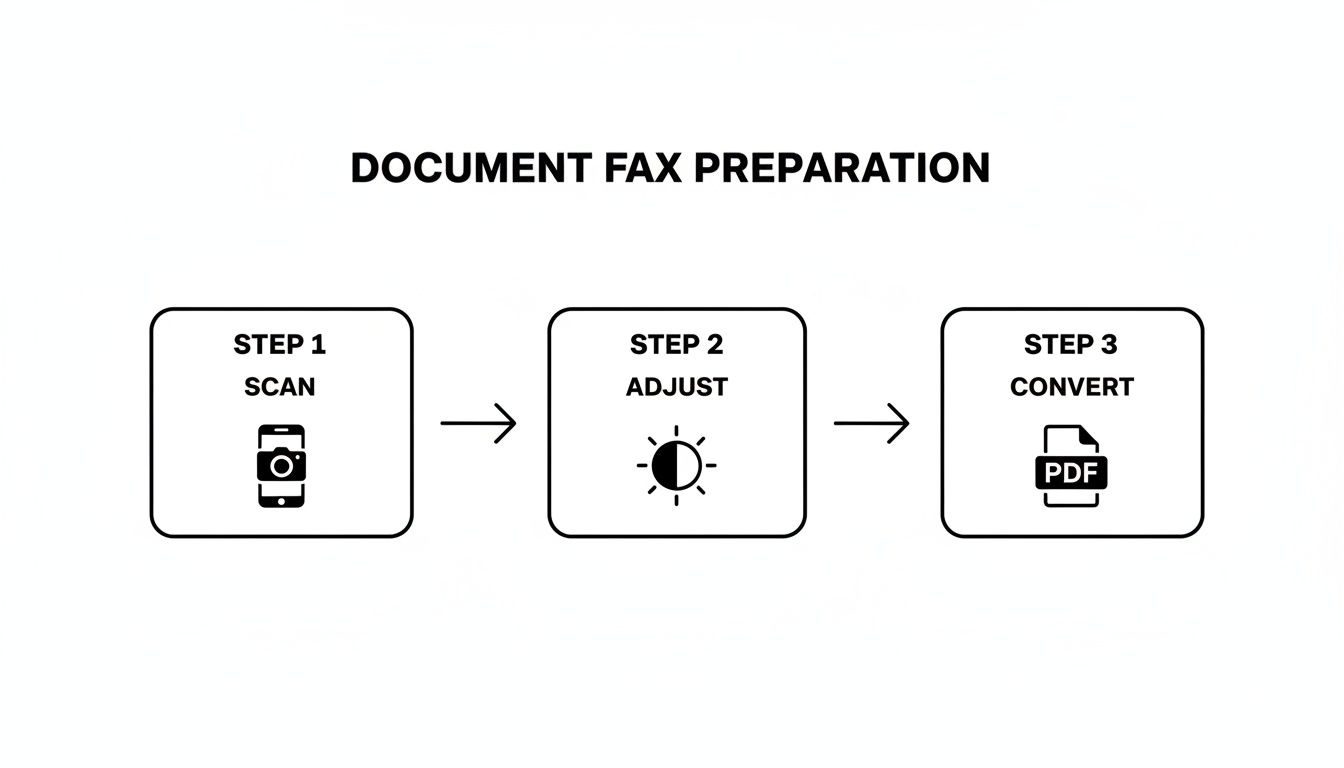
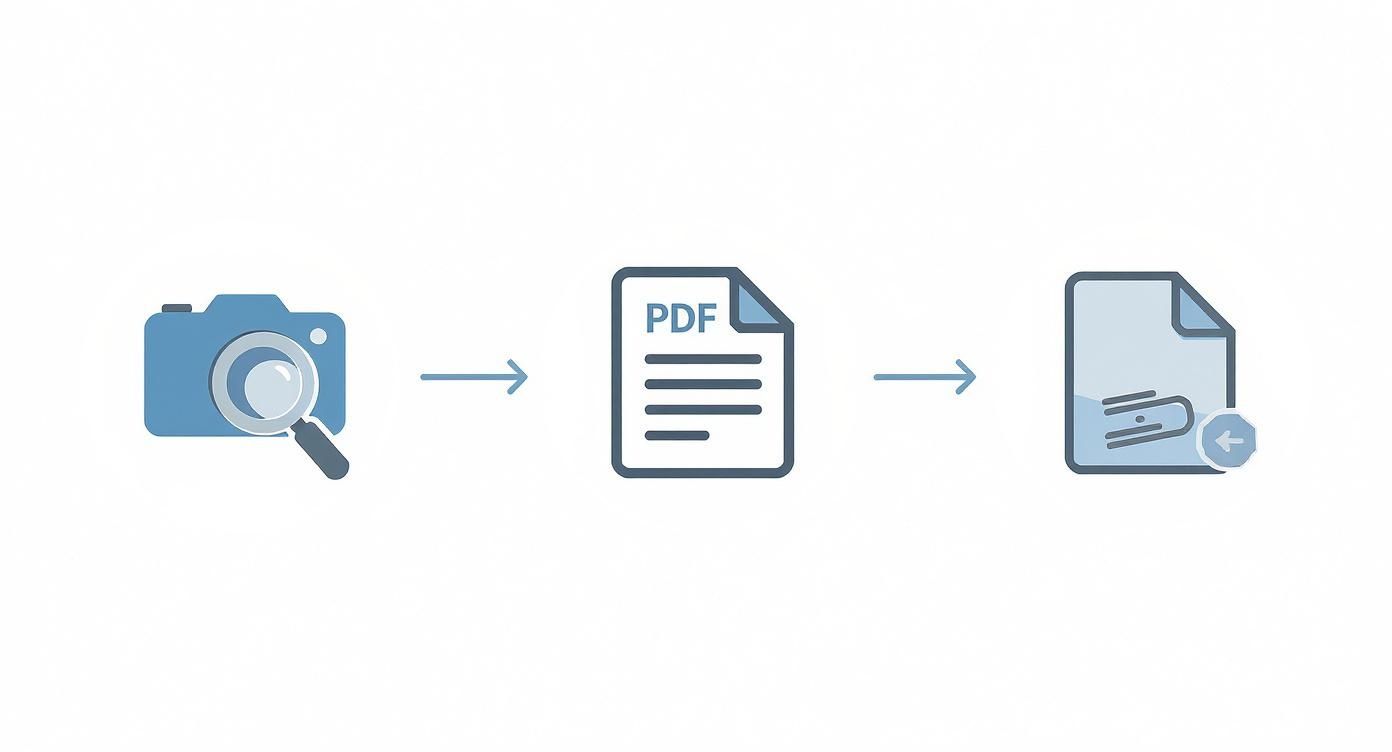
    This infographic breaks down the prep work that makes the sending process so smooth.

    Infographic about how to send fax online

    A successful fax really starts before you even hit "send." A clean scan, the right format, and a professional cover sheet set you up for success.

    Entering the Right Information

    This is the one part where you need to be meticulous. One wrong digit in the fax number, and the whole thing fails. Pay close attention here.

    • Recipient's Fax Number: Type in the full 10-digit number for any US or Canada destination. Don't add a "1" in front of the area code like you would for a long-distance call; it's not needed.
    • Your Information: You’ll need to provide your name and a valid email address. The email is critical—it’s where your delivery confirmation receipt will be sent.
    • Cover Page Message: You'll see a spot to add a short message. This is perfect for a subject line ("Invoice #4521") or a quick note ("Signed contract attached, as requested.").

    Choosing Between Free and Paid Options

    One of the biggest questions I get is whether to use a free service or spring for a low-cost paid one. Honestly, the answer just depends on what you're sending and to whom.

    Free services are fantastic for quick, non-sensitive documents. They usually let you send a few pages at no cost but will place their own branding or a small ad on the cover page. If you're sending something informal, they work great.

    On the other hand, a low-cost, one-time payment option (what we call an "Almost Free" plan) gives you a professional edge for less than the price of a coffee. You typically get to send more pages, your fax gets priority in the queue, and—most importantly—there’s no third-party branding on your cover sheet. For any kind of business communication, that clean look is worth the tiny cost.

    Here's a quick way to look at it:

    Choosing Your Online Faxing Method

    Deciding between free and paid often comes down to the purpose of your fax. This table breaks down the key differences to help you make the right call in seconds.

    Feature Free Services Paid Services (e.g., 'Almost Free')
    Cost $0 A small, one-time fee (typically $1-$2)
    Cover Page Includes service branding or ads Clean, professional, and brand-free
    Page Limit Usually limited (e.g., 3-5 pages) Higher page count included (e.g., up to 25 pages)
    Delivery Speed Standard queue Priority delivery
    Best For Personal, non-urgent, or informal documents Business, legal, healthcare, or any professional use
    Security Basic transmission security Often includes enhanced security and HIPAA compliance
    Confirmation Basic email confirmation Detailed confirmation with a transmission record

    Ultimately, if you're sending a registration form to your local gym, the free option is probably fine. But if you’re submitting a time-sensitive legal document or a patient intake form, the paid option is the only way to go.

    For a deeper dive, our guide on how to send a free fax from your computer really gets into the weeds on the pros and cons of each.

    Once you’ve filled everything out and chosen your service level, you just hit the send button. The platform handles the rest, converting your digital file and dialing up the recipient's fax machine. In a few minutes, you’ll get that confirmation email, giving you a clear record that your document arrived safely.

    Keeping Your Faxes Secure and Private

    A digital lock icon overlaid on a document, symbolizing secure online faxing.

    Let's be honest—when you're sending a fax, it’s usually because the contents are important. We’re talking about contracts, medical records, or sensitive financial documents. The last thing you need is that information getting into the wrong hands. This is where understanding how to send a fax online securely gives you a massive advantage over the old-school way.

    Just picture a traditional fax machine humming away in a busy office. Your confidential report prints out and just… sits there. It's out in the open for anyone walking by to see. Online faxing completely sidesteps that risk. Your document is sent digitally, landing securely in the recipient's inbox, not on a shared paper tray.

    The Tech Keeping Your Documents Safe

    Good online fax services don’t just send your files; they wrap them in a layer of powerful encryption from the moment you click "send." The workhorse behind this is SSL/TLS (Secure Sockets Layer/Transport Layer Security). If that sounds familiar, it should—it’s the exact same security standard your bank uses to protect your online transactions.

    What SSL/TLS does is create a private, encrypted tunnel for your document to travel through. So, even if someone managed to intercept the data while it’s in transit, all they’d get is a bunch of unreadable, scrambled code. It's a level of security that an old analog phone line just can't offer.

    Why Professionals Trust Online Fax for Compliance

    For anyone working in healthcare, law, or finance, data security isn't just a good idea; it's a legal necessity. Regulations like HIPAA in the United States mandate the secure handling of patient health information, which is a big reason why the market shift towards secure online faxing is so pronounced in medical fields. They need the encryption and audit trails that traditional faxing simply doesn't provide.

    A huge benefit here is the automatic digital paper trail. Every fax you send comes with a clear record.

    • A precise timestamp of when you sent it.
    • A clear confirmation of successful delivery.
    • A permanent record of the recipient's fax number.

    This audit trail is pure gold when you need to prove a document was sent and received on a specific date, which is often crucial for legal notices or time-sensitive contracts.

    Choosing a service built with security in mind really just gives you peace of mind. You can send sensitive information with confidence, knowing it’s protected by solid encryption and backed by a verifiable delivery record.

    At the end of the day, it’s all about making sure your private information stays private. Using an encrypted online fax service is a simple but powerful step to protect your data.

    What to Do When Your Online Fax Fails

    Even the best online fax services can hit a snag. Seeing that "transmission failed" email can be annoying, but don't worry—it’s usually an easy fix. Unlike an old-school fax machine that just gives you a cryptic error code, online services give you clear clues about what went wrong.

    Most of the time, the problem isn't some major technical meltdown. It’s often something simple: the line was busy, you mistyped a number, or there was an issue with your file. Instead of just hitting "send" again and again, let's figure out what’s actually happening.

    Figuring Out the Failure Message

    That notification email is your best friend. It almost always tells you why the fax failed, so you know exactly what to do next.

    Here are the most common culprits I see and how to handle them:

    • Busy Signal: This is the big one. It just means the recipient's fax machine was already tied up or maybe even switched off. The fix is simple: just give it 10-15 minutes and try again.
    • No Answer: This means their machine never picked up the call. The first thing you should do is double-check the fax number you entered. It's so easy to get one digit wrong, and that's all it takes for the fax to go into the void.
    • File Error: Sometimes the problem is the document itself. If your file is too big or in a format the service doesn't like, it won't go through. Stick to standard formats like PDF, DOC, or DOCX, and keep an eye on the page limit (most services have a cap, like 25 pages).

    Believe it or not, faxing is still incredibly busy. Industry data shows 82% of workers at large companies send the same faxes daily, and 89% of IT professionals continue to rely on faxing. All that traffic means busy signals are more common than you might think. You can dig into more of these online fax statistics to see just how prevalent it still is.

    A Quick Troubleshooting Checklist

    Before you try sending it again, run through these quick checks. In my experience, this solves 99% of delivery issues and will save you a ton of headache.

    1. Check the Fax Number (Again): Seriously, look at it one more time. Carefully re-type the full 10-digit number for faxes to the US or Canada. A single transposed digit is the most common reason for failure.
    2. Look at Your Document: Is the scan clean and easy to read? A fuzzy or crooked document can get rejected by the receiving machine. If it looks rough, just rescan it with good lighting.
    3. Think About File Size: If you're sending a huge contract loaded with images, the file might be too large to transmit reliably. If you keep getting an error, try splitting the document into two smaller faxes.

    Running through these steps will help you quickly pinpoint the problem and get it fixed. It’s a much better approach than just guessing, and it ensures your documents get where they need to go.

    Got Questions About Online Faxing? We've Got Answers.

    Alright, now that you've seen how the process works, let's dig into some of the questions that pop up when people first start faxing online. Getting these sorted out will help you send your next document with complete confidence.

    The great thing is, most of the common hang-ups are simpler than you'd expect. Modern online faxing was designed from the ground up to be intuitive, getting rid of all the old technical headaches.

    Can I Also Receive Faxes This Way?

    Absolutely. While this guide is all about sending, most dedicated online fax platforms offer plans that give you your very own virtual fax number. This is a total game-changer if you need to both send and receive documents on a regular basis.

    Here's how it works: when someone faxes your virtual number, there's no physical machine involved. The service instantly converts the incoming fax into a PDF and delivers it straight to your email. You can then open, save, or forward it just like any other attachment, from anywhere in the world.

    Do I Need Any Special Equipment?

    Nope, and that’s one of the best parts. You can completely forget about bulky fax machines, dedicated phone lines, and all the toner and paper that goes with them.

    All you need is a device with an internet connection. Your laptop, your tablet, even your smartphone is all the hardware you need to get the job done. This freedom is what makes online faxing a perfect fit for remote work, business travel, or just clearing clutter off your desk.

    Is It Safe and Legal to Fax Sensitive Documents Online?

    Yes, it’s not only legal but often far more secure than using a traditional fax machine. Any reputable online fax service builds its platform with security as the top priority, using strong encryption to protect your documents while they're in transit.

    Many services are specifically built to be compliant with tough industry regulations like HIPAA (Health Insurance Portability and Accountability Act). This makes them a trusted and legally sound choice for professionals in healthcare, law, and finance to send contracts, patient records, and other confidential files.

    Plus, the digital confirmation receipt you get for every transmission provides a clear audit trail—something a dusty old machine could never offer.

    How Can I Be Sure My Fax Was Actually Delivered?

    This is where online faxing really shines. Gone are the days of listening for a specific beep or trying to decipher a cryptic error code. Online services give you a clear, definitive digital paper trail.

    Shortly after you hit send, you'll receive an automated email confirmation that serves as your proof of transmission. No more guessing games.

    • This receipt will tell you point-blank if the delivery was successful or if it failed.
    • If it failed, it usually gives a reason, like a busy signal or an invalid number.
    • This lets you immediately pinpoint the issue, fix it, and resend with confidence.

    This instant feedback loop takes all the anxiety out of the process. You'll always know the exact status of your documents, which offers some serious peace of mind.


    Ready to send your first fax without the hassle? With SendItFax, you can send your document securely from any browser in just a few clicks—no account needed. Try our Almost Free plan for a professional, ad-free experience at https://senditfax.com.