
Of course you can. It's actually a common misconception that you still need a landline to send a fax. Today, you can easily fax without a landline using online fax services, dedicated mobile apps, or even public fax machines at places like FedEx or UPS.
These modern solutions work over an internet connection, completely sidestepping the need for a physical phone line or one of those clunky, old-school fax machines.
Why You No Longer Need a Landline to Fax
For years, that iconic dial-up screech of a fax machine was the soundtrack of a busy office. But let's be honest, that technology now feels like a relic from another era. While faxing itself is still incredibly important for sending secure documents in fields like law, healthcare, and real estate, the hardware that powered it is officially obsolete.
The shift to digital faxing is more than just about convenience—it’s a direct response to how we all work now. It gives you the freedom to send legally binding documents from literally anywhere you have an internet connection. This is a game-changer for remote teams, people who travel for work, or anyone who just needs to send a signed contract without tracking down an office supply store.
The Rise of Digital Faxing
Modern faxing basically works like email, but with the security of a traditional fax. Instead of sending signals over a phone line, your document gets converted into a secure digital file and sent over the internet to the recipient's fax number.
This approach brings some serious benefits to the table:
- It’s Cheaper: You can say goodbye to paying for a dedicated phone line, not to mention the costs of paper, ink, and machine repairs.
- Fax from Anywhere: Send documents from your computer, tablet, or smartphone. Whether you're at home, a coffee shop, or an airport, you're good to go.
- Seriously Secure: Good online fax services use strong encryption to protect your sensitive information while it's in transit, making it a much safer bet than email for confidential documents.
If you're curious about the mechanics, you can learn more by checking out our guide on what a fax number is and how it functions in today's digital world.
A Growing Market Confirms the Trend
This isn't just a small trend; it's a massive shift in how businesses handle documents. Even in 2024, the global online fax market is valued at a whopping $2.55 billion.
It’s projected to grow at a rate of 5.78% every year through 2029. That kind of growth tells you everything you need to know: companies and individuals are ditching the hardware and embracing more flexible, internet-based solutions. For more data on this, the Global Market Monitor offers some great insights.
The bottom line is that faxing technology has caught up with the times. You get the classic security and reliability you need, but with the flexibility and cost-efficiency of a modern digital tool. Faxing without a landline isn't just possible—it's the new standard.
Choosing the Right Digital Faxing Method
So, you need to send a fax but don't have a landline. It might seem like a puzzle at first, but figuring out the best method really just comes down to your specific situation. Are you just sending a one-time signed contract, or are you part of a team that needs to handle a steady stream of documents?
Think about it this way: a freelancer who faxes a signed agreement once every few months has totally different needs than a small medical clinic that sends patient referrals every single day. The freelancer is looking for a simple, pay-as-you-go option. The clinic, on the other hand, needs a reliable, subscription-based service with solid tracking and security.
This quick guide can help you figure out which path makes the most sense for you.
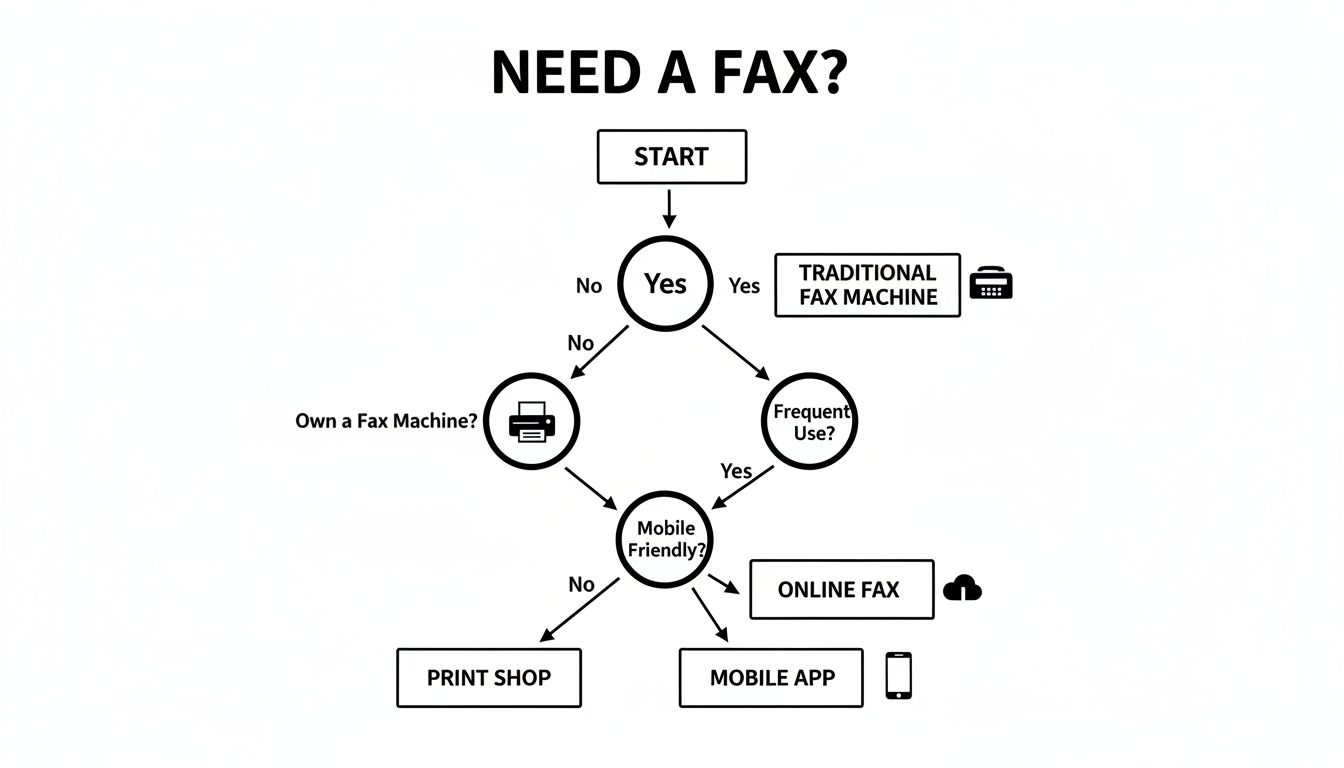
As you can see, your choice really boils down to frequency, convenience, and security. Let's dig into what each of these options actually looks like in practice.
Online Fax Services
For most people, online fax services like SendItFax are the go-to solution, and for good reason. They hit that sweet spot between ease of use for individuals and the professional features businesses need. You just upload your document in a web browser, type in the recipient's fax number, and hit send. It’s that simple.
These platforms are a fantastic fit for a few different scenarios:
- The Occasional User: If you only send a fax once in a blue moon, a pay-per-use model is perfect. You avoid a monthly fee and only pay for what you actually send.
- Small Businesses: Features like delivery confirmations, professional cover pages, and secure, encrypted transmissions are often essential for business operations.
- Remote Workers: The freedom to send a fax from any computer with an internet connection is a game-changer for anyone working outside a traditional office.
The shift to these services is huge. The fax services market was valued at $3.46 billion in 2023 and is expected to balloon to $6.5 billion by 2029. This growth is almost entirely thanks to cloud-based solutions that ditch the need for clunky hardware. Industries like healthcare heavily rely on the security of faxing for sending patient records, something email often can't guarantee. You can get more details on this trend from the full industry report on BusinessWire.
Mobile Faxing Apps
If you’re always on the go, a mobile fax app essentially turns your smartphone into a pocket-sized fax machine. These apps cleverly use your phone's camera to scan a physical document, which you can then send off in just a few taps.
This approach is ideal for:
- People in the Field: Think of real estate agents or sales reps who need to get signed documents back to the office immediately from a client’s location.
- Urgent Situations: When you have a paper document in hand and need to send it right now but aren't near a computer, a mobile app is your best friend.
A Quick Tip from Experience: Scan quality is everything here. Always find a well-lit spot and make sure your document is completely flat before you snap the picture. A blurry or shadowy scan can be completely unreadable on the other end.
Public Fax Services
Finally, there’s the old-school approach for a true one-off emergency: using a public fax service at a place like FedEx, a UPS Store, or even your local library. It's a straightforward way to get the job done without owning any equipment.
This is your best bet if:
- You send a fax so rarely that it feels like a once-a-year task.
- The document you're sending isn't sensitive, as you can’t fully guarantee privacy in a public setting.
Each method has its place. If you're leaning toward an online service, you might find our detailed online fax services comparison helpful for seeing how different platforms stack up on features and pricing.
Walking Through Your First Online Fax
Ready to send a fax without a landline? It’s probably easier than you think. I'll walk you through the process using a browser-based service like SendItFax as our guide. The beauty of this approach is that there's no software to install or complicated account setup—you can get your document sent in just a few minutes.
At its core, the process is simple: get your document ready, tell the service where it's going, and send it off. It feels a lot like sending an email, but you get the security and official delivery confirmation that only faxing provides.
Getting Your Document Ready for a Perfect Send
A little prep work before you even open your browser can make all the difference. The quality of your digital file directly translates to the quality of the fax on the other end.
Think of it this way: a sharp, clean digital file arrives as a sharp, clean fax. A blurry scan or a low-quality photo will only look worse after being transmitted over a phone line.
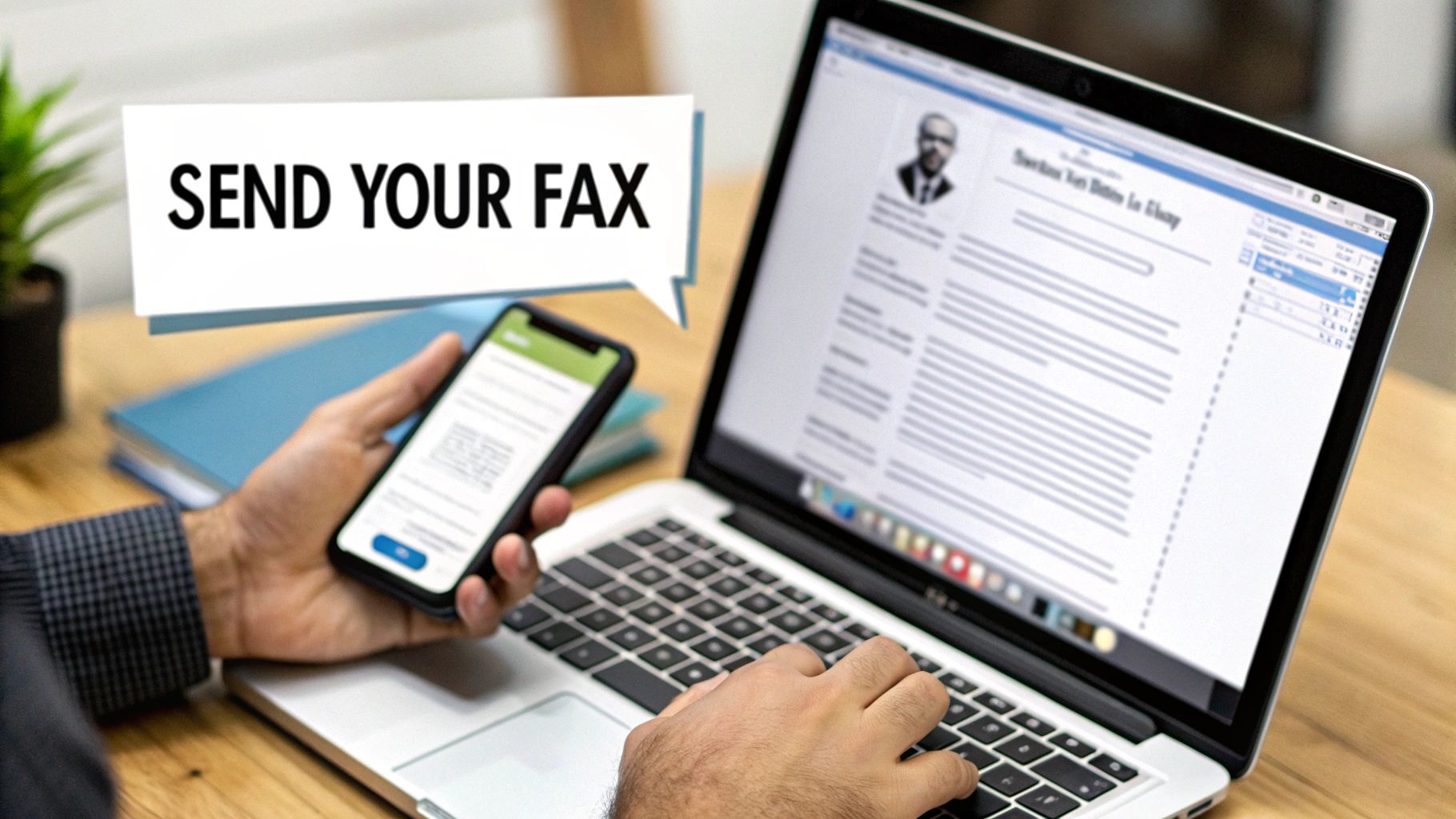
For the best results, always start with a high-quality digital original. If you’re working from a paper copy, a flatbed scanner is your best friend. If you don't have one, a good mobile scanning app can work wonders—just make sure you have plenty of light and a steady hand to avoid shadows and blur.
-
File Format is Key: PDF is the gold standard here. It locks in all your formatting, fonts, and images, so what you send is exactly what they see. Most online services, SendItFax included, also handle standard document files like DOC or DOCX.
-
Do a Final Readability Check: Open the file one last time before you upload it. Is the text crisp? Can you clearly see signatures and other important details? If you have to zoom in or squint to read it on your screen, it's going to be a mess on the receiving end.
This quick pre-flight check can save you from a failed transmission or a frustrating phone call from a recipient who can't read your document.
Uploading and Sending Your Fax
With your document prepped, the rest is a breeze. Services like SendItFax are designed to be incredibly intuitive, with clear fields for everything you need.
You’ll typically follow a few quick steps:
- Upload Your File: Just drag and drop your polished PDF or DOCX file into the upload box, or click to browse for it on your computer.
- Enter Recipient Info: This is the critical part. Carefully type in the recipient’s name and their full fax number, including the country and area code. I can't stress this enough: double-check the fax number. Sending sensitive documents to the wrong place is a nightmare you want to avoid.
- Add Your Details: Put in your name and email address. The service will send your delivery confirmation here, so make sure it's correct.
- Write a Quick Cover Page Note: Most services generate a cover page for you. It’s always good practice to add a brief, clear message. Something simple like, "Hi Jane, attached is the signed contract for your review," is all you need.
Pro Tip: That email confirmation is your proof of transmission. Treat it like the printed confirmation sheet from an old fax machine. I always save mine in a dedicated folder for my records—it's your official receipt showing the document was successfully delivered.
Free vs. Paid: When to Make the Call
Many online services have a free option, which is perfect for sending a quick, non-urgent document. SendItFax, for instance, lets you send up to three pages completely free, though it will have their branding on the cover page.
But when you're sending something important—think legal contracts, medical records, or financial forms—upgrading to a paid send is a no-brainer. It's usually a minimal cost, around $1.99, but the upgrade is well worth it.
Here’s what you typically get:
- Higher Page Limits: Send much longer documents, often up to 25 pages.
- No Branding: You get a clean, professional cover page without the service's logo.
- Priority Delivery: Your fax jumps to the front of the line, which can be crucial for time-sensitive materials.
That small investment adds a layer of professionalism and gives you peace of mind. Once you hit send, you'll get that all-important email confirmation, and you're done. For an even more detailed breakdown, you can read our complete guide on how to send a fax online.
Tips for Secure and Professional Faxing
When you're sending a fax without a landline, you're often dealing with pretty sensitive stuff—contracts, medical records, you name it. Making sure those documents are sent securely and look professional isn't just good practice; it's a must. A few simple habits can save you from major headaches and keep private information safe.
Honestly, the most critical step happens before you even think about hitting "send." Double-check the recipient's fax number. I can't stress this enough. A single wrong digit could land your confidential documents in the hands of a total stranger, which is a massive privacy breach.
Nail the Formatting and Keep It Secure
Choosing the right file format is surprisingly important for making sure your document looks the way you want it to on the other end. While most services are flexible, one format is king for professional faxes.
Always choose PDF when possible. A Word doc can get messy—formatting shifts, fonts go missing, and it can be edited. A PDF, on the other hand, locks everything down. It guarantees that what the recipient sees is an exact copy of your original, preserving signatures, layouts, and all.
Beyond the file itself, modern online fax services have security baked in. Good platforms use encryption to shield your data as it travels, making it a much safer bet than regular email for sending sensitive files.
Common Mistakes That Are Easy to Avoid
Even with today's simple faxing tools, it's the little mistakes that can make you look unprofessional. If you know what to watch for, you can make sure every fax you send is perfect.
- Skipping the Cover Page: A cover page isn't just fluff. It's the first thing someone sees, telling them who the fax is for, who it's from, and how to get in touch with you. In a busy office, it’s essential for getting your document to the right person.
- Ignoring Page Limits: Always check the page limits, especially with free services. Sending an incomplete document because you ran out of pages looks sloppy and can bring things to a screeching halt.
- Tossing the Confirmation: That transmission receipt is your golden ticket. It's your proof of delivery. Always save it. If someone ever says they didn't get your fax, this confirmation is your proof that it went through successfully.
Key Takeaway: Think of your digital fax confirmation like a certified mail receipt. It's your official record that the document arrived, and it can be a lifesaver in any potential dispute.
The sheer convenience of sending a fax without a landline has completely changed the game. The online fax market was valued at $3.31 billion in 2024 and is expected to hit $4.48 billion by 2030, all thanks to accessible cloud-based tech. A big driver of this growth is the pay-per-use model offered by services like SendItFax, which is perfect for people who only need to fax occasionally without being locked into a subscription. You can read more about the growth of the online fax market to see where things are headed.
Troubleshooting Common Online Faxing Problems
Even with a process as smooth as online faxing, you can occasionally hit a bump in the road. It happens. Most of the time, the fix is surprisingly simple, and knowing what to look for can save you a lot of frustration.
That little moment of panic when you get a "transmission failed" notification is a familiar one. But before you assume the worst, take a deep breath and check the most common culprit: a simple typo in the fax number. I’ve seen it happen countless times—one wrong digit is all it takes to send your document into the void. Always give the number a quick once-over before you click send.
Another classic issue is the dreaded busy signal. Remember, faxing isn't like email where messages just queue up. It's a real-time connection, and if the machine on the other end is already handling another fax, yours will have to wait.
Solving Failed Transmissions
Okay, so you've double-checked the number and it’s definitely correct, but the fax still won’t go through. What's next? My first piece of advice is usually just to wait a few minutes and try again. Patience often pays off.
If you’re still getting a failure message after a couple of tries, it's time to consider what might be happening on the recipient's end. There are a few common scenarios I run into:
- The machine is off or unplugged. It’s especially common if you’re sending something after business hours.
- It's out of paper or toner. A machine that can't print will often refuse to receive new faxes.
- There’s a local network problem. The fax machine itself might have lost its connection.
When you suspect one of these issues, the quickest solution is often the most direct. Pick up the phone and give the recipient a quick call. It’s far more efficient than repeatedly trying to send a fax to a machine that isn't ready for it.
Improving Document Quality and Delivery
So, your fax went through—great! But then you get a call back saying it’s a blurry, unreadable mess. This is almost always an issue with the quality of your original file. A low-resolution photo or a grainy scan is only going to look worse after being transmitted.
To get a crystal-clear result, make sure your document is scanned on a flat surface in a well-lit room. If you're working with a digital file like a Word document, save it as a high-quality PDF first. This locks everything in place and is the best way to preserve formatting and clarity.
And what about that missing confirmation email? Before you panic, take a quick peek in your spam or junk folder. Automated notifications have a knack for getting filtered out. If it’s not there, it’s worth double-checking that you typed your own email address correctly on the send screen.
Pro Tip: Running into an error because your file is too large? This usually happens when you have high-resolution images embedded in your document. The easy fix is to use a free online tool to compress the PDF before you upload it. This can drastically shrink the file size without making the text unreadable, helping your fax send without a hitch.
Got Questions About Digital Faxing?
It's totally normal to have a few questions when you're moving on from a technology you've used for years. When people first look into how to fax without a landline, they usually want to know about security, if they can get faxes back, and what’s really involved. Let's break down the common stuff.
The big one is almost always security. Is sending a fax over the internet as safe as a traditional machine? The short answer is yes—and in most cases, it's actually a whole lot safer.
Think about it this way: good online fax services use the same kind of heavy-duty encryption that your bank uses to protect your financial data. Your document gets scrambled the moment you send it and stays that way until it reaches its destination, which keeps prying eyes out. It’s a huge improvement over old-school faxing, where your sensitive documents could end up sitting in a public tray for anyone to see.
So, Can I Get Faxes Back This Way?
You sure can. While a simple, pay-as-you-go service like SendItFax is built just for sending, many other online fax platforms offer monthly plans that give you your very own virtual fax number.
This number acts just like a regular one, but with a modern twist. Instead of a bulky machine whirring to life, incoming faxes are converted into PDF files and sent right to your email. It's incredibly convenient. This is the perfect setup for anyone who needs a reliable way to both send and receive faxes without being tied down to a physical machine or an extra phone line.
Key Takeaway: A virtual fax number completely replaces the need for a landline. It untethers your faxing from a physical office, letting you send and receive from literally anywhere you have an internet connection.
Do I Have to Install Any Software?
Nope, not usually. Most of the best online fax services are web-based, which means you can do everything right from your browser. There's no software to download or app to install. You just head to the website, pop your document in, type in the fax number, and hit send.
This "no-install" approach is a lifesaver if you need to send something in a hurry from a library computer or just don't want another program cluttering up your laptop. It genuinely makes sending a fax as easy as firing off an email.
So how do you pick the right service for you? It really just boils down to what you need. Ask yourself a few quick questions:
- How often am I really sending faxes? If it's just once in a blue moon, a pay-per-fax service is your best bet. If it's a weekly thing, a subscription will probably save you money.
- Do I need to receive faxes, too? If the answer is yes, you'll want a service that offers a dedicated virtual fax number.
- What other features matter to me? Are things like a professional-looking cover page, a confirmation email, or the ability to send a 100-page document important?
Once you know the answers, you'll be able to spot the perfect service for your needs in no time.
Ready to send a fax without a landline in the next five minutes? Give SendItFax a try. You don’t need an account and there’s nothing to install. Just upload your file and send it securely. Get started now at SendItFax.