Stuck trying to figure out where to send a fax these days? It's a common problem. The fastest and easiest options are either using an online fax service like SendItFax right from your computer or phone, or just swinging by a local shop like UPS or FedEx. Both get the job done without you needing an old-school fax machine.
Your Quick Guide to Sending a Fax Right Now
It’s true, faxing can feel like a technology from a bygone era. But for many industries, it’s still a surprisingly vital tool. When you absolutely have to send a signed contract, a sensitive medical form, or an official legal document, knowing your options is key. The great news is, you don’t need to hunt down a clunky fax machine anymore.
Modern faxing has branched out, giving you three main ways to send your documents. Each one is built for a different set of needs, whether you prioritize speed, easy access, or keeping everything under your own control. If you want a full step-by-step breakdown, our guide on how to send a fax walks you through the entire process.
Faxing Options at a Glance
To help you pick the right method without overthinking it, let's compare the most common options. Your decision will likely come down to balancing convenience, cost, and how secure your documents need to be.
Here's a quick way to think about it:
- Online Fax Services: This is the modern equivalent of a secure, high-priority email. It's incredibly fast, you can do it from anywhere, and you get a digital confirmation that it was delivered.
- Retail Stores: Think of this as the "full-service" choice. You just hand over your pages, and an employee takes care of the rest. It's simple but offers less privacy.
- All-in-One Printers: This is your personal faxing hub. It gives you the most control and privacy but means you need to own the right printer and have a landline connection.
This table breaks it down so you can see which path makes the most sense for you.
| Faxing Method | Best For | Typical Cost | Convenience Level |
|---|---|---|---|
| Online Fax Service | Urgent, remote, and frequent faxing | Free to low-cost subscription | High |
| Retail Store (UPS/FedEx) | One-time or occasional faxes | Per-page fee | Medium |
| All-in-One Printer | High-volume or sensitive documents | Hardware + phone line costs | Low |
Each option has its place, but as you can see, online services really shine when it comes to combining ease of use with affordability.
Why Is Faxing Still a Thing?
It seems a little strange, right? We have email, instant messaging, and a dozen other ways to send files in a flash. So why are people still asking, "where can I send a fax?"
The truth is, faxing never really went away. In certain professions, it’s not just an option—it’s a necessity. It all comes down to a unique blend of security and legal weight that digital methods can't always guarantee.
Think of it this way: sending an email is like mailing a postcard. It’s open and travels through many hands (servers) before it reaches its destination, creating opportunities for it to be intercepted. A fax, however, works more like a secure, private phone call directly between two machines. That point-to-point connection is much harder to tap into.
This built-in security is precisely why faxing remains non-negotiable in some of the most important industries.
Who Still Relies on Faxing?
When you're dealing with sensitive information, you can't afford to take chances. Faxing offers a time-tested and verifiable way to transmit documents that absolutely cannot fall into the wrong hands.
- Healthcare: Medical practices are bound by strict privacy laws like HIPAA. Faxing provides a compliant channel for sending patient records, lab results, and prescriptions between clinics, hospitals, and pharmacies.
- Legal: For lawyers and courts, proof of delivery is everything. Sending signed contracts, court filings, or affidavits via fax generates a transmission receipt that can stand up as legal evidence.
- Finance and Government: From mortgage applications and bank statements to tax documents, these sectors handle a massive amount of personal financial data. Faxing is a trusted method for keeping that information secure.
This isn't just anecdotal. A surprising 17% of businesses worldwide still use faxing for essential tasks. In the U.S. healthcare system alone, an estimated 9 billion fax pages are sent each year for things like insurance claims and prescription authorizations. If you're curious, you can discover more about the resilience of faxing in modern business practices.
A successful fax transmission creates a confirmation receipt. This little report is more than just a piece of paper—it's legally admissible proof that your document arrived safely and on time.
The Power of a Paper Trail
Beyond security, the real magic of a fax is its built-in proof of delivery. When your fax goes through, the receiving machine sends an acknowledgment, and your machine prints out a confirmation report.
This report is your golden ticket. It shows the recipient's number, the exact date, and the time the transmission was completed, creating a rock-solid audit trail.
Ever sent a critical email and worried it landed in a spam folder? Faxing eliminates that doubt. For a time-sensitive legal notice or a multi-million dollar contract, that verifiable receipt isn't just nice to have—it's everything. It’s the definitive "yes, they got it," and it's why so many professionals won't use anything else for their most important documents.
The Modern Answer: Sending a Fax Online
For anyone looking for the most efficient and flexible way to send a fax, online services are the clear winner. These platforms turn any device with an internet connection—your laptop, tablet, or even your phone—into a fully functional fax machine you can carry in your pocket.
The whole process is incredibly simple. Forget feeding paper into a clunky machine. Instead, you just upload a digital file, punch in the recipient's fax number, and hit send. This approach completely changes the answer to the question "where can I send a fax?" to a much simpler one: "anywhere."
This isn't just a small trend; it's a massive shift in how businesses and individuals handle documents. The online fax market is on track to jump from $3.18 billion to a whopping $5.96 billion by 2025. This growth is all about the convenience and security that cloud-based faxing provides, with North America leading the charge and holding over 60% of the market, thanks in large part to its heavy use in regulated fields like healthcare. Discover more insights about the future of faxing and its market growth.
Why Faxing Online Just Makes Sense
Making the switch from a physical machine to a web service comes with a few immediate perks that solve the biggest headaches of traditional faxing.
- Total Portability: Send that urgent contract from your home office, a coffee shop, or even an airport lounge. You’re no longer chained to a specific location.
- No Extra Hardware: Say goodbye to that bulky fax machine taking up space. You also get to ditch the dedicated phone line and the recurring costs of paper, ink, and repairs.
- Instant Digital Proof: Instead of waiting by the machine for a printed receipt that can get lost, you get an immediate confirmation right in your email. It’s a clean, digital record that your fax got there successfully.
The real beauty of online faxing is how it bridges the gap between old and new technology. You can send a secure, legally binding document to a 30-year-old machine using the same smartphone you use to scroll through social media.
How Services Like SendItFax Make It Easy
Platforms like SendItFax are built from the ground up to be as straightforward as possible, especially for people who only need to send a fax once in a while. A lot of services force you to create an account or sign up for a monthly plan, which is overkill if you just have a single document to send.
SendItFax cuts through that red tape. You can send a fax right from the website without needing to sign up for anything. Just upload your file, enter the details, and you’re done in minutes.
While a free send is perfect for something quick and not super critical, sometimes you need a few more features. For a small fee, you can usually get some great upgrades to add a professional polish.
- Remove Branding: Send a clean fax without the service's logo plastered on the cover sheet.
- Higher Page Limits: Send longer documents, like detailed contracts or medical histories, that go beyond the typical free limits.
- Priority Delivery: Bump your fax to the front of the line to make sure it gets sent out faster, which is perfect for time-sensitive materials.
This kind of flexibility is what makes online faxing such a great tool for almost everyone. If you're ready to see just how easy it is, you can learn more about how to send a fax online with our step-by-step guide.
Finding In-Person Public Fax Machines
Sometimes, you just need to handle things in person. If sending a fax online isn't your speed, or you have a stack of physical papers ready to go, public fax services are a surprisingly reliable option. Think of it like using a copy machine at the library—you pay a little bit to get the job done without needing to own the equipment.
Finding a place to send a fax is actually easier than you'd think. These services are perfect for those one-off situations where you need to send something quickly. You just hand over your documents, give them the fax number, and an employee handles the rest. It's a simple, no-fuss process that takes all the technical guesswork out of your hands.
Common Places to Send a Fax
While dedicated fax shops are mostly a memory, a number of big-name retailers have picked up the slack. They’ve rolled faxing right into their other office services, making them a convenient stop.
Here are the most common spots you're likely to find a public fax machine:
- Shipping Centers (UPS & FedEx): This is probably the most well-known option. Both The UPS Store and FedEx Office locations are go-to hubs for faxing. They can send to numbers in the US and internationally, and they’ll give you a printed confirmation sheet to prove it was sent.
- Office Supply Stores (Staples & Office Depot): Big office supply chains almost always have a fax machine waiting at their print and copy centers. It’s a great choice if you also need to grab copies or other supplies while you're there.
- Local Libraries: Don't forget your public library! Many offer faxing services to the community, and they are often the most affordable choice you'll find. Just be sure to check their hours first.
One thing to remember: when you use a public fax machine, your documents will be handled by an employee and could sit in a tray in a public area. If you're sending something highly confidential—like medical records or financial statements—the privacy of an online service is probably a better fit.
What to Expect at the Counter
Using a public fax machine is pretty straightforward, but a little preparation goes a long way. Before you head out, make sure you have all your documents in order and the recipient's full fax number, area code included.
Pricing is almost always per-page. The first page usually costs the most, with each additional page costing a little less. For instance, you might pay $2.00 for the first page and then $1.00 for every page after that. For longer documents, those costs can add up fast, so it’s always a good idea to ask about the fees upfront.
Most places will offer to add a cover sheet for you, but they might charge for it. If you want to save a few bucks and make sure your fax looks professional, you can easily make your own. We've got a great guide and a free printable fax cover sheet with no download needed to help you get your documents ready. It’s a simple step that ensures your fax has all the right info and looks clean.
Choosing the Right Faxing Method for Your Needs
With so many ways to send a fax these days, how do you know which one is right for you? It's not just about getting a document from here to there. The best choice really comes down to what you're sending, how often you send it, and how quickly it needs to arrive.
Think about it this way: a remote worker needing to send a signed contract on a tight deadline will love the speed and simplicity of an online service like SendItFax. On the other hand, if you just need to send a single, non-urgent form once in a blue moon, a quick trip to a local shipping store might be all you need. It's all about context.
This simple flowchart can help you figure out if heading to a public fax machine is the right move for your document.
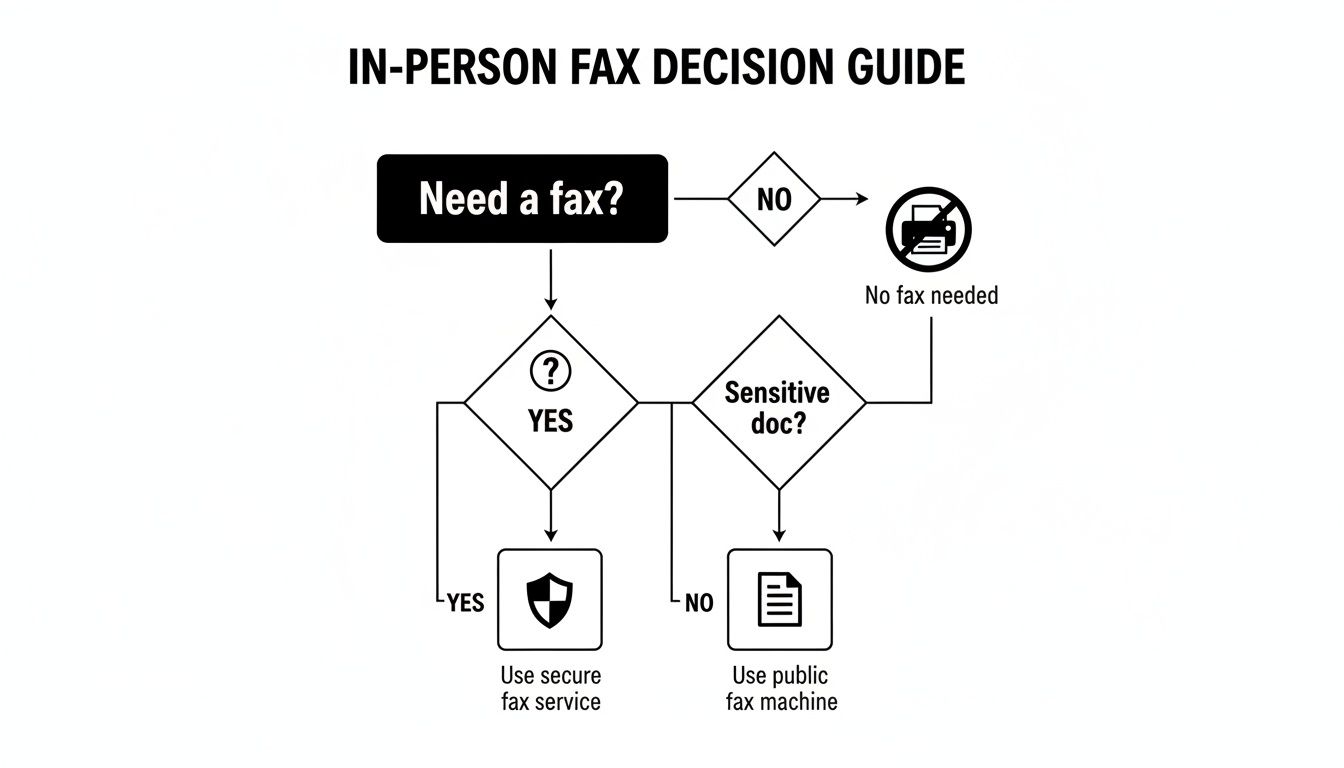
The main takeaway here is pretty clear: the more sensitive your document, the more you should lean toward the privacy of a digital service over the convenience of a public machine.
Matching the Method to the Mission
Let's walk through a few common scenarios. Seeing how different needs lead to different solutions will help you feel confident about where to send a fax to get the job done right.
- For High-Stakes Documents: Imagine a patient sending medical forms. Security is non-negotiable. In this case, an online fax service that uses encryption is the only logical choice. It ensures HIPAA compliance and keeps private health information from prying eyes at a public copy center.
- For Occasional, Low-Sensitivity Faxes: Just need to send a signed permission slip for a school trip or a simple registration form? A public fax machine at a library or office supply store is a cheap and easy solution.
- For Frequent Business Use: A small business that regularly sends invoices or files government applications needs something reliable that also provides a paper trail. An online fax subscription is perfect, offering digital confirmations and organized archives that make their workflow much smoother.
Faxing is still a major player in industries where ironclad proof of delivery is required by law. In healthcare, a whopping 75% of providers now rely on digital fax platforms for patient records. That trend is skyrocketing as cloud faxing proves it can meet strict compliance demands. Legal and government sectors aren't far behind, with adoption rates well above the global business average of 17%. In fact, over 80% of small businesses report that their fax usage is either holding steady or increasing, highlighting its lasting value for secure communication. You can learn more about these faxing trends and their industry impact.
The most important question to ask yourself is: "What would be the consequence if this document were delayed or intercepted?" Your answer will immediately point you toward the right level of security and reliability.
Key Factors to Consider
Before you send that next fax, just run through this quick mental checklist. It will help you confidently pick the best method for your specific task, ensuring your documents get where they need to go, safely and on time.
- Urgency: How fast does it need to get there? Online services are instant, while driving to a store obviously takes more time.
- Confidentiality: Is the information sensitive? Encrypted online services offer far better privacy than a machine anyone can walk up to.
- Frequency: Are you sending faxes all the time, or is this a one-off? For frequent use, an online subscription is usually much more economical than paying by the page.
- Budget: How much are you looking to spend? Free online options and low-cost library services are great for small jobs, but retail stores can get pricey if you have a lot of pages.
Your First Fax with SendItFax: A Step-by-Step Guide
So, you need to send a fax but don't have a machine handy. No problem at all. SendItFax turns your browser into a fully functional fax machine, letting you get documents where they need to go in just a few minutes. All you do is upload your file, pop in the details, and click send.
Head over to the SendItFax homepage to get started. You'll see a simple form where you can upload your document—it handles common formats like DOC, DOCX, and PDF with ease. From there, just type in the recipient's 10-digit fax number.
For instance, if you're faxing to the US or Canada, you'd just enter the number like 5551234567. You also have the option to add a message to the cover page, which is a great touch for professional documents to give the recipient some context.
Getting It Sent
Ready to go? It's a straightforward process that takes just a couple of minutes.
- Choose between the Free or Almost Free plan right on the main page.
- Upload your document. The free plan lets you send up to 3 pages, with a limit of 5 faxes per day.
- Fill in your information and the recipient's fax number.
- Decide if you want to include a cover sheet.
- Hit the "Send" button and watch for the confirmation.
Within moments, a confirmation will pop up right on your screen, letting you know the fax is on its way. It's really that simple.
A quick heads-up: the free service includes SendItFax branding on the cover page. If you need a more professional look or have a longer document, the Almost Free plan is a great option. For just $1.99, you can send up to 25 pages with no branding, and you can even skip the cover sheet if you don't need one.
"SendItFax made my first fax as simple as sending an email," says freelance paralegal Jamie L.
Quick Tips for a Smooth Send
- Double-check the number. It's the most common reason for a fax to fail, so make sure that 10-digit number is perfect.
- Give the cover page a once-over. If you're using one, a quick preview ensures everything looks professional and is easy to read.
- Check the page limits. Before you hit send, just make sure your document fits within the limits of the plan you've chosen.
Using SendItFax genuinely feels like having a personal fax machine built right into your web browser. It’s a direct answer to the question "where can I send a fax?" by offering flexible, no-fuss options. No software to download, no sign-up required, and no hidden costs.
Frequently Asked Questions About Sending a Fax
Even with all the modern options, it's natural to have a few questions about how sending a fax works today. Let's tackle some of the most common things people ask when they're figuring out where to send a fax.
Can I Send a Fax from My Email or Phone?
You absolutely can. Modern online fax services are built for convenience, letting you send a fax from any device with a web browser. That means your smartphone, tablet, or laptop can all double as a portable fax machine.
Many of these services also have a clever "email-to-fax" feature. You just compose a regular email, attach your documents, and send it to a special address provided by the service. They handle the rest, converting it into a standard fax and delivering it to the recipient's machine.
Is Sending a Fax Online Secure?
Yes, it is—often more secure than using a public machine. Reputable online fax services use powerful encryption to scramble your data as it travels, protecting it from anyone trying to intercept it. You don't have to worry about sensitive documents sitting on a shared machine in a store.
The traditional fax process is already considered more secure than email because it creates a direct point-to-point connection. Good online fax providers take that a step further by adding modern security layers like TLS encryption, making it a very safe way to send confidential files.
This is exactly why industries like healthcare and law, which handle highly sensitive information, still rely heavily on faxing. It gives them the best of both worlds: the trusted, direct connection of a fax with the advanced security of today's technology.
How Do I Know If My Fax Was Delivered?
This is one of the biggest perks of using an online service. Instead of getting a flimsy paper slip from a machine, you receive a digital confirmation report, usually right in your email inbox. This report is your proof that the fax went through successfully.
These digital confirmations are easy to save and organize for your records. They typically include all the important details:
- The fax number you sent it to
- The exact date and time it was delivered
- The total number of pages that were successfully sent
This gives you a clear and reliable digital paper trail, so there’s never any question about whether your document arrived.
Ready to send your fax without hunting for a machine? With SendItFax, you can send documents securely from any device in just a few minutes, and you don't even need an account. Send your fax for free with SendItFax.