Tag: fax confirmation

  • Fax Transmission Report: How to Read and Use It

    Fax Transmission Report: How to Read and Use It

    You've just sent an important fax, and the confirmation page is staring back at you with a destination number, timestamps, page counts, a duration, and a status that says OK, Failed, or something less familiar. Many readers scan for the green checkmark or red X and move on. That's understandable, but the details in between explain exactly what occurred.

    A fax transmission report is easier to use once you stop treating it as a simple success receipt. It records what happened during the connection between sending and receiving systems, whether you used a fax machine, an office multifunction printer, or a browser-based service such as SendItFax. The key question is simple: what does this page prove, and what does it leave out?

    Why You Are Staring at a Fax Confirmation Right Now

    You may be checking a report because a medical office is waiting for records, a law firm needs confirmation that documents were sent, or a customer expects a signed form. In each case, the report looks more technical than it really is. A number may identify the receiving line, a timestamp may show when the call began, and a status field may compress several technical events into one short verdict.

    Start by reading the page as a record of a communication session, not as a statement that a person received your document. First, confirm the destination number. Next, check the time and page count. Then read the final status and any accompanying code or error description.

    Practical rule: Read the report from left to right, but interpret the status only after checking the number, time, and pages.

    The same basic information can appear on a printed confirmation from a Brother device, a multifunction printer's activity log, or an online fax dashboard. The layout changes, but the underlying questions stay the same: did the sender reach a fax-capable endpoint, did the endpoints exchange the pages, and did the session finish without a reported protocol error?

    That distinction keeps the report useful without asking it to prove more than it can. It can help you document a send, diagnose a failure, and decide whether a retry is sensible. It can't independently confirm that the intended individual opened, read, or acted on the document.

    What a Fax Transmission Report Actually Is

    A fax transmission report is a transport-level verification artifact produced after a sending system attempts to exchange a document with another fax endpoint. In plain language, it summarizes the technical conversation between the two systems. The report typically captures the recipient fax number, transmission date and time, number of pages, transmission duration, and whether delivery succeeded or failed, as described in Brother's explanation of its Transmission Verification Report.

    A shipping handoff record can show that a carrier reached a delivery location and completed the handoff process. It usually doesn't prove that the named person opened the package or used what was inside. Fax reporting works similarly. A successful result generally means that the receiving fax device answered, negotiated with the sender, and accepted the transmitted data.

    The fields summarize protocol events

    A report may include several of these fields:

    • Recipient number: The fax number dialed by the sender.
    • Date and time: When the system placed or completed the transmission.
    • Page count: The number of pages the sender attempted to transmit or reported as completed.
    • Duration: How long the session lasted.
    • Speed: The negotiated transmission rate, when the device displays it.
    • Result status: A condensed outcome such as success, busy, no answer, or error.
    • Error or endpoint identifiers: Codes that can help identify negotiation, line, or receiving-device problems.
    • ECM information: An indication that error correction was used or affected the session, depending on the equipment.

    The report isn't a copy of the fax. That's useful for privacy and recordkeeping because it can document the session without reproducing the document's contents. It also means the report can't tell you whether a page was readable, correctly filed, or reviewed by a person.
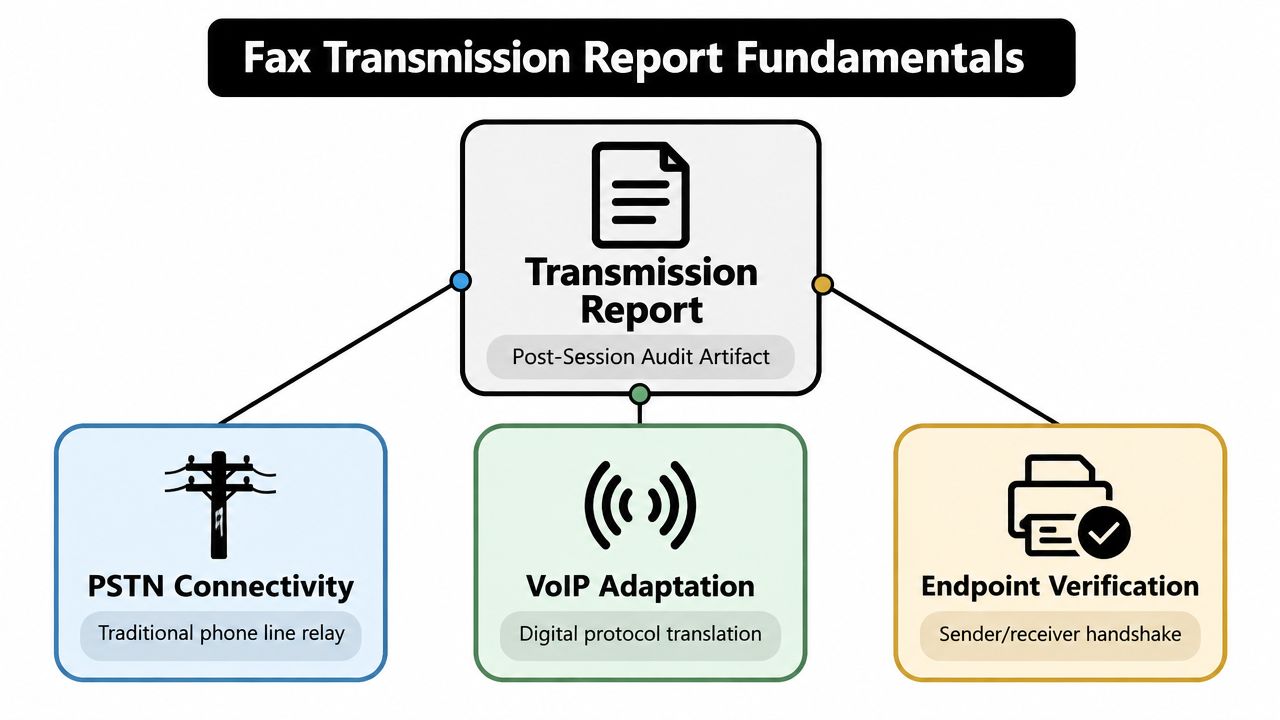
    A diagram illustrating the fundamentals of a fax transmission report including PSTN connectivity, VoIP adaptation, and endpoint verification.

    Fax systems may communicate through traditional telephone infrastructure or through services that adapt fax protocols to internet-based calling. Either way, the report reflects the outcome visible to the sending side. It's a post-session audit record, not a human acknowledgment.

    How to Read Every Field on the Report

    Read the report in the order a support technician would inspect it. Begin with the identity of the destination, then verify when the attempt occurred, how much data moved, and what conclusion the system reached.

    Recipient number

    The number shown is the number the sending system dialed. It may include a country code, area code, extension formatting, or masking that differs from the way the number appears in your address book.

    Compare every digit with the intended destination. A successful result on the wrong number is still the wrong transmission, so number verification comes before interpreting any green status.

    Date and time

    The timestamp records when the sender placed or completed the fax session. Many devices use the sender's configured local time, so a report created in one location may need timezone context before it enters a formal case file or compliance record.

    If several people handle the same workflow, agree on one naming and timestamp convention. That makes it easier to match the report with the original document and any later phone call.

    Page count

    The page count shows how many pages the sending system transmitted or recorded during the session. A five-page document with a report showing only three completed pages needs investigation, even if the layout makes the overall result difficult to spot.

    Cover pages can create confusion. Check whether the system counts the cover separately and whether the displayed total refers to pages sent, pages accepted, or pages included in the uploaded file.

    Duration, speed, and ECM

    Transmission duration tells you how long the connection remained active. Speed may show the negotiated rate, while ECM, or error correction mode, indicates whether the systems used a mechanism designed to detect and recover from corrupted data.

    These fields rarely provide the complete diagnosis by themselves. A longer session may reflect more pages, slower negotiation, retries, or line conditions. For a practical explanation of why fax speed varies, see this guide to fax transmission speed and negotiation.

    Result status

    The final status combines several signals into one label. It may reflect whether the receiving line answered, whether the endpoints identified themselves as fax devices, whether the pages transferred, and whether the session ended cleanly.

    Treat this line as the starting point for interpretation, not the whole explanation. The next question is always: what kind of failure or completion does the status describe?

    Status Codes and What Each One Means

    A status code becomes easier to understand when you separate the session into two layers.

    The connect layer asks whether the call reached and established contact with the destination. Busy, no answer, and an invalid fax response usually belong here. The transmission layer begins after the receiving endpoint answers and asks whether the systems successfully exchanged the pages.

    Status Result What Happened Most Likely Cause
    Success or OK The endpoints connected and the reported pages completed The receiving fax device accepted the transmission
    Busy The destination line returned a busy condition Another call or fax session was using the line
    No Answer or No Response The call rang without a usable fax response The machine was offline, unattended, or unavailable
    Failed The session ended before the expected transmission completed A connection, number, document, or endpoint problem
    Error The system detected a protocol or data exchange problem Line quality, incompatible behavior, or corrupted frames
    Partial Some pages completed, but the full transmission did not The connection failed during the page exchange

    A Success or OK result means the sending system saw the expected completion signals. It doesn't transform the report into proof of human receipt.

    Busy usually points to the connect layer. Try the same number again after a reasonable interval, especially if the destination is a shared office line.

    No Answer or No Response means the sender didn't receive a usable fax response. Verify that the number is active and that you haven't omitted a required dialing prefix or area code.

    Failed is a broad outcome. Look for a secondary code or message before retrying. The failure may have happened before the fax devices connected, or after several pages had already moved.

    Error often needs more interpretation. Fax report taxonomies include outcomes such as no answer, busy, not a fax machine, and invalid or unknown T.30 responses, while OpenText Fax's report taxonomy describes conditions including retrain events, protocol timer violations, and FCS errors. These signals can point toward line quality, incompatible endpoint behavior, or corrupted frames.

    Partial means the report shouldn't be filed as a complete delivery record. Identify the confirmed page count, verify the destination and document, and resend the full file unless the receiving party specifically instructs you to resume or send only selected pages.

    If the code describes a connection problem, retry after checking availability. If it describes a transmission problem, verify both the number and document before sending again.

    Why a Green Checkmark Is Not the Same as Receipt

    A successful report proves something valuable, but narrower than many users assume. It indicates that the sending system connected with a fax endpoint and that the expected data exchange completed. It does not prove that a named person received, read, understood, or processed the pages.

    The receiving endpoint may be an unattended machine in a copy room, a shared fax queue, or a system that stores incoming documents digitally. Paper can remain in a tray, toner can be faint, a page can jam after transmission, or staff can file the document incorrectly. None of those downstream events necessarily changes the sender's status from successful to failed.

    The distinction matters in sensitive workflows

    Healthcare teams may need to protect patient information while confirming that the correct destination received it. Healthcare-focused guidance discusses fax safeguards such as recipient verification, confidentiality notices, and transmission logs, while also explaining that a fax report is only one part of a broader control framework in guidance on faxing medical records.

    Legal workflows require similar care. Whether a fax counts as valid service, notice, or filing can depend on the jurisdiction and the specific procedure. A transmission report may support the record by showing the number, time, pages, and outcome, but it may not satisfy every requirement for legal acceptance.

    For a practical distinction between a delivery record and confirmation from the recipient, see this explanation of how to confirm receipt of a fax. The appropriate follow-up may be a phone call, a reply fax, a portal acknowledgment, or another approved confirmation method.

    A green checkmark means the fax system completed its delivery conversation. It doesn't mean a person completed theirs.

    Use the report as evidence that the document reached the destination device or service. Add a human acknowledgment when the consequence of non-review is significant.

    Troubleshooting Failed and Partial Transmissions

    Suppose a five-page fax returns Failed after page three, or the report says Partial without explaining what to do next. Don't immediately send the same file repeatedly. Start with the result line, then inspect the error code and confirmed page count.

    Follow the evidence in order

    1. Check the destination number. Compare the full number with the source record. Look for a transposed digit, a missing area code, or an incorrect country code. A report that shows a clean connection to the wrong number still requires correction.

    2. Check the document. Open the original file and confirm that it isn't corrupted, password-protected, or unusually difficult for the sending service to process. Review page orientation, image-heavy pages, and the final page count before retrying.

    3. Check the recipient's availability. A busy line, offline machine, depleted toner, full paper tray, or receiving queue can prevent completion. If the result is clearly a connect-layer failure, waiting and retrying may be enough.

    4. Check the partial count. If the report confirms three of five pages, treat the first three as potentially delivered to the receiving endpoint, but don't assume the recipient has a complete document. Unless the recipient gives different instructions, resend the complete file.

    5. Label the replacement clearly. Add a cover-page note such as “Complete replacement transmission” when a duplicate or partial fax could cause confusion. Keep the failed report with the retry record rather than deleting it.

    Fax reporting can expose protocol-level clues. T.30 negotiation problems, corrupted frames, and endpoint incompatibility may require a different receiving number, a later retry, or assistance from the fax administrator.

    A browser-based workflow should provide the same diagnostic essentials as hardware. After sending through SendItFax, look for the destination number, timestamp, page count, and final status so you can compare the result with a printed machine report. The fax troubleshooting guide can help organize the first checks when a send doesn't complete.

    The important decision is whether the report shows no connection or incomplete transmission. The first usually calls for availability and number checks. The second calls for document verification and a complete replacement send.

    How SendItFax Surfaces Delivery Information

    After a browser-based fax is sent, the confirmation view should answer the same operational questions as a machine-generated report. Look for the recipient number, page count, send timestamp, final status, transmission duration, and any retry attempts. Those fields let you document the session without owning or standing beside a fax machine.
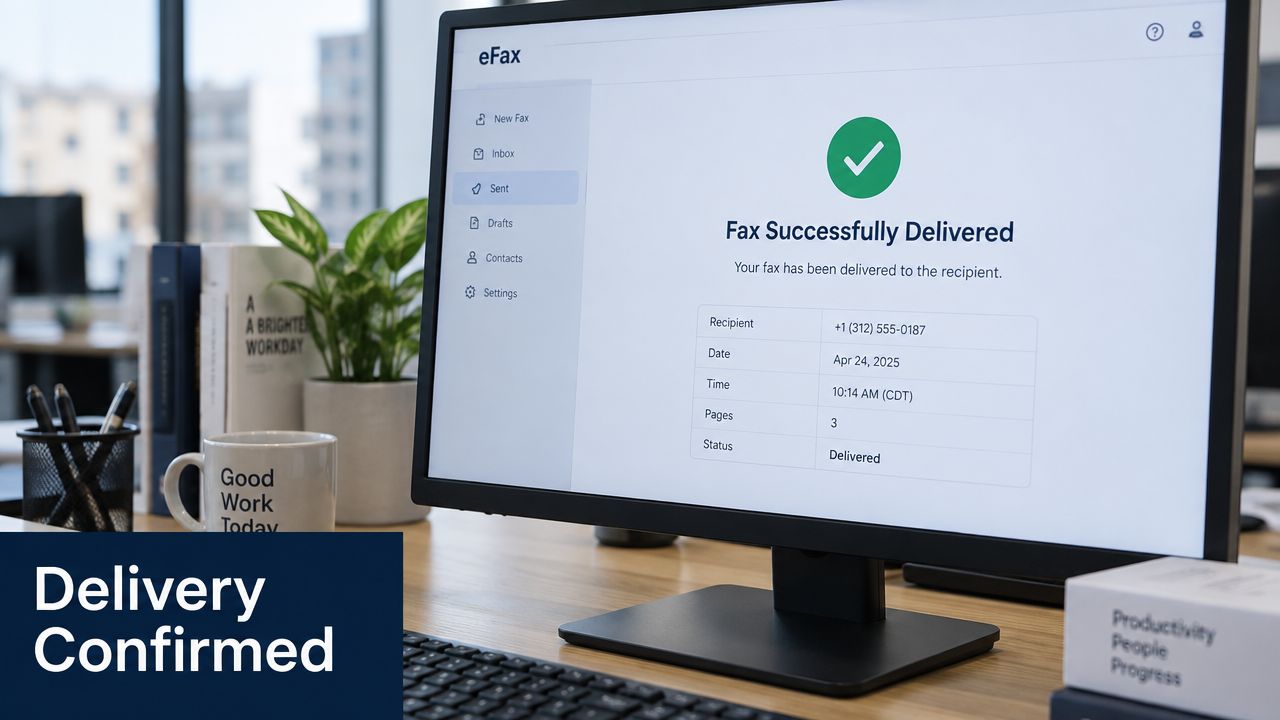
    Screenshot from https://senditfax.com/sendfax

    Read the confirmation in three passes. First, verify the number. Second, compare the displayed page count with the file you uploaded. Third, interpret the status and duration together, checking whether the service records a retry or a partial result.

    SendItFax's publisher information states that the Almost Free plan surfaces these delivery details inline rather than hiding them behind a separate subscription. The confirmation can be preserved as a PDF or captured in a screenshot for an internal record. Store it with the original document, and avoid treating the screen alone as proof that a person reviewed the content.

    Partial success versus hard failure

    A partial-success warning means the service has information showing that some portion of the transmission completed, but the full document did not. Record the reported page count, then resend the complete document unless the recipient asks for a different remedy.

    A hard failure means the system didn't complete the expected transmission. The next action depends on the cause. A busy or no-answer result may justify a later retry, while a protocol error calls for checking the destination, file, and receiving endpoint before repeating the attempt.

    The browser workflow is useful because the delivery record remains available without a printed page. It also makes it easier to save the confirmation immediately, while the recipient number, status, and timestamp are still visible.

    Use the following walkthrough as a visual check for where confirmation information appears after sending.

    A saved report still has the same evidentiary limits as a printed one. It documents transport to an endpoint. For high-consequence documents, establish a separate acknowledgment process.

    Best Practices for Keeping a Clean Fax History

    A fax report becomes much more useful when someone else can understand it months later. Save it with the original file, preserve the destination details, and use a naming convention that makes related records easy to find.

    Build a repeatable record

    • Name files consistently: Use a structure such as YYYY-MM-DD-recipient-document-report, replacing the recipient label with an internal identifier when confidentiality requires it.
    • Pair source and confirmation: Store the sent document beside the report, with a clear relationship between the two filenames.
    • Normalize time records: Keep the sender's timezone in the record, or convert times consistently when several offices share one workflow.
    • Retain according to policy: Match the retention period to your organization's legal, contractual, and regulatory obligations. Don't choose a period casually for sensitive records.
    • Review exceptions: Escalate failed and partial results, unusual error codes, wrong-number concerns, and transmissions involving incomplete or unreadable documents.

    The report alone may be enough when the task requires evidence that a document was sent to a specified fax endpoint and the recipient's process accepts that form of confirmation. It's not enough when the workflow requires proof that a person reviewed the content, when the document is time-sensitive, or when a rule requires an acknowledgment or filing confirmation.

    Recordkeeping habit: Save the report before closing the browser or walking away from the fax machine, then attach the follow-up evidence later.
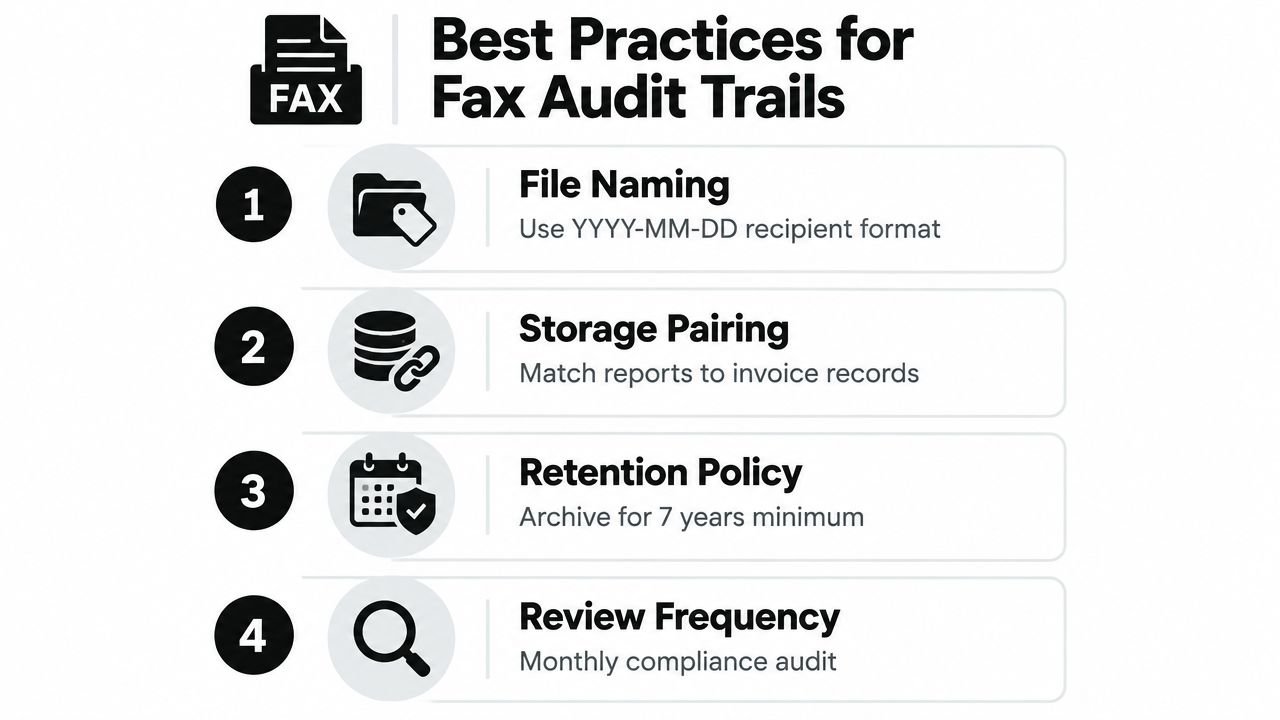
    An infographic showing four best practices for managing fax audit trails, including naming, storage, retention, and review.

    A clean history also helps diagnose recurring problems. If several reports show the same destination failing during transmission, the pattern gives your administrator or service provider something concrete to investigate. If only one report has an incorrect number or page count, the issue may be a human entry or document-preparation error.

    Finish each important fax with one question: what level of evidence does this workflow require? File the transmission report as transport evidence, then add a call, reply fax, portal acknowledgment, or other approved confirmation whenever the recipient's actual review matters.


    SendItFax lets you send documents from a browser and review the destination, timestamp, page count, duration, and delivery status in the confirmation flow. Visit SendItFax to send your next fax without a fax machine and preserve the transmission record alongside your document.
  • Fake Fax Confirmation Page: How to Spot and Verify One

    Fake Fax Confirmation Page: How to Spot and Verify One

    You're asked to provide a polished PDF labeled Fax Confirmation as proof that a deadline-day document was sent. The page shows a recipient number, a timestamp, a page count, and a reassuring “successful” status, so you save it with the project records. Weeks later, the other party says the fax never arrived. The PDF looks official, but nobody can show the original transmission record behind it.

    That situation captures the risk of a fake fax confirmation page. The threat has two forms. Someone may forge or edit a PDF that imitates a real transmission report, or an attacker may send an inbox message saying you've received a fax and use it to steal credentials. Both attacks work because a familiar document encourages people to stop asking what produced it and what it proves.

    Fax records still appear in healthcare, legal, tax, business, and government workflows, where people may need to demonstrate that a document was sent on time. A confirmation report can help establish that a sending endpoint completed a transmission protocol, but it isn't conclusive proof that a person read the document, that every page printed correctly, or that the recipient accepted its contents. Legal commentary on fax confirmations describes such a report as strong evidence in a particular dispute, while also showing why its evidentiary value depends on the surrounding facts.

    The safe approach isn't to learn how to make a convincing fake. It's to understand the document's anatomy, test whether its fields tell a coherent operational story, verify the source records, and treat unexpected fax notifications as possible phishing.

    Why a Fake Fax Confirmation Page Matters

    A genuine-looking confirmation page can influence a decision before anyone checks it. A contractor might attach one to an invoice, a patient-services team might file it with a referral, or a legal department might rely on it when reconstructing a deadline. If the report is forged, the appearance of documentation can delay discovery of the underlying problem and make a later dispute harder to untangle.

    The first threat is a forged transmission report. An attacker, dishonest party, or careless intermediary may provide a PDF that copies the layout of an online fax provider or multifunction printer. It may include familiar labels such as “destination,” “pages,” “duration,” and “result,” but those labels don't establish that a fax system generated the file. A PDF can look professional while having no connection to an outbound fax log.

    The second threat arrives through the inbox. A message styled as “new fax received” may contain a link to a counterfeit Outlook, SharePoint, or fax-provider login page. GOVCERT.LU documented a 2022 campaign in which a fake fax notice led users toward an attachment and a fraudulent page designed to collect email credentials. Similar advisories describe “encrypted fax document” and “new fax received” lures. The GOVCERT.LU advisory shows why the email itself can be the attack, even when there's no forged transmission report attached.

    Practical rule: Treat a fax confirmation as an artifact that needs verification, and treat an unexpected fax notification as an untrusted message until you confirm it through a known channel.

    The legal distinction matters. A confirmation usually records what the sender's equipment or service reported, not whether a human opened, understood, or acted on the document. That limitation makes counterfeit pages attractive in ordinary disputes and fraud schemes alike. The rest of the verification process should therefore focus on source, consistency, and corroboration, not visual polish.

    What a Legitimate Fax Confirmation Page Contains

    A legitimate confirmation page is normally generated by the sending endpoint. That endpoint might be a physical fax machine, a multifunction printer, an online fax platform, or a telephony service. The report records the event as the sender's system observed it, which is why the fields should describe one connected transmission rather than a collection of plausible-looking details.

    An infographic detailing the six key components included on a legitimate fax confirmation page for verification purposes.

    Start with the event identity

    A date and time stamp should identify when the sending system handled the call. A time zone or recognizable local-time convention makes the entry more useful. A report that gives only a vague date, rounds times unusually, or conflicts with the sender's account of the event deserves follow-up.

    The report should identify the transmitting fax number and the destination number. The sender field may represent a configured sender ID rather than the physical line, so it isn't always a direct telephone-number match. The destination should reflect the number dialed, including any required prefix or extension shown by the service.

    The page count connects the report to the file that was sent. If the original document has a cover sheet and several pages, the confirmation should tell a compatible story. Page count alone doesn't prove that every page arrived intact, but a mismatch is a useful reason to pause.

    Read the status as a machine result

    A result or status code may say successful, busy, failed, interrupted, or partially completed, depending on the provider. A successful status generally means the sending endpoint completed the communication exchange it was designed to record. It doesn't mean a person read the document.

    Other fields can strengthen the record. A transmission ID, Called Subscriber Identification, resolution setting, transmission duration, and retry history can help connect the page to a provider dashboard or device log. The precise labels vary, but a genuine report's fields should be internally consistent. The number of pages, duration, destination, status, and event time should all belong to the same transmission.

    Proof of Transmission vs Proof of Receipt

    The easiest way to avoid overclaiming is to separate the sender's record from the recipient's acknowledgment. A sender-side report can show that a system attempted to send a document and recorded a completed exchange with the receiving fax endpoint. It doesn't automatically show that a person saw the pages or that the destination organization accepted them.

    Dimension Proof of Transmission Proof of Receipt
    Created by The sending machine or fax service The recipient, recipient system, or an independently confirmed workflow
    Shows Dialed number, event time, page count, and transmission result Acknowledgment that the document reached a particular person, inbox, or process
    Human action Not established by the report alone Supported by a signed cover sheet, written acknowledgment, call record, or comparable confirmation
    Legal strength Useful evidence of sending and timing, but not conclusive proof of acceptance Stronger when it identifies the recipient and connects the acknowledgment to the document
    Main weakness It may not show printing, reading, or correct handling of every page It can still require authentication and context in a dispute

    The fax legal-document guidance describes a confirmation as a machine-generated record of a completed protocol exchange, not human receipt. In a dispute, the report becomes more persuasive when it sits beside a call log, written acknowledgment, or separate recipient record. For contractors who need broader documentation of completed work, a resource on verified proof of work for contractors can help frame the difference between an activity record and independent proof that the work was accepted.

    Tax matters can add another layer of caution. Guidance discussing IRS fax evidence explains that a fax confirmation doesn't receive the same legal presumption of timely filing associated with certain mail or authorized electronic methods, so a report may function as circumstantial evidence rather than automatic protection. If you need to establish receipt, use the recipient's normal confirmation process and confirm receipt of a fax through a known contact path.

    Takeaway: transmission evidence answers “Did the sender's system record a completed exchange?” Receipt evidence answers “Can we establish that the intended recipient received and handled this document?”

    How to Verify a Real Fax Confirmation

    Verification works best when you compare the document with records that the sender didn't create after the fact. Ask for the original provider export or device log, not just a screenshot or re-saved PDF. A report generated by the sending endpoint carries more weight than a file that has passed through unknown hands.

    Follow the transmission trail

    1. Check the timestamp. Look for the local time and time-zone indication. Compare it with the claimed deadline, the sender's email, and any call record. A time that appears rounded, redacted, or inconsistent is a warning sign, not proof of fraud by itself.

    2. Locate the transmission ID. The ID should follow the format used by the named fax provider or device. Ask the sender to locate that ID in the provider dashboard or outbound log. If no system can find it, the PDF's appearance becomes much less important.

    3. Compare the fax numbers and CSID. Confirm that the recipient number is the exact number dialed and that the sender identity or CSID fits the organization named on the report. Don't rely on a number copied from a directory or email signature. Check the original transmission record.

    4. Reconcile pages and duration. Compare the stated page count with the source file, including any cover page. The duration should be operationally plausible for the reported job. A short call paired with an unexplained large document, or a page total that differs from the source, needs clarification.

    5. Cross-check the outbound log. The sender's fax dashboard, machine history, carrier record, or contemporaneous business log should tell the same story. A printed confirmation without a matching source record is incomplete evidence.

    Field on Confirmation What to Check Genuine Indicator
    Date and time Local time, time zone, and event context Matches the sender's system record
    Transmission ID Provider or device format and searchable record Appears in the original outbound log
    Sender and recipient Exact numbers, prefixes, extensions, and CSID Align with the intended parties
    Page count Source file and cover-sheet inclusion Matches the transmitted job
    Duration and retries Call behavior and status history Fits the provider's normal report
    Final status Success, busy, error, or partial result Agrees with the underlying log

    For a broader explanation of report fields, see this guide to a fax confirmation report. If the sender won't provide the source record, record that limitation clearly rather than declaring the page authentic or fake based only on its design.

    How Fake Fax Confirmations Actually Arrive

    A fake fax confirmation page doesn't always begin with someone editing a document. Often, the attacker starts with a routine-looking message and counts on the recipient to follow the workflow without checking the source.

    The polished PDF attachment

    A contractor sends a PDF titled “Fax Confirmation” after claiming to have transmitted a signed form. The social hook is reassurance under deadline pressure. The recipient sees the familiar layout and files it without asking for the provider log.

    Early warning signs include a generic sender address, a file name that doesn't match the organization's normal naming pattern, missing provider identifiers, and a refusal to share the original dashboard record. A document can support a claim, but the person presenting it should still be able to explain how the sending system generated it.

    The new-fax notification

    An employee receives an email saying an encrypted fax is waiting. The message uses a fax-service logo, urgent language, and a button that appears to open a document portal. Clicking may lead to a fake Microsoft Outlook or SharePoint sign-in page, where the attacker collects credentials.

    GOVCERT.LU's documented campaign used a fake fax notice to encourage attachment opening and credential entry. Practical guidance on encrypted fax document scams recommends checking the sender address, avoiding credential entry through the message, and reaching the supposed fax service through its normal website or app instead.

    The paper confirmation

    A printed page may appear in routine mail or an office tray with a credible sender name. The hook is familiarity. Staff assume that paper records belong to the same workflow as other documents, even when nobody can identify the machine, service, or person that produced them.

    Verify the claimed event with the organization that supposedly sent it, using a phone number or portal you already trust. Tools designed for spotting manipulated documents with AI may help with triage, but they shouldn't replace source-log verification or a direct confirmation.

    Common Signs of a Tampered Confirmation

    The strongest warning signs involve operational plausibility, not typography. A copied logo, clean typography, and a convincing footer are easy to reproduce. A coherent connection between the number dialed, event time, page count, duration, status, and provider record is harder to fake accidentally and easier to verify independently.

    An infographic titled Common Signs of a Tampered Confirmation, illustrating five key indicators of document fraud.

    Test whether the fields agree

    Look for contradictions that a real sending system would normally avoid:

    • Inconsistent timestamps: The report time conflicts with the email, deadline, device history, or stated local time.
    • Mismatched page count: The PDF says one total, while the original file, cover sheet, or provider log shows another.
    • Altered confirmation ID: The ID is missing, uses an unfamiliar format, or can't be found in the named service.
    • Suspicious numbers: The destination number differs from the number the sender says they called, or the CSID doesn't fit the supposed recipient.
    • Internal logic errors: The status says success while the detail rows describe a failure, busy signal, retry, or incomplete transmission.

    Duration deserves close attention. A report that claims a lengthy document completed unusually quickly may be questionable, but don't decide from speed alone. Fax behavior varies by resolution, endpoint, line quality, and service, so the right question is whether the value matches the provider's own record.

    A timestamp outside ordinary working hours isn't automatically suspicious either. A legitimate automated service may transmit at any time. The useful test is whether the sender can explain the timing and produce a matching system entry.

    A fake report often fails as a story before it fails as a picture. Read the fields together.

    Redactions and rounded values can be legitimate for privacy or presentation, but they reduce what you can verify. Ask for an unaltered provider export when the matter has legal, financial, healthcare, or compliance consequences.

    Preserving Legitimate Proof of Fax Transmission

    If you're the sender, create a record that another person can trace without relying on your memory. The objective is an unbroken chain from the original file and dialed number to the stored confirmation. Manipulating a date, ID, page count, or recipient field destroys the reliability you're trying to establish.

    Build the record at the time of sending

    Generate the report directly from the sending machine or online fax service after the call completes. Save the provider's original export as a non-editable PDF where possible, and retain the fax cover sheet with the confirmation. A screenshot of a PDF open in editing software doesn't show who created the underlying document or whether its fields changed.

    A practical preservation bundle can include:

    1. The original transmission report, downloaded from the device or provider.
    2. The source document, preserved in its sent form, including the cover sheet where applicable.
    3. The dialed number, copied from the sending system rather than typed later.
    4. A carrier or service record, if the provider makes one available.
    5. A short contemporaneous log, stating who requested the fax, why it was sent, and when the report was saved.

    The log doesn't need to be dramatic. “Sent signed agreement to the recipient number supplied by the client, saved provider report after completion” is more useful than a retrospective note written weeks later. Keep the report and related records in a controlled folder or document system with access history.

    A five-step infographic showing how to properly document and preserve evidence of a sent fax transmission.

    Preserve, don't manufacture

    If the recipient disputes delivery, send the original report and request an acknowledgment through a known contact. Don't “clean up” the page by changing fields to make it more persuasive. Legitimate preservation never requires backfilling a transmission ID or rewriting the recipient number.

    Store a backup on a secure drive or approved cloud system, while respecting the sensitivity of legal, medical, tax, and personal records. The strongest package connects the event to independent context without pretending that a sender-side report proves a human read every page.

    Building a Reliable Verification Habit

    A repeatable habit works better than a single detection tool because both forged PDFs and inbox lures exploit rushed decisions. Use four questions whenever a fax confirmation or fax notification arrives.

    A flowchart titled Building a Reliable Verification Habit, outlining four questions for verifying fax transmission data.

    Ask four questions

    Does the document have the expected structure? Check for the provider or device identity, event fields, destination, page count, status, and any normal reference information. If the layout is unfamiliar, request the original export instead of treating unfamiliarity as proof of fraud.

    Does the timestamp match the claimed event? Compare it with the deadline, email trail, call notes, and local time. If it doesn't align, pause and ask for an explanation.

    Can the confirmation ID be found in the sender's records? A real identifier should connect the PDF to a provider dashboard, device history, or service log. If it doesn't, escalate the issue rather than accepting the page on appearance.

    Do the numbers and page count make sense together? Confirm the sender and recipient details, CSID where available, total pages, duration, retries, and final status. A mismatch means the document needs corroboration.

    Your next action should follow the result. A consistent report with a matching source record may be accepted as evidence of transmission. A missing record means you should request the original file or provider export. An unexpected inbox link should be ignored while you access the fax service through its known path. A suspected forgery involving a legal, healthcare, tax, or financial matter should go to the relevant compliance or security contact.

    For operational testing of fax workflows, use a controlled guide on how to test a fax. The habit is simple: verify the source, not just the surface.


    SendItFax lets users send DOC, DOCX, or PDF files to recipients in the United States and Canada from a browser, with a confirmation report or delivery email that records details such as the date, time, page count, recipient number, and delivery status. Visit SendItFax when you need a traceable fax transmission without a physical fax machine.

  • How to Confirm Receipt of Fax: Reliable Methods That Work

    How to Confirm Receipt of Fax: Reliable Methods That Work

    Twenty minutes after sending a signed offer letter, a paralegal refreshes her email and checks the fax machine again. The report says Success, the destination number appears correct, and every page is listed. She still calls the recipient because a machine-level result doesn't tell her whether the agent's office received the document, routed it to the right person, or noticed it before the deadline.

    That distinction is the operational problem behind every request to confirm receipt of fax. A transmission report can show that two devices completed a fax session, but it can't prove that a human reviewed the pages. The difference matters when a court filing goes out after business hours, a signed contract must reach a closing team, a patient record lands in the wrong department, or loan documents disappear into a shared office inbox.

    The reliable answer is a layered workflow. Use the fax report as technical evidence, then add delivery records, a direct callback, or written acknowledgment according to the document's risk.

    Why Confirming Fax Receipt Is Harder Than It Looks

    A signed filing reaches the courthouse fax line before the deadline. The confirmation page shows a successful session, yet no one can tell you whether the clerk docketed it. That gap is why a machine result alone is weak evidence in an audit, dispute, or time-sensitive filing.

    Fax remains embedded in daily operations across several industries. An independent survey reported that 77% of German companies still used fax in 2024, while 25% of those companies said they used fax frequently or very frequently. The figures come from Boersenblatt's report on continuing business fax use. Healthcare remains heavily dependent on fax as well, with the sector exchanging more than 9 billion fax pages annually, according to medical fax transmission statistics from Get CorCodes Health.

    Why the status creates false confidence

    Four handoffs show where the process can break:

    • A court clerk's fax line accepts a filing, but no one confirms whether it was docketed.
    • A seller's agent's machine receives a contract, but the pages remain in the output tray.
    • A clinic receives a referral, but the fax goes to records instead of scheduling.
    • A lender's shared fax inbox accepts documents, but the assigned processor never sees them.

    Here, transport succeeded while the business process remained unverified. The report supports the sender's record that transmission completed. It does not establish legal acceptance, correct internal routing, readable pages, or human review.

    Use the report as technical evidence, then verify the handoff according to the document's risk. Routine information may require only a saved transmission record. A deadline-sensitive filing needs a named recipient, a callback request, and a preserved acknowledgment.

    Operational rule: Treat “OK” as permission to begin verification, not permission to stop.

    That layered approach separates machine-level transmission success from meaningful human receipt, the distinction that makes fax evidence hold up when the outcome matters.

    What a Fax Confirmation Report Actually Contains

    A standard report is the final record generated after the fax session completes. Technical guidance on fax tracking and confirmation records describes the report as a transport-level outcome, commonly containing the destination number, transmission time, page count, duration, and a result such as OK, failed, busy, or disconnected.

    Read the page as an evidence map. Each field answers one question and leaves another unanswered.

    Field What It Shows What It Does NOT Prove
    Destination number The number used for the transmission, often echoed by the system That the number belonged to the intended person or department
    Date and time When the sending session ended or was recorded That the recipient reviewed the document by a deadline
    Page count How many pages the system processed That every page printed clearly or arrived in the expected order
    Duration How long the fax session lasted That the receiving office acted on the document
    Result code Whether the session completed or encountered a reported error That a human received, read, or accepted the content
    CSID or TSID Device or station identifiers exchanged during the fax process That the device was operated by the named recipient

    How to interpret the result

    An OK result generally indicates that the receiving device answered, negotiated the protocol, and accepted the transmitted data. A busy result points to a line that couldn't accept the call at that time. No answer or disconnected statuses indicate that the session didn't reach a completed exchange. A partial result deserves special attention because the system may have processed less than the expected payload.

    Save the report with the original file, not in a separate printout pile. A defensible record includes the document sent, destination number, timestamp, page count, status code, and any follow-up acknowledgment. This guide to fax confirmation reports is useful for reviewing the report's role, but the report should remain one part of the evidence package.

    Transmission Success Is Not the Same as Receipt

    The machine signal and the human acknowledgment belong to different layers of the workflow.

    A successful fax status can show that the receiving device answered, the protocol was negotiated, and the pages were transmitted. It doesn't show that the pages were collected, legible, routed internally, or read by the intended person. The receiving device might print into a public tray, a shared inbox might contain several departments, or an employee might discard an unfamiliar document.

    Three environments where the gap matters

    Healthcare requires more than an equipment response when records affect care. A referral, authorization, or lab-related document can reach the wrong internal queue even though the sending report says OK. A direct confirmation from the receiving clinician's office or designated staff member closes the operational gap.

    Legal work creates a separate evidentiary concern. Courts have treated properly generated fax confirmations as strong evidence in some disputes, including situations where the report helped create a rebuttable presumption or a factual issue about receipt. The Indiana Lawyer discussion of fax confirmation evidence illustrates the key point: a report can support a sender's position without proving every element of receipt or acceptance.

    Real estate depends on controlled document exchange. A signed contract may arrive at an office fax number while the person managing the transaction is away. A callback from the named agent or transaction coordinator provides far stronger operational assurance than a status screen alone.

    What counts as meaningful acknowledgment

    Use a callback request when the recipient is known and timing matters. A cover sheet can say, “Please call or reply by the requested time to confirm that all pages arrived legibly.” For organizations using secure portals, an upload confirmation may offer a more appropriate human workflow than an unattended fax tray.

    The practical standard is simple: machine success proves delivery to a device, while acknowledgment proves contact with the receiving workflow. Use both whenever a missed document could create financial, clinical, contractual, or legal harm.

    Layered Verification Methods for Critical Faxes

    Critical documents need a stack, not a single receipt. Build the stack from technical evidence toward human confirmation, then remove layers only when the document's consequences justify doing so.

    1. Capture the transmission report immediately. Check the result code, destination number, page count, and duration. Compare the page count with the file you intended to send. A mismatch is a stop signal, not an administrative detail.

    2. Preserve the online fax record. A web dashboard may retain the sent file, event history, and status timeline. Download the rendered document and the transaction record together. Testing a fax before relying on it helps identify process failures before a deadline creates pressure.

    3. Use automated delivery notifications. Email or SMS alerts can tell you when a service queues, sends, delivers, or fails a transmission. They improve visibility, but they still may describe delivery to a gateway rather than receipt by a named employee.

    4. Obtain human acknowledgment. Put the recipient's name and requested response method on the cover sheet. Ask for a call or reply within a specific window, then log the person's name, time, and confirmation.

    A four-layer diagram illustrating verification methods for ensuring critical faxes are received and confirmed by recipients.

    A closing-day example

    Suppose a signed contract must reach a transaction team before a closing deadline. The sender saves the original PDF, sends it to the verified office number, downloads the successful transmission report, preserves the online event log, enables the delivery notification, and calls the named coordinator. The confirmation log records the fax ID, destination, timestamp, page count, status, recipient name, and acknowledgment time.

    For repeat-heavy operations, pair this process with autonomous documentation validation so teams can check whether required artifacts are present and consistent before closing the record. The stack is modular. A low-risk informational fax may stop after the transmission report, while a filing, authorization, or signed agreement should normally reach the callback stage.

    Online Fax Tools and Their Built-In Confirmation Features

    Online fax services make confirmation easier to store, search, and distribute, but they don't remove the central ambiguity. Services such as eFax, HelloFax, RingCentral Fax, MetroFax, and FaxZero commonly provide transmission receipts that identify sender and recipient numbers, duration, page count, and result status. Many deliver the receipt by email or attach it as a PDF.

    The useful question isn't whether a provider shows “sent.” Ask what record you can retrieve after the event and who receives the alert.

    Service Transmission Receipt Cloud Log Retention Email Delivery Notification API or Webhook Support
    eFax Commonly available Service-plan dependent Commonly available Availability depends on integration
    HelloFax Available through fax history and confirmation email Available through account history Available Public integration options should be checked before purchase
    RingCentral Fax Available Available through account administration Configurable Integration support varies by plan
    MetroFax Available Available through account history Commonly available Confirm current developer options
    FaxZero Basic status and confirmation features More limited than enterprise-oriented services Available for send outcomes Not designed primarily for complex workflow callbacks

    Features that improve the evidence trail

    Persistent cloud logs help teams locate a transaction without searching paper trays. Delivery notifications can route alerts to several responsible people, reducing dependence on one inbox. Webhooks and API callbacks are valuable when a CRM, EHR, or document system needs to record queued, sent, delivered, or failed events automatically.

    Those events still describe the service's delivery path. They don't necessarily identify the human who opened the document, and a gateway can report success while an internal department misses the file. Free or low-cost plans may also retain logs for a shorter period, so export records when the matter has audit or dispute exposure.

    For occasional browser-based sending, SendItFax's online faxing service overview provides a useful comparison point. Choose a provider based on the artifacts it preserves, then add one external check, usually a callback or reply email, when the recipient is unknown.

    Jurisdiction and Industry Differences That Change Your Workflow

    There isn't one universal definition of confirmed fax receipt. The right evidence depends on the sector, the jurisdiction, the document, and the receiving organization's rules.

    Healthcare illustrates the pressure clearly. Industry sources describe fax as carrying a large share of medical communication, including roughly 70% to 90% of healthcare communications and about 90% of medical record requests, as summarized by medical-record faxing guidance from mFax. In that environment, verify the destination number, protect the cover sheet and pages, save the transmission report, and obtain a callback when the document affects care or authorization.

    Match proof to the governing environment

    Legal teams should ask whether the forum accepts a transmission record as evidence and what additional foundation may be required. A report can support a dispute, but it doesn't guarantee that a court clerk docketed a filing or that a recipient accepted service. Confirm the receiving office's procedure before relying on fax alone.

    Real estate teams should distinguish delivery from transaction acceptance. A faxed signature may reach the intended office, yet the counterparty, title company, or closing process may require another form of execution or document exchange. Confirm the requirement with the responsible professional rather than treating the fax report as final approval.

    Cross-border workflows require another check. Recent coverage describes a divergence in healthcare policy, with continued heavy U.S. fax use alongside European moves toward phasing fax out, including a source describing a full ban in one setting after a transition period in July 2026. The HIPAA faxing guidance from Softlinx discusses this changing compliance context and why storing confirmation records remains part of a controlled process in some U.S. workflows.

    Before sending, answer three questions:

    • Which rules apply? Identify the sector and jurisdiction.
    • What evidence does the recipient require? Ask whether a report, callback, portal record, or signed return is necessary.
    • How long should artifacts remain available? Set retention according to policy, contract, audit needs, and legal advice.

    Organizations that handle property transactions may also benefit from reviewing approaches to integrating secure file sharing with your PMS, especially when fax confirmation isn't sufficient for the document exchange required.

    Practical Checklist and Common Questions

    Use this checklist before sending anything deadline-sensitive:

    • Verify the destination: Confirm the fax number and identify the department or person who should receive the pages.
    • Name the recipient: Put the recipient's name, sender contact details, and requested response time on the cover sheet.
    • Save the evidence: Preserve the original file, T.30 transmission report, fax ID, timestamp, page count, and status code.
    • Request acknowledgment: Ask for a callback or reply email, then record the confirming person's name and time.
    • Archive notifications: Keep delivery emails, dashboard exports, and any follow-up correspondence with the document.
    • Escalate quickly: If the result is partial, failed, busy, or unconfirmed, call the recipient and resend through an approved channel.

    Common questions

    Does a confirmation page alone hold up in court? It can be strong evidence of transmission and may help create a factual dispute about receipt, but it doesn't guarantee legal acceptance or prove that a person read the pages. Preserve the report with the original document and obtain acknowledgment when the filing or notice matters.

    How long should I keep proof? Follow your organization's retention policy and the applicable legal or regulatory requirements. Don't delete the record because the fax completed successfully.

    What should I do with a partial result? Treat it as incomplete. Compare the reported page count with the source file, call the recipient, verify which pages arrived, and resend the complete document.

    Does a forwarded fax count as confirmed receipt? No. A forward creates another handoff. Ask the new recipient to confirm the complete, legible document and retain that acknowledgment separately.

    The durable standard is technical proof plus human acknowledgment. A single report is reasonable for low-stakes documents, but it isn't enough when a missed fax could affect a deadline, patient, contract, or dispute.


    SendItFax lets you send DOC, DOCX, or PDF files to U.S. and Canadian fax numbers from a browser, with a confirmation email and Fax ID you can use to check delivery status. For an occasional or time-sensitive fax, visit SendItFax, save the resulting record, and add a direct recipient acknowledgment when the document carries real consequences.