
Sending a fax online is surprisingly straightforward. You just upload your document to a web service like SendItFax, punch in the recipient's fax number, and hit send. That's it. This approach ditches the need for a clunky machine and a dedicated phone line, letting you send files like PDFs or Word docs right from your computer or phone in a matter of minutes.
Why Online Faxing Still Matters
It's easy to think of faxing as something that went out with dial-up internet, but for a lot of professionals, it’s still a go-to tool. Fields like healthcare, law, and government hang on to it for good reason: it’s incredibly secure and holds up legally. When you’re handling sensitive information, the direct point-to-point connection of a fax gives you a level of security that your average email just can't promise.
Learning to send a fax online isn't about dusting off old tech. It’s about getting comfortable with a modern communication method that puts security and reliability first, whether you’re using it for work or personal stuff.
The Enduring Role of Fax in Key Industries
So, why are so many vital sectors still leaning on this method? It all comes down to compliance and having a paper trail. Take healthcare, for instance. Doctors and hospitals have to follow strict HIPAA rules to keep patient information private. Faxing gives them a secure, verifiable way to send records between clinics, pharmacies, and insurance companies.
The numbers really tell the story. At its peak, global fax transmissions hit over 17 billion documents in a single year. The U.S. healthcare system alone accounted for more than 9 billion of those. Even now, about 17% of businesses around the world still use faxing, which shows just how essential it remains in certain fields.
The real advantage? A fax transmission creates a solid record of exactly when a document was sent and successfully received. That kind of proof is gold for legal and medical paperwork.
Thinking about making the switch? It helps to see the differences side-by-side.
At a Glance Comparing Traditional vs Online Faxing
This table provides a quick comparison of the key differences between using a traditional fax machine and a modern online fax service, helping you understand the benefits of going digital.
| Feature | Traditional Fax Machine | Online Fax Service |
|---|---|---|
| Hardware | Requires a dedicated machine and phone line. | No special hardware needed—just a computer or smartphone. |
| Cost | High initial cost plus ongoing expenses for paper, ink. | Low monthly subscription fees, often with free trial options. |
| Accessibility | You have to be physically present at the machine. | Send and receive faxes from anywhere with an internet connection. |
| Document Quality | Can be blurry or distorted depending on the connection. | Delivers crisp, clear digital copies every time. |
| Security | Secure point-to-point, but documents can be left exposed. | Enhanced with end-to-end encryption and secure cloud storage. |
| Confirmation | Prints a confirmation page (if it doesn't jam). | Sends instant email notifications and provides a digital log. |
As you can see, online faxing takes the core strengths of traditional faxing and modernizes them for today’s needs, offering a more flexible and cost-effective solution.
Security and Legal Recognition
Faxing is often considered a safer bet than email when you're sending sensitive documents. A classic fax travels over a dedicated phone line, which is much harder to intercept than hacking into an email server. You can dive deeper into whether fax is more secure than email in our detailed comparison.
Today's online fax services build on that security with features like end-to-end encryption. This scrambles your documents from the moment you send them until they land safely on the recipient's machine. It’s this blend of old-school reliability and new-school security that makes faxes legally binding in many situations, from signing contracts to submitting official paperwork. It’s a surprisingly useful skill to have in your back pocket.
Getting Your Documents Ready for a Perfect Send
Before you even get to the "send" button, the single most important thing is the quality of your document. I’ve seen it happen countless times: a blurry or poorly formatted file gets sent, and it arrives as an unreadable mess on the other end. This wastes time and can cause real headaches, especially with important paperwork.
The goal here is simple: start with a clean, crisp digital file. That one step will solve 90% of potential problems down the line.
Choosing the Right File Format
The file type you use has a direct impact on how your fax looks when it prints out of that machine miles away.
For anything with a lot of text—think contracts, applications, or official letters—PDF is the gold standard. It’s the closest thing to a guarantee that your formatting, fonts, and layout will stay exactly as you intended.
If you have a Word document, I strongly recommend converting it first. It only takes a second. Our guide on how to convert a Word document to a PDF shows you exactly how.
Other common formats that usually work well include:
- DOC/DOCX: Microsoft Word files are accepted almost everywhere, but be aware that formatting can sometimes get a little wonky during the fax conversion process. PDF avoids this.
- JPG/PNG: These are perfect for sending photos, diagrams, or scanned papers. Just make sure they are high-resolution. A fuzzy image will only look worse after being faxed.
Pro Tip: Think of your digital file as the "original" master copy. The better its quality, the clearer the final fax will be. You can't make a low-resolution scan look sharp on the other end.
How to Scan Physical Papers (Without a Scanner)
What if your document is a physical piece of paper? You don’t need to hunt down a bulky office scanner anymore. Your smartphone is more than capable of creating a great-looking digital copy.
For the best results, lay the document on a flat surface with plenty of light. Watch out for your own shadow! Position yourself so the light source isn’t directly behind you, casting a shadow over the page.
Modern phone cameras and scanning apps (like Adobe Scan or even your phone's built-in Notes app) are smart enough to find the document's edges and automatically straighten the image for you.
Once you have the picture, take 30 seconds to edit it. The most important tweak is to increase the contrast. This makes the text pop and the background a clean white. It makes a massive difference in readability for the person receiving the fax. Zoom in and double-check that even the fine print is sharp.
Finally, save your freshly scanned document as a PDF or a high-quality JPG. Taking these few extra minutes to prep your file properly is the secret to a smooth transmission every single time. It's the foundational step that ensures your message gets received loud and clear.
The Complete Walkthrough for Sending Your First Online Fax
Alright, you've got your documents scanned, cleaned up, and ready to go. Now for the easy part: actually sending the fax. If you're used to wrestling with an old, clunky fax machine, you're in for a pleasant surprise. The whole process is much more like sending an email.
Let's walk through it together using a service like SendItFax as our example. The goal of these platforms is to be dead simple—get your file from your computer to their machine with zero fuss.
This little visual sums up the prep work perfectly. You scan it, tweak it for clarity, and save it as a PDF. That's it.
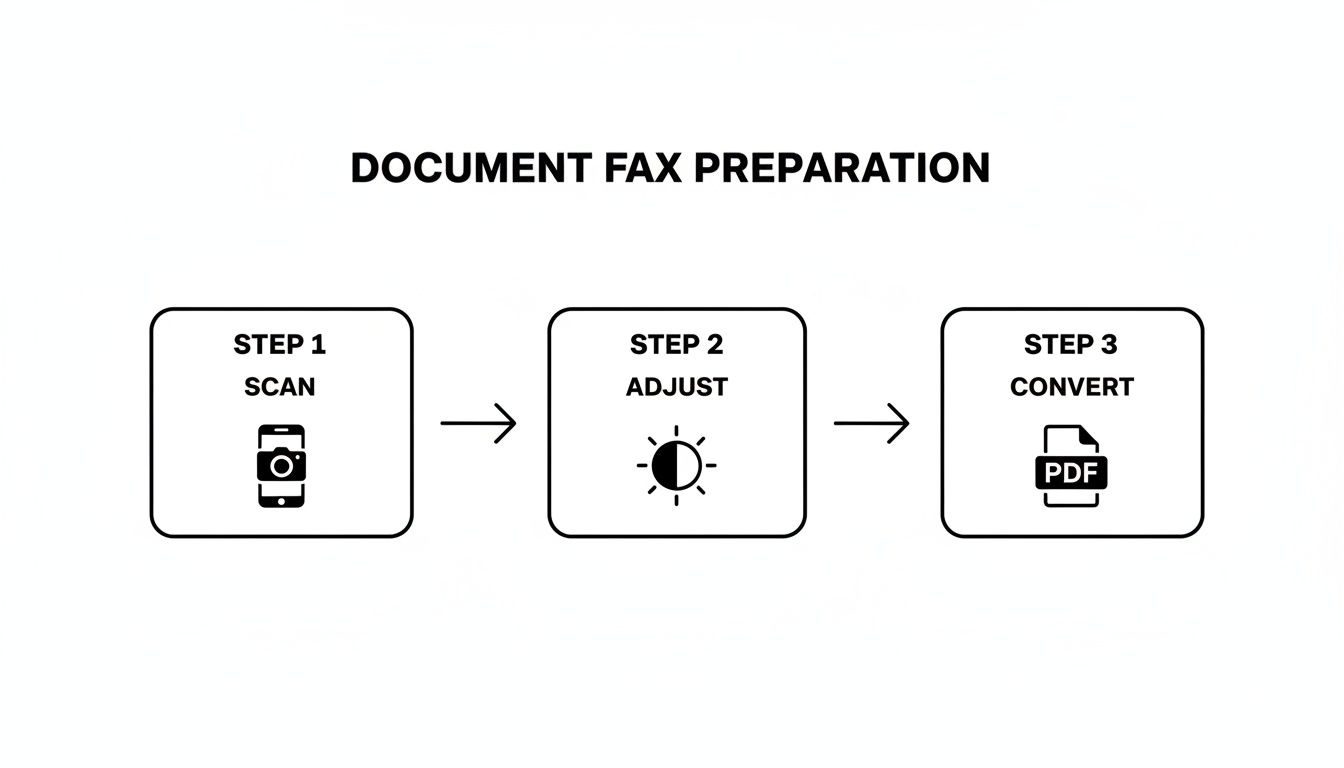
Getting this part right is the secret to making sure your fax lands on the other end looking sharp and professional.
Entering Sender and Recipient Information
First things first, you have to tell the service who you are and where the fax is going. Think of it as the "To" and "From" on an envelope. On the sender side, you'll plug in your name, maybe your company, and your email. That email address is critical—it’s where your delivery confirmation (or failure notice) will land.
Now for the recipient's info. The make-or-break detail here is the fax number. This is where most mistakes happen, so pay close attention.
- Sending to the U.S. or Canada? You'll need all 10 digits: area code plus the number. Something like 212-555-0199.
- Going international? You'll have to lead with the country code, then the city/area code, and the local number. A fax to London, for example, would look something like +44 20 7946 0958.
I can't stress this enough: double-check every single digit. One wrong number and your fax either vanishes into the ether or ends up in the wrong hands. It’s the digital version of sending a sensitive contract to the wrong street address.
Uploading Your Document and Adding a Cover Page
Next, you'll see a big, friendly button to upload your file. This is where you grab that polished PDF you just created. Most services these days even let you drag the file from your desktop and drop it right into the web page. Easy.
This is also your chance to add a cover page. Don't skip this. While it might seem optional, a cover page is essential for any kind of professional communication. It’s the first thing the recipient sees and tells them what they’re looking at and who it’s for.
A good cover page is your fax’s handshake. It provides immediate context and makes sure your document doesn't get lost in a pile on a shared office machine. It gets it routed to the right person, right away.
So, what goes on a great cover page?
- A Clear Subject Line: Get straight to the point. Instead of "Fax," try "Signed Lease Agreement" or "Invoice #5829 for Payment."
- A Quick Note: This is the spot for a brief message. Something like, "Hi John, attached are the 5 signed pages for your records. Please confirm receipt."
- The Page Count: Always, always include the total number of pages you're sending, including the cover page itself. This is how the recipient confirms they got the whole thing.
Once all the fields are filled and your document is attached, take one last look over everything. Is the fax number perfect? Names spelled correctly? Happy with your cover page message?
When you’re good to go, hit "Send." The service takes over from there, translating your digital file into a signal that a traditional fax machine can understand and dialing up the recipient. Within a few minutes, you should get an email in your inbox confirming whether the fax went through successfully.
Free vs. Paid Online Faxing: Which One Is Right for You?
When you're ready to send a fax online, you’ll quickly hit a fork in the road: go free, or pay for a subscription? There’s no single right answer. The best choice really boils down to what you’re sending and how often you’ll be sending it. Let's break down what you get—and what you give up—with each.
Free services, like the starter option here at SendItFax, are fantastic for those one-and-done situations. Imagine you just need to send a signed three-page contract to a vendor. A free plan is the perfect tool for the job. No cost, no commitment.
But, as with most things in life, "free" comes with a few strings attached. You'll usually run into some predictable limitations:
- Strict Page Limits: Most free services cap you at just a handful of pages per fax.
- Forced Branding: Expect the service’s logo or a small ad to appear on your cover page.
- Slower Delivery: Your fax often gets put in a queue behind paying customers, so it might not go out immediately.
For a single, non-urgent document, those trade-offs are usually a no-brainer. But if your faxing needs are more consistent or business-related, you'll start feeling the limitations of the free model pretty quickly.
When Does It Make Sense to Pay for a Fax Service?
If you're sending faxes more than once in a blue moon, or if they're for professional purposes, upgrading to a paid plan is less of a luxury and more of a practical necessity. Paid services are built for consistency, better security, and a polished, professional look.
This shift towards professional-grade services is actually driving major growth in the industry. The global market for online faxing was valued at $3.3 billion in 2024 and is projected to reach $4.47 billion by 2030. Why? Because businesses need features that free plans simply can't provide, like advanced security and software integrations.
Stepping up to a paid plan isn't just about getting rid of ads. It’s an investment in a professional toolkit that ensures your faxes are delivered securely, reliably, and with the clean presentation your business deserves.
The Real Perks of a Premium Plan
So, what exactly are you paying for? A premium online fax service unlocks a whole suite of powerful features that make a real difference.
The biggest game-changer is getting a dedicated fax number. This means you can not only send faxes but also receive them, effectively turning your email into a two-way virtual fax machine. You also get a major security boost with features like end-to-end encryption. This is non-negotiable for anyone handling sensitive information in fields like healthcare (think HIPAA compliance) or law.
On top of that, you can typically expect:
- Generous page limits, and sometimes even unlimited faxing.
- Detailed delivery confirmations and an organized, searchable archive of sent faxes.
- Priority delivery, so your faxes jump to the front of the line.
- A clean, professional look with no third-party branding on your cover sheets.
If you're still on the fence, check out our online fax service comparison to see a side-by-side breakdown. For the occasional personal document, free is often all you need. For anything more, a paid plan is a smart move for pure reliability.
Keeping Your Faxes Secure and Private
When you're handling sensitive documents—think medical records, legal contracts, or financial statements—security isn't just a feature; it's a necessity. Knowing how to send a fax online is less about convenience and more about using a channel known for its robust privacy. Unlike an email, which can be intercepted at various points, a secure online fax creates a much more direct and protected pathway for your information.
This heightened security is exactly why so many regulated industries still depend on faxing. It’s not an outdated habit; it’s a deliberate choice to meet strict legal and compliance requirements.
How Encryption and Compliance Work
The magic behind modern online fax security is end-to-end encryption. Imagine locking your document in a digital safe the moment you hit "send." The file is instantly scrambled into unreadable code and isn't pieced back together until it safely arrives at the recipient's fax service. This process shields it from prying eyes while it's in transit.
This level of protection is a game-changer for meeting compliance standards like HIPAA (for healthcare) and GDPR (for data privacy). These regulations have strict rules about handling personal information, which is especially critical in healthcare, where about 75% of providers communicate digitally. To send a fax that holds up legally, a service must offer features like encryption and a zero-trust framework, giving your documents a legal standing that a standard email just can't match. You can learn more about where this technology is headed from these future trends in faxing from FaxFix.com.
When you're picking a service, always look for explicit mentions of HIPAA compliance or TLS encryption. That's your green light, signaling that the provider has the right infrastructure to protect your data seriously.
Practical Tips to Keep Your Faxes Safe
While a good service handles the technical heavy lifting, you're the first line of defense. Keeping your own account secure is just as crucial as the transmission itself.
Here are a few simple but powerful habits to get into:
- Create Strong Passwords: Don't just recycle your email password. Make a unique, complex password for your fax service account to keep it locked down.
- Turn On Two-Factor Authentication (2FA): If the service offers it, enable 2FA immediately. It adds a vital second layer of security by asking for a code from your phone before you can log in.
- Triple-Check the Number: This one is huge. Always, always double-check the recipient's fax number before sending. A single wrong digit could land your confidential document in the hands of a complete stranger.
By pairing the provider's security features with your own smart practices, you can send faxes with complete peace of mind, knowing your documents are protected every step of the way.
Of course. Here is the rewritten section, crafted to sound completely human-written and natural.
What to Do When Your Online Fax Fails
Even the most reliable online fax service can hit a roadblock now and then. But don't worry—most of the time, the fix is surprisingly simple once you know what to look for. Figuring out why a fax failed is the first step to making sure it gets through on the next try.
The most frequent error you'll encounter is the classic "busy signal." It means exactly what it sounds like: the receiving fax machine is already tied up with another transmission, or maybe someone left the phone off the hook.
My advice? Don't hit resend right away. Just give it 15 or 20 minutes. Nine times out of ten, the line will be free when you try again.
Digging into Other Error Messages
Sometimes you'll get a more puzzling message, like "no answer" or a generic "communication error." These usually signal a problem on the other end—it could be a bad phone line, or the machine itself might be powered off or out of paper.
Before you start pulling your hair out, run through this quick checklist:
- Is the number right? It sounds obvious, but you’d be surprised how often a single wrong digit is the culprit. Double-check it.
- Is their machine actually on? A quick phone call or email to your recipient can save you a lot of hassle. Just ask if they're ready to receive a fax.
- Could it be your file? On rare occasions, a corrupted file or one that’s unusually large can cause the transmission to time out and fail. Try re-saving it or reducing the file size if possible.
The single most useful tool you have is the delivery confirmation report. It’s not just a pass/fail notification; it gives you specific codes and reasons for the failure. Always check it before you do anything else—it takes all the guesswork out of the equation.
Learning how to troubleshoot these little hiccups is just as important as knowing how to send the fax in the first place. A proactive approach turns a potential headache into a minor delay, and you can get back to your day.
Got Questions? We’ve Got Answers.
When you're trying a new way to handle an old task, a few questions are bound to come up. Sending a fax online is a perfect example—it blends a technology we all know with the convenience of the internet. Let's clear up some of the most common sticking points people run into.
You might be wondering what you actually need to get started. Honestly, it's less than you think. All it takes is a device with an internet connection (your laptop, tablet, or phone will do) and the document you want to send saved as a digital file. No dedicated phone line, no bulky machine.
Another big one we hear all the time: "Is an online fax even a 'real' fax in the eyes of the law?" For most situations, the answer is a resounding yes.
Is an Online Fax Legally Binding?
When you send a fax through a trusted service, it carries the same legal weight as one sent from a clunky old machine. Courts, government bodies, and businesses generally accept electronically sent documents and signatures as completely valid.
This is a game-changer for time-sensitive things like signed contracts or official applications where you need solid proof of delivery. The digital delivery confirmation you get is your verifiable record that the document arrived safe and sound.
For anyone working in healthcare or finance, online faxing is often the smarter choice. Modern services use security measures like end-to-end encryption, creating a protected digital trail that a traditional fax machine could never provide.
Can I Receive Faxes This Way, Too?
Absolutely. While one-off sending services are fantastic for a quick task, most paid online fax platforms give you your own dedicated fax number.
This means you can start receiving faxes right in your email inbox, usually as a PDF attachment. It turns your email into a full-fledged faxing hub, letting you handle back-and-forth communication without ever touching a piece of paper.
Ready to send your document without the headache? SendItFax lets you send secure faxes right from your browser in under a minute. Try it now at https://senditfax.com and see how easy it can be.