Yes, online fax services work, and the fax ecosystem remains active at scale, with more than 17 billion individual fax documents sent in 2019 and 82% of surveyed German companies still using fax. They act as a cloud-based bridge that translates digital files into standard fax signals, allowing you to send documents to a traditional fax machine without owning hardware.
You may be facing that need right now. A client has sent a contract that must be signed today, a hospital still requires a medical record by fax, or a government office won't accept an email attachment. Your laptop has the document, but there's no fax machine in sight.
That gap is exactly what online faxing fills. You upload a file through a browser, the service handles the conversion and transmission, and the recipient receives the document through a traditional fax number or another digital fax service. You don't need to understand every part of the telephone network to use it, but understanding the basic transport and security layers helps you choose a service that can handle important documents reliably.
The technology isn't a new communications standard competing with fax. It sits on top of the established fax ecosystem, preserving compatibility while removing the machine, paper, toner, and dedicated workspace. The global market signals that this model remains commercially relevant, with one industry summary estimating the fax services market at $3.31 billion in 2024 and projecting $4.47 billion by 2030, at a compound annual growth rate of roughly 5.15% (FaxSIPit's market overview).
The Reality of Cloud Faxing
A real estate agent working from a train station can open a document on a phone, enter a recipient's fax number, and send the paperwork without finding an office with a machine. A lawyer working from home can transmit a signed agreement from a browser. A clinic can send a record from a controlled digital workflow instead of printing it and leaving it in an output tray.
The visible experience is simple, but the service is doing several jobs behind the screen. It accepts a digital file, renders the pages into a fax-compatible representation, connects to the recipient's fax destination, negotiates the transmission, and returns a delivery result. The recipient may use a traditional machine, a multifunction printer with fax capability, or another online fax platform.
The practical mental model: online faxing is a cloud delivery layer on top of the long-standing fax network, not a replacement network that requires the recipient to use the same service.
That distinction explains why browser-based faxing can work with an old-fashioned fax number. The online provider translates between two environments. On your side, the document is a PDF, DOC, DOCX, or image. On the recipient's side, it arrives through the fax infrastructure their organization already accepts.
Why fax remains relevant
Fax persists because some organizations have built approval, identity, and record-keeping processes around it. A fax number can be part of a known intake process, and staff may trust a transmission report as evidence that a document was sent. The overview of cloud-based fax solutions describes this role as a bridge between modern digital workflows and established fax destinations.
The continued use isn't evenly distributed. The Association for Computing Machinery's report on fax usage cites a 2023 Bitkom survey in which 82% of 505 German companies with 20 or more employees still used fax, with about one-third using it frequently or very frequently. The same report says heavy users, defined as organizations sending or receiving more than 100 pages per week, were concentrated in healthcare, legal, and financial industries.
That makes the answer to “do online fax services work” more specific than a simple yes. They work because they connect a modern upload experience to a communication method that many recipients still support. Reliability then depends on the service's transport path, file preparation, delivery confirmation, and security controls.
How Delivery Mechanics Actually Function
The file format usually isn't the main reason a fax fails. The transport path is. Once the service has prepared your document, it must move fax data through gateways and networks that can preserve the timing and signal quality expected by fax equipment.
A provider may use T.38, a protocol designed for fax over IP, or it may send fax tones through an audio channel. Those approaches behave differently under network stress.
T.38 versus audio passthrough
T.38 carries fax as real-time fax data instead of treating it like an ordinary voice call. That matters because voice systems often compress audio, smooth timing, or discard packets that seem unimportant to a conversation. A fax modem can't recover easily from those changes. It expects a stable, circuit-like exchange.
With audio passthrough, the fax signal travels as sound. Lossy codecs, jitter, delay, packet loss, and poorly configured gateways can distort that sound before it reaches the recipient. The i3forum technical guidance on fax over IP identifies controlled bandwidth, low delay, low packet loss, and correct gateway configuration as important conditions for reliable fax-over-IP operation.
T.38 doesn't make every network problem disappear. It gives the service a better way to represent and protect fax data across an IP path. A provider still needs properly configured gateways, sensible routing, and monitoring for failed attempts.
The difference shows up in practical delivery results. One 2026 industry review reports that correctly implemented T.38 services can reach 95% to 98% delivery on standard internet connections, while G.711-style routing has substantially more failures on VoIP-heavy paths (mFax's review of online fax services). Treat that as a provider-specific technical benchmark, not a guarantee for every transmission.
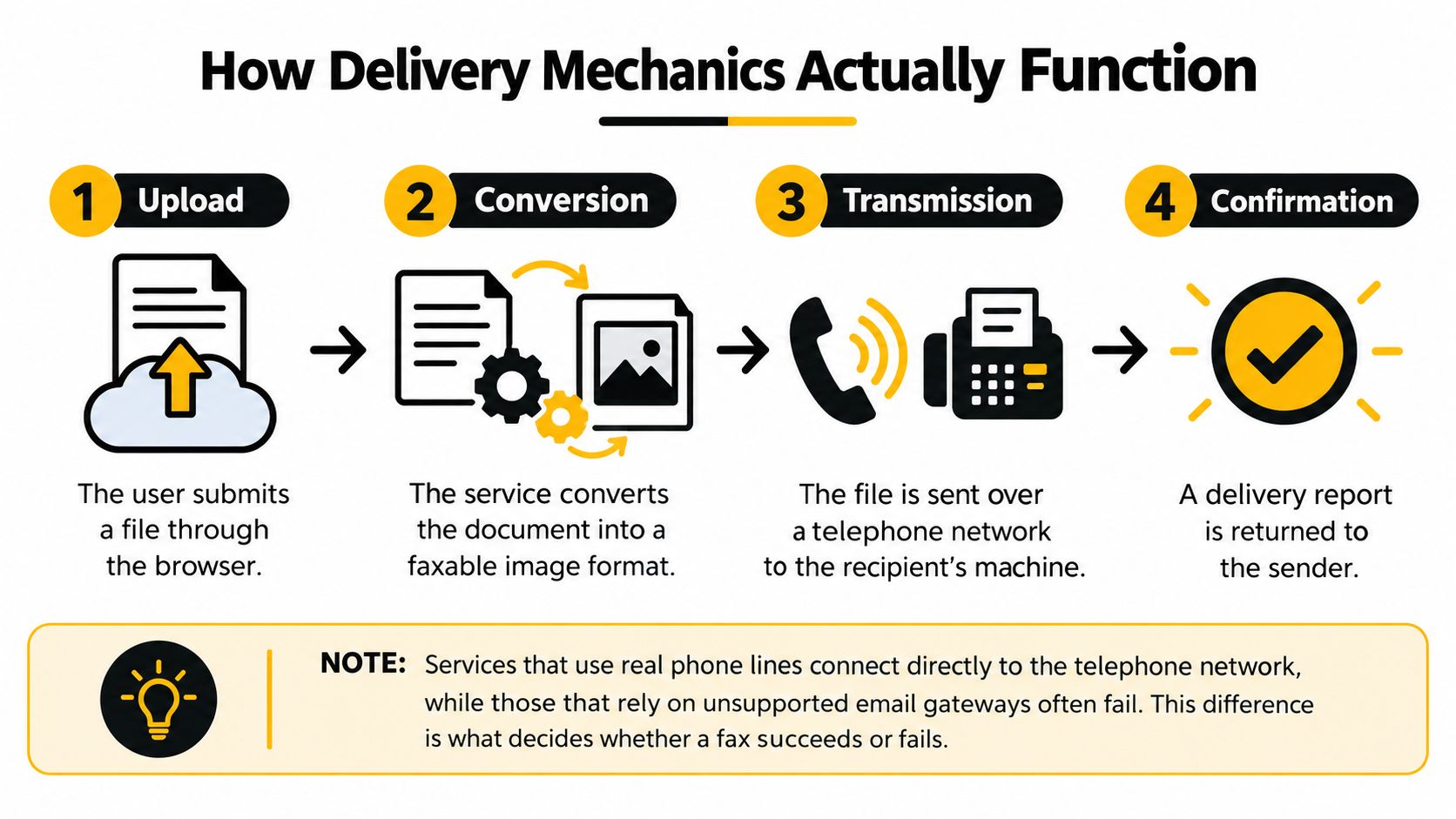
Here is what happens after you click send:
- Upload: The service receives your file and sender details.
- Conversion: It renders the document into a faxable page representation.
- Transmission: Its gateway negotiates with the recipient's fax endpoint and sends the pages.
- Confirmation: The service reports whether the attempt completed, failed, or needs another try.
The service's delivery report is therefore more useful than a generic promise that it “supports fax.” Look for confirmation details, routing behavior, file compatibility, and a clear way to distinguish a completed transmission from an unsuccessful attempt.
For a plain-language explanation of the user workflow, this guide to what internet faxing is can help connect the browser experience to the underlying transmission process.
File Formats and Size Limits
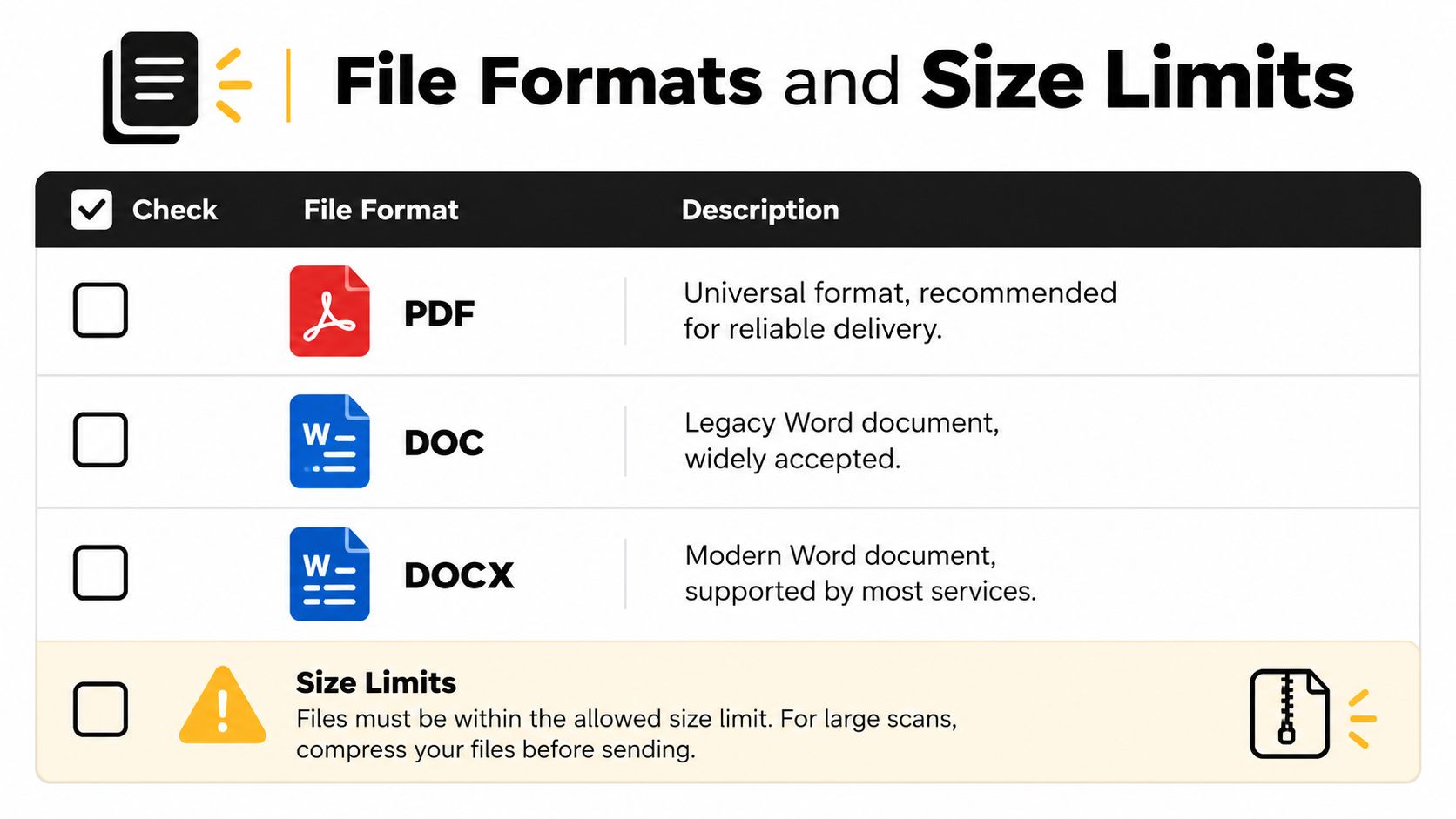
A fax service can often accept several document types, but PDF is usually the safest starting point because it preserves the page layout you approved. Word files can be useful when a provider supports them directly, but conversion may change fonts, spacing, page breaks, or embedded elements.
The service may also impose a maximum file size, page count, or transmission limit. Those limits vary by provider and plan, so check them before sending a long contract or a scan made with a phone. A large file can take longer to process and may create a timeout or conversion problem even when the fax network itself is operating normally.
Prepare the document before uploading
Use this quick preparation routine:
- Choose PDF when layout matters: Export the final version rather than printing and scanning it again. Open the PDF and check that signatures, tables, page numbers, and margins appear correctly.
- Review DOC and DOCX files: Confirm that the recipient doesn't need editable content. If the document is only being reviewed or printed, a flattened PDF generally gives you more predictable output.
- Reduce oversized scans: Crop empty margins, remove unnecessary pages, and compress high-resolution images. This guide to compressing documents provides a practical reference when a scan is too large to upload efficiently.
- Keep text legible: Fax output may be less detailed than the file on your screen. Use clear contrast, avoid very small type, and inspect scanned pages for shadows or blurred handwriting.
- Separate confidential material: Remove unrelated pages and metadata where appropriate. Sending only the required document reduces exposure and makes the recipient's intake process clearer.
Build a useful cover page
A cover page should identify the sender, recipient, subject, and total page count when the service supports those fields. Don't place essential content only in a cover note if the recipient may separate it from the document. For sensitive files, verify that the destination number is correct before including personal or confidential information.
The guide to sending a fax as a PDF is useful when your workflow starts with a finished PDF and you need to understand how the service handles it. The core rule is simple: prepare a clean, readable file first, then let the provider convert it rather than relying on an improvised scan at the last moment.
Security and Encryption Standards
Online faxing can be appropriate for sensitive documents, but “online” doesn't automatically mean secure. Security depends on how the provider protects data during transmission, how it stores documents afterward, who can access them, and how long it retains them.
Reputable services commonly use TLS to protect data in transit and AES-256 to protect stored files, according to recent coverage of online fax security (mFax's security review). Audit logs and access controls can help an organization establish who sent or viewed a document. Some providers also offer controls associated with formal compliance programs, including SOC 2 controls.
Encryption is only one layer
Think of security as a chain rather than a single feature.
| Layer | Question to ask |
|---|---|
| Transmission | Does the provider protect the connection between your browser, its platform, and its delivery systems? |
| Storage | Are stored files encrypted, and can you control retention or deletion? |
| Access | Can administrators restrict documents to authorized users? |
| Auditability | Does the service record sending, receiving, access, and deletion events? |
| Compliance | Can the provider support the specific obligations of your industry and contract? |
Healthcare organizations need special care. A service may advertise encryption but still be unsuitable for protected health information if it doesn't offer the required contractual and administrative safeguards. For a HIPAA-regulated workflow, confirm whether the provider will sign a Business Associate Agreement, then review its access controls, retention rules, breach procedures, and administrative permissions.
Legal and financial teams face a similar distinction. A confidential contract can be encrypted in transit yet remain exposed if copies sit in a shared inbox or cloud archive longer than necessary. Review the privacy policy and retention settings before sending client records, not after a dispute arises.
Security question to ask before subscribing: “What happens to my document after delivery, who can access it, and when is it deleted?”
Your own handling practices matter too. Use an approved device, avoid downloading sensitive files to unmanaged computers, confirm the recipient number, and store delivery records in the organization's controlled document system. This practical resource on how to keep PDFs safe covers document-level safeguards that complement a provider's platform security.
Real-World Use Cases with SendItFax
A remote worker may need to send a short contract from a laptop while traveling. A small business may have no reason to maintain a fax machine but still need to submit a form to a recipient in the United States or Canada. A legal professional may want a longer priority transmission without adding service branding to the cover page.
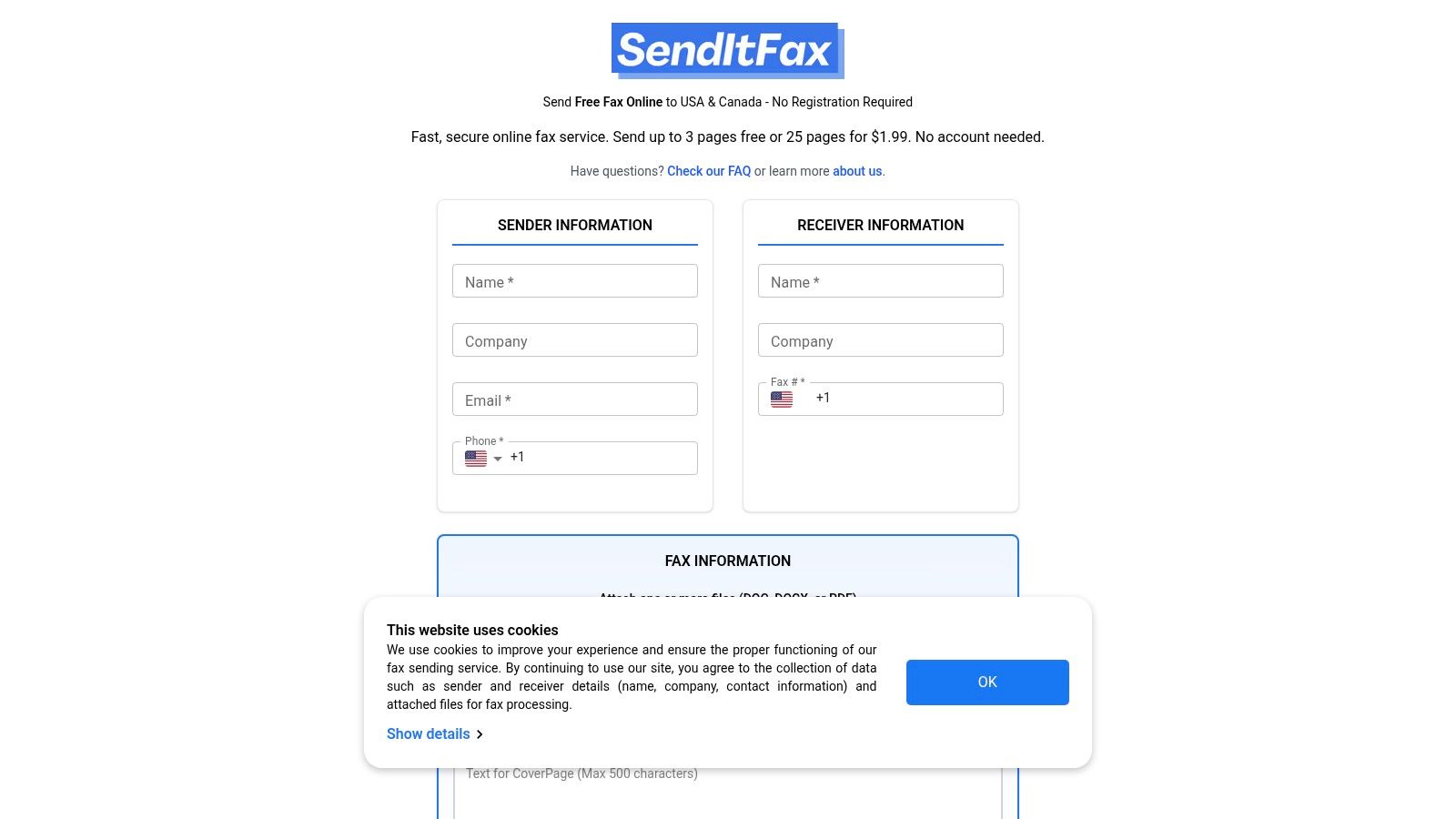
A browser-based service can fit those situations because the workflow starts with the document, not with hardware installation. The user enters sender and recipient details, uploads a PDF, DOC, or DOCX file, optionally adds a cover message, and submits the fax. That approach resembles other remote communication tasks, including the varied use cases for expat calling, where people need communication tools that work across locations.
Match the option to the job
SendItFax offers browser-based sending to recipients in the United States and Canada without requiring an account. Its free option supports up to three pages plus a cover, allows up to five free faxes daily, and includes SendItFax branding on the cover page. That can suit an occasional personal or small-business transmission where branding isn't a concern.
The Almost Free option costs $1.99 per fax through Stripe, supports up to 25 pages, provides priority delivery, and removes the service branding. Users can also omit the cover page. Those details matter when the document is longer, time-sensitive, or being sent on behalf of a professional practice.
What this workflow doesn't replace
A no-account service is not automatically the right choice for every regulated organization. Teams handling protected health information or records subject to internal retention policies should verify the provider's security and compliance terms before using it. They may need user accounts, audit logs, administrative controls, recurring fax numbers, or a Business Associate Agreement.
For occasional transmissions, however, the value is practical. You don't need a physical machine, a dedicated fax line, or installed software to submit a prepared document from a browser. The decision should rest on destination coverage, file requirements, delivery confirmation, and the sensitivity of the material.
Troubleshooting Common Delivery Failures
A failed fax doesn't always mean the service is broken. The recipient's number may be wrong, the line may be busy, or the receiving machine may be out of paper or unable to store more pages. Start with the delivery report because it usually tells you whether the failure occurred before connection, during negotiation, or after transmission began.
Use the error message as a diagnosis
Check these issues in order:
- Recipient number: Confirm the country code, area code, extension requirements, and destination digits. A fax sent to a voice number won't complete.
- Busy destination: Retry after a short interval if the report indicates a busy signal. Repeated busy results may mean the recipient needs to clear or reset the line.
- Receiving machine condition: Ask the recipient to check paper, toner, memory, power, and connection status. Their machine may answer but fail while receiving pages.
- File conversion: Open the uploaded file locally. Replace a damaged document, flatten a complex PDF, or export the source again if the preview looks wrong.
- Network route: If several destinations fail, contact the provider and ask whether it sees a gateway or route issue. Don't assume that changing the file will fix a transport problem.
- Page readability: Ask the recipient which page failed or printed poorly. A successful connection doesn't guarantee that a faint scan or tiny text will be useful.
If the report says the fax completed but the recipient can't find it, verify the destination number and ask whether the machine printed it under a different queue or stored it in memory. If the report shows a partial or interrupted transmission, resend the document after checking the file and recipient equipment.
Keep the original file and each delivery report together. For a contract, medical record, or legal notice, that record helps you show what was sent, where it was sent, and how the provider reported the outcome.
Ensuring Timely and Reliable Transmission
Reliable online faxing comes from controlling the parts you can control. Verify the recipient number, prepare a readable file, use a provider with a suitable transport design, and preserve the delivery confirmation. The recipient's machine and network still matter, so allow time for a retry when the document has a firm deadline.
Schedule international transmissions with the recipient's working hours in mind. A busy office line, a machine turned off overnight, or a destination that requires manual handling can delay completion even when your upload succeeds. For urgent documents, contact the recipient through another channel and confirm that the fax arrived clearly.
Make the workflow repeatable
Use a short pre-send routine:
- Confirm the fax number from a trusted record or direct contact.
- Open the final document and check every page.
- Remove unnecessary attachments and sensitive information.
- Add a clear cover page when the recipient needs context.
- Submit the fax and wait for the delivery result.
- Save the sent file and confirmation in the appropriate folder.
- Follow up if the report is ambiguous or the recipient doesn't confirm receipt.
Independent reviews emphasize that practical performance depends on delivery confirmation, routing, and file compatibility, not just whether a service has a browser interface (PCMag's online fax service coverage). That is the useful conclusion for business owners. Online faxing is mature infrastructure when the provider connects to the fax network correctly and gives you enough evidence to manage failures.
You don't need to become a telecommunications engineer. You do need to ask how the service transports fax data, how it protects stored files, what destinations it supports, and what happens when a transmission fails. Answer those questions before an urgent document is waiting in your outbox.
SendItFax lets you upload a PDF, DOC, or DOCX file and send it to recipients in the United States or Canada from a browser, without creating an account or maintaining a fax machine. Visit SendItFax for a quick occasional transmission, then choose the free or Almost Free option based on your page count, delivery priority, and cover-page needs.